


 Video Converter Ultimate
 Enregistreur d'écran
 Réparation vidéo
 Téléchargement sécurisé
3 façons gratuites de convertir WebM en GIF animé
Les GIFs sont récemment devenus très populaires sur diverses applications sociales. Vous cherchez un moyen de convertir une vidéo comme le WebM en GIF ?
En fait, il est assez simple de créer vos propres GIFs à partir de courts extraits vidéo, à condition de disposer d’un bon convertisseur de GIF animés ou d’un créateur de GIF. De nombreux convertisseurs de vidéo en GIF, y compris des outils en ligne gratuits, affirment pouvoir vous aider à convertir WebM en GIF facilement. Mais avec autant d’outils disponibles sur le marché, vous pouvez ne pas savoir lequel utiliser.

Compte tenu de vos besoins, cet article souhaite vous présenter 3 méthodes gratuites pour convertir WebM en GIF. Trois excellents convertisseurs de vidéo en GIF sont recommandés pour créer des GIFs animés. En plus du WebM, ils prennent en charge d’autres formats vidéo courants comme MP4, MOV, AVI, FLV, et bien d’autres. Vous trouverez un guide détaillé expliquant comment convertir WebM en GIF avec ces outils.
Partie 1. Convertir WebM en GIF avec un convertisseur en ligne gratuit
Dans la première partie, nous souhaitons vous présenter un convertisseur vidéo en GIF en ligne très populaire, le Free Online Video Converter. Il peut fonctionner comme convertisseur vidéo en GIF pour vous aider à transformer votre vidéo WebM en GIF en ligne.
En plus du format WebM, il prend en charge tous les formats vidéo populaires, notamment MP4, MOV, MKV, AVI, FLV, WMV, M4V, et bien plus encore. Cela signifie que vous pouvez facilement téléverser n’importe quelle vidéo sur ce convertisseur GIF en ligne et la convertir en fichier GIF. Vous pouvez maintenant suivre le guide ci‑dessous pour convertir WebM en GIF gratuitement en ligne.
Étape 1. Ouvrez votre navigateur Web, par exemple Google Chrome, Microsoft IE, Safari, Yahoo ou Firefox, et rendez-vous sur ce site de convertisseur WebM en GIF gratuit. Une fois sur la page, cliquez sur le bouton Add Files to Convert pour installer rapidement un lanceur pour la conversion en GIF. L’installation n’est requise que la première fois.
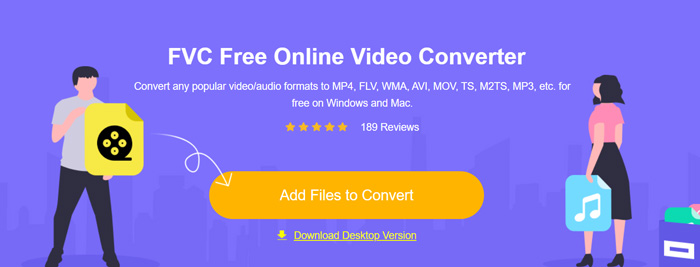
Étape 2. Ensuite, vous pouvez parcourir et sélectionner votre vidéo WebM dans la fenêtre pop-up. Dans certains cas, vous devrez cliquer de nouveau sur le bouton Add Files to Convert pour téléverser le fichier manuellement. Vous serez alors dirigé vers la fenêtre du convertisseur.
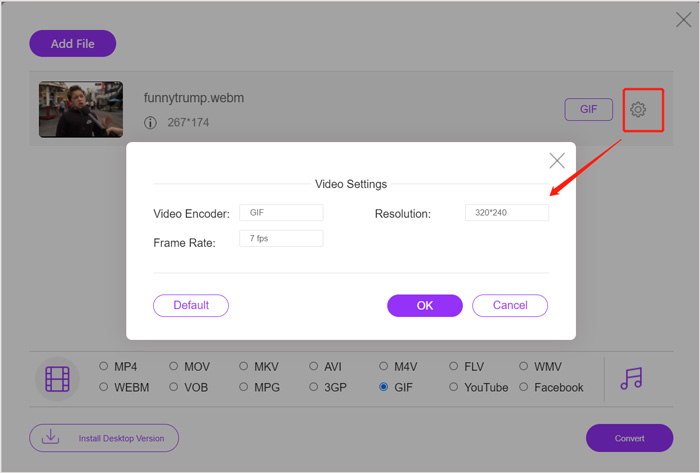
Étape 3. De nombreux formats vidéo courants y sont répertoriés. Ici, vous devez choisir GIF comme format de sortie. Cliquez sur l’icône settings à côté du format GIF de sortie, et vous pourrez personnaliser l’encodeur vidéo, la résolution et la fréquence d’images. Cliquez sur OK pour enregistrer les modifications. Après toutes ces opérations, cliquez simplement sur le bouton Convert pour lancer la conversion de WebM en GIF. Comme mentionné ci‑dessus, ce convertisseur vous permet également de convertir MP4 en GIF facilement.
Partie 2. Un moyen gratuit de convertir WebM en GIF sans perte de qualité
En dehors des convertisseurs WebM en GIF en ligne, il existe aussi d’autres convertisseurs GIF gratuits qui peuvent vous aider à transformer WebM en GIF. Nous recommandons vivement le Free Video to GIF Maker. Il est spécialement conçu pour gérer divers types de conversions vidéo et audio. Il vous permet de convertir WebM en GIF sans perte de qualité.
Téléchargement gratuitPour Windows 7 ou version ultérieureTéléchargement sécurisé
Téléchargement gratuitPour macOS 10.7 ou version ultérieureTéléchargement sécurisé
Étape 1. Ce convertisseur WebM en GIF vous permet de créer vos propres GIFs sur un PC Windows 10/8/7 comme sur un Mac. Choisissez la version adaptée à votre système, puis installez-la gratuitement sur votre ordinateur.
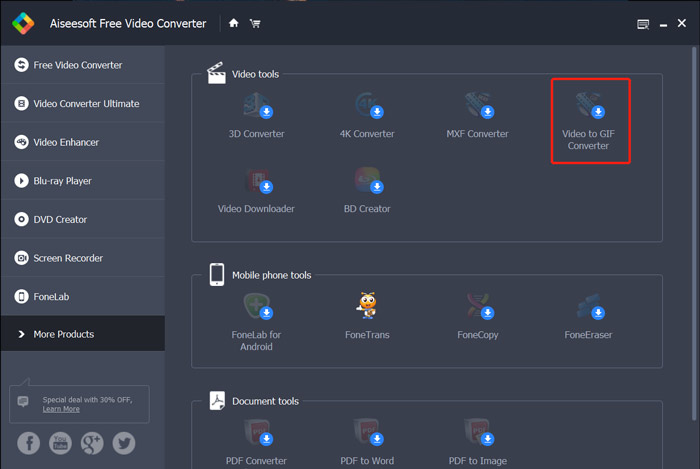
Lancez-le et cliquez sur More Products sur la gauche pour afficher davantage d’outils. Repérez le Video to GIF Converter et cliquez sur son icône pour lancer l’installation.
Étape 2. Une fois l’installation terminée, vous serez redirigé vers Video to GIF Converter. Ici, vous pouvez cliquer sur Add File pour charger votre fichier WebM.
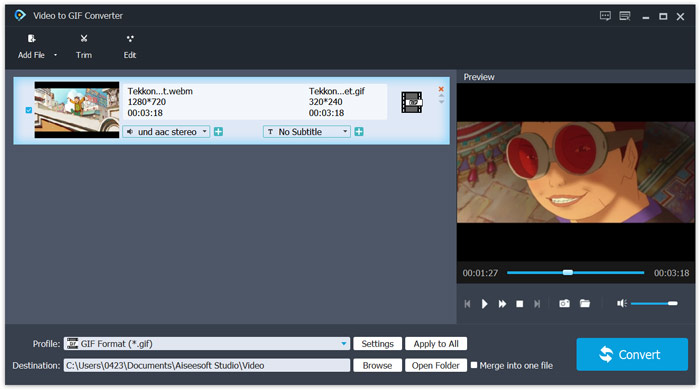
Étape 3. Ce convertisseur WebM en GIF gratuit est doté de nombreuses fonctions d’édition, comme couper, fusionner, faire pivoter, appliquer des effets, ajouter un filigrane, et plus encore. Avant la conversion en GIF, vous pouvez les utiliser pour éditer votre fichier et ajuster les effets de sortie.
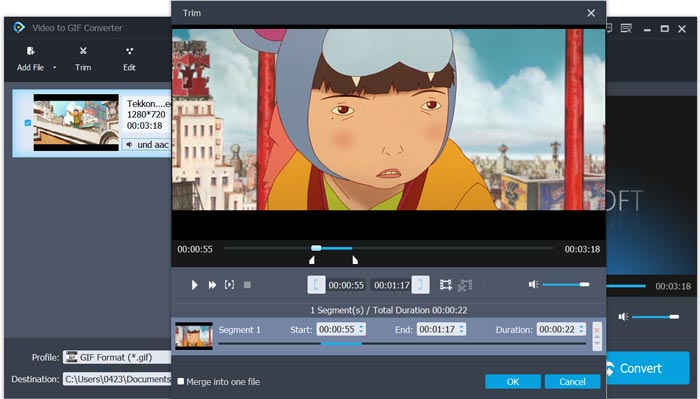
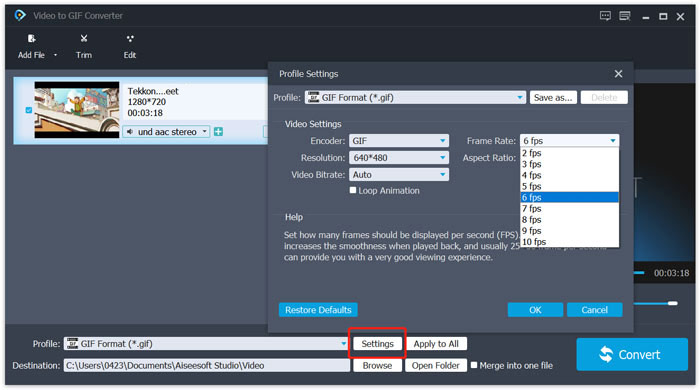
Étape 4. Le format cible sera automatiquement défini sur GIF. Vous pouvez cliquer sur le bouton Settings à côté de Profile pour personnaliser davantage d’options. Ensuite, cliquez sur le bouton Convert pour commencer à convertir WebM en GIF animé.
Partie 3. Comment changer WebM en GIF avec ZAMZAR
Zamzar est un convertisseur de fichiers en ligne tout-en-un qui peut vous aider à convertir WebM en GIF animé très facilement. Il propose différents services de conversion pour transformer des vidéos, des fichiers audio, des documents, des livres numériques et d’autres types de fichiers. Il dispose d’une page WEBM to GIF qui vous permet de lancer directement la conversion de WebM en GIF.
Étape 1. Accédez à cette page de convertisseur WebM en GIF en ligne gratuit dans votre navigateur.
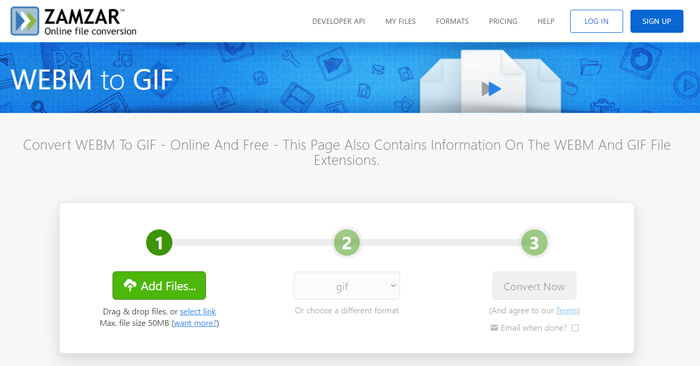
Étape 2. Cliquez sur le bouton Add Files pour téléverser votre fichier WebM. La taille du fichier téléversé est limitée à 50 Mo.
Étape 3. Assurez-vous que le format de sortie est bien GIF, puis cliquez sur le bouton Convert Now. Ce convertisseur GIF en ligne gratuit lancera le téléversement et la conversion du fichier.
Étape 4. Une fois la conversion terminée, vous pouvez cliquer sur Download pour enregistrer le fichier GIF converti sur votre ordinateur. Le fichier converti sera conservé sur leurs serveurs pendant 24 heures.
Partie 4. FAQ sur la conversion de WebM en GIF
Question 1. WebM est-il un GIF ?
Non. WebM est une sorte d'alternative au format GIF. Comparé à GIF, WebM offre une qualité de fichier bien supérieure et une taille de fichier plus petite. De plus, WebM vous permet de contrôler sa lecture comme l'arrêt, le démarrage, la lecture automatique et la boucle. GIF n'oblige personne à appuyer sur play.
Question 2. Puis-je changer l'extension de fichier pour transformer WebM en GIF ?
Vous pouvez facilement changer l'extension de fichier WebM en .gif pour effectuer la conversion WebM en GIF. Avec cette méthode, vous pouvez enfin obtenir un fichier GIF. Cependant, dans la plupart des cas, le fichier GIF sera corrompu et vous ne pourrez pas l'ouvrir ou le lire normalement.
Question 3. Pourquoi les GIF sont-ils de si mauvaise qualité ?
La plupart des GIF sont créés avec une faible résolution et une petite taille. Par rapport à l'image statique, il est difficile de conserver une série d'images animées à la même taille de fichier. Ainsi, la plupart des GIF ont l'air de si mauvaise qualité. D'autre part, les fichiers GIF peuvent être partagés fréquemment. Ainsi, le fichier source sera compressé et se détériorera à chaque fois qu'il sera enregistré ou téléchargé à nouveau. Mais il existe encore de nombreux convertisseurs vidéo en GIF et les créateurs de GIF peuvent facilement exporter des GIF de haute qualité.
Conclusion
Créer des GIFs à partir de vidéos WebM est facile. Dans cet article, vous découvrez 3 méthodes gratuites pour convertir WebM en GIF sur votre ordinateur ou gratuitement en ligne. Avec les convertisseurs recommandés dans cet article, vous pouvez également convertir FLV en GIF. Lorsque vous souhaitez transformer un extrait vidéo en GIF animé, vous pouvez choisir l’outil qui vous convient le mieux pour réaliser cette tâche.
-
 Top 5 des meilleurs enregistreurs de souris et de clavier pour Windows et Mac
 Voici les cinq meilleurs programmes d'enregistreurs de souris et de clavier qui peuvent enregistrer vos mouvements de souris et vos clics de clavier, et répéter les événements.
-
 Tutoriel pour compresser un GIF et réduire sa taille de fichier avec une haute qualité
 Voici 2 façons simples de compresser des GIF sur votre ordinateur ou votre téléphone portable. Vous pouvez utiliser FVC Free Online Video Compressor et Photoshop pour réduire la taille du fichier GIF sous différents aspects.
-
 Lecteur GIF - 5 meilleurs lecteurs GIF pour Windows PC, Mac, Android et iPhone
 Quel programme ouvre les fichiers GIF? Comment afficher les GIF sur Android? L'iPhone a-t-il un lecteur GIF pour ouvrir les GIF? Cet article partage 5 meilleurs lecteurs GIF pour vous.
