


 Video Converter Ultimate
 Enregistreur d'écran
 Réparation vidéo
 Téléchargement sécurisé
Des moyens parfaits pour convertir des images en PNG
Pour afficher des images de haute qualité, on utilise le format de fichier PNG. Les PNG, développés pour surpasser les fichiers GIF, offrent une compression sans perte et un spectre de couleurs plus large et lumineux. La conversion d’images en PNG est essentielle, surtout si vous souhaitez des visuels de haute qualité. Vous avez de la chance, car cet article va vous présenter différentes méthodes de conversion de fichiers. Vous pouvez convertir vos fichiers à l’aide de programmes en ligne et hors ligne. Ainsi, vous pourrez déterminer quelle application est la plus adaptée pour vous. Avant toute chose, lisez cet article pour découvrir les meilleures procédures afin de convertir des images en PNG.

Partie 1 : Méthodes les plus simples pour convertir des images en PNG en ligne
Convertir des images en PNG à l'aide du convertisseur d'images gratuit FVC
FVC Free Image Converter est l’un des meilleurs outils en ligne pour convertir des images en PNG. Cet outil de conversion d’images en ligne convertit n’importe quel format d’image en PNG. Il propose également une interface simple et des options clairement présentées. Les professionnels comme les débutants peuvent l’utiliser pour convertir des photos de cette manière. Les formats d’entrée pris en charge par cet outil incluent JPG, PNG, JPEG, TIFF, BMP, ICO, et bien d’autres. En outre, il est facile à utiliser. Ce convertisseur d’images en PNG ne nécessite que quelques étapes pour convertir vos photos. Il garantit également une haute qualité d’image. Ce convertisseur permet aussi la conversion par lot : vous pouvez convertir un grand nombre de photos en une seule fois. Suivez les étapes ci-dessous pour convertir l’image en JPG.
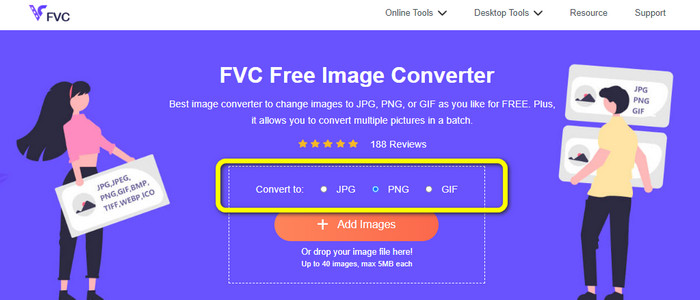
Étape 1 : Rendez-vous sur le site officiel de FVC Free Image Converter. Sélectionnez le format de fichier PNG comme format de sortie dans les options Convert to.
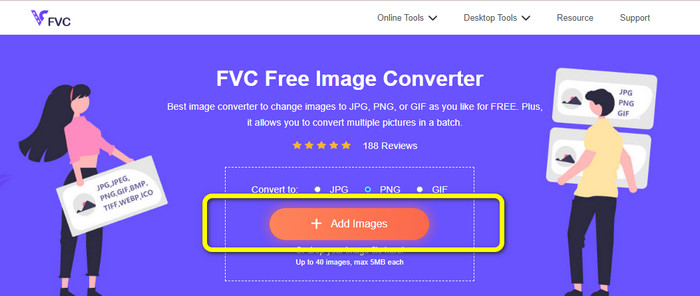
Étape 2 : L’étape suivante consiste à cliquer sur le bouton Add Images. Le dossier de votre ordinateur s’ouvrira à l’écran ; cliquez sur l’image que vous devez convertir, puis cliquez sur Open. Patientez pendant le processus de conversion.
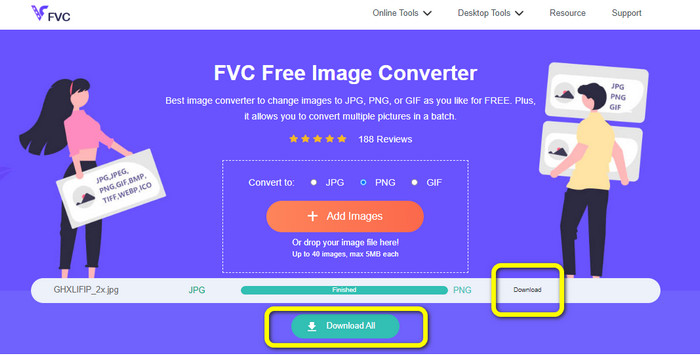
Étape 3 : Pour la dernière étape, cliquez sur le bouton Download ou Download all afin d’enregistrer vos images converties. Vous pouvez ensuite ouvrir l’image téléchargée dans l’emplacement de fichier que vous avez choisi.
Convertir des images en PNG à l'aide d'Image Candy
Image Candy est un autre outil en ligne pour convertir des images en PNG. Il prend en charge un large éventail de formats d’images comme PNG, JPG, GIF, et bien d’autres. Il peut aussi convertir des photos jusqu’à 2 Go. L’utilisation de ce convertisseur est très simple. Il est accessible depuis tous les navigateurs. De plus, cette application protège aussi votre confidentialité : votre photo sera supprimée après 24 heures.
Mais, il n'autorise que les téléchargements basés sur l'appareil. Vous ne pouvez pas télécharger une image à partir du cloud ou d'une URL. De plus, le format de sortie pris en charge est peu nombreux.
Étape 1 : Allez sur le site de Image Candy et cliquez sur le bouton Add Files pour téléverser l’image.

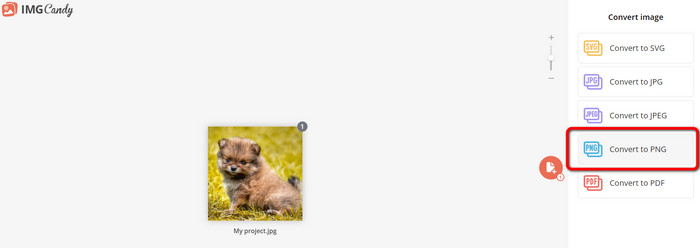
Étape 2 : Sélectionnez l’option Convert to PNG sur la partie droite de l’interface. Puis attendez la fin du processus de conversion.
Étape 3 : Enfin, cliquez sur le bouton Download File pour enregistrer l’image sur votre ordinateur.
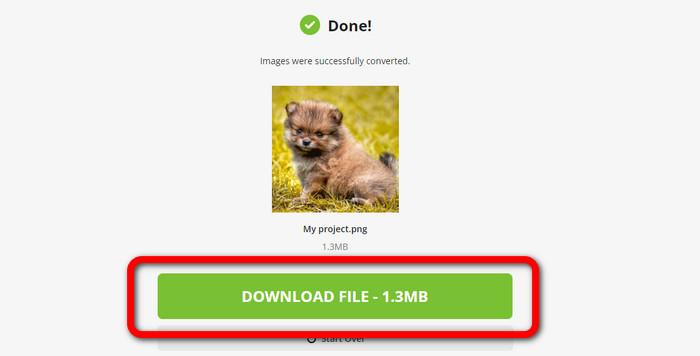
Convertir des images en PNG à l'aide de Convertio
Un autre outil en ligne pour convertir des images est Convertio. L'utilisation de cet outil est facile. Il a une interface facile à comprendre. De plus, il a un processus de conversion simple, qui convient à tous les utilisateurs. De plus, le processus de conversion est assez rapide. De cette façon, vous pouvez convertir de nombreux fichiers image. En outre, il prend en charge presque tous les formats populaires, notamment JPG, PNG, BMP, TIFF, etc. Cette application protège également votre vie privée. Il supprime vos images après 24 heures. Mais, lorsque vous utilisez la version gratuite, il existe certaines limitations. Vous ne pouvez télécharger qu'avec la plus grande taille de fichier de 100 Mo. Vous devez acheter un plan d'abonnement pour télécharger une taille de fichier illimitée.
Étape 1 : Visitez le site web de Convertio. Cliquez sur le bouton Choose Files pour téléverser l’image.
Étape 2 : Après avoir importé l’image que vous souhaitez convertir, allez dans les options de format et choisissez le format PNG.
Étape 3 : Cliquez sur le bouton Convert. Attendez la fin du processus de conversion puis enregistrez l’image convertie.
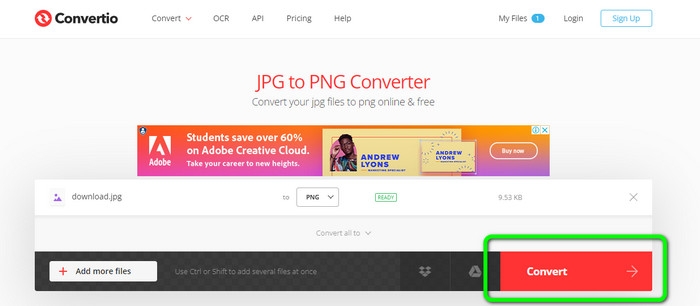
Convertir des images en PNG à l'aide de FreeConvert
FreeConvert est un convertisseur d’images en ligne sur lequel vous pouvez compter si vous souhaitez convertir votre image en PNG. Le processus est simple et l’interface est facile à comprendre. Les utilisateurs professionnels comme les non-professionnels peuvent utiliser cette application. Elle peut également convertir plus de 500 formats d’images différents, comme JPG, PNG, WebP, et bien d’autres. Les fichiers image RAW provenant d’appareils photo peuvent également être convertis. Ce convertisseur d’images est accessible depuis n’importe quel navigateur web, comme Chrome, Firefox, Edge, Safari, etc. Il offre confidentialité et sécurité pour vos fichiers. Cependant, il présente certaines limitations, en particulier dans la version gratuite. La taille maximale de fichier est de 1 Go. Acheter la version complète est la meilleure solution si vous voulez téléverser davantage d’images. En outre, ce convertisseur d’images affiche des publicités sur la page web, ce qui peut gêner certains utilisateurs.
Étape 1 : Allez sur le site de FreeConvert. Sélectionnez l’option Choose Files pour ajouter la photo que vous souhaitez convertir en format PNG.
Étape 2 : Rendez-vous dans l’option Output pour sélectionner votre format de sortie souhaité, le format PNG.
Étape 3 : Pour la dernière étape, cliquez sur le bouton Convert et attendez la fin du processus de conversion. Ensuite, enregistrez l’image au format PNG.
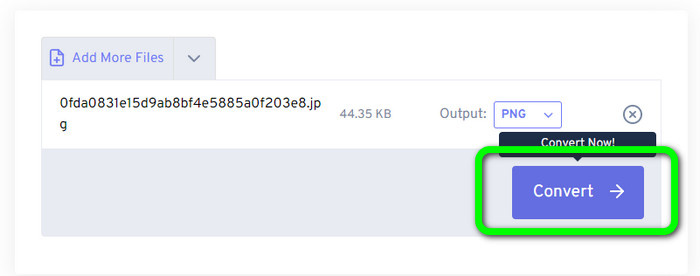
Partie 2 : Meilleure façon de convertir des images en PNG à l'aide d'un programme hors ligne
Video Converter Ultimate est le meilleur outil pour convertir des images au format PNG. Ce convertisseur d’images offre une interface facile à comprendre, ce qui le rend parfait pour tous les utilisateurs. De plus, les étapes à suivre sont simples. Ainsi, convertir des images en PNG devient un jeu d’enfant. En dehors du PNG, il prend également en charge divers formats de fichiers image. Il gère les formats WEBP, BMP, TIF, TIFF, JPG, et bien d’autres, ce qui est très pratique. Vous pouvez aussi utiliser cette application aussi bien sur Windows que sur Mac.
De plus, en plus de convertir des images, Video Converter Ultimate offre plus de fonctionnalités. Vous pouvez convertir des vidéos, supprimer des filigranes, améliorer la vidéo et créer une vidéo musicale. En outre, vous pouvez créer un collage, découper une vidéo, etc. Avec ces fonctionnalités, vous pouvez faire beaucoup de choses. De cette façon, vous pouvez rendre vos vidéos et images parfaites et attrayantes.
Étape 1 : Téléchargez Video Converter Ultimate sur votre Mac ou votre PC Windows. Lancez le logiciel après l’installation.
Téléchargement gratuit pour Windows 7 ou version ultérieure Téléchargement sécurisé
Téléchargement gratuit pour macOS 10.7 ou version ultérieure - Téléchargement sécurisé
Étape 2 : Après avoir ouvert l’application, accédez à l’onglet Toolbox. Ensuite, sélectionnez la fonction Image Converter.
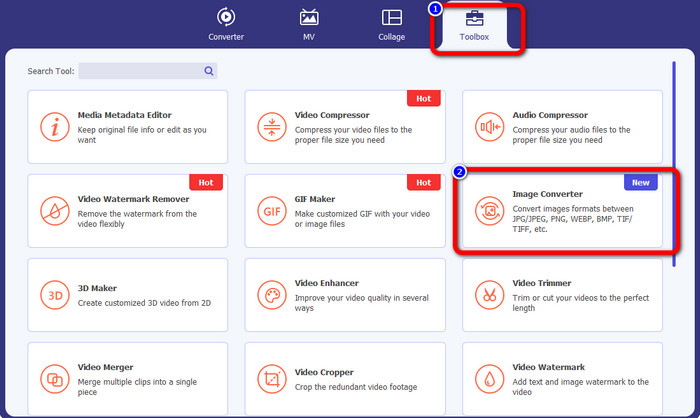
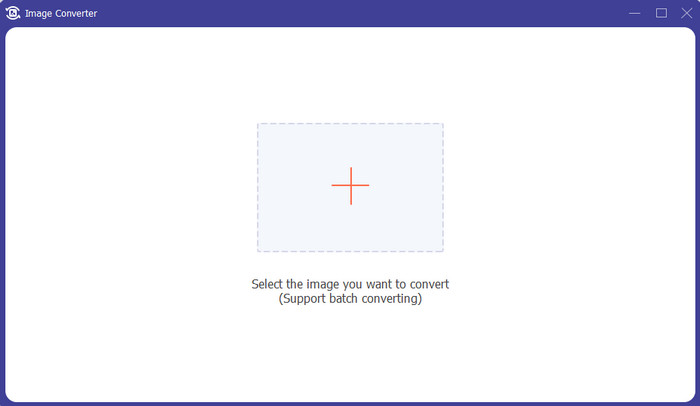
Étape 3 : Une nouvelle interface va s’afficher à l’écran. Cliquez sur le bouton avec le signe + pour ajouter l’image.
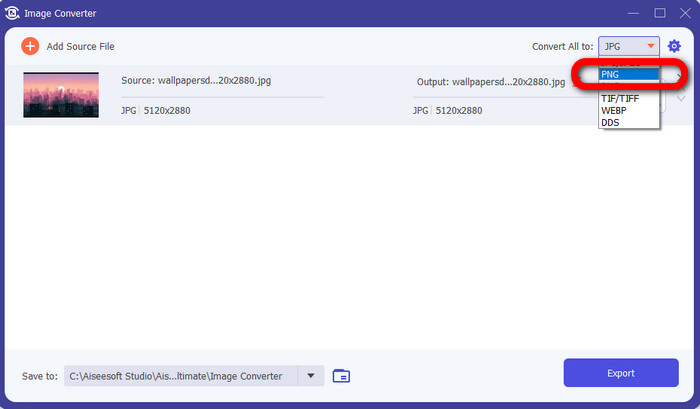
Étape 4 : Après avoir ajouté la photo, allez dans les options de format et cliquez sur le format de fichier PNG.
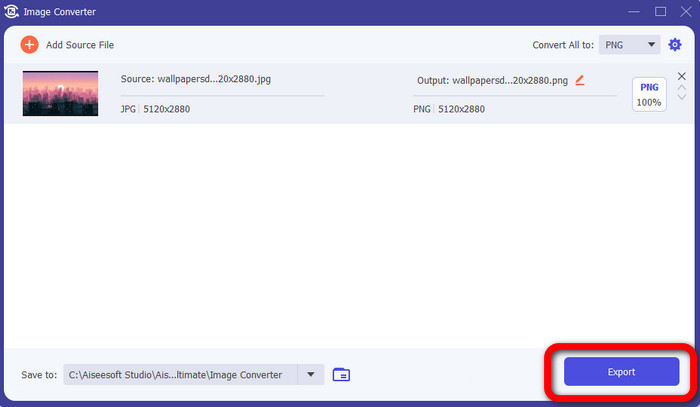
Étape 5 : Cliquez sur le bouton Export dans le coin inférieur gauche de l’interface pour enregistrer l’image. Vous pouvez également utiliser ce logiciel pour convertir des images en JPG.
Partie 3 : FAQ sur la conversion d'images en PNG
1. Qu'est-ce qu'un fichier PNG ?
En raison de sa capacité à permettre la transparence dans les navigateurs, PNG est un format d'image standard utilisé sur Internet. PNG est un substitut au GIF, qui utilisait une méthode de compression propriétaire dans les années 1990. PNG est un format accessible. Comme GIF et JPG, PNG prend en charge les couleurs 8 bits et 24 bits. Ils sont également considérés comme des fichiers sans perte, ce qui signifie que la qualité n'a aucun effet. Peu importe combien de fois vous ouvrez et enregistrez le fichier.
2. Quel est l'avantage du PNG ?
Le fait que PNG soit un format sans perte avec une capacité de couleur 24 bits est l'un des principaux avantages. Si vous convertissez à partir d'un JPG, n'oubliez pas que ces fichiers sont avec perte. Leur compression initiale peut avoir entraîné une certaine perte de qualité. Pourtant, PNG est sans perte. Ainsi, plus d'ouvertures ou de sauvegardes de l'image n'entraîneront pas de perte de qualité supplémentaire.
3. Pourquoi le PNG est-il meilleur ?
Il ressort clairement des avantages mentionnés ci-dessus que le format de fichier PNG est supérieur. C'est mieux pour les autres formats de photos utilisés. La compression sans perte est la meilleure caractéristique. Si vous enregistrez les images au format de fichier PNG, cela n'endommagera pas le format de fichier si vous les enregistrez, les ouvrez ou les réenregistrez. Ici, l'algorithme de compression fonctionne. Vous pouvez utiliser de nombreuses méthodes pour réduire la visibilité du gaspillage d'excellentes données. Les fichiers PNG ont une compression supérieure à celle des fichiers JPG et GIF.
Conclusion
Ce guide vous présente de nombreuses méthodes en ligne et hors ligne pour convertir des images en PNG. Toutefois, si vous souhaitez un outil web de tout premier ordre, utilisez FVC Free Image Converter.
-
 Comment convertir par lots HEIC en PNG sur Mac, iPhone et en ligne
 Vous cherchez des moyens de convertir HEIC en PNG? Cet article vous donne les meilleurs moyens de changer facilement HEIC en PNG en ligne et hors ligne
-
 Les 9 meilleurs convertisseurs HEIC en PNG pour PC et Mac [En ligne et hors ligne]
 Découvrez les meilleurs convertisseurs en ligne et hors ligne ici. Nous vous présentons les meilleurs convertisseurs HEIC vers PNG gratuits pour Windows et Mac.
-
 Top 5 des meilleurs convertisseurs PNG en HEIC à ne pas manquer
 Si vous voulez connaître les convertisseurs PNG vers HEIC les plus utilisés, nous vous fournissons les meilleurs convertisseurs PNG vers HEIC en ligne. Lisez cet article pour plus d'informations.
