


 Video Converter Ultimate
 Enregistreur d'écran
 Réparation vidéo
 Téléchargement sécurisé
Des moyens efficaces pour convertir TIFF en JPG et PNG
Le TIFF est un format de fichier image couramment utilisé par les photographes et les graphistes. Il se caractérise par une haute qualité, une grande flexibilité et une compatibilité quasi universelle. En revanche, sa taille est plus importante, ce qui le rend moins pratique à partager avec d’autres personnes ou sur le web. Dans ce cas, l’une des meilleures solutions consiste à convertir ce fichier vers d’autres formats. Les formats JPG et PNG ont une taille de fichier plus réduite que le TIFF. Ainsi, convertir un TIFF en JPG ou PNG est généralement préférable. Cet article vous présente les meilleures méthodes pour convertir un TIFF en JPG/PNG. Vous y découvrirez également toutes les informations nécessaires sur ces formats d’image. Sans plus attendre, poursuivez la lecture de cet article pour trouver la solution que vous recherchez.

Partie 1. TIFF vs JPG vs PNG
| Format de fichier | TIF/TIFF | JPG | PNG |
| Extension de nom de fichier | .tif / .tiff | .jpg | .png |
| Développé par | Alde (acquis par Adobe) | Groupe mixte d'experts photographiques | Groupe de développement PNG |
| La description | En 1992, le Tag Image File Format (TIFF) était développé. Les développeurs peuvent étendre ce type de fichier flexible pour répondre à de nombreux besoins. Les fichiers TIF et TIFF sont tous deux des formats de fichiers image utilisés pour stocker des images. Mais, il y a quelques distinctions entre ces formats. Les fichiers image TIFF sont capables de stocker plus d'une image dans un fichier. D'autre part, les fichiers TIF ne peuvent stocker qu'une seule image. De plus, les fichiers TIFF peuvent stocker des métadonnées concernant l'image, mais pas les fichiers TIF. | JPG et JPEG sont des extensions égales qui font référence au même format d'image numérique. Il n'y a pas de différences entre les formats JPEG et JPG. La seule différence est le nombre de caractères utilisés. Les fichiers JPG sont enregistrés avec l'extension de fichier .jpg et les fichiers JPEG sont enregistrés avec l'extension .jpeg. JPEG est l'acronyme de Joint Photographics Experts Group. | L'acronyme de PNG signifie Portable Network Graphic. Vous pouvez enregistrer des photos de haute qualité et les partager au format PNG. Les PNG peuvent gérer 16 millions de couleurs stupéfiantes. Il prend également en charge les arrière-plans transparents et semi-transparents. Le fichier image PNG est un format ouvert, ce qui signifie que vous pouvez enregistrer et ouvrir un fichier PNG à partir de n'importe quel logiciel de retouche d'image. |
Partie 2. Excellentes méthodes pour convertir TIF/TIFF en JPG/PNG en ligne
FVC Free Image Converter est l’outil de conversion en ligne idéal pour transformer un fichier TIFF en JPG ou PNG. La démarche de conversion est très simple. Les images peuvent être converties en trois étapes seulement. Une fonction de conversion par lots est également proposée, ce qui permet de convertir plusieurs photos en même temps. Vous gagnez ainsi du temps pour la conversion de vos images. L’outil est facile à comprendre et dispose d’une interface intuitive avec des paramètres clairs. De plus, FVC Free Image Converter prend en charge de nombreux formats d’entrée, notamment JPG, PNG, BMP, TIFF, WEBP et GIF. Par ailleurs, ce convertisseur est entièrement gratuit. Il protège également la confidentialité des utilisateurs en supprimant immédiatement vos données une fois les images converties et enregistrées. Le fait que cette application en ligne soit compatible avec tous les types de navigateurs améliore encore son accessibilité. Pour utiliser ce convertisseur TIFF vers JPG, suivez les instructions simples ci‑dessous.
Convertir TIF/TIFF en JPG
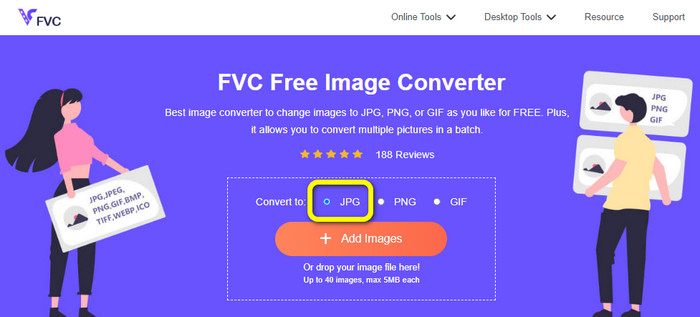
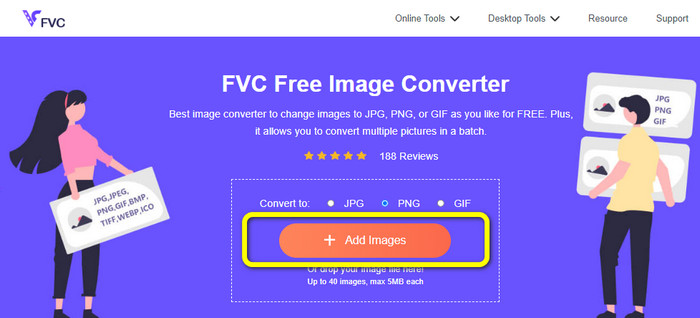
Étape 1 : Rendez-vous sur le site FVC Free Image Converter à partir de votre navigateur. Puis, choisissez le format de fichier JPG dans l’option Convert to.
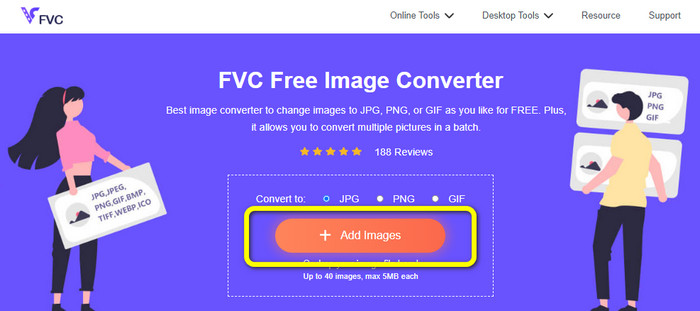
Étape 2 : Cliquez ensuite sur le bouton Add Images. Après le clic, le dossier de fichiers s’ouvrira sur l’écran de votre ordinateur. Sélectionnez le fichier image, puis cliquez sur Open.
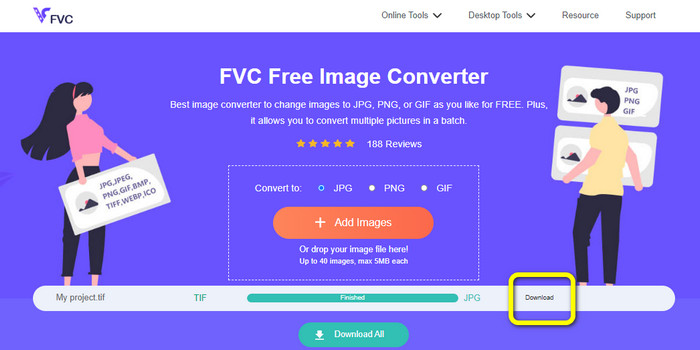
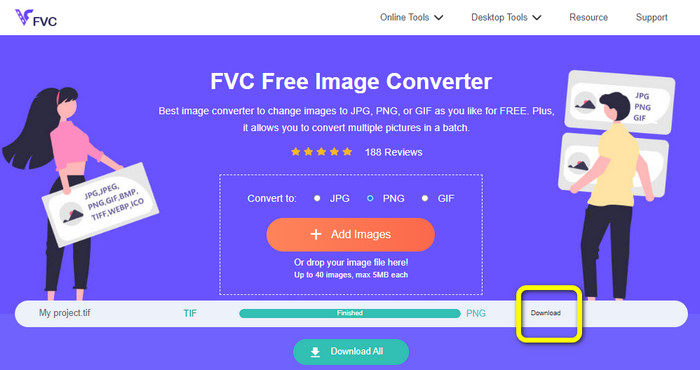
Étape 3 : Après le téléversement, le convertisseur d’images convertira automatiquement votre image. Cliquez sur le bouton Download pour enregistrer et télécharger sur votre ordinateur l’image convertie.
Convertir TIFF/TIF en PNG
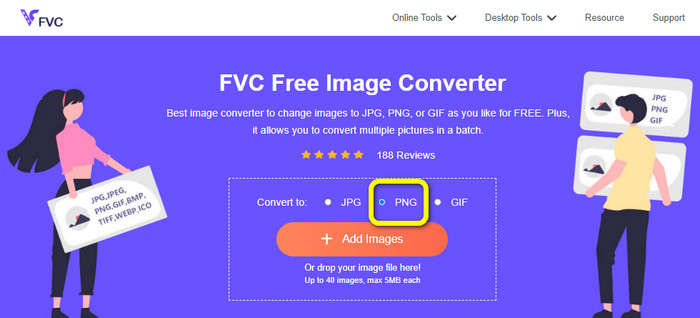
Étape 1 : Depuis la page web, sélectionnez le format de fichier PNG dans l’option de format.
Étape 2 : Cliquez sur le bouton Add Images. Lorsque le dossier de fichiers apparaît à l’écran, choisissez le fichier PNG que vous souhaitez convertir, puis ouvrez-le.
Étape 3 : Une fois la conversion terminée, cliquez sur le bouton Download. Patientez le temps de l’enregistrement, puis ouvrez votre image dans votre dossier. Cliquez ici pour apprendre à convertir un BMP en JPG ou PNG.
Partie 3. Meilleures façons de convertir TIF/TIFF en JPG/PNG hors ligne
Video Converter Ultimate est l’une des meilleures solutions hors ligne pour convertir un fichier TIF en JPG ou PNG. Vous pouvez télécharger ce programme aussi bien sur macOS que sur Windows. Ce convertisseur d’images hors ligne vous permet de convertir vos fichiers TIF en JPG et PNG. Il prend également en charge d’autres formats comme WEBP, BMP, GIF, TIFF, JPG, PNG, et bien plus encore. Le convertisseur propose une interface conviviale, idéale aussi bien pour les professionnels que pour les débutants. En outre, si vous souhaitez convertir plusieurs fichiers à la fois, c’est possible grâce à sa fonction de conversion par lots. Cela le rend très pratique pour tous les utilisateurs qui ont de nombreux fichiers image à convertir. De plus, pendant la conversion, vous pouvez effectuer d’autres réglages. Dans l’icône des paramètres, vous pouvez zoomer ou dézoomer vos images. Vous pouvez aussi modifier la qualité de l’image selon vos préférences. De cette manière, vous obtenez le résultat souhaité. Suivez les étapes de base ci‑dessous pour convertir un TIF en JPG ou PNG.
Convertir TIFF en JPG
Étape 1 : Téléchargez Video Converter Ultimate sur votre ordinateur. Ensuite, lancez l’application après l’installation. Repérez le bouton Download ci‑dessous et cliquez dessus pour accéder facilement au convertisseur.
Téléchargement gratuit pour Windows 7 ou version ultérieure Téléchargement sécurisé
Téléchargement gratuit pour macOS 10.7 ou version ultérieure - Téléchargement sécurisé
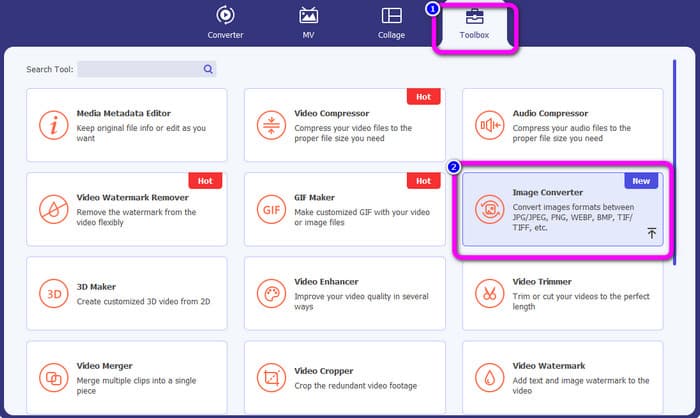
Étape 2 : Cliquez sur le panneau Toolbox dans la partie supérieure de l’interface. Sélectionnez ensuite la fonction Image Converter.
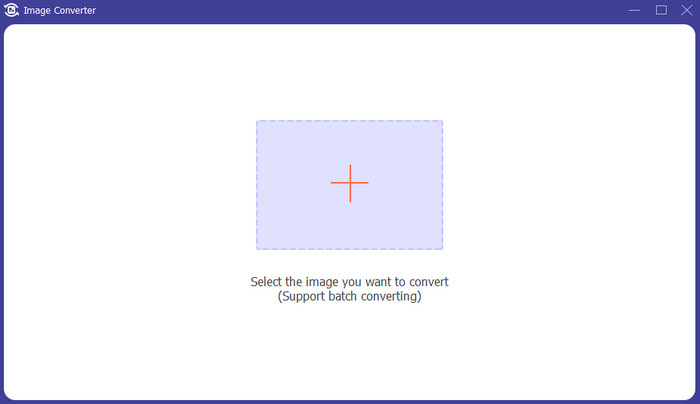
Étape 3 : Cliquez ensuite sur le bouton en forme de Plus au centre de l’interface. Sélectionnez le fichier image TIFF dans votre dossier, puis ouvrez-le.
Étape 4 : Si vous souhaitez ajouter d’autres images, cliquez sur le bouton Add Source file. Puis, allez dans l’option Convert All to et choisissez le format de fichier JPG.
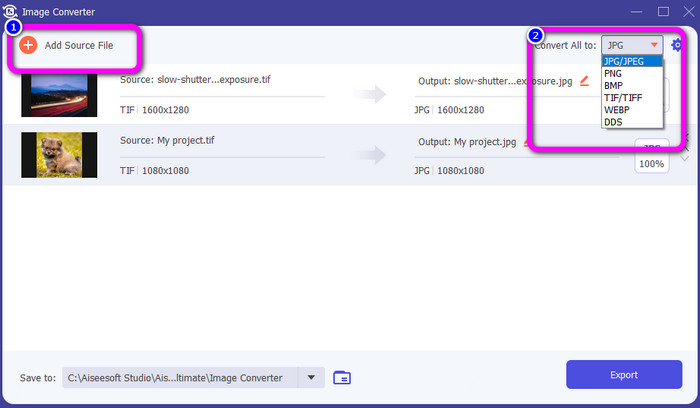
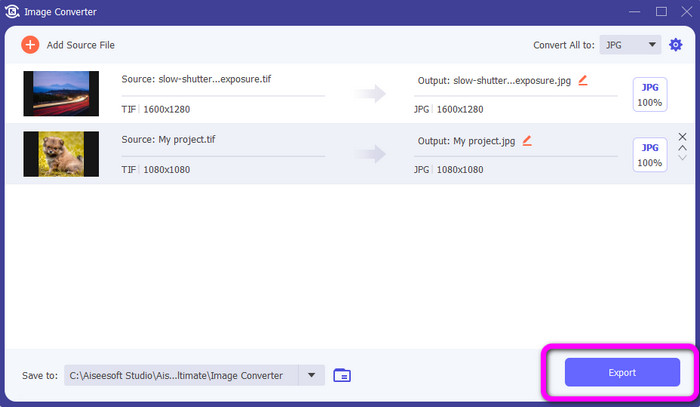
Étape 5 : Enfin, cliquez sur le bouton Export après avoir choisi le JPG comme format de sortie. Une fois la conversion terminée, vous pouvez ouvrir votre image convertie dans votre dossier.
Convertir TIFF en PNG
Étape 1 : Vous pouvez suivre la même procédure que ci‑dessus. Accédez au panneau Toolbox et sélectionnez la fonction Image Converter.
Étape 2 : Cliquez sur l’icône en forme de Plus pour insérer le TIFF que vous souhaitez convertir.
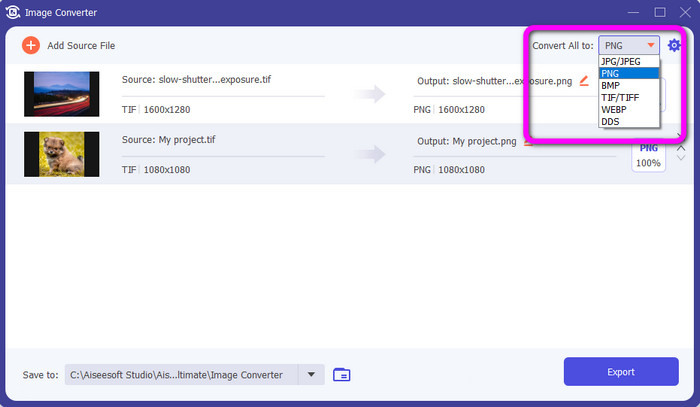
Étape 3 : Après avoir ajouté vos images TIFF, allez dans l’option Convert All to. Sélectionnez le format de fichier PNG comme format de sortie.
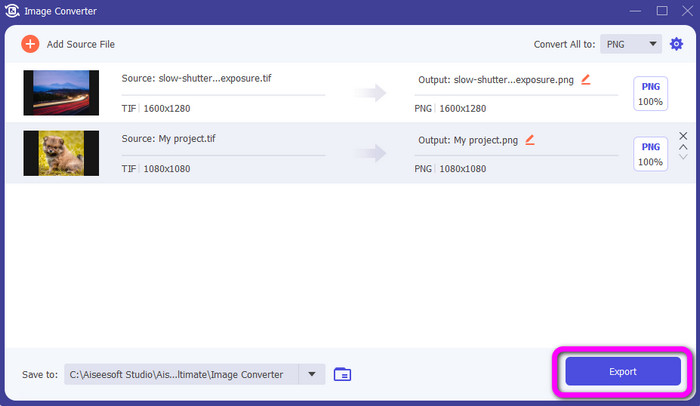
Étape 4 : Pour terminer, cliquez sur le bouton Export dans le coin inférieur gauche de l’interface. Vous pouvez également utiliser ce logiciel pour convertir un JPG en PNG.
Partie 4. FAQ sur la conversion de TIF/TIFF en JPG/PNG
1. Comment convertir TIFF en PNG sur Mac ?
L’une des méthodes efficaces pour convertir un TIFF en PNG sur Mac consiste à utiliser FVC Free Image Converter. Ouvrez Safari sur votre Mac et accédez à ce convertisseur d’images en ligne. Sur la page principale, choisissez le format PNG dans l’option de format. Cliquez sur le bouton Add Images pour ajouter le fichier TIFF que vous voulez convertir. Pendant le téléversement, le fichier sera converti automatiquement. Cliquez ensuite sur le bouton de téléchargement pour enregistrer l’image convertie sur votre Mac.
2. Quels sont les avantages de convertir TIF en PNG ?
Si vous souhaitez réduire la taille de votre fichier, il est nécessaire de modifier votre fichier TIF vers d'autres formats. La conversion de TIF en fichier PNG est préférable car PNG a une taille de fichier plus petite. Il vous donnera une taille de fichier gérable pour les navigateurs Web et les appareils.
3. Quel fichier est le plus facile à envoyer, JPG ou TIFF ?
Le format de fichier JPG a une taille de fichier plus petite. Il facilite l'envoi d'une image en ligne ou par e-mail. TIFF a une taille de fichier plus grande, ce qui ralentit l'envoi d'une image.
Conclusion
Vous savez désormais que le fichier image TIFF a une taille plus importante. Ainsi, si vous souhaitez envoyer une image plus rapidement en ligne, il est préférable de la convertir vers d’autres formats plus légers. Cet article vous a donc présenté les meilleures solutions pour convertir un TIFF en JPG et PNG. Si vous voulez une méthode encore plus simple pour convertir des fichiers image, utilisez FVC Free Image Converter. Il offre une interface claire avec des méthodes simples pour convertir des fichiers image.
-
 Convertissez efficacement JPEG en JPG [Cinq méthodes répertoriées]
 Venez découvrir les tutoriels les plus simples sur la conversion du format de fichier image JPEG en JPG. Cliquez sur ce guide et commencez à apprendre vos méthodes préférées
-
 Top 5 des principaux tutoriels pour convertir rapidement PNG en JPG
 Si vous avez besoin de convertir votre fichier PNG au format JPG, vous pouvez apprendre les meilleures façons ici. Vous apprendrez également la différence entre les formats de fichier PNG et JPG
-
 Détails complets sur les différences entre JPEG, JPG et PNG
 Cet article vous donnera suffisamment d'informations sur les différences entre JPEG, JPG et PNG. De plus, vous apprendrez comment convertir des images vers ces fichiers
