


 Video Converter Ultimate
 Enregistreur d'écran
 Réparation vidéo
 Téléchargement sécurisé
Manière exceptionnelle de supprimer les émoticônes des images
Voulez-vous découvrir et apprendre à supprimer des émojis de vos photos ? Alors vous êtes sur le bon blog. Les émojis sont l’un des meilleurs moyens de rendre une photo attrayante. Ils ont un impact plus fort sur les yeux des spectateurs. Cependant, il arrive que ces émojis deviennent agaçants pour certains. Ainsi, cet article va vous présenter d’excellentes méthodes pour retirer ces objets indésirables de vos photos à l’aide d’applications sur Android, iPhone et ordinateur. Lisez cet article pour obtenir des informations plus détaillées.

Partie 1 : Pouvez-vous supprimer les émoticônes des images
Si vous voulez savoir s'il est possible de supprimer des emojis d'une image, alors la réponse est définitivement oui ! À l'aide de différentes applications, vous pouvez éliminer les objets indésirables de vos photos, comme les emojis, les autocollants, les logos, les filigranes, etc. Si vous souhaitez apprendre les méthodes les plus efficaces pour supprimer ces objets indésirables de votre photo, en particulier les emojis, lisez les parties suivantes de cet article.
Partie 2 : Excellents outils en ligne pour supprimer les émoticônes des images
FVC Free Watermark Remover
Si vous recherchez la meilleure méthode pour supprimer des émojis d’une photo, alors FVC Free Watermark Remover est la solution. C’est un outil en ligne capable de supprimer tout ce que vous n’aimez pas sur vos photos, comme les émojis, logos, filigranes, textes, et bien plus encore. De plus, pour ce qui est du processus de suppression, vous n’avez pas besoin d’attendre longtemps. Cet outil propose une suppression rapide, ce qui est une excellente nouvelle pour tous les utilisateurs. Il prend en charge les formats d’image les plus populaires, tels que JPG, PNG, BMP, TIFF, etc. Vous pouvez ainsi importer n’importe quelle image dans ce logiciel. En outre, en plus des outils de suppression de filigranes, FVC Free Watermark Remover offre une fonction de recadrage : si les filigranes se trouvent sur le bord ou dans un coin de votre photo, vous pouvez facilement les recadrer.
De plus, il possède une interface utilisateur conviviale et des étapes simples à suivre, ce qui est parfait pour tout utilisateur, en particulier les débutants. Vous pouvez accéder à cet outil Web dans presque tous les navigateurs b, tels que Google Chrome, Microsoft Edge, Mozilla Firefox, etc. Enfin, si vous avez terminé de supprimer les emoji de votre photo, vous pouvez obtenir la qualité d'origine de votre photo, vous n'avez donc pas à vous inquiéter si votre image devient floue ou non. Suivez les étapes simples ci-dessous pour supprimer les emojis de votre photo.
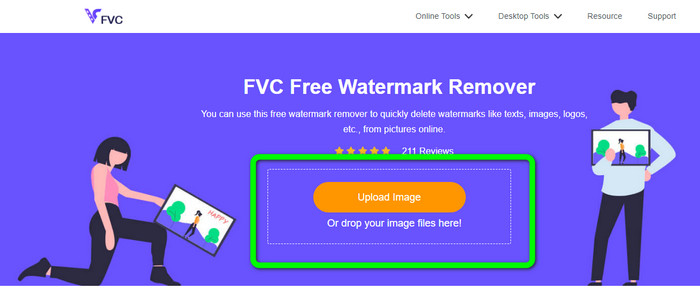
Étape 1 : Rendez-vous sur FVC Free Watermark Remover dans votre navigateur. Cliquez sur le bouton Upload Image pour joindre votre photo contenant l’émoji que vous souhaitez effacer. Vous pouvez aussi déposer directement votre fichier image dans la zone prévue.
Étape 2 : Une fois la photo importée, surlignez les émojis à l’aide des outils de suppression de filigrane. Ces outils sont : Pinceau (Brush), Lasso et Polygone (Polygonal). Vous pouvez également utiliser les icônes + et - sous la photo pour zoomer ou dézoomer.
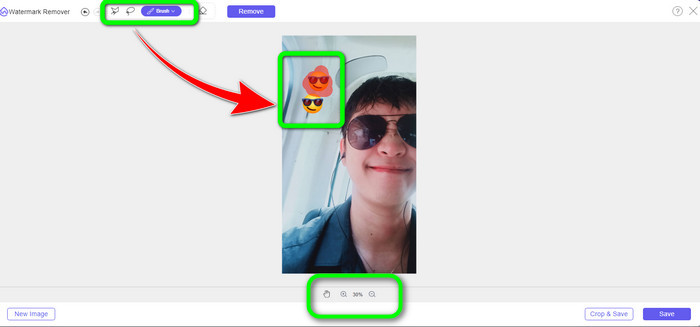
Étape 3 : Après avoir surligné tous les émojis sur votre photo, vous pouvez les supprimer en cliquant sur le bouton Remove. Après avoir cliqué, patientez le temps du processus de suppression.
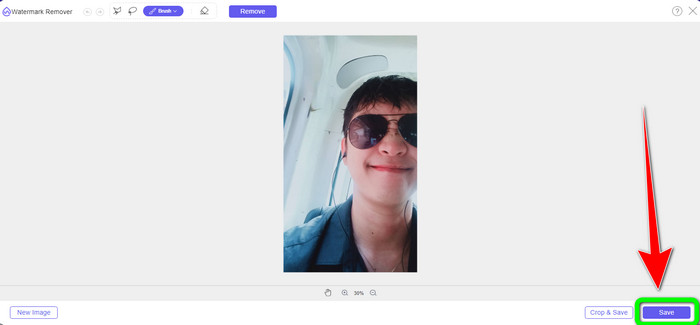
Étape 4 : Lorsque les émojis sont supprimés, enregistrez la photo finale en cliquant sur le bouton Save.
Couper
BeeCut est le meilleur outil en ligne que vous puissiez utiliser si vous voulez supprimer des émojis de vos photos sur Internet. Il permet également de supprimer les filigranes de vos photos et vidéos. C’est une application en ligne simple d’utilisation, idéale pour les débutants. Les émojis peuvent être facilement retirés de votre image en seulement quelques étapes. En plus de cela, BeeCut propose de nombreuses options de montage, notamment des filtres, des pistes sur la timeline, la division et la fusion de clips, le rognage, la découpe, et bien plus encore. Elle offre également quelques étapes simples. De plus, vous pouvez ajouter des sous-titres si vous créez une vidéo, ce qui est pratique pour les spectateurs.
Cependant, cette application prend beaucoup de temps pour enregistrer les modifications et télécharger les photos. De plus, comme il s'agit d'un programme Web qui ne peut être utilisé qu'en ligne, vous ne pouvez pas utiliser cet outil si vous n'avez pas de connexion Internet. Suivez les quelques étapes ci-dessous pour supprimer les emojis de vos images à l'aide de cet outil en ligne.
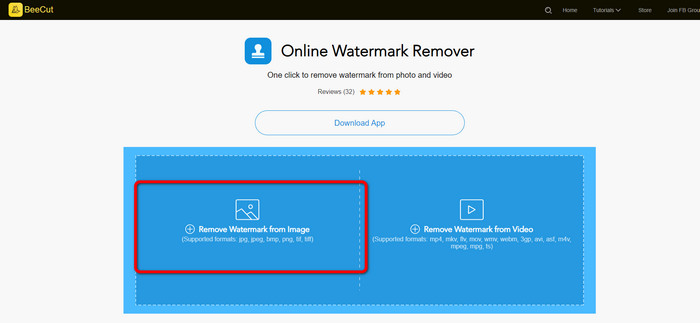
Étape 1 : Allez sur le site officiel de BeeCut. Puis sélectionnez le bouton Remove Watermark from Image pour ajouter la photo.
Étape 2 : Ensuite, surlignez l’émoji que vous souhaitez supprimer de votre photo à l’aide du cadre bleu. Après cela, cliquez sur le bouton Erase et attendez la fin du processus.
Étape 3 : Enfin, vous pouvez enregistrer votre photo sans émojis en cliquant sur le bouton Download. Cliquez ici pour apprendre comment supprimer des émojis de vidéos.
Partie 3 : Comment supprimer Emoji des photos sur iPhone et Android
Supprimer les emojis des images sur iPhone
Pour savoir comment supprimer un emoji d'une image à l'aide d'un iPhone, vous pouvez télécharger Apowersoft Background Eraser. C'est l'un des meilleurs outils de suppression d'arrière-plan photo que vous pouvez utiliser sur votre mobile. Il peut facilement effacer tous les objets indésirables de vos images, tels que les logos, les autocollants, les emojis, les filigranes, etc. Vous pouvez utiliser l'outil Pinceau pour mettre en surbrillance manuellement les emoji. Vous pouvez déjà obtenir votre photo sans emoji en une seconde. Cependant, le processus de téléchargement et d'installation de cette application est lent, alors assurez-vous de ne pas vous précipiter lorsque vous utilisez ce logiciel. Suivez les étapes ci-dessous pour supprimer l'emoji de votre photo.
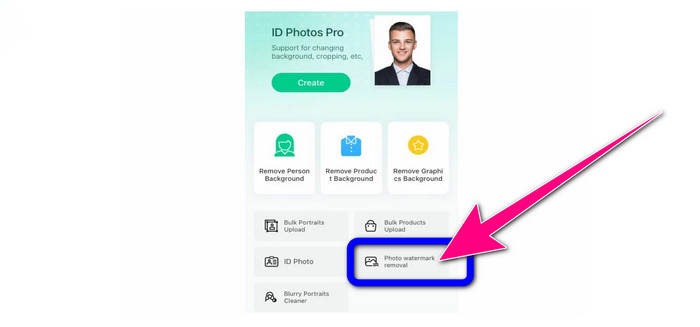
Étape 1 : Lancez Apowersoft Background Remover et sélectionnez le bouton Photo Watermark Removal pour importer l’image avec un émoji.
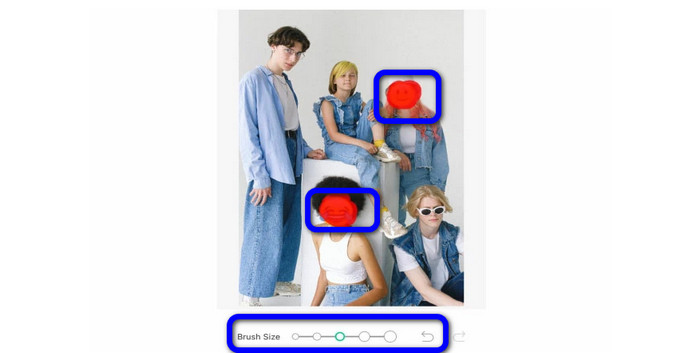
Étape 2 : Après avoir importé l’image, vous pouvez surligner l’émoji avec l’outil Brush. Vous pouvez aussi ajuster ou modifier la taille de l’outil Pinceau. Ensuite, cliquez sur le Checkmark.
Étape 3 : Après avoir cliqué sur la coche, vous verrez que l’émoji a disparu. Cliquez alors sur le bouton Save pour enregistrer votre photo.

Supprimer les emojis des photos sur Android
Pouvez-vous supprimer des émojis des images ? C’est l’une des questions que les gens posent souvent lorsqu’ils voient un émoji sur leurs photos. Vous pouvez donc utiliser Photo Retouch. Cette application est disponible sur Android. Elle est aussi simple à utiliser, car elle possède une interface facile à comprendre. Cependant, il arrive parfois que l’application plante et ne fonctionne pas correctement. Mais si vous souhaitez utiliser Photo Retouch pour enlever des émojis de votre image, suivez les étapes simples ci-dessous.
Étape 1 : Téléchargez et installez Photo Retouch sur votre appareil Android. Puis lancez l’application.
Étape 2 : Ajoutez la photo en appuyant sur l’icône de l’album. Puis sélectionnez le bouton Object Removal.
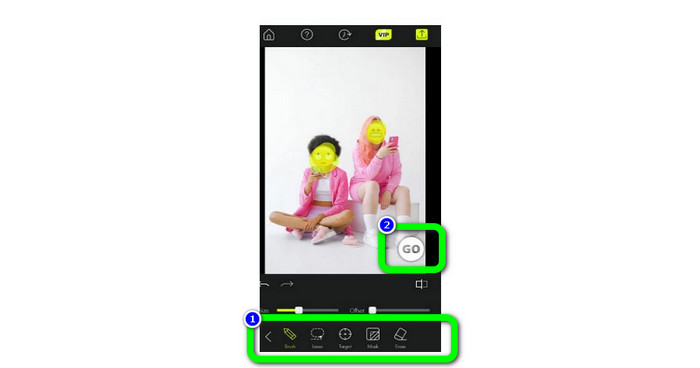
Étape 3 : Surlignez l’émoji à l’aide des outils de suppression, comme l’outil Brush ou Lasso. Après les avoir surlignés, sélectionnez le bouton Go.
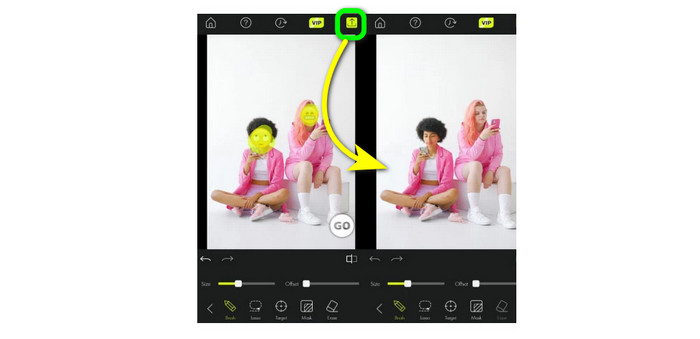
Étape 4 : La dernière étape consiste à cliquer sur l’icône Save.
Partie 4 : FAQ sur la suppression des emojis des images
1. Puis-je également supprimer un emoji de ma vidéo ?
Oui, bien sûr. Vous pouvez utiliser des outils de suppression de filigrane, tels que Video Converter Ultimate, HitPaw, Media.io, Online Video Cutter, etc. Grâce à ces applications, vous pouvez facilement supprimer des émojis d’une vidéo.
2. Existe-t-il un moyen le plus rapide de supprimer les emoji d'une photo ?
Oui, il y en a. La meilleure méthode pour les supprimer rapidement est d’utiliser FVC Free Watermark Remover. Vous pouvez enlever l’émoji en une seconde avec cette application.
3. Comment supprimer les emojis d'une photo sans utiliser de dissolvant ?
La meilleure chose à faire est d'utiliser un outil de recadrage. Lorsque l'emoji se trouve dans le coin ou le bord de vos photos, les recadrer est la meilleure méthode.
Conclusion
Cet article a présenté des méthodes efficaces et rapides pour expliquer comment supprimer des émojis de vos photos. Parmi toutes ces excellentes applications, nous recommandons vivement FVC Free Watermark Remover. Il propose des méthodes simples, adaptées à tout le monde.
-
 Excellentes façons de supprimer l'autocollant d'une photo et d'une vidéo
 Voulez-vous supprimer sans effort les autocollants des vidéos et des photos ? Voici les moyens efficaces, y compris les méthodes les plus fiables et les plus simples que vous pouvez essayer
-
 Des moyens simples pour supprimer le filigrane de JPG en ligne
 Découvrons les meilleures tactiques pour supprimer les filigranes de JPG en ligne à l'aide d'applications efficaces. Suivez cet article pour connaître les procédures
-
 Guides complets pour supprimer facilement les filigranes iFunny
 Découvrez le dissolvant de filigrane iFunny le plus exceptionnel pour vous. Apprenez également ces méthodes simples pour supprimer les filigranes iFunny de vos photos
