


 Video Converter Ultimate
 Enregistreur d'écran
 Réparation vidéo
 Téléchargement sécurisé
Conversion transparente de café en MP3 pour préserver la qualité audio et l'accessibilité
La conversion de Caf en MP3 est essentielle pour améliorer la compatibilité et l'accessibilité. La conversion de vos fichiers Caf en MP3 garantit une lecture transparente sur diverses plates-formes, éliminant les problèmes de compatibilité. De plus, les fichiers MP3 sont de plus petite taille, ce qui les rend plus faciles à stocker, transférer et partager. Que vous souhaitiez profiter de votre collection audio sur des smartphones, des ordinateurs ou des systèmes embarqués, la conversion de Caf en MP3 vous offre une plus grande flexibilité et commodité pour accéder à votre musique, podcasts ou enregistrements préférés.
En utilisant un convertisseur Caf vers MP3, vous pouvez facilement transformer vos fichiers Caf en populaire format MP3, ce qui garantit une accessibilité plus large, des fichiers plus légers et un partage fluide de votre collection audio. Cela dit, découvrez les outils que vous pouvez utiliser pour vous aider à convertir vos fichiers de Caf en MP3.

Partie 1. Qu'est-ce que CAF et pourquoi convertir CAF en MP3
Caf ou Core Audio Format est un format de fichier audio introduit par Apple Inc. Il est couramment utilisé sur les plates-formes macOS et iOS. Les fichiers Caf sont souvent créés et utilisés dans des applications audio professionnelles, telles que l'édition, le mixage et l'enregistrement du son. La conversion de Caf en MP3 offre plusieurs raisons et avantages convaincants. Voici quelques-unes des quelques principales raisons pour lesquelles vous pourriez envisager de convertir vos fichiers Caf au format MP3 :
Compatibilité améliorée : le MP3 est l’un des formats audio les plus largement pris en charge sur une grande variété d’appareils, de lecteurs multimédias et de systèmes d’exploitation. En convertissant vos fichiers Caf en MP3, vous assurez leur compatibilité et éliminez les problèmes ou limitations de lecture que vous pourriez rencontrer avec les fichiers Caf.
Accessibilité : convertir des fichiers Caf en MP3 offre une accessibilité accrue à votre contenu audio. Les fichiers MP3 peuvent être diffusés sur de nombreux appareils, notamment les smartphones, les tablettes, les ordinateurs portables, les ordinateurs de bureau, les baladeurs numériques et même les systèmes audio embarqués. Cette polyvalence vous permet de profiter de votre musique, de vos podcasts ou de vos enregistrements préférés à tout moment et en tout lieu.
Taille de fichier réduite : les fichiers MP3 sont généralement compressés, ce qui donne des tailles de fichiers nettement plus petites que les fichiers Caf. Cette compression permet d’économiser de l’espace de stockage sur vos appareils sans dégradation notable de la qualité audio. Elle facilite également le transfert ou le partage de vos fichiers audio par e‑mail, applications de messagerie ou plateformes en ligne.
Partie 2. Convertir CAF en MP3 hors ligne
Video Converter Ultimate est un logiciel très performant qui permet de convertir divers formats de fichiers vers différents formats audio tels que Caf et MP3. Le logiciel propose une fonction de conversion par lot, permettant à l’utilisateur de convertir plusieurs fichiers audio simultanément.
De plus, les utilisateurs ont la possibilité d'optimiser la qualité de n'importe quelle chanson souhaitée grâce à la fonctionnalité du programme qui permet la personnalisation des détails techniques de sortie, y compris le taux d'échantillonnage et le débit binaire. Pour les personnes cherchant à effectuer une conversion par lots de fichiers audio de Caf en MP3 ou vice versa, nous avons fourni un guide concis ci-dessous pour votre lecture. Vous pouvez vous référer aux instructions ci-dessous pour savoir comment changer Caf en MP3.
Étape 1. Sélectionnez l’icône de Téléchargement gratuit appropriée ci‑dessous pour lancer le programme sur votre appareil. Veillez à suivre les instructions à l’écran pour activer le programme à l’étape suivante. Une fois installé, son interface est facile à maîtriser. Cet outil fonctionne comme un convertisseur Caf vers MP3 pour Mac et Windows.
Téléchargement gratuitPour Windows 7 ou version ultérieureTéléchargement sécurisé
Téléchargement gratuitPour macOS 10.7 ou version ultérieureTéléchargement sécurisé
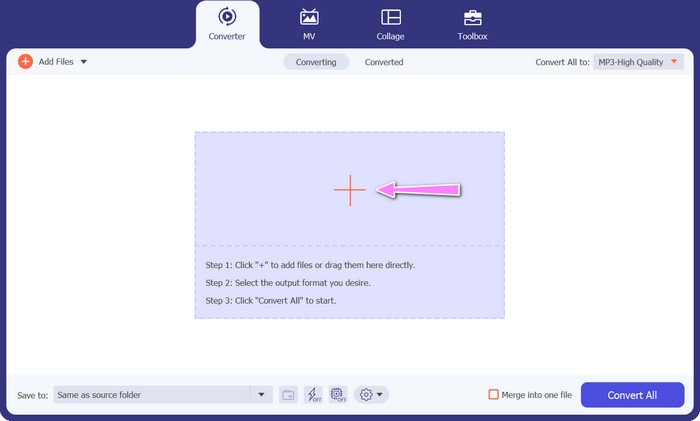
Étape 2. Cliquez sur le bouton Ajouter dans l’interface principale pour importer le fichier audio que vous souhaitez modifier. Vous serez ensuite dirigé vers une vignette du fichier importé. Vous pouvez également soumettre un dossier pour convertir plusieurs fichiers en une seule fois. Choisissez l’emplacement, dans votre répertoire, qui contient tous les fichiers audio nécessaires.
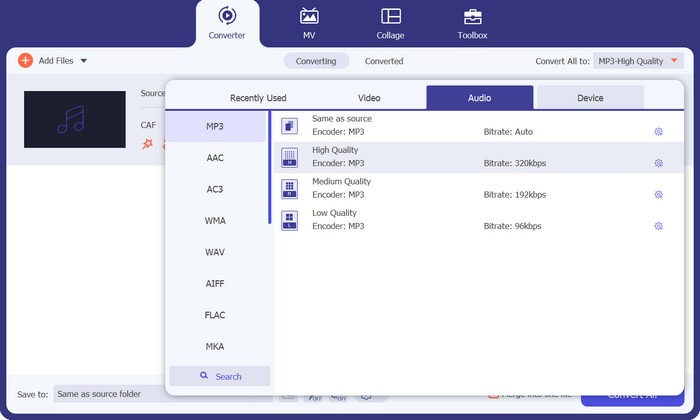
Étape 3. Vous pouvez maintenant modifier le format de sortie en cliquant sur le bouton Tout convertir en situé en haut de la fenêtre du programme. Choisissez MP3 dans le volet intitulé Audio. Par la même occasion, vous pouvez ajuster la fréquence d’échantillonnage et le débit binaire du fichier de sortie afin d’obtenir la qualité souhaitée.
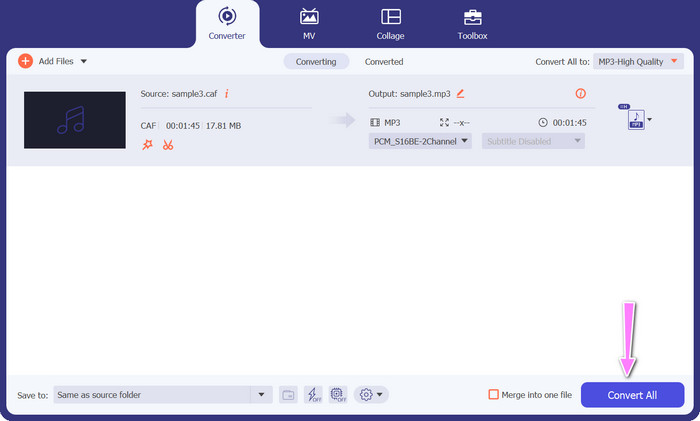
Étape 4. Cliquez sur le bouton Tout convertir ci‑dessous pour lancer la procédure de conversion en dernière étape. Le programme ouvrira ensuite automatiquement le dossier de sortie afin que vous puissiez vérifier le nouveau format de fichier.
Avantages
- Il peut convertir par lots le format de fichier audio Caf au format MP3.
- Le programme fonctionne bien avec Windows et Mac OS.
Les inconvénients
- Il nécessite des frais d'abonnement payants après l'essai gratuit.
Partie 3. Convertir CAF en MP3 en ligne
Vous pouvez également utiliser le Free MP3 Audio Converter Online, qui constitue une autre option. Il s’agit d’une application en ligne qui fonctionne via Internet, comme son nom l’indique. Par conséquent, vous n’avez pas besoin d’installer une application pour convertir Caf en MP3. Tout est accessible, et vous n’avez besoin que de votre navigateur pour effectuer vos tâches. En termes de fonctionnalités, ce convertisseur gratuit de Caf en MP3 n’a rien à envier aux autres. De plus, vous pouvez téléverser un grand nombre de fichiers, les convertir en masse ou ajuster le profil d’un clip vidéo ou audio. En suivant les méthodes décrites ici, vous découvrirez le meilleur convertisseur Caf en MP3 en ligne.
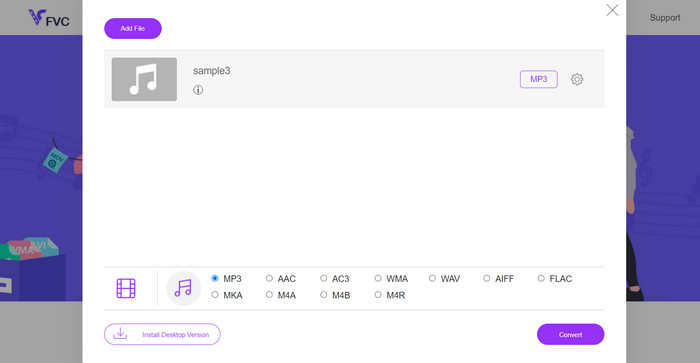
Étape 1. Rendez‑vous simplement sur le site principal de Free MP3 Audio Converter Online en cliquant sur le lien ci‑dessus. Vous pouvez soumettre votre fichier audio en allant sur l’écran d’accueil et en sélectionnant l’option Ajouter des fichiers à convertir.
Étape 2. Un aperçu du fichier d’origine que vous avez sélectionné apparaîtra à l’écran. Vous pouvez choisir le format de sortie souhaité en vous rendant sous le panneau où vous vous trouviez au départ.
Étape 3. Pour changer le format de fichier de Caf en MP3, cliquez sur le bouton Convertir. Vous devrez répéter la même procédure depuis le début si vous souhaitez convertir un autre fichier.
Avantages
- Les utilisateurs peuvent profiter de conversions illimitées par jour.
- Ce convertisseur Caf en MP3 en ligne fonctionne sur presque tous les navigateurs Web.
Les inconvénients
- La vitesse de conversion est proportionnelle à la bande passante Internet disponible.
Pour aller plus loin :
Conversion MP3 en AAC : comment améliorer la qualité de votre audio
Téléchargement de lecteurs MP3 – 10 meilleurs lecteurs de musique MP3 gratuits en 2023
Partie 4. FAQ sur la conversion de CAF en MP3
Puis-je conserver les métadonnées de mes fichiers Caf après les avoir convertis en MP3 ?
La préservation des métadonnées lors de la conversion de Caf en MP3 dépend du convertisseur ou du logiciel spécifique que vous utilisez. Certains outils de conversion ont la capacité de conserver des métadonnées telles que le nom de l'artiste, le titre de l'album, le numéro de la piste, etc. Cependant, il est important de noter que tous les convertisseurs ne prennent pas en charge la conservation des métadonnées.
Existe-t-il d'autres formats audio vers lesquels je peux convertir des fichiers Caf ?
Oui, outre le MP3, il existe plusieurs autres formats audio vers lesquels vous pouvez convertir des fichiers Caf, en fonction de vos besoins spécifiques. Les formats alternatifs courants incluent WAV, FLAC (Free Lossless Audio Codec), AAC et OGG (Ogg Vorbis).
Dois-je payer pour un convertisseur Caf en MP3 ?
Il existe des options de conversion Caf en MP3 gratuites et payantes. De nombreux convertisseurs en ligne offrent des services gratuits, vous permettant de convertir des fichiers Caf en MP3 sans aucun frais. Cependant, certains logiciels avancés ou services en ligne premium peuvent nécessiter un achat ou un abonnement pour des fonctionnalités supplémentaires ou des vitesses de conversion plus élevées.
Conclusion
Grâce à la conversion Caf en MP3, vous pouvez exploiter tout le potentiel de votre collection audio et profiter d’une lecture fluide à tout moment et en tout lieu. Elle vous permet d’écouter votre musique, vos podcasts ou vos enregistrements favoris sur une vaste gamme d’appareils et de plateformes.
-
 Les 4 meilleures façons de convertir AIFF en MP3 sur Mac et PC
 Vous rencontrez des difficultés car les fichiers AIFF sont trop gros pour être sauvegardés ? Vous devez donc continuer à lire pendant que nous expliquons comment le résoudre en convertissant AIFF au format MP3.
-
 Découvrez comment convertir AMR en MP3 [en ligne et hors ligne]
 Vous rencontrez des difficultés parce que les fichiers .amr ne peuvent pas être lus sur votre bureau ? Lisez ensuite cet article pour savoir comment convertir AMR au format MP3.
-
 Guide sur la façon d'ajouter une pochette d'album à un MP3 sans effort chez Breze
 Voulez-vous savoir comment ajouter une pochette d'album au MP3 ? Si tel est le cas, lisez tous les détails et un didacticiel sur la modification de la pochette de l'album sur votre fichier.
