


 Video Converter Ultimate
 Enregistreur d'écran
 Réparation vidéo
 Téléchargement sécurisé
Meilleurs convertisseurs MP3 vers M4A : conversion audio rapide et facile
Êtes-vous insatisfait lorsque vous écoutez un son de mauvaise qualité qui ne rend pas justice à vos chansons préférées ? Il est temps d’améliorer votre expérience audio grâce à la puissance de la conversion MP3 en M4A ! En convertissant vos fichiers audio au format M4A, vous pouvez libérer tout le potentiel de votre bibliothèque musicale et constater par vous-même la différence. Dans ce guide, nous vous présenterons les avantages de la conversion MP3 en M4A et vous proposerons les meilleurs logiciels de conversion pour garantir un processus fluide. Préparez-vous à transformer votre expérience d’écoute et à profiter de votre musique comme jamais auparavant.

Partie 1. Meilleures façons de convertir MP3 en M4A
Voici quelques-uns des meilleurs convertisseurs audio de MP3 vers M4a. Il existe un moyen hors ligne, qui est une application de bureau, et un autre outil en ligne, qui est un programme Web. Consultez-les pour en savoir plus.
1. Convertisseur vidéo ultime
Video Converter Ultimate est un logiciel polyvalent qui offre un large éventail de fonctions pour la conversion audio et vidéo. Pour convertir un MP3 en M4A, Video Converter Ultimate est un excellent choix, car il propose aux utilisateurs une procédure simple et directe pour convertir leurs fichiers audio. L’outil prend en charge un grand nombre de formats audio et sa technologie avancée de codec audio garantit une sortie de haute qualité. Que vous ayez besoin de convertir des fichiers audio pour un usage personnel ou professionnel, Video Converter Ultimate rend le processus rapide, ce qui vous permet de vous concentrer sur l’essentiel : profiter de vos fichiers audio de haute qualité.
Étape 1. Télécharger et installer le programme
Pour commencer, cliquez sur l’un des boutons Téléchargement gratuit, puis suivez les instructions à l’écran pour enregistrer le fichier sur votre ordinateur. Lancez ensuite l’application et familiarisez-vous avec ses commandes intuitives.
Téléchargement gratuitPour Windows 7 ou version ultérieureTéléchargement sécurisé
Téléchargement gratuitPour macOS 10.7 ou version ultérieureTéléchargement sécurisé
Étape 2. Ajouter des fichiers audio
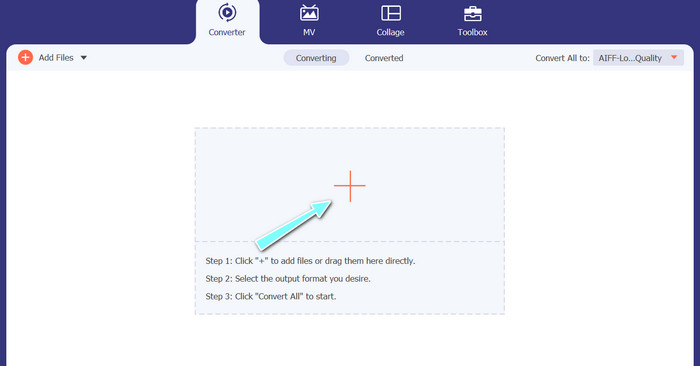
Ensuite, cliquez sur le signe plus dans l’interface principale et accédez à l’emplacement du fichier audio que vous souhaitez convertir. Une fois le fichier importé, un aperçu s’affichera dans l’interface utilisateur. Si vous souhaitez convertir plusieurs MP3 en M4A en une seule fois, vous pouvez importer un dossier contenant plusieurs fichiers.
Étape 3. Choisir un format de sortie
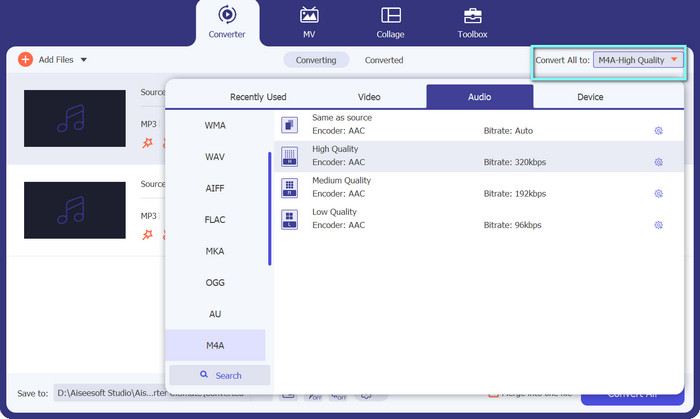
Choisissez ensuite le format de sortie en cliquant sur l’onglet Audio dans le menu Profil (situé en haut à droite de l’outil). Vous pouvez convertir vers ou depuis le format MP3 en choisissant le format MP3 ou M4A.
Étape 4. Enregistrer le fichier de sortie
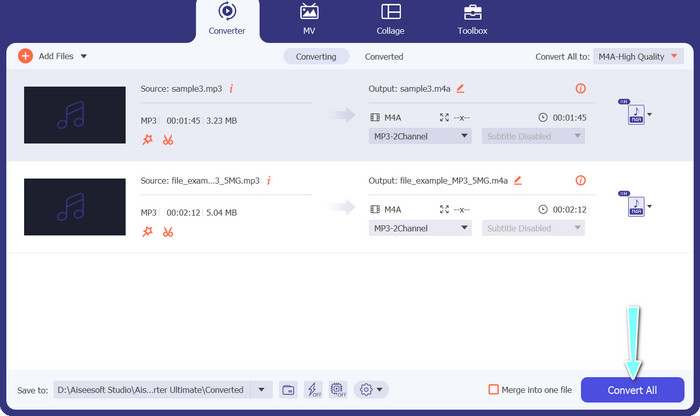
En bas de l’écran, sélectionnez le dossier de destination. Lorsque vous êtes prêt à lancer la conversion, cliquez sur le bouton Tout convertir.
2. Convertisseur vidéo gratuit en ligne
Vous n’avez plus d’espace pour installer un autre programme ? Pas d’inquiétude : vous pouvez opter pour un outil en ligne pour convertir vos fichiers sans rien installer. L’application web Free Video Converter Online vous permet de convertir directement depuis votre navigateur. Elle prend en charge de nombreux formats, aussi bien pour la vidéo que pour l’audio. Sans compter que vous pouvez effectuer des conversions par lots avec cet outil en ligne. En plus de cela, la personnalisation des paramètres de sortie audio est un autre atout majeur de l’outil. Découvrez ci-dessous comment fonctionne ce convertisseur MP3 en M4A en ligne.
Étape 1. Pour commencer à utiliser Free Video Converter Online, ouvrez d’abord votre navigateur web préféré et accédez directement au site.
Étape 2. Sélectionnez ensuite le fichier MP3 que vous souhaitez convertir en M4A en cliquant sur le bouton Ajouter des fichiers à convertir.
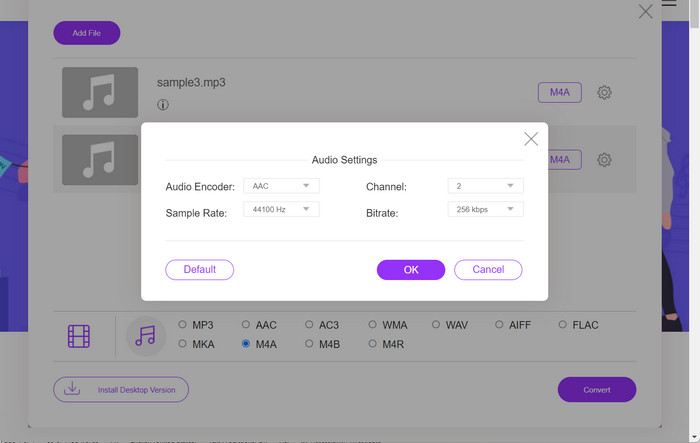
Étape 3. Dans les options de format Audio, choisissez M4A comme format de sortie souhaité. Vous pouvez également modifier la qualité de sortie, ou le débit binaire (bitrate), du fichier M4A.
Étape 4. Cliquez sur le bouton Convertir pour lancer le processus de conversion. Voilà comment convertir un MP3 en M4A en ligne.
Partie 2. Convertir MP3 en M4A sous Windows
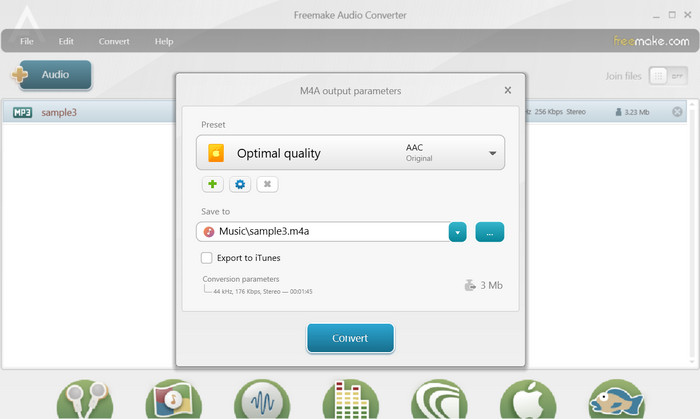
Freemake Audio Converter est un programme gratuit et facile à utiliser qui permet aux utilisateurs de convertir des fichiers audio en différents formats, notamment M4A, MP3, WAV, etc. Grâce à son interface simple par glisser-déposer, les utilisateurs peuvent facilement ajouter leurs fichiers MP3 et les convertir en M4A sans paramètres ni configurations compliqués. L'outil dispose également d'une gamme d'options de personnalisation, permettant aux utilisateurs d'ajuster des paramètres tels que le débit binaire et le taux d'échantillonnage pour obtenir la qualité de sortie souhaitée. Dans l'ensemble, c'est l'un des meilleurs convertisseurs MP3 vers M4A que vous puissiez utiliser.
Étape 1. Téléchargez et installez Freemake Audio Converter sur votre ordinateur Windows.
Étape 2. Lancez le programme et cliquez sur le bouton +Audio pour ajouter votre ou vos fichiers MP3 au programme.
Étape 3. Sélectionnez M4A dans la liste des formats disponibles en bas de la fenêtre du programme. Utilisez le menu déroulant pour choisir les paramètres de qualité souhaités pour votre fichier de sortie.
Étape 4. Choisissez le dossier de sortie dans lequel vous souhaitez enregistrer votre fichier converti. Enfin, cochez (cliquez sur) le bouton Convertir pour démarrer le processus de conversion.
Partie 3. Convertir MP3 en M4A sur Mac
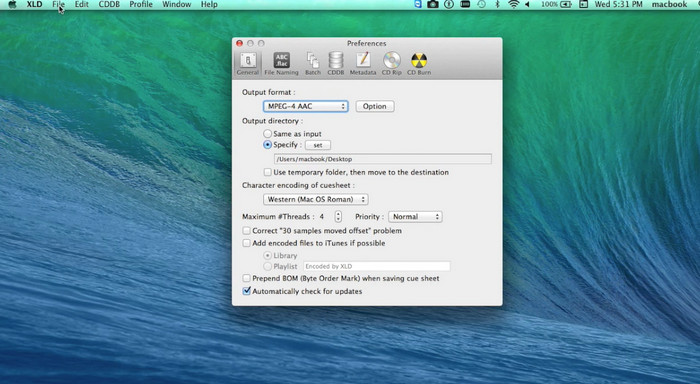
XLD est un programme gratuit et facile à utiliser qui permet aux utilisateurs de Mac de convertir des fichiers audio en différents formats, notamment M4A, MP3, FLAC, etc. Grâce à son interface simple par glisser-déposer, les utilisateurs peuvent facilement ajouter leurs fichiers MP3 et les convertir en M4A sans paramètres ni configurations compliqués. XLD propose également une gamme d'options de personnalisation, permettant aux utilisateurs d'ajuster des paramètres tels que le débit binaire et le taux d'échantillonnage pour obtenir la qualité de sortie souhaitée.
Étape 1. Téléchargez et installez XLD sur votre ordinateur Mac.
Étape 2. Lancez le programme et cliquez sur le bouton Ouvrir pour ajouter votre ou vos fichiers MP3 au programme.
Étape 3. Sélectionnez M4A dans la liste des formats disponibles dans les préférences du programme. Vous pouvez utiliser le menu déroulant pour choisir les paramètres de qualité souhaités pour votre fichier de sortie.
Étape 4. Choisissez ensuite le dossier de sortie dans lequel vous souhaitez enregistrer votre fichier converti. Enfin, appuyez sur le bouton Convertir pour lancer le processus de conversion. Voilà comment convertir gratuitement un MP3 en M4A sur Mac.
Partie 4. Convertir MP3 en M4A sur Android
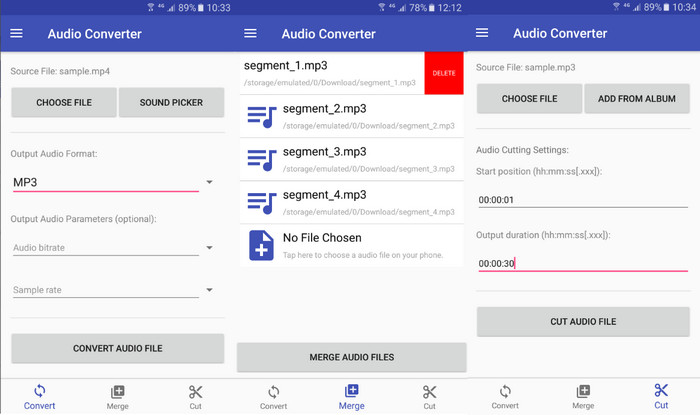
Lorsqu'il s'agit de convertir des fichiers audio, le logiciel Android gratuit et simple Audio Converter de Online-Convert.com est difficile à battre. Les utilisateurs peuvent simplement faire glisser et déposer leurs fichiers MP3 dans l'interface du programme pour commencer le processus de conversion en M4A. La qualité de sortie d'un fichier audio peut être ajustée en modifiant des paramètres tels que le débit binaire et le taux d'échantillonnage dans Audio Converter. Voici les étapes pour changer MP3 en M4A sur Android :
Étape 1. Téléchargez et installez Audio Converter by Online-Convert.com depuis le Google Play Store sur votre appareil Android. Lancez l’application et touchez le bouton Convertir audio.
Étape 2. Sélectionnez ensuite MP3 comme format d’entrée et M4A comme format de sortie.
Étape 3. Appuyez maintenant sur le bouton Sélectionner des fichiers pour ajouter votre ou vos fichiers MP3 à l’application. Enfin, touchez le bouton Démarrer la conversion pour lancer le processus. C’est aussi simple que cela ! Vous savez désormais comment convertir un MP3 en M4A sur Android.
Partie 5. Convertir MP3 en M4A sur iOS
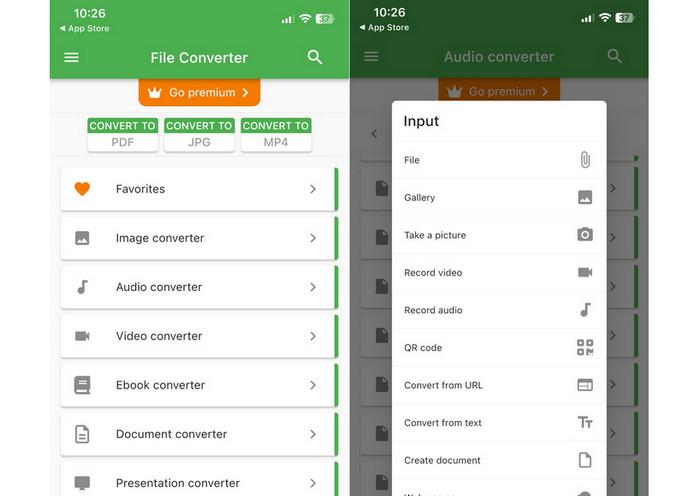
Les fichiers audio, tels que MP3, peuvent être convertis au format M4A plus portable et sans perte à l'aide de File Converter Free, un logiciel iOS gratuit et simple. Sa conception simple permet à quiconque de charger des fichiers MP3 et de les convertir en M4A sans avoir à modifier les paramètres ou les configurations.
Étape 1. File Converter Free est disponible gratuitement sur l’App Store pour le téléchargement et l’utilisation. Lancez le programme et appuyez sur l’onglet Audio.
Étape 2. Choisissez MP3 comme format d’entrée et M4A pour le format AAC d’Apple. Sélectionnez la qualité de fichier de sortie souhaitée à l’aide du menu déroulant. Pour importer un MP3 dans le programme, cliquez sur le bouton Ajouter un fichier.
Étape 3. Pour lancer le processus de conversion, cliquez sur le bouton Convertir.
Partie 6. FAQ sur la conversion de MP3 en M4A
Puis-je convertir MP3 en M4A en utilisant Windows Media Player ?
Oui, vous pouvez convertir un MP3 en M4A avec Windows Media Player, mais cela nécessite quelques étapes supplémentaires, car le format M4A n’est pas pris en charge de manière native par Windows Media Player. Vous pouvez aussi tout simplement utiliser une alternative à Windows Media Player.
La conversion de MP3 en M4A entraînera-t-elle une perte de qualité audio ?
La conversion de MP3 en M4A peut entraîner une légère perte de qualité audio en raison des différences d'algorithmes de compression utilisés par les deux formats.
Puis-je reconvertir M4A en MP3 ?
Oui, de nombreux programmes et outils de conversion audio permettent de convertir un fichier M4A en MP3 si nécessaire. Cependant, gardez à l’esprit que des conversions successives entre différents formats peuvent entraîner une perte de qualité.
Conclusion
La conversion MP3 en M4A est un processus utile pour quiconque souhaite améliorer la qualité et la compatibilité de ses fichiers audio. En suivant les étapes et conseils présentés dans cette discussion, vous pouvez facilement convertir vos fichiers MP3 au format M4A et profiter d’un son de haute qualité sur n’importe quel appareil.
-
 Gratuit et en ligne | Comment convertir MP4 en M4A sur Windows / Mac
 Comment convertir MP4 en M4A en ligne? Puis-je extraire l'audio des fichiers MP4? Lisez cet article et vous obtiendrez toutes les réponses sur la conversion de MP4 en M4A.
-
 Meilleurs outils que vous pouvez utiliser pour convertir par lots des fichiers MP3 en M4R
 Vous cherchez un convertisseur capable de transformer votre fichier MP3 en sonnerie M4R pour votre iPhone ou iPad par lot ? Lisez l'article pour découvrir certains des meilleurs qui soient.
-
 5 MP3 Cutters pour couper facilement n'importe quel audio [Mise à jour 2023]
 Avez-vous besoin d'un découpeur MP3 pour découper l'audio ? Dans ce cas, lisez cet article car nous fournissons les outils sur lesquels vous pouvez compter et qui permettent de couper facilement l'audio.
