


 Video Converter Ultimate
 Enregistreur d'écran
 Réparation vidéo
 Téléchargement sécurisé
Convertir JPG en MP4 sur Windows/Mac sans perte de qualité
Le format JPG est le format d'image le plus courant et nous l'utilisons à diverses fins, du partage de photos en ligne au stockage d'instantanés numériques sur nos appareils. Grâce à sa compatibilité étendue et à sa taille de fichier relativement petite, le format JPG est devenu le choix de prédilection pour capturer et préserver des souvenirs visuels dans la vie de tous les jours.
Mais de nos jours, créer des vidéos à partir d’images devient tendance. C’est aussi une autre façon de conserver des souvenirs de manière plus créative et passionnée. Vous pouvez ajouter de l’audio, des transitions, ou simplement réaliser un diaporama vidéo MP4 avec votre musique préférée en arrière‑plan. Donc, si cela vous intéresse et que vous prévoyez de transformer des JPG en MP4, poursuivez la lecture de cet article et découvrez comment les convertir en utilisant 4 méthodes différentes sans perdre en qualité. Libérez dès aujourd’hui toute votre créativité !

Partie 1 : La meilleure façon de convertir un fichier JPG en MP4 sur Windows/Mac [Idéal pour les débutants]
La méthode ultime pour convertir un JPG en MP4 consiste à utiliser FVC Video Converter Ultimate. Cet outil possède une fonctionnalité spéciale appelée MV, qui permet aux utilisateurs de créer des vidéos MP4 de bonne qualité à partir de leurs photos JPG. Il est livré avec des thèmes prédéfinis que vous pouvez utiliser librement ainsi que divers effets et filtres. De plus, vous pouvez facilement faire pivoter et recadrer les fichiers JPG avant de les exporter en MP4. Le plus amusant avec cet outil, c’est que vous pouvez importer votre propre audio, le personnaliser avec un filigrane, et bien plus encore. Enfin, cet outil n’est pas difficile à utiliser, car il dispose d’une interface très intuitive et conviviale. Pour ce faire, suivez les étapes ci‑dessous :
Étape 1. Commencez par télécharger le logiciel sur Windows ou Mac, puis téléchargez‑le et installez‑le.
Téléchargement gratuit pour Windows 7 ou version ultérieure Téléchargement sécurisé
Téléchargement gratuit pour macOS 10.7 ou version ultérieure - Téléchargement sécurisé
Étape 2. Ensuite, ouvrez l’outil et, parmi les 4 onglets situés en haut, cliquez sur MV.
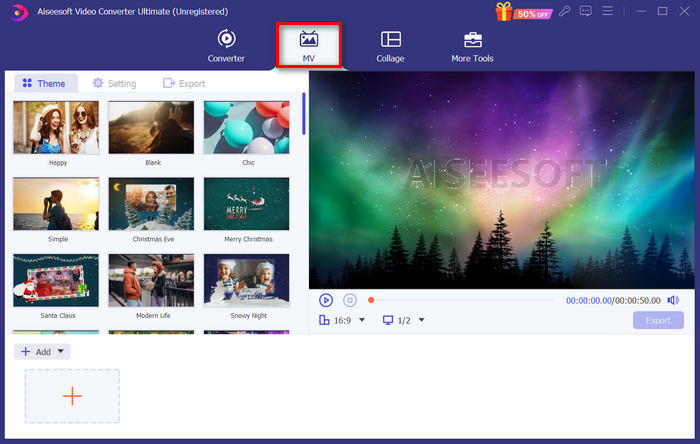
Étape 3. Maintenant, une fois sur l’interface principale de MV, cliquez sur le bouton Add File pour ajouter les fichiers JPG que vous souhaitez convertir en MP4.
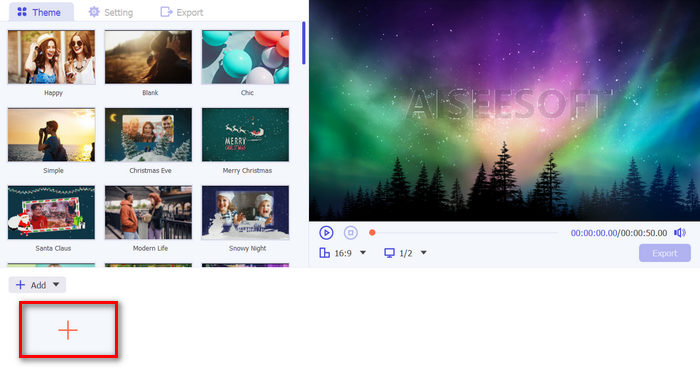
Étape 4. Pour ajouter, monter et couper votre vidéo MP4, cliquez sur le bouton situé dans la partie supérieure du bouton Add File. Vous pouvez également choisir un thème prédéfini en cliquant sur l’onglet Theme en haut.
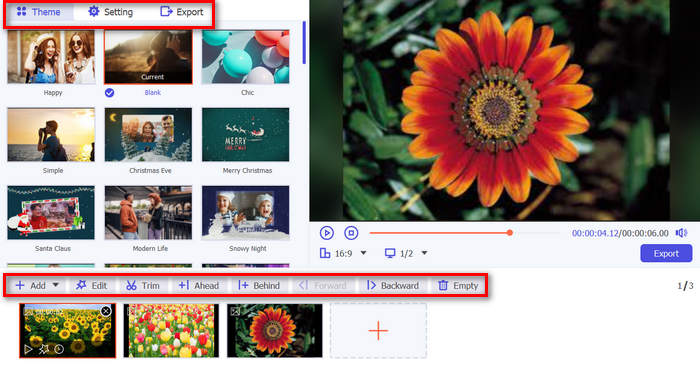
Étape 5. Pour recadrer et faire pivoter les images, ajouter des filtres et des effets, ainsi qu’un filigrane pour personnaliser davantage votre création, cliquez simplement sur l’icône Edit en bas ; une nouvelle fenêtre s’ouvrira.
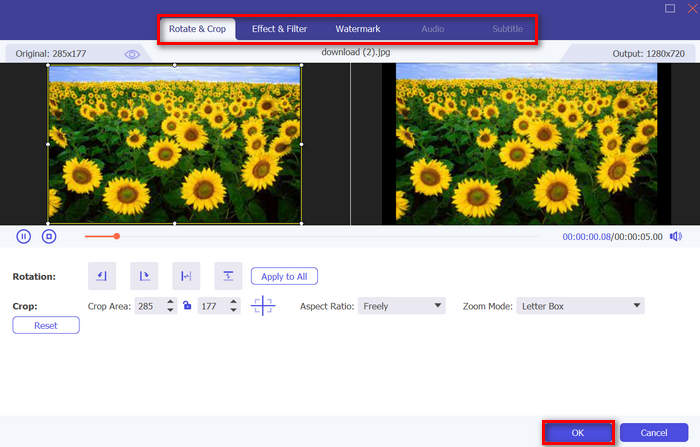
Étape 6. Une fois tout réglé, cliquez sur le bouton Export, où vous pourrez changer le format en MP4 et modifier la fréquence d’images, la résolution et la qualité. Vous pouvez également indiquer dans quel dossier seront enregistrés vos fichiers convertis de JPG en MP4. Pour finir, cliquez sur le bouton Start Export pour enregistrer votre fichier.
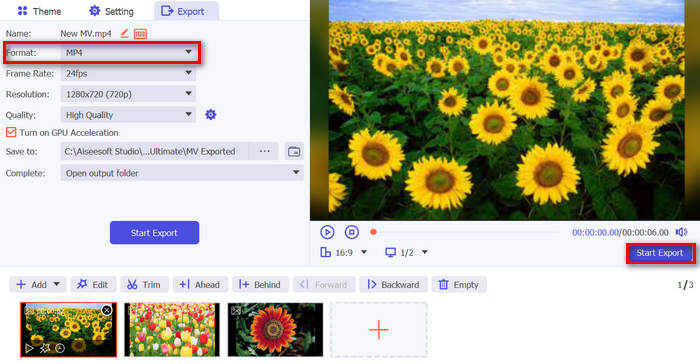
FVC Video Converter Ultimate simplifie la conversion de JPG en MP4 grâce à son interface conviviale, ses fonctionnalités personnalisables, ses thèmes prédéfinis, ses outils d'édition, sa sortie de haute qualité et sa compatibilité avec les systèmes d'exploitation Windows et Mac. C'est en effet le moyen ultime de transformer des photos ennuyeuses en vidéos amusantes et créatives.
Partie 2 : Convertir JPG en MP4 sur Windows 11/10 avec l'outil Photos par défaut
Sous Windows 10 et 11, Clipchamp est désormais intégré à l'application Photos, qui permet aux utilisateurs de convertir des fichiers JPG en fichiers MP4. Cette intégration facilite l'édition qui peut ensuite être enregistrée au format MP4. Alors, pour vous guider, suivez le processus étape par étape ci-dessous :
Étape 1. Sur votre ordinateur, ouvrez le Menu Démarrer puis cliquez sur Photos.
Étape 2. Dans Photos, allez dans Dossiers dans l’onglet de gauche. Il vous sera demandé d’ajouter un dossier, ou vous pouvez simplement sélectionner les photos que vous souhaitez transformer en MP4.
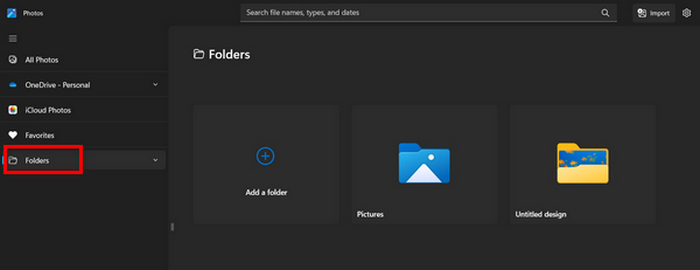
Étape 3. Après avoir choisi les images JPG que vous voulez convertir, cliquez sur l’icône Create a video.
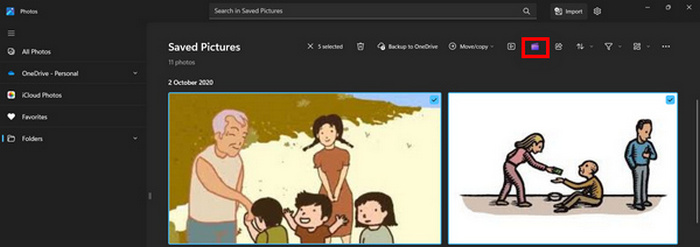
Étape 4. Dans une nouvelle fenêtre, il vous sera demandé d’ajouter des fichiers multimédias à cette vidéo. Cliquez sur Yes to Add Video.

Étape 5. Faites ensuite glisser les médias importés vers la timeline. Vous pouvez utiliser les options de montage de l’onglet de gauche, où vous pouvez ajouter du texte, choisir des modèles, etc. Dans l’onglet de droite, vous pouvez ajouter de l’audio, des effets, des filtres, etc. Une fois terminé, il vous suffit de cliquer sur le bouton Export, et le MP4 sera enregistré directement sur votre ordinateur.
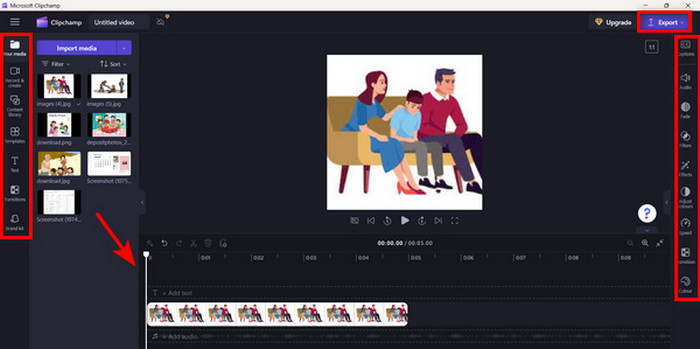
Si vous êtes un utilisateur Windows, cette méthode permet de convertir rapidement des fichiers JPG en MP4. Cependant, cette méthode aurait pu être plus simple que d'autres outils. De plus, vous ne pouvez pas exporter de vidéo en résolution 2K/4K avec sa version gratuite et vous n'avez pas accès à d'autres bons effets et filtres par rapport à d'autres outils de conversion.
Partie 3 : Convertir JPG en MP4 sur Mac avec iMovie
Si vous êtes un utilisateur Mac, il existe une solution pratique pour convertir des fichiers JPG en MP4. Mac dispose d'une application intégrée appelée iMovie. Il s'agit d'une application de montage vidéo qui offre des fonctions de montage de base à ses utilisateurs, mais en dehors de cela, elle peut également être utilisée pour transformer des fichiers JPG en MP4. Il leur suffit d'importer leurs images, d'ajouter des effets et des filtres, puis de les enregistrer au format MP4.
Étape 1. Sur votre Mac, lancez l’app iMovie et cliquez sur Create New.
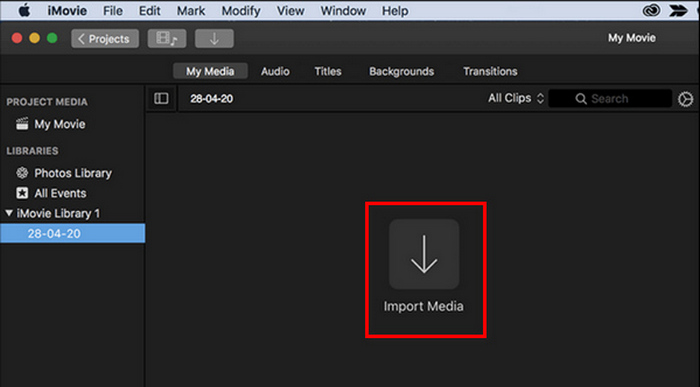
Étape 2. Ajoutez ensuite votre fichier JPG dans l’app en cliquant sur le bouton Import Media dans l’interface principale.
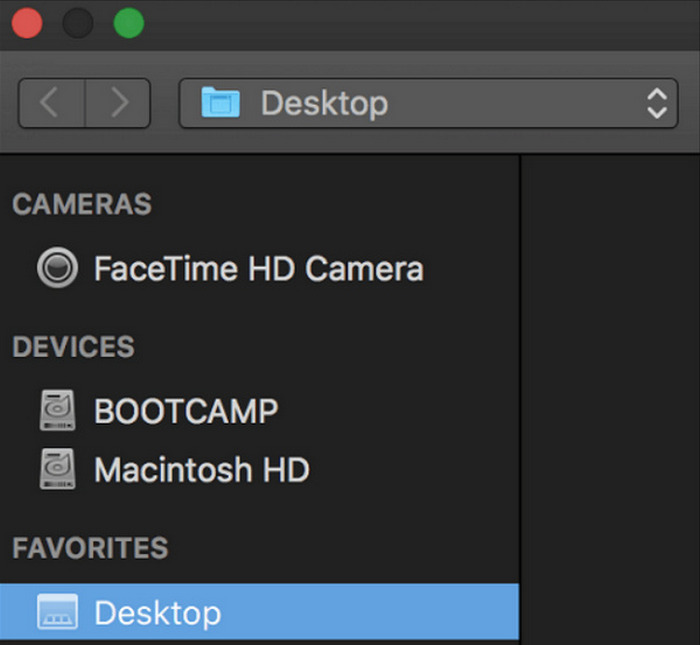
Étape 3. Recherchez maintenant les fichiers JPG que vous souhaitez convertir en MP4.
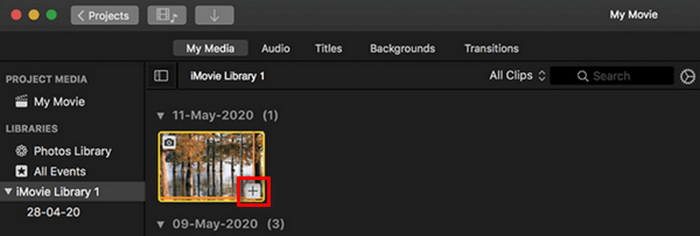
Étape 4. Quand votre JPG apparaît dans l’interface de l’app, sélectionnez‑le : un signe Plus apparaîtra. Cliquez dessus pour ajouter la photo à la timeline.
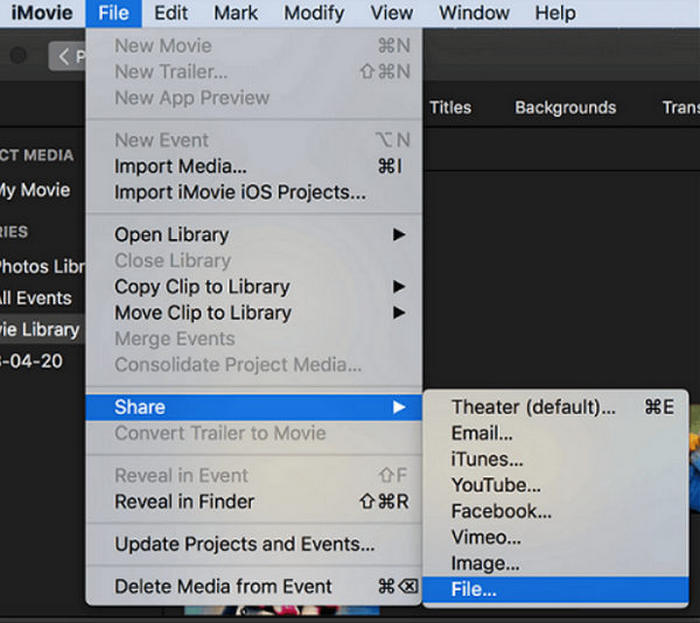
Étape 5. Après avoir ajouté les fichiers JPG à la timeline, vous pouvez faire glisser les coins pour allonger la durée de votre fichier MP4 final. Puis cliquez sur le menu File en haut, sélectionnez Share, puis choisissez File pour exporter votre fichier.
Étape 6. Enfin, donnez un nom à votre fichier MP4 en haut, renseignez les autres métadonnées de votre vidéo, puis cliquez sur Next. Sélectionnez l’emplacement souhaité pour enregistrer le fichier MP4 que vous voulez convertir. Une fois l’emplacement choisi, le processus de conversion commence.
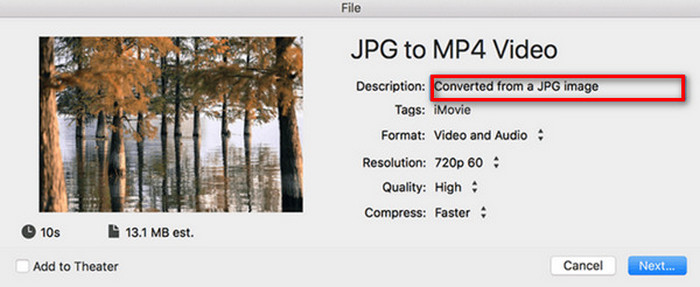
iMovie offre aux utilisateurs Mac un moyen pratique de convertir des fichiers JPG en MP4 grâce à son interface conviviale et à ses outils de montage intégrés. Cependant, il peut manquer de fonctionnalités avancées par rapport à d’autres convertisseurs, ce qui limite les options de personnalisation et les effets. S’il convient pour des montages basiques, les utilisateurs deviennent aujourd’hui plus exigeants et créatifs, recherchant un outil capable de répondre réellement aux besoins et attentes de chacun. De plus, cet outil ne fonctionne pas sous Windows. Si vous aimez iMovie, retrouvez ici les outils iMovie pour Windows.
Partie 4 : Convertir des fichiers JPG en MP4 en ligne
Maintenant, si vous cherchez une autre façon de convertir des fichiers JPG en MP4, la conversion en ligne pourrait être pour vous. L'un des meilleurs convertisseurs en ligne pour cela est Online Convert.com. Vous pouvez exécuter cet outil à partir de différents navigateurs sur votre ordinateur et il peut être utilisé facilement grâce à son interface utilisateur intuitive.
Étape 1. Dans votre navigateur, recherchez le site Online Convert.com.
Étape 2. Une fois sur leur site, sélectionnez les formats appropriés. Puisque vous allez convertir un JPG en MP4, choisissez JPG dans le menu déroulant Convert et MP4 dans le menu déroulant To.
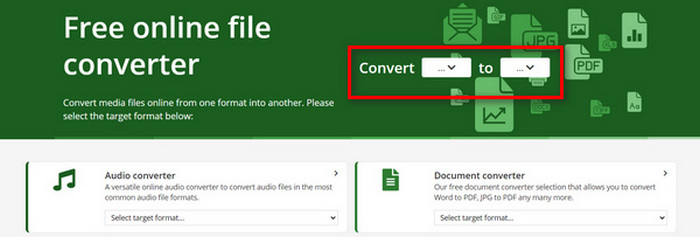
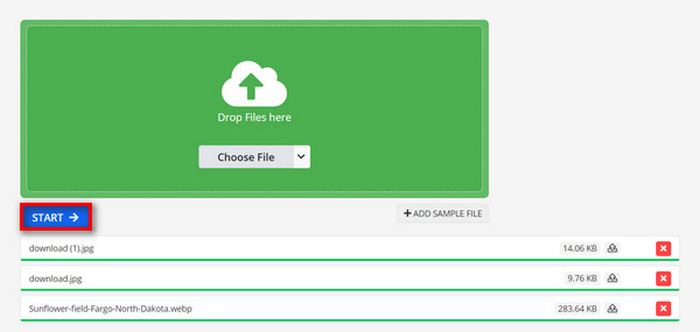
Étape 3. Ensuite, téléversez les fichiers JPG que vous souhaitez convertir en cliquant sur le bouton déroulant Choose File, qui vous permet d’importer vos fichiers depuis votre appareil, Dropbox, Google Drive, voire à partir d’une URL.

Étape 4. Après avoir téléversé les fichiers JPG que vous voulez convertir en MP4, cliquez sur le bouton Start.
Étape 5. Pour finir, téléchargez votre fichier MP4 en cliquant sur le bouton Download.
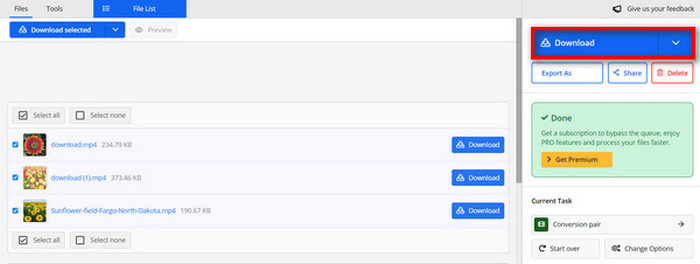
La sortie convertie à partir de cet outil est le résultat d'un paramètre vidéo prédéfini que les utilisateurs ont ajusté manuellement avant de convertir les fichiers. Bien que cela transforme facilement un fichier JPG en MP4, vous ne pouvez pas améliorer directement la vidéo convertie en fonction de votre style créatif.
Partie 5 : FAQ sur la conversion de JPG en MP4
JPEG est-il identique à JPG ?
JPEG et JPG sont essentiellement le même format d’image numérique : ces deux extensions de fichier renvoient au format JPEG, créé par le Joint Photographic Experts Group, ou JPEG. Découvrez ici comment convertir un JPEG en JPG.
Quand dois-je convertir JPG en MP4 ?
Vous devez convertir JPG en MP4 lorsque vous souhaitez créer une présentation visuelle ou partager une série d'images sous forme de vidéo, comme créer des diaporamas, des albums photo numériques ou des diapositives vidéo. En dehors de cela, si vous souhaitez faire preuve de créativité dans la façon dont vous souhaitez que vos fichiers JPG soient vus, les convertir en MP4 est le moyen idéal pour ajouter des transitions, de la musique, des superpositions de texte et d'autres éléments multimédias.
Comment combiner JPG et MP4 ?
La seule façon de combiner des fichiers JPG et MP4 est d'utiliser des outils de montage vidéo. Avec cette approche, vous avez un contrôle total sur la disposition, le timing et la personnalisation des images et de la vidéo que vous souhaitez combiner.
Conclusion
À vous de jouer maintenant ! Convertir un JPG en MP4 est une autre façon de conserver vos souvenirs de manière créative. Donc, si vous avez des fichiers JPG et que vous souhaitez les convertir, suivez toutes les méthodes présentées dans cet article et choisissez celle qui vous convient le mieux. Lancez‑vous dès aujourd’hui et laissez la magie opérer !
-
 Top 5 des principaux tutoriels pour convertir rapidement PNG en JPG
 Si vous avez besoin de convertir votre fichier PNG au format JPG, vous pouvez apprendre les meilleures façons ici. Vous apprendrez également la différence entre les formats de fichier PNG et JPG.
-
 Méthodes sans effort pour convertir le format SVG au format JPG
 Trouver le meilleur moyen de convertir SVG en JPG ? Cet article vous donnera quelques tutoriels infaillibles que vous pouvez essayer. Vous découvrirez également le convertisseur SVG en JPG pour vous.
-
 Méthodes utiles pour convertir facilement TIFF en JPG/PNG
 Ne manquez pas ces excellents moyens de convertir les formats TIF en JPG/PNG. Cet article vous donnera les informations nécessaires que vous devez savoir. Cela inclut leurs différences.
