


 Video Converter Ultimate
 Enregistreur d'écran
 Réparation vidéo
 Téléchargement sécurisé
MP4 en MXF pour lire sans problème les fichiers MXF sur différents appareils
Parfois, certains logiciels de montage vidéo ou systèmes de diffusion préfèrent les fichiers MXF. Si vous êtes confronté à ce problème, la conversion de vos vidéos MP4 en MXF devient essentielle pour une lecture et un montage fluides. Il existe des outils pratiques qui peuvent faire de cette conversion un jeu d’enfant. Alors, si vous êtes curieux de vous attaquer à cette tâche sans transpirer, continuez à lire !
Apprenons à connaître ces fantastiques convertisseurs MP4 en MXF et les étapes simples qu’ils proposent pour convertir vos fichiers MP4 en MXF comme un pro.

Partie 1. Les 5 meilleures façons de convertir MP4 en MXF
1. Convertisseur vidéo ultime
Video Converter Ultimate est un outil de premier ordre qui offre une excellente solution pour convertir des fichiers MP4 vers divers formats vidéo et appareils comme l’iPhone, l’iPad, le Galaxy S6, et bien d’autres. Son interface conviviale le rend très simple à utiliser, même pour les personnes peu à l’aise avec la technologie. Sa vitesse de conversion est impressionnante et surpasse largement de nombreux autres logiciels. De plus, le mode de conversion par lots pour plusieurs fichiers est tout simplement remarquable. Consultez le guide ci‑dessous pour apprendre à convertir un MP4 en MXF à l’aide de cet outil puissant.
Étape 1. Téléchargez et installez le convertisseur à partir des boutons Téléchargement gratuit ci‑dessous. Une fois l’installation terminée, lancez l’application sur votre ordinateur.
Téléchargement gratuitPour Windows 7 ou version ultérieureTéléchargement sécurisé
Téléchargement gratuitPour macOS 10.7 ou version ultérieureTéléchargement sécurisé
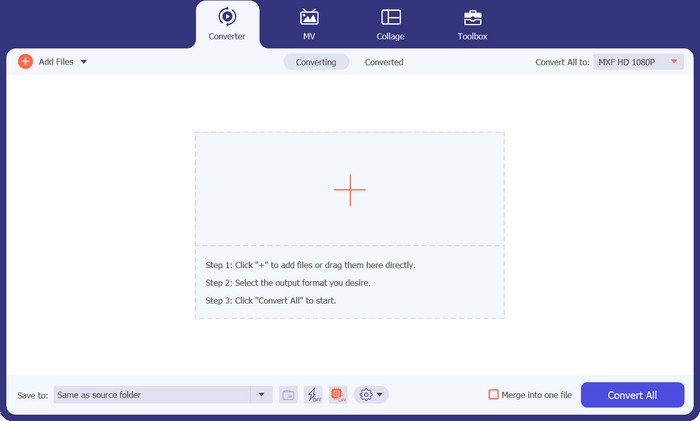
Étape 2. Importez la vidéo MP4 que vous souhaitez convertir en cliquant sur le bouton en forme de signe Plus ou en utilisant la barre d’espace pour ouvrir le dossier de votre ordinateur. Parcourez et sélectionnez la vidéo cible.
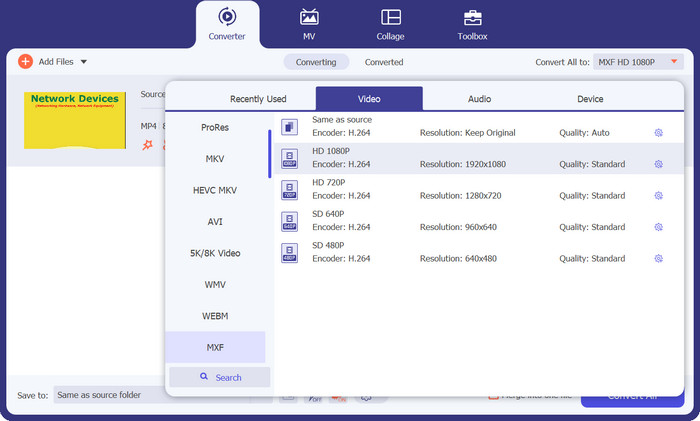
Étape 3. Choisissez MXF comme format de sortie. Il vous suffit de dérouler la liste Profil dans le coin supérieur droit, d’aller dans l’onglet Vidéo et de trouver MXF. Vous pouvez également utiliser la barre de recherche pour le localiser rapidement. Sélectionnez la qualité souhaitée pour votre fichier de sortie.
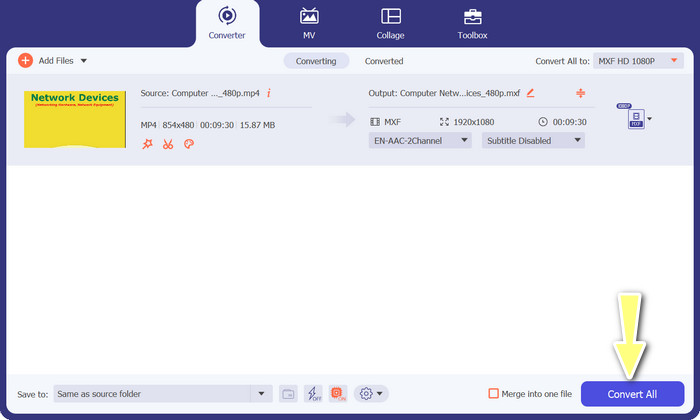
Étape 4. Prêt à convertir ! Cochez le bouton Tout convertir dans le coin inférieur droit, et voilà ! Votre fichier converti sera automatiquement enregistré dans un dossier de votre ordinateur.
2. Convertisseur MP4 gratuit en ligne
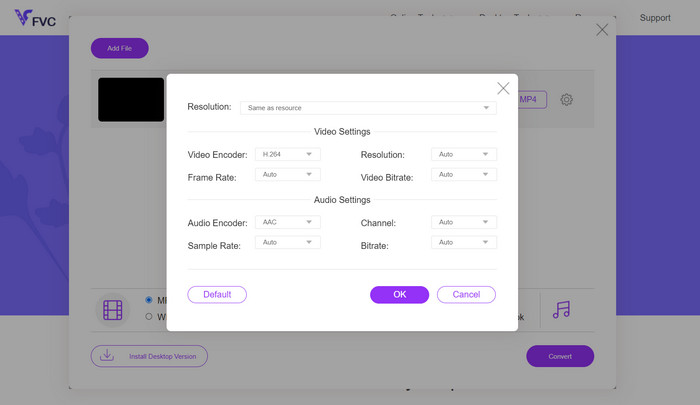
Si vous recherchez un convertisseur MP4 en ligne fiable pour convertir un MP4 en MXF directement sur Internet, essayez Free MP4 Converter Online. Ce site offre une plateforme sécurisée et fiable pour téléverser vos fichiers MP4 et les convertir en MXF ou en de nombreux autres formats. Soyez assuré que la qualité des conversions reste constamment élevée à chaque utilisation. En outre, vous pouvez ajuster les paramètres de conversion en modifiant le codec vidéo et le préréglage. Testez‑le, et vous pourrez personnaliser vos conversions exactement comme vous le souhaitez.
Étape 1. Rendez‑vous sur leur site avec votre navigateur web. Vous n’avez rien à télécharger ; ouvrez‑le simplement comme n’importe quel autre site.
Étape 2. Cliquez sur le bouton Add Files to Convert (Ajouter des fichiers à convertir) ou faites glisser et déposez votre vidéo MP4 sur le site. Le traitement de votre fichier commencera, et vous verrez une barre de progression.
Étape 3. Une fois le téléversement terminé, trouvez l’option puis sélectionnez MXF dans la liste. S’il existe un réglage de qualité, choisissez celui que vous préférez. Cliquez sur le bouton Convert, et la magie opère !
3. FreeFileConvert
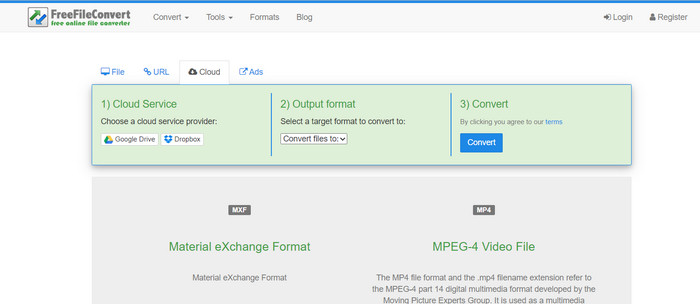
Vous recherchez un autre convertisseur MXF vers MP4 gratuit ? Essayez FreeFileConvert ! Cette plateforme conviviale suit un processus simple en trois étapes et offre une interface facile à naviguer pour vous aider à convertir vos vidéos sans tracas. Visitez simplement leur site Web, téléchargez votre fichier depuis votre ordinateur, sélectionnez le format de sortie souhaité et cliquez sur Convertir. Non seulement vous pouvez télécharger des fichiers depuis votre ordinateur, mais vous avez également la possibilité de les télécharger depuis votre compte Dropbox ou Google Drive.
Étape 1. Ouvrez votre navigateur web et rendez‑vous sur le site FreeFileConvert. Aucune installation n’est nécessaire, c’est comme visiter un site web classique.
Étape 2. Cliquez sur le bouton Choose File. Vous pouvez également importer un fichier depuis Dropbox ou Google Drive si cela vous convient mieux.
Étape 3. Dans le menu déroulant Output Format (Format de sortie), recherchez MXF et choisissez‑le comme format souhaité. Puis cliquez sur le bouton Convert et laissez FreeFileConvert faire le reste !
4. AnyConv
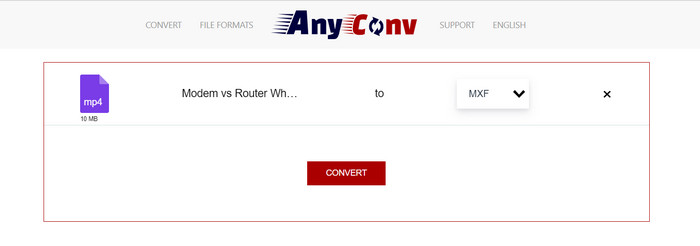
Vous recherchez un outil en ligne pour convertir MP4 en MXF ? Ne cherchez pas plus loin qu'AnyConv ! Comme les autres, il ne nécessite aucune installation. De plus, cela ne se limite pas au MP4 vers MXF ; il peut également gérer diverses autres conversions de format ! La meilleure partie? Vous n'avez pas besoin de vous inscrire au service complet – c'est sans tracas. Suivez simplement les étapes ci-dessous et votre conversion MP4 en MXF sera effectuée en un rien de temps. Très facile.
Étape 1. Ouvrez le site web d’AnyConv avec le navigateur de votre choix.
Étape 2. Cliquez sur le bouton CHOOSE FILES pour téléverser votre vidéo MP4. Ensuite, déroulez le menu Profil et trouvez le format MXF.
Étape 3. Prêt à convertir ? Cliquez sur le bouton bleu Convert, et le processus de conversion commencera.
5. Convertio
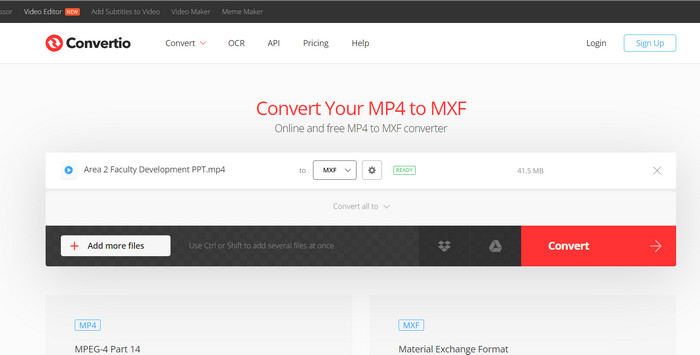
Appel à tous les utilisateurs qui souhaitent un convertisseur de fichiers sans avoir besoin de télécharger des applications supplémentaires ! Convertio est là pour vous. Avec cet outil, la conversion de MP4 en MXF en ligne est un jeu d'enfant sans avoir à modifier des paramètres compliqués. La meilleure partie? Il prend en charge divers formats de fichiers multimédias, notamment les documents, les archives, les feuilles de calcul, les présentations, etc.
Étape 1. Choisissez un navigateur sur votre ordinateur et rendez‑vous sur la page officielle de l’outil.
Étape 2. Sur l’interface principale du programme, cliquez sur le bouton Choose Files pour importer vos fichiers MP4. Pour plus de simplicité, vous pouvez aussi faire glisser et déposer le fichier vidéo.
Étape 3. Trouvez le menu Profile et sélectionnez le format MXF dans la section Video. Ensuite, cliquez sur le bouton Convert pour lancer le processus de conversion.
Pour aller plus loin :
4 moyens gratuits de convertir les fichiers MXF de caméscope en MP4 pour une lecture universelle
[Guide] 2 méthodes ultimes pour assembler des vidéos MXF d’une caméra Sony X70
Partie 2. FAQ sur MP4 vers MXF
Qu'est-ce qu'un fichier MXF ?
Un fichier MXF est une extension de fichier représentant Material Exchange Format, qui sert de conteneur pour le contenu audio et vidéo professionnel standard. Il est couramment utilisé dans la diffusion télévisée et théâtrale en raison de sa capacité à maintenir une vidéo de haute qualité. Essentiellement, MXF agit comme une alternative au stockage de vidéos réelles au format numérique, ce qui en fait un choix privilégié pour gérer le contenu vidéo professionnel.
Puis-je convertir MXF en MP4 ?
Absolument! Avec des outils comme Video Converter Ultimate, convertir MP4 en MXF ou vice versa est un jeu d'enfant. Vous avez la possibilité d’essayer les deux options et de voir laquelle vous convient le mieux.
Comment ouvrir un fichier MXF ?
Lorsqu'il s'agit d'ouvrir des fichiers MXF, VLC Media Player est un choix de premier ordre. Cet utilitaire multimédia léger et multiplateforme excelle dans la visualisation de fichiers multimédias de toutes sortes.
Quels sont les inconvénients potentiels de la conversion de MP4 en MXF ?
La conversion de MP4 en MXF peut entraîner des tailles de fichiers plus grandes en raison des différentes méthodes de compression utilisées dans MXF. De plus, certains outils peuvent nécessiter une connexion Internet stable pour la conversion en ligne.
Puis-je modifier les fichiers MXF après la conversion ?
Oui, après avoir converti MP4 en MXF, vous pouvez éditer les fichiers MXF à l'aide d'un logiciel de montage vidéo compatible. Les fichiers MXF sont bien pris en charge par les outils de montage vidéo professionnels et les systèmes de montage non linéaires.
Conclusion
Que vous ayez besoin de convertir un MP4 en MXF, d’ouvrir des fichiers MXF ou de gérer n’importe quel format vidéo, il existe des outils conviviaux pour rendre le processus fluide. Grâce à ces outils puissants et polyvalents, vous pouvez naviguer sans effort dans l’univers des conversions vidéo et profiter d’une lecture multimédia sans prise de tête.
-
 Comment compresser MXF avec Premiere Pro et en ligne gratuit
 Comment compresser MXF avec une taille de fichier plus petite? Comment compresser des fichiers MXF dans Adobe Premiere Pro? Cet article partage 2 façons de compresser les fichiers MXF.
-
 Top 4 des meilleures solutions pour convertir MXF en MKV [Résolu]
 Apprenez à connaître ces quatre excellentes méthodes pour convertir facilement MXF en MKV en ligne et hors ligne. Les applications incluses dans cet article peuvent vous aider à convertir des fichiers sans tracas.
-
 Comment convertir MP4 en MPG sur le bureau et en ligne facilement
 Apprenez à convertir votre MP4 préféré en MPG en quelques étapes simples. Pas de soucis techniques, juste des transitions fluides pour vos fichiers multimédias.
