


 Video Converter Ultimate
 Enregistreur d'écran
 Réparation vidéo
 Téléchargement sécurisé
Comment convertir MP4 en WMV pour Mac / Windows
Avant de présenter une liste suggérée de convertisseurs MP4 vers WMV, permettez‑moi de vous poser une question sur les formats vidéo.
Pour enregistrer des données vidéo numériques sur un système informatique, nous devons utiliser un format de fichier conçu pour la vidéo. Alors, quels formats vidéo connaissez‑vous ? MP4 ? WMV ? FLV ? AVI ? Ce sont en effet des formats vidéo couramment utilisés pour le stockage de données vidéo numériques. Mais vous êtes‑vous déjà demandé pourquoi il existe autant de formats de fichiers vidéo ? Quelle est la différence entre MP4 et WMV ?
En général, MP4 est compatible avec presque tous les types d'appareils sur le marché, ce qui signifie que vous pouvez lire MP4 partout, même sur le lecteur vidéo par défaut de votre ordinateur ou de votre téléphone. Cependant, si vous utilisez des appareils Windows, je pense que WMV peut mieux vous servir. Non seulement parce qu'il est développé par Microsoft, mais parce qu'il peut enregistrer la vidéo HQ dans un petit espace disque.
Aujourd’hui, vous allez apprendre comment convertir un fichier MP4 en WMV avec les meilleurs convertisseurs vidéo que nous recommandons.

Partie 1. Comment convertir gratuitement MP4 en WMV en ligne
Outre l'installation d'un logiciel de bureau classique, l'utilisation de convertisseurs Web est également une option de nos jours. Bien que simples, de nombreux convertisseurs en ligne sont légèrement lents lors de la conversion. Certains limitent même la taille et la quantité des fichiers que vous téléchargez et ne peuvent garantir la qualité des vidéos de sortie.
Ainsi, nous vous présentons ici FVC Free Online Video Converter, un convertisseur vidéo en ligne gratuit, rapide et efficace qui peut vous aider à convertir une série de vidéos ou d’audios sans perte de qualité.
En tant que convertisseur MP4 vers WMV en ligne gratuit multifonction, FVC Video Converter prend en charge presque tous les types de formats vidéo. Vous pouvez convertir des fichiers MP4 de grande taille vers/depuis MKV, MOV, WMV, AVI, TS, etc. Vous pouvez également monter votre vidéo selon vos besoins. Il est très facile de régler le débit binaire, la fréquence d’échantillonnage, le nombre d’images par seconde, la résolution et le volume sur FVC. Et il n’y a aucun filigrane sur votre vidéo après la conversion.
Maintenant, vous pouvez vous inquiéter qu'avec toutes ces fonctionnalités, il pourrait être difficile de comprendre comment faire fonctionner ce convertisseur. En fait, la vérité est tout à fait contraire. Il suffit de quelques étapes pour maîtriser ce convertisseur MP4 en WMV.
Étape 1. Cliquez ici pour accéder à FVC Free Online Video Converter. Puis cliquez sur Add Files to Convert pour télécharger d’abord le FVC Launcher.
Téléchargez la version de bureau pour convertir des fichiers par lots.
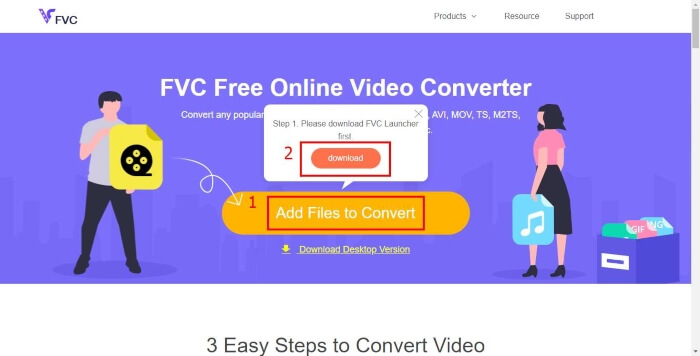
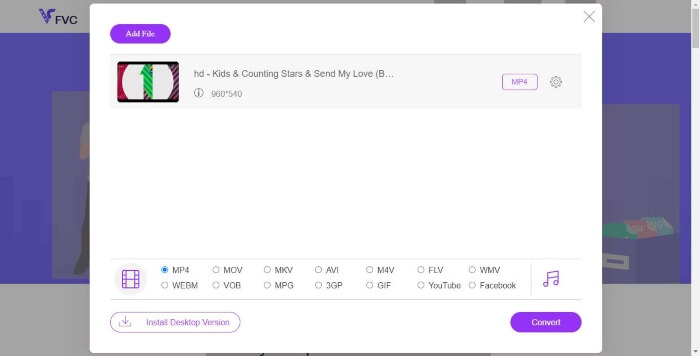
Étape 2. Après avoir installé le lanceur, la fenêtre Open File s’ouvrira. Trouvez simplement le fichier MP4 que vous souhaitez convertir.
Étape 3. Ensuite, sur la page de conversion, choisissez le format de sortie WMV. Au fait, si vous souhaitez modifier les paramètres vidéo, ouvrez simplement la fenêtre Settings en cliquant sur l’icône Setting. Cliquez sur le bouton Convert et choisissez un emplacement de destination pour enregistrer la vidéo convertie.
Partie 2. Convertissez MP4 en WMV avec le logiciel de bureau
1. RealPlayer
RealPlayer est devenu l’un des lecteurs multimédias les plus populaires depuis 1995. Il peut non seulement vous aider à gérer facilement vos vidéos, votre musique et vos images, mais aussi convertir les vidéos dans plusieurs formats et les transférer vers d’autres appareils mobiles.
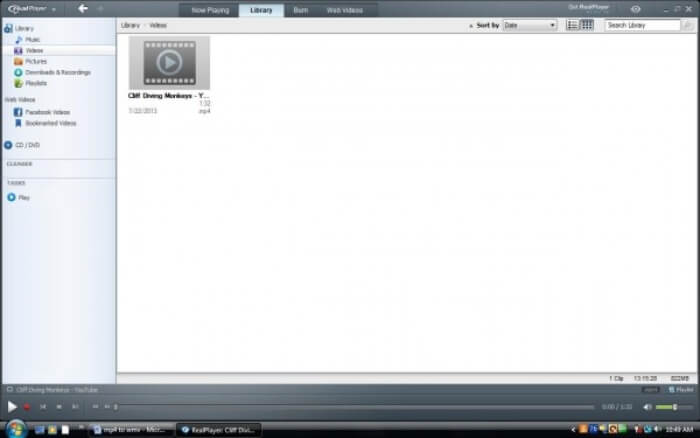
Étape 1. Si RealPlayer est installé sur votre ordinateur, enregistrez le fichier MP4 dans la bibliothèque RealPlayer. Sélectionnez Library après avoir lancé RealPlayer. Trouvez votre fichier dans la liste Video.
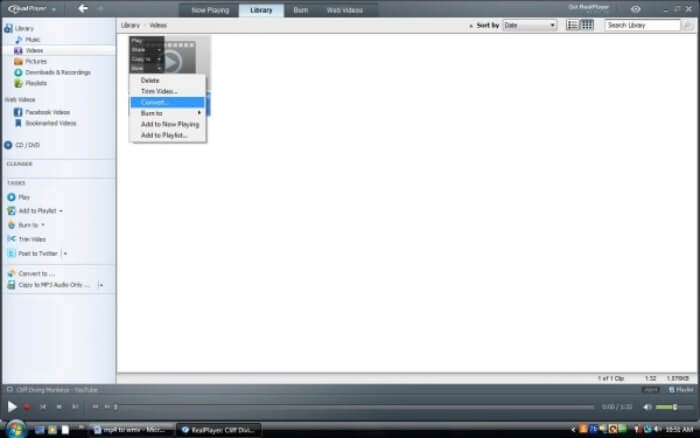
Étape 2. Cliquez sur le fichier et sélectionnez l’option More dans le menu contextuel. Sélectionnez ensuite l’option Convert.
Étape 3. Choisissez WMV dans le menu Select a Device et cliquez sur OK. Cliquez maintenant sur le bouton Start. En quelques secondes, votre vidéo sera dans la bibliothèque RealPlayer.
2. Lecteur multimédia VLC
VLC est un lecteur open source et multiplateforme qui peut lire des vidéos dans différents formats. Il prend également en charge la conversion de fichiers vers de nombreux formats populaires. Suivez les étapes ci‑dessous pour exporter un fichier WMV à partir d’un MP4.
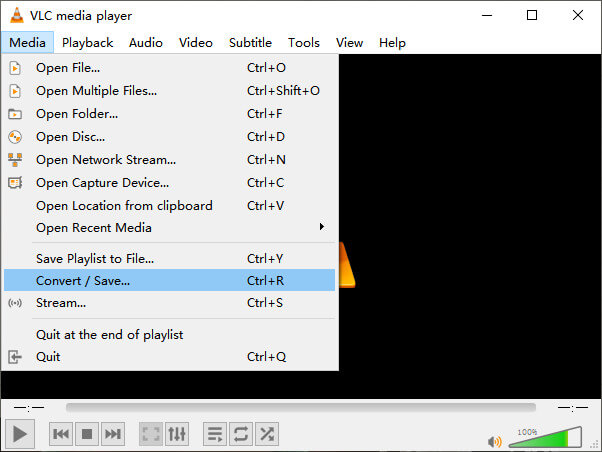
Étape 1. Ouvrez VLC Media Player et cliquez sur Convert / Save dans le menu Media.
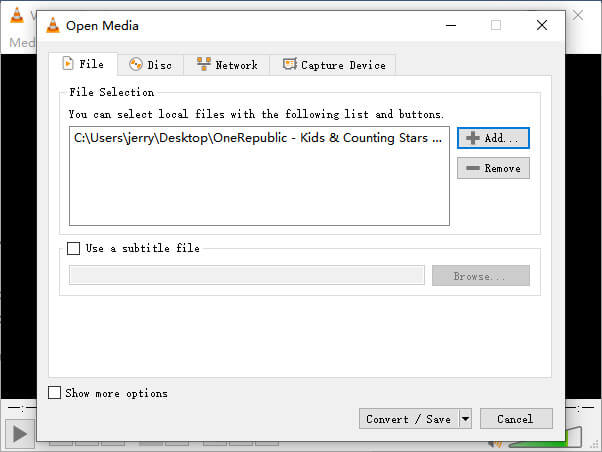
Étape 2. Ajoutez le fichier dans VLC. Puis cliquez sur le bouton Convert / Save.
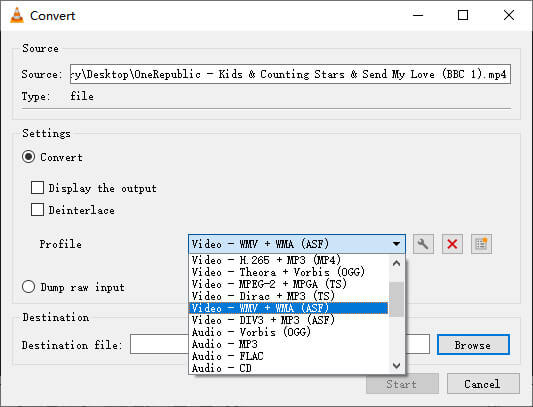
Étape 3. Cherchez WMV dans le Profile et sélectionnez un dossier comme destination pour enregistrer le fichier de sortie. Ensuite cliquez sur Start.
MP4 contre WMV
Lancé par le Moving Picture Experts Group (MPEG) en 2001, le format MP4 peut vous aider à enregistrer des données vidéo, audio, de sous-titres et d'image dans des pistes séparées. C'est l'abréviation de MPEG-4 Part 14. De plus, c'est l'un des formats les plus populaires utilisés pour le streaming et le partage de vidéos.
Produit par Microsoft, WMV était l'un des formats vidéo les plus courants dans les années 2000. Il peut être vu sur le Web et lu par divers lecteurs multimédias sous Windows. Et c'est aussi le format de fichier vidéo par défaut de Windows Media Player. Mais il a été repris par d'autres formats récemment.
Partie 3. FAQ sur la conversion MP4 en WMV
1. Handbrake peut-il convertir MP4 en WMV?
Après avoir fait quelques recherches, il s’avère malheureusement que la dernière version de Handbrake ne peut pas convertir MP4 en WMV. Il est vrai que Handbrake prend en charge la plupart des fichiers multimédias courants, mais cela concerne les sources d’entrée. Les options de formats de sortie sont MP4(.M4V) et MKV.
2. Puis-je convertir un fichier MP4 de plus de 100 Mo en WMV en ligne gratuitement?
Ça dépend. Différents convertisseurs vidéo en ligne gratuits ont des limitations différentes. Certains convertisseurs comme FVC Free Online Video Converter vous permettent de convertir des fichiers de plus de 100 Mo. Mais d’autres convertisseurs peuvent vous faire payer pour cela.
3. Le Lecteur Windows Media peut-il convertir MP4 en WMV?
Vous ne pouvez pas convertir un fichier MP4 en WMV avec Windows Media Player. En effet, il s’agit uniquement d’un lecteur, pas d’un convertisseur. Si vous voulez convertir un fichier MP4 en WMV, vous devez utiliser un convertisseur vidéo performant.
4. Puis-je lire un fichier WMV sur Mac?
Les outils vidéo intégrés sur Mac ne peuvent pas lire les fichiers WMV. Mais vous disposez d’autres moyens pour lire des vidéos WMV sous macOS. Vous pouvez convertir les fichiers WMV vers un autre format pris en charge par Mac. Ou installer Windows Media Player for Mac pour lire les fichiers WMV.
Conclusion
Même si MP4 et WMV ont des similitudes, ils possèdent aussi leurs propres caractéristiques. Vous devez donc faire votre choix en fonction de la situation concrète. Nous espérons qu’après avoir lu cet article, les problèmes de conversion de MP4 en WMV ne seront plus un souci pour vous. La prochaine fois que vous aurez besoin d’un fichier WMV, suivez simplement le guide ci‑dessus et convertissez le fichier en toute simplicité.
-
 Comment convertir vos fichiers vidéo MP4 en images GIF animées sans perte de qualité
 Vous recherchez le meilleur moyen de convertir votre vidéo MP4 en GIF animés? Voici un guide détaillé pour le faire dans Photoshop, Windows Movie Maker, le convertisseur vidéo en ligne et plus encore.
-
 Comment convertir vos fichiers vidéo FLV en MP4 sans payer un centime
 Ce guide partage quatre méthodes gratuites pour convertir vos fichiers vidéo FLV au format MP4 sur Windows 10/8/7 / XP et Mac OS X, afin que vous puissiez profiter des vidéos sur tous les appareils.
-
 Comment convertir un MOV en MP4 sans perdre en qualité
 Vous voulez convertir des fichiers MOV (Apple QuickTime Movie) en MP4? Cet article partage 4 méthodes gratuites pour convertir vos fichiers vidéo MOV au format MP4 sous Windows 10/8/7 / XP et Mac OS X.

