


 Video Converter Ultimate
 Enregistreur d'écran
 Réparation vidéo
 Téléchargement sécurisé
Moyens gratuits et en ligne pour convertir RMVB en MP4
RMVB (RealMedia Variable Bitrate) est un fichier vidéo RealMedia qui n’est pas pris en charge par toutes les applications. Beaucoup de personnes souhaitent changer le format du fichier de RMVB en MP4 pour une lecture plus facile sur les téléphones mobiles. Ce guide va vous présenter trois méthodes gratuites et en ligne pour convertir rapidement des fichiers RMVB en MP4 afin que vous puissiez continuer à profiter de vos vidéos sans le moindre souci.

Partie 1. Comment convertir RMVB en MP4 avec un convertisseur RMVB en MP4
Pour convertir un fichier RMVB en MP4 sur votre Windows 10 ou votre Mac, un convertisseur RMVB vers MP4 est une solution très rapide et fiable. Free RMVB to MP4 Video Converter est un convertisseur vidéo gratuit et performant qui permet une conversion rapide de RMVB en MP4. Il prend également en charge la conversion de RMVB en AVI, FLV, MOV ou d’autres formats. Voici les étapes pour passer de RMVB à MP4.
Téléchargement gratuitPour Windows 7 ou version ultérieureTéléchargement sécurisé
Téléchargement gratuitPour MacOS 10.7 ou version ultérieureTéléchargement sécurisé
Étape 1. Avant de commencer, vous devez télécharger et installer ce logiciel gratuit sur votre ordinateur. Ensuite, lancez Free RMVB to MP4 Converter et importez les fichiers RMVB dans le programme en cliquant sur le bouton Add File(s). Par ailleurs, il vous permet de lancer une conversion par lots afin de convertir simultanément plusieurs fichiers RMVB.
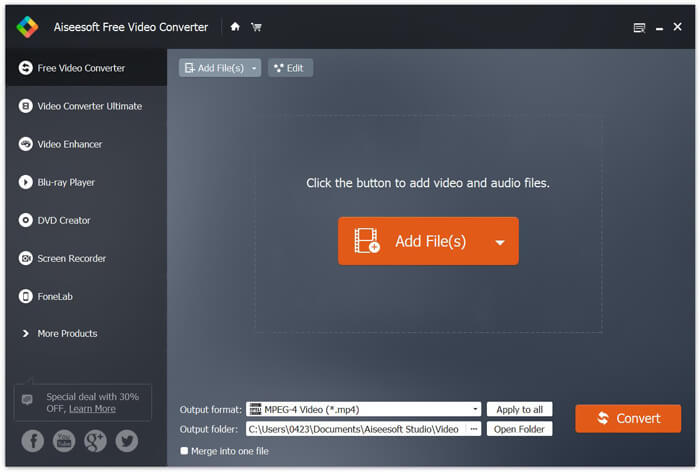
Étape 2. Après avoir ajouté vos fichiers dans le programme, allez dans Output format, puis choisissez le format MP4.

Étape 3. Cliquez sur le bouton Convert. Patientez quelques minutes et vous obtiendrez vos fichiers MP4 souhaités.
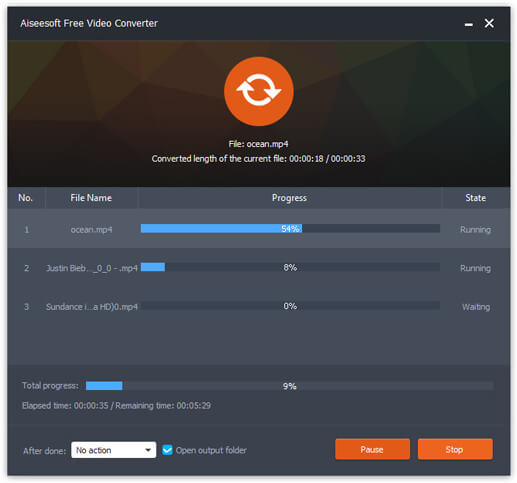
Une fois vos fichiers MP4 obtenus, vous pouvez les lire sur votre ordinateur ou vos appareils mobiles. De plus, vous pouvez également utiliser ce Free RMVB to MP4 Converter pour convertir RM en MP4 ou encore convertir WMV en MP4.
Partie 2. Comment convertir RMVB en MP4 avec VLC
VLC fonctionne également comme un outil de conversion vidéo pratique et vous pouvez facilement convertir vos fichiers RMVB en MP4 en haute qualité. Voyons comment utiliser VLC pour faire ce travail.
Étape 1. Pour commencer, vous devez télécharger et installer le programme VLC Media Player sur votre ordinateur, puis le lancer.
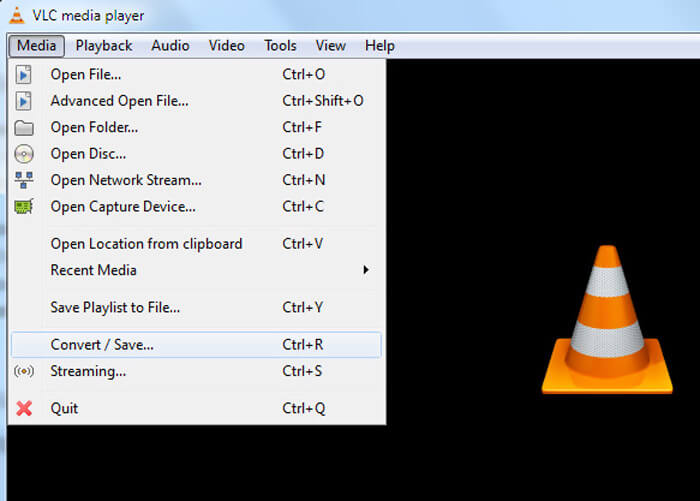
Étape 2. Allez dans l’onglet Media, puis choisissez Convert/Save pour continuer.
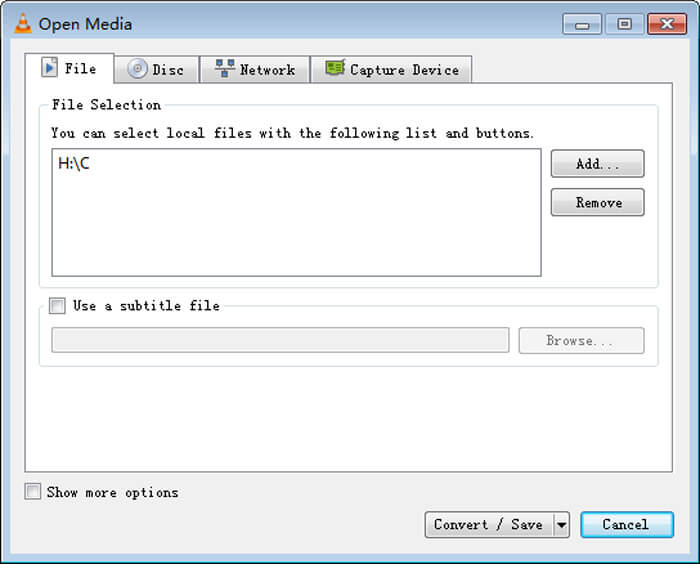
Étape 3. Lorsque la fenêtre Open Media apparaît, vous devez ajouter vos fichiers RMVB dans VLC en cliquant sur le bouton Add… dans l’option File. Ensuite, cliquez sur le bouton Convert/Save en bas de la fenêtre.
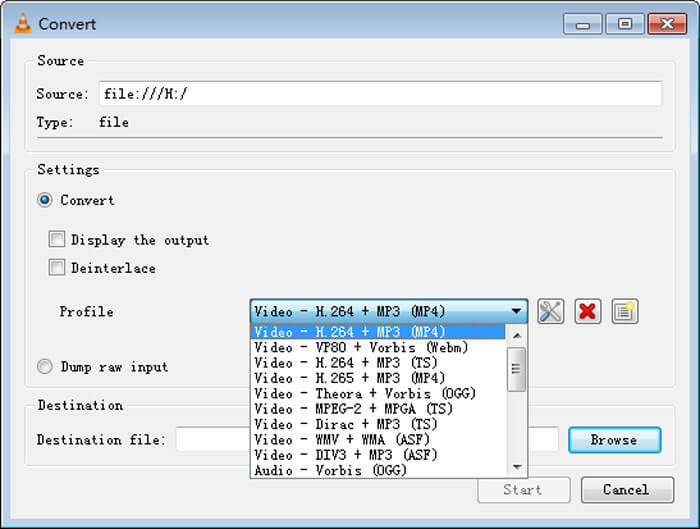
Étape 4. Vous arrivez alors à la fenêtre Convert. Ici, vous devez trouver Settings, aller dans Profile, puis choisir MP4 comme format de sortie dans le menu déroulant. Enfin, cliquez sur Start pour convertir votre RMVB en MP4 et en faciliter la lecture.
Partie 3. Comment changer RMVB en MP4 en ligne
Le convertisseur vidéo en ligne permet lui aussi de convertir des vidéos RMVB en MP4 à grande vitesse. Free Online Video Converter est un convertisseur vidéo en ligne qui peut convertir gratuitement n’importe quel fichier vidéo ou audio populaire en MP4, MOV, FLV, AVI, MP3, AAC, et bien d’autres formats. Il permet aux utilisateurs de convertir facilement des fichiers de RMVB en MP4 directement depuis le navigateur.
Étape 1. Rendez-vous sur https://www.free-videoconverter.net/free-online-video-converter/ et cliquez sur le bouton Add Files to Convert pour activer le lanceur.
Téléchargez la version de bureau pour convertir des fichiers par lots.

Étape 2. Importez ensuite vos fichiers RMVB dans cet outil en ligne. Puis, choisissez le format MP4 sous l’onglet Video. Lorsque vous êtes prêt à lancer la conversion, cliquez sur le bouton Convert pour démarrer le processus. Une fois la conversion terminée, les fichiers convertis seront automatiquement enregistrés sur votre ordinateur.

RMVB contre MP4
RMVB, une variante plus récente du format standard Real Media (.RM), est un format de fichier vidéo Real Media compressé à l'aide d'un débit binaire variable. C'est un format populaire pour les films et les dessins animés asiatiques. Les fichiers RMVB sont plus petits et ont des débits inférieurs mais une meilleure qualité.
Lancé par le Moving Picture Experts Group (MPEG) en 2001, le format MP4 peut vous aider à enregistrer des données vidéo, audio, de sous-titres et d'image dans des pistes séparées. C'est l'abréviation de MPEG-4 Part 14. De plus, c'est l'un des formats les plus populaires utilisés pour le streaming et le partage de vidéos.
Partie 4. FAQ de RMVB à MP4
Qu'est-ce qu'un fichier RMVB?
RMVB (RealMedia Variable Bitrate) est un format de fichier vidéo Real Media utilisant le débit variable. Il était autrefois populaire pour la distribution d'anime, de films, d'épisodes, de torrent, etc. asiatiques sur le Web, car la taille du fichier est plus petite et la qualité est bien meilleure.
Comment ouvrir un fichier RMVB?
RealPlayer prend en charge la lecture des fichiers RMVB sous Windows, Mac OS X et Linux. Ou vous pouvez utiliser VLC pour lire des fichiers RMVB.
HandBrake peut-il convertir RMVB en MP4?
HandBrake est un excellent outil pour convertir une vidéo afin qu'elle fonctionne sur un certain nombre d'appareils pris en charge. C'est un excellent choix pour quiconque de transformer RMVB en MP4.
C'est ainsi que vous convertissez les fichiers RMVB en MP4. Avez-vous rencontré un problème en suivant les étapes mentionnées ci-dessus? N'hésitez pas à nous faire part de vos réflexions.
-
 3 étapes faciles pour graver des fichiers / dossiers vidéo _TS sur DVD sur Mac / Windows
 Comment convertir et graver des fichiers TS sur un disque DVD? Ce guide étape par étape vous montrera comment copier des fichiers et des dossiers TS sur un DVD sous Windows / Mac afin de pouvoir regarder des fichiers TS sur un lecteur DVD ou un téléviseur.
-
 6 façons simples de convertir TS en AVI / MKV / MOV / WMV sur Windows / Mac
 Vous voulez convertir rapidement des fichiers TS en AVI / MKV / MOV / WMV? Cet article présente les convertisseurs vidéo en ligne et hors ligne avec un guide complet. Peut-être que vous pouvez obtenir le meilleur convertisseur TS gratuit ici.
-
 Comment convertir MP4 en M4A sur Windows / Mac (gratuit et en ligne)
 Comment convertir MP4 en M4A en ligne? Puis-je extraire l'audio des fichiers MP4? Lisez cet article et vous obtiendrez toutes les réponses sur la conversion de MP4 en M4A.

