


 Video Converter Ultimate
 Enregistreur d'écran
 Réparation vidéo
 Téléchargement sécurisé
3 façons gratuites de convertir des fichiers VOB en MP4 sur Windows / Mac / en ligne
VOB est connu comme un format de fichier d'objet vidéo DVD. Ainsi, les disques DVD enregistrent par défaut les flux vidéo, audio et de sous-titres au format VOB. Quant au MP4, il s'agit d'un format de conteneur populaire pour stocker des données vidéo, audio et de sous-titres. La plus grande comparaison entre VOB VS MP4 est la compatibilité. Presque tous les appareils et lecteurs portables peuvent lire des vidéos MP4. C'est la principale raison de convertir VOB au format MP4.
De plus, les fichiers VOB sont toujours de grande taille. Pour économiser de l'espace de stockage et résoudre les problèmes d'incompatibilité, la conversion de VOB en MP4 est un bon choix. Vous pouvez stocker le même contenu vidéo avec une assez bonne qualité et une taille de fichier beaucoup plus petite. En conséquence, vous pouvez lire des vidéos VOB sur votre téléphone ou votre ordinateur directement après la conversion au format MP4.

Partie 1: Comment convertir VOB en MP4 en ligne par lots
Existe-t-il un convertisseur VOB en MP4 en ligne qui prenne en charge la conversion par lots ? Bien sûr. Il s’agit de FVC Free Online Video Converter, qui permet aux utilisateurs de convertir par lots des fichiers VOB en MP4 gratuitement en ligne. Il n’y a aucune limite de durée maximale. Vous n’avez pas à vous inquiéter de la taille trop volumineuse des fichiers. Ainsi, si vous recherchez un convertisseur VOB en MP4 en ligne sans aucune limite, FVC Free Online Video Converter peut être votre premier choix.
- • Conversion par lots de fichiers VOB en MP4 tout en conservant la qualité d'origine.
- • Aucune limite de taille de fichier. Vous pouvez convertir gratuitement de gros fichiers VOB en fichiers MP4.
- • Ajustez la résolution vidéo, la fréquence d'échantillonnage, la fréquence d'images et plus encore avant d'exporter VOB au format MP4.
- • Pas de filigrane. Vos vidéos MP4 converties seront totalement sans filigrane.
Étape 1 : Cliquez sur Add Files to Convert et installez son lanceur. Dans la fenêtre qui apparaît, parcourez vos dossiers et ajoutez votre fichier VOB.
Étape 2 : En bas du convertisseur vidéo en ligne, définissez MP4 comme format vidéo de sortie.
Étape 3 : Cliquez sur l’icône en forme de roue dentée à côté pour ajuster les paramètres vidéo de sortie.
Étape 4 : Cliquez sur Convert pour convertir gratuitement VOB en MP4 en ligne.
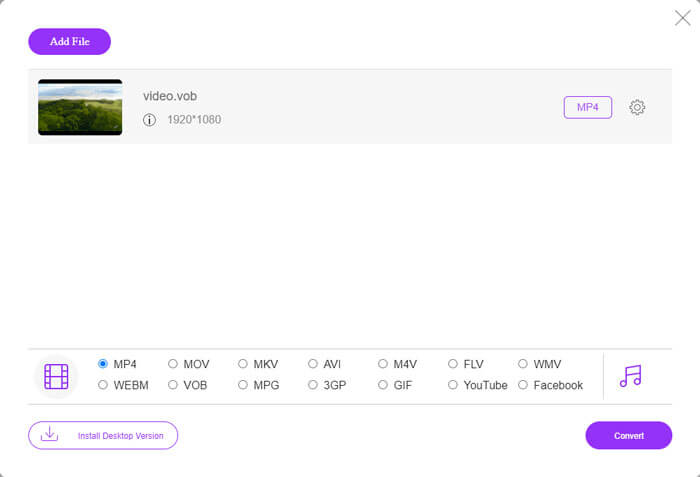
Ce convertisseur MP4 en ligne gratuit peut également convertir d’autres formats comme M2TS, MTS, MOV, MKV, WMV, TS, etc., en MP4.
Il existe également une version de bureau pour votre essai :
Téléchargement gratuit pour Windows 7 ou version ultérieure Téléchargement sécurisé
Téléchargement gratuit pour macOS 10.7 ou version ultérieure - Téléchargement sécurisé
Partie 2: Comment convertir VOB en MP4 sous Windows (avec VLC)
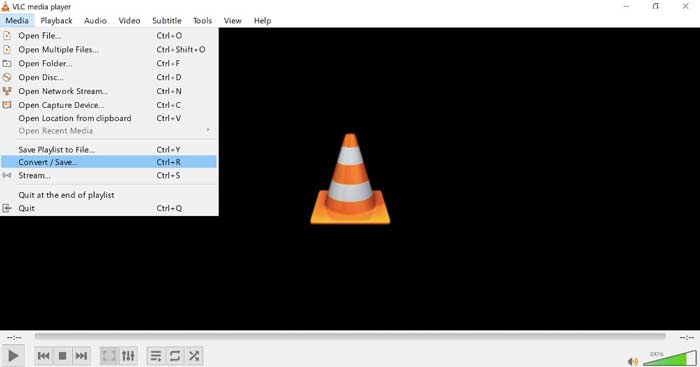
VLC peut être votre application gratuite de conversion VOB en MP4 pour les utilisateurs Windows, Mac, iOS et Android. Vous pouvez facilement convertir un fichier VOB en MP4 sur votre téléphone ou votre ordinateur. Ici, vous montrez comment convertir VOB en MP4 sur Windows 10 à l'aide de VLC Media Player.
Étape 1 : Lancez VLC. Choisissez Convert/Save dans le menu Media en haut.
Étape 2 : Cliquez sur Add dans la fenêtre Open Media. Parcourez et importez une vidéo VOB dans VLC.
Étape 3 : Choisissez Convert à partir de Convert/Save dans le coin inférieur droit.
Étape 4 : Dans la section Profile, définissez MP4 comme format vidéo de sortie.
Étape 5 : Cliquez sur Start pour commencer à convertir les fichiers VOB en MP4 avec VLC.
Partie 3: Comment convertir VOB en MP4 sur Mac (avec HandBrake)
HandBrake est un convertisseur vidéo open source qui peut convertir VOB en MP4 gratuitement sur Windows, Mac et Linux. Il est pris en charge pour convertir plusieurs fichiers VOB en MP4 en même temps. Bien que la vitesse de conversion vidéo ne soit pas rapide.
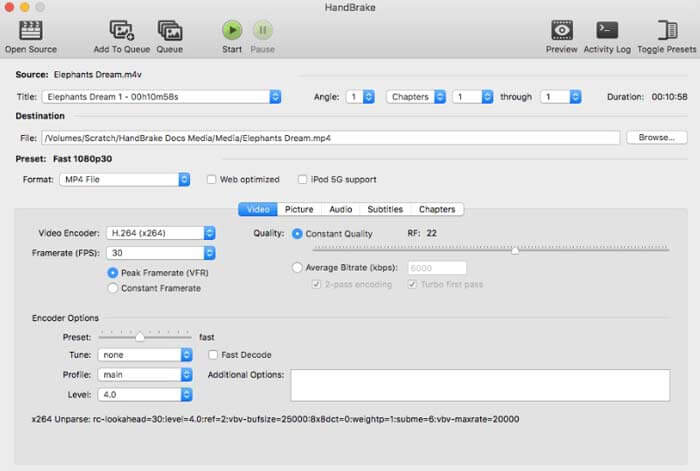
Étape 1 : Lancez HandBrake. Cliquez sur Open Source pour ajouter un fichier VOB de DVD.
Étape 2 : Cliquez sur Browse pour définir un nouveau dossier de destination.
Étape 3 : Sous la section Preset, sélectionnez MP4 dans la liste Format.
Étape 4 : Réglez les autres paramètres de sortie vidéo.
Étape 5 : Cliquez sur Start pour convertir VOB en MP4 sur Mac avec HandBrake.
-
Partie 4: FAQ sur la conversion de VOB en MP4
Comment convertir VOB en MP4 en utilisant FFmpeg?
FFmpeg est un bon convertisseur VOB pour les utilisateurs Windows et Mac. Cependant, FFmpeg n’est pas facile à utiliser ni à mettre en œuvre pour les débutants. Si vous êtes à l’aise avec les lignes de commande, vous pouvez taper ffmpeg -i input -acodec libfaac -vcodec mpeg4 -b 1200k -mbd 2 -flags+mv4+aic -trellis 2 -cmp 2 -subcmp 2 -metadata title=filename output.mp4 dans la fenêtre FFmpeg. Puis appuyez sur la touche Enter pour convertir VOB en MP4 avec FFmpeg.
Pouvez-vous convertir VOB en MP4 à l'aide de Windows Media Player?
Non. Windows Media Player peut être votre lecteur VOB uniquement. Vous pouvez lire un fichier VOB sur le lecteur Windows Media. À propos, la première fois que vous lisez des fichiers VOB sous Windows, vous devrez télécharger des codecs.
Comment lire des fichiers VOB sur iPhone et Android?
VOB n'est pas pris en charge nativement par les téléphones mobiles. Vous devez installer un lecteur VOB, tel que VLC Media Player. Ou vous pouvez changer VOB en d'autres formats pour compresser efficacement la taille du fichier. Par exemple, vous pouvez créer des fichiers VOB à partir de MP4 pour obtenir une lecture iPhone et Android.
Quel est le meilleur convertisseur VOB en MP4? Différentes personnes ont des réponses différentes. Certaines personnes souhaitent convertir par lots VOB en MP4 sans perte de qualité, tandis que d'autres se concentrent davantage sur une interface intuitive, des fonctionnalités avancées et plus encore. Quoi qu'il en soit, si vous ne voulez rien installer d'autre, mais que vous devez toujours convertir de gros fichiers VOB en MP4, FVC Free Online Video Converter est votre bon choix. Vous pouvez convertir par lots des fichiers VOB en MP4 en ligne sans limite ni filigrane.
Plus de lecture-
 Comment convertir M2TS en MP4 sans réduire la qualité
 Vous voulez convertir la vidéo d'un caméscope HD en MP4 commun? Voici 5 façons simples et gratuites de changer le fichier M2TS en MP4 sur Windows et Mac.
-
 Comment convertir un MOV en MP4 sans perdre en qualité
 Vous voulez convertir des fichiers MOV (Apple QuickTime Movie) en MP4? Cet article partage 4 méthodes gratuites pour convertir vos fichiers vidéo MOV au format MP4 sous Windows 10/8/7 / XP et Mac OS X.
-
 Comment modifier et convertir des fichiers M2TS gratuitement
 Comment éditer des fichiers M2TS gratuitement? Existe-t-il un moyen de convertir des fichiers M2TS? Dans ce guide, nous vous montrerons le meilleur éditeur M2TS gratuit pour vous aider à éditer et à convertir facilement des fichiers M2TS.
-
