


 Video Converter Ultimate
 Enregistreur d'écran
 Réparation vidéo
Apprenez à lire une vidéo à l'envers avec le logiciel 3 Elite
De nombreuses vidéos mises en ligne en continu sur toutes sortes de plateformes de partage ont déjà intégré l’effet « marche arrière » pour offrir quelque chose de nouveau au regard du spectateur. Ainsi, dans cet article, nous allons voir en détail comment lire une vidéo à l’envers, avec des étapes précises et différents logiciels que vous pouvez utiliser. Continuez donc votre lecture pour vous faire une idée de la manière d’inverser une vidéo.

Partie 1. Meilleure façon de lire une vidéo à l'envers
Ce convertisseur remarquable a déjà franchi la première étape du montage vidéo, en particulier pour l’inversion. De nombreux utilisateurs se servent déjà de cet outil pour rendre leurs vidéos exceptionnelles. Video Converter Ultimate a déjà largement dépassé les attentes de ses clients fidèles. De plus, ce logiciel propose de nombreuses fonctionnalités avancées que vous pouvez utiliser pour donner un aspect totalement nouveau à vos enregistrements aux yeux des spectateurs. Alors, voulez-vous savoir comment lire une vidéo à l’envers et l’enregistrer ? Suivez alors les étapes ci‑dessous et essayez par vous‑même.
Étape 1. Avant de pouvoir utiliser Video Converter Ultimate, vous devez d’abord le télécharger. Installez‑le, puis effectuez la configuration rapide et simple.
Téléchargement gratuit pour Windows 7 ou version ultérieure Téléchargement sécurisé
Téléchargement gratuit pour macOS 10.7 ou version ultérieure - Téléchargement sécurisé
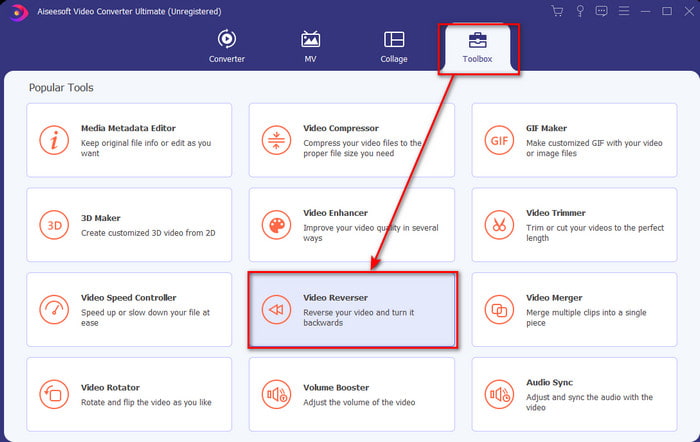
Étape 2. Allez dans la Boîte à outils et repérez le Video Reverser.
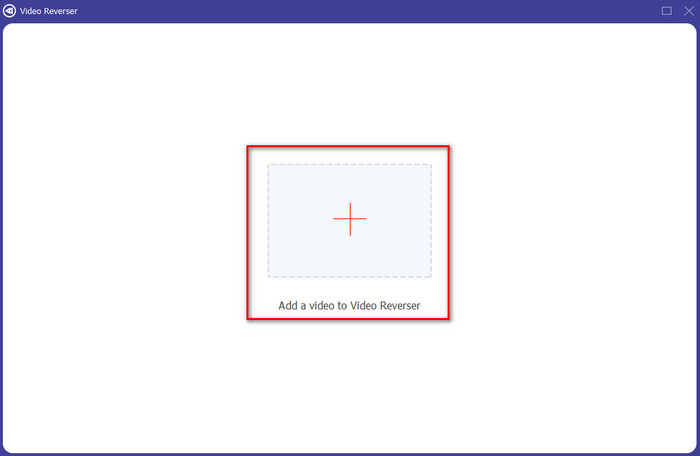
Étape 3. Pour ajouter le fichier, cliquez sur le bouton + et un dossier s’affichera. Sélectionnez le fichier vidéo et cliquez sur Ouvrir pour l’importer.
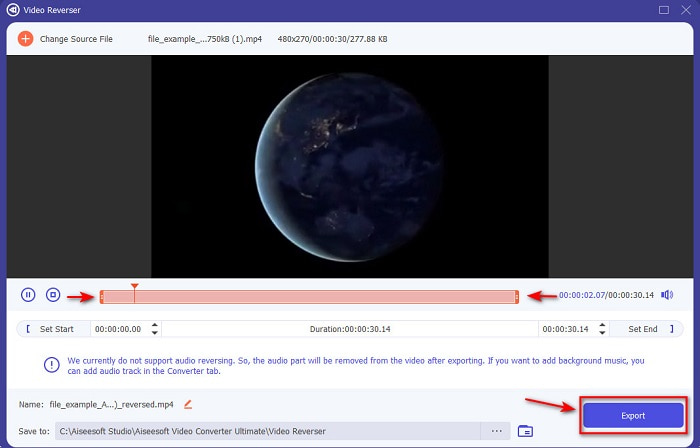
Étape 4. Modifiez les points d’entrée et de sortie de la lecture si vous souhaitez raccourcir la vidéo. Cliquez ensuite sur Exporter pour commencer l’enregistrement de la vidéo inversée sur votre ordinateur.
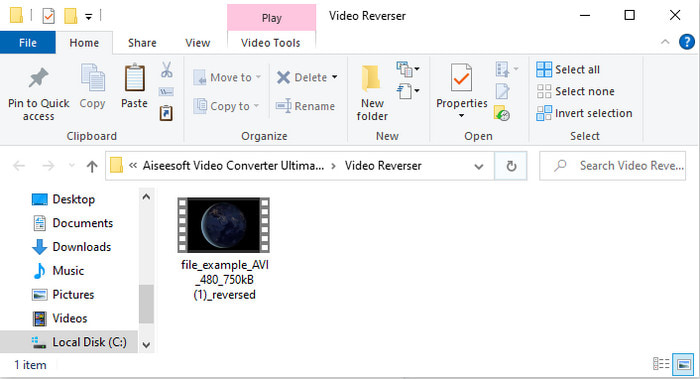
Étape 5. Une fois la vidéo exportée, un dossier contenant la vidéo inversée apparaîtra à l’écran. Cliquez sur le fichier pour regarder la vidéo à l’envers.
Avantages
- Il possède de nombreuses fonctionnalités avancées et est beaucoup plus facile à gérer que Adobe Premiere Pro.
- Il prend en charge tous les formats vidéo. Donc, pas besoin de vous inquiéter si votre vidéo est au format AVI, MP4, MKV, MOV ou autre.
- Convient aux professionnels et aux débutants qui souhaitent disposer d'un outil simple offrant une fonctionnalité de conversion phénoménale.
Les inconvénients
- C'est payant mais le prix de celui-ci est bien moindre si on le compare au logiciel premiere pro.
- Avant de pouvoir accéder à l'outil, vous devez d'abord le télécharger.
Partie 2. Comment lire une vidéo en sens inverse sur iMovie
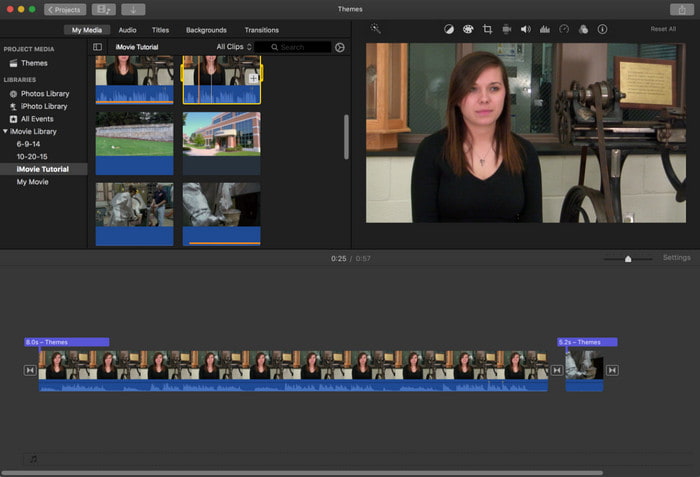
iMovie est le logiciel de montage vidéo natif que vous pouvez utiliser gratuitement sur Mac. Cet outil est déjà préinstallé sur le disque, vous n’avez donc pas besoin de le télécharger pour y accéder. Ainsi, si vous voulez savoir comment lire une vidéo à l’envers avec iMovie, suivez les étapes ci‑dessous.
Étape 1. Ouvrez iMovie sur votre Mac. Puis faites glisser le fichier dans la Timeline.
Étape 2. Cliquez sur le bouton en forme de horloge et cochez Inverser. Ajustez ensuite la vitesse sur Normal, Lent, Rapide, etc.
Étape 3. Pour enregistrer le résultat, cliquez sur le bouton Exporter et sauvegardez‑le dans votre bibliothèque.
Avantages
- Aucun téléchargement nécessaire et gratuit pour tous les utilisateurs de Mac.
- Facile à utiliser pour des modifications rapides que vous aimerez faire immédiatement.
- Il dispose de fonctionnalités de sauvegarde automatique, il n'est donc pas nécessaire de commander + S.
Les inconvénients
- Exporter des vidéos ici prendrait beaucoup de temps.
- Il manque des fonctionnalités avancées dont vous aurez besoin en tant qu'éditeur professionnel.
Partie 3. Comment lire une vidéo à l'envers à l'aide d'Adobe Premiere Pro
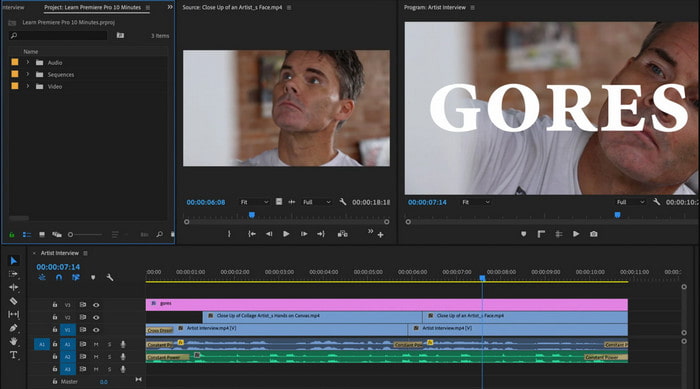
Adobe Premiere Pro est l’un des meilleurs outils de montage que vous puissiez utiliser si vous voulez obtenir un rendu professionnel. Mais ce logiciel peut sembler complexe pour un débutant sans expérience en montage vidéo. Donc, si vous voulez apprendre comment faire lire une vidéo à l’envers dans Premiere Pro, copiez fidèlement les étapes ci‑dessous.
Étape 1. Téléchargez Adobe Premiere Pro sur votre ordinateur et lancez le logiciel.
Étape 2. Glissez‑déposez le fichier vidéo dans le panneau Media Port, puis transférez‑le sur la Timeline. Cliquez sur la vidéo, faites un clic droit, puis allez dans Vitesse/Durée.
Étape 3. Cochez Vitesse inversée, définissez la durée souhaitée, puis cliquez sur OK.
Avantages
- C'est le meilleur choix pour l'éditeur professionnel car il prend en charge des fonctionnalités avancées pour une sortie professionnelle.
- Il peut faire du montage lourd et vous devrez produire une vidéo montée de haute qualité.
- Il prend en charge presque tous les formats vidéo.
Les inconvénients
- C'est vraiment cher si vous voulez juste inverser ou faire un montage simple.
- Apprendre à l'utiliser vous prendra beaucoup de temps. Fondamentalement, ce n'est pas convivial.
- Parfois, le logiciel se bloque pour des raisons inconnues.
Partie 4. FAQ sur la lecture de vidéo à l'envers
Comment lire une vidéo à l'envers sur un iPhone ?
L’iPhone ne dispose pas de fonction intégrée pour inverser une vidéo, mais vous pouvez télécharger des applications qui vous permettront de le faire facilement sur votre iPhone, comme celles présentées ici. Si vous voulez en savoir plus, cliquez sur ce lien pour découvrir d’autres applications d’inversion vidéo que vous pouvez utiliser.
Pourquoi mes vidéos perdent-elles en qualité après l'inversion ?
Il se peut que la sortie que vous réglez soit moyenne ou faible. Mais pour éviter cela, vous pouvez régler les paramètres sur élevé pour avoir une vidéo inverse sans perte de qualité. Cependant, attendez-vous à une taille de fichier beaucoup plus grande que celle de faible qualité.
Comment puis-je ajouter des sons sur ma vidéo inversée ?
Tous ces outils inversent votre vidéo, mais pas l’audio. Donc, si vous voulez savoir comment ajouter une musique de fond à votre vidéo, lisez cet article. Nous y expliquons comment ajouter du son à une vidéo pour l’améliorer.
Conclusion
Maintenant que nous savons comment lire une vidéo à l’envers, il est temps de passer à la pratique. Grâce à cet outil incroyable, facilement trouvable sur Internet, vous pouvez vous lancer. Cependant, si vous voulez créer une vidéo en marche arrière plus originale qu’avec iMovie, mais moins coûteuse qu’avec Premiere Pro, l’outil idéal pour vous est le Video Ultimate Converter. Selon les retours des utilisateurs, ce logiciel est excellent sur tous les plans pour l’inversion vidéo. Avant de commencer votre aventure dans l’inversion de vidéos, vous devez donc choisir l’outil adapté, capable de rendre vos vidéos phénoménales. Pour en savoir plus, téléchargez d’abord cet outil et laissez‑le faire le travail.
-
 Tutoriel concret - Comment fusionner deux pistes audio dans Audacity
 Audacity est réputé pour l'édition audio. Vous avez téléchargé Audacity mais ne savez pas comment fusionner des pistes audio dans Audacity ? Cet article vous expliquera comment fusionner des pistes dans Audacity.
-
 2 méthodes efficaces pour fusionner des fichiers MPEG afin de combiner d'anciennes séries télévisées
 Lorsque vous avez de vieilles séries télévisées en MPEG, vous pouvez en savoir plus sur les 2 méthodes efficaces pour fusionner des fichiers MPEG en un seul film en fonction de vos besoins.
-
 2 façons de compresser les vidéos AMV en une taille plus petite
 Que vous souhaitiez télécharger ou télécharger des MV animés en ligne, la grande taille de fichier d'AMV est une déception. Cet article partage 2 façons simples de réduire la taille du fichier AMV sur l'ordinateur pour résoudre ce problème.
