


 Video Converter Ultimate
 Enregistreur d'écran
 Réparation vidéo
 Téléchargement sécurisé
5 façons de réparer Windows Media Player ne fonctionnant pas sous Windows 7/8/10
Windows Media Player a cessé de fonctionner. Un problème a empêché le programme de fonctionner correctement. Il jouera également l'audio mais pas la vidéo. Comment résoudre ce problème?
Lorsque Windows Media Player cesse de fonctionner, vous pouvez recevoir l'erreur "Window Media Player a cessé de fonctionner" sans aucune information spécifique à ce sujet, ou vous êtes informé que "Le type de fichier n'est pas pris en charge". Même s'il n'y a pas d'invites, et vos clics ne fonctionnent tout simplement pas.
Il existe de nombreuses raisons pour lesquelles Windows Media Player ne fonctionne pas. Le problème le plus courant est l’absence de prise en charge de certains fichiers, ce qui entraîne la lecture de vidéos sans image, sans son ou sans sous-titres. Dans les autres cas, les causes peuvent être très variées, sans message d’erreur précis. Vous devez alors vérifier tous les problèmes listés dans l’article ci‑dessous pour corriger cette erreur complexe. Mais vous pouvez aussi choisir la solution la plus simple : utiliser un lecteur vidéo alternatif pour regarder n’importe quelle vidéo sans problème ni limitation.

Partie 1 : Le meilleur lecteur multimédia alternatif à ne pas manquer
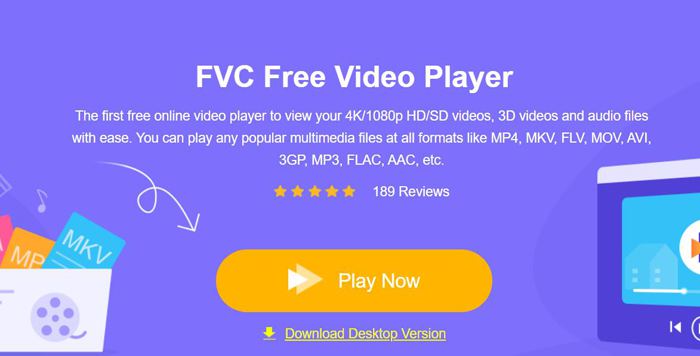
Pour éviter que Windows Media Player ne fonctionne pas correctement, il est préférable de choisir une alternative professionnelle. FVC Free Video Player est un lecteur vidéo en ligne gratuit qui résout tous les problèmes que vous pouvez rencontrer avec Windows Media Player. Il permet de lire des vidéos sans aucune limitation de format ni de résolution. Et sans installer d’autre logiciel, vous pouvez lire tous les formats vidéo en toute fluidité.
- 1. Prend en charge la lecture de presque tous les formats, y compris les fichiers FLV, MKV, RMVB et DVD ou Blu-ray.
- 2. Lisez des vidéos de haute qualité atteignant une résolution 4K.
- 3. Capable d'ajuster les pistes audio et les sous-titres dans différentes langues.
- 4. Prenez une capture d'écran à tout moment lors de la lecture de vidéos.
Étape 1 : Accédez au site de FVC Free Video Player depuis n’importe quel navigateur. Cliquez ensuite sur le bouton Play Now pour installer le lanceur. Après quelques minutes, cliquez de nouveau sur le bouton Play Now pour démarrer FVC Free Video Player.
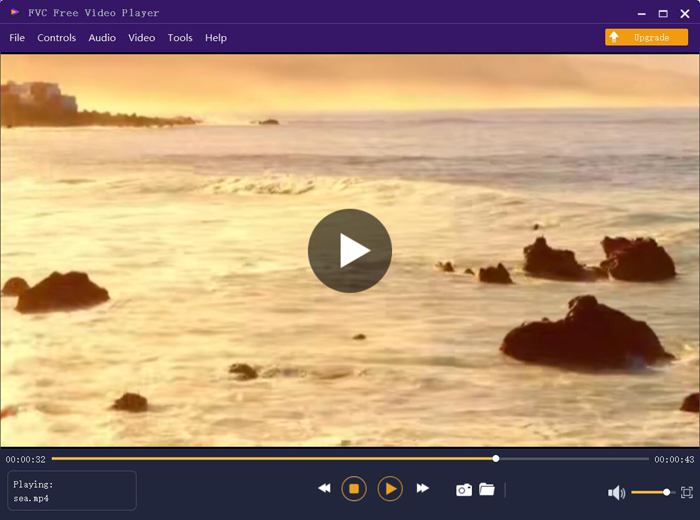
Étape 2 : Cliquez sur le bouton Open Files pour choisir la vidéo souhaitée. Elle se lancera alors automatiquement. Dans le menu Control, vous pouvez consulter les raccourcis clavier pour ajuster le volume. Vous pouvez également sélectionner les pistes audio ou vidéo selon vos besoins. De plus, si vous cliquez sur le bouton Tools puis choisissez l’option Effect, vous pouvez même régler la teinte, la luminosité, le contraste, la saturation et le gamma.
Partie 2 : Comment réparer Windows Media Player ne fonctionnant pas sous Windows 7/8/10
Comme mentionné précédemment, de nombreuses raisons peuvent empêcher Windows Media Player de fonctionner, et il existe 3 méthodes pour résoudre ce problème dans différentes situations.
Méthode 1 : Lancer l'utilitaire de résolution des problèmes de Windows Media Player
Lorsque votre Windows Media Player ne répond pas après des clics, cette méthode vous aidera à le résoudre.
Étape 1 : Appuyez sur les touches Windows et R de votre clavier pour ouvrir le programme Run. Copiez ensuite et collez msdt.exe -id WindowsMediaPlayerConfigurationDiagnostic dans la barre de recherche. Cliquez sur le bouton OK pour accéder à l’utilitaire de résolution des problèmes de configuration de Windows Media Player. Puis cliquez sur le bouton Next pour le lancer.
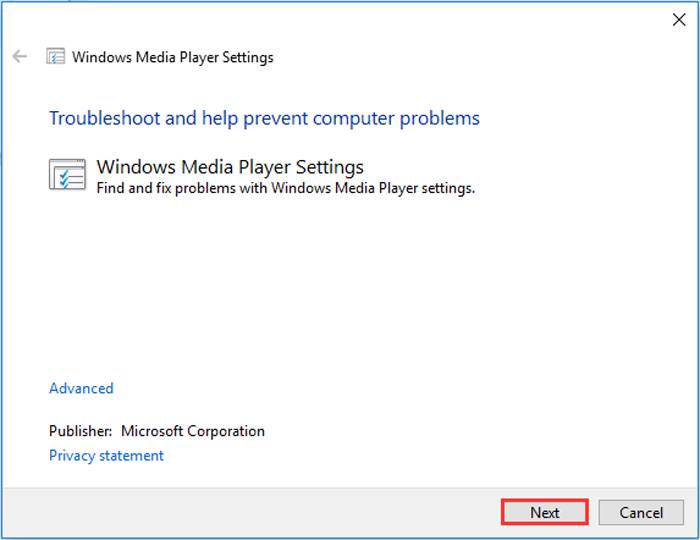
Étape 2 : Après l’apparition de la fenêtre, cliquez sur le bouton Apply this fix pour réinitialiser Windows Media Player aux paramètres par défaut. Vous pouvez ensuite essayer de redémarrer Windows Media Player.
Méthode 2 : installer d'autres décodeurs sur Windows Media Player
Si votre lecteur Windows Media ne fonctionne pas avec certaines vidéos ou audios spéciaux, vous pouvez télécharger le décodeur correspondant pour lire ces vidéos.
Étape 1 : Ouvrez le Microsoft Store sur votre ordinateur. Cliquez sur le bouton Search, puis saisissez Video Extension dans la barre de recherche. Vous pouvez télécharger l’extension vidéo souhaitée sur votre ordinateur.
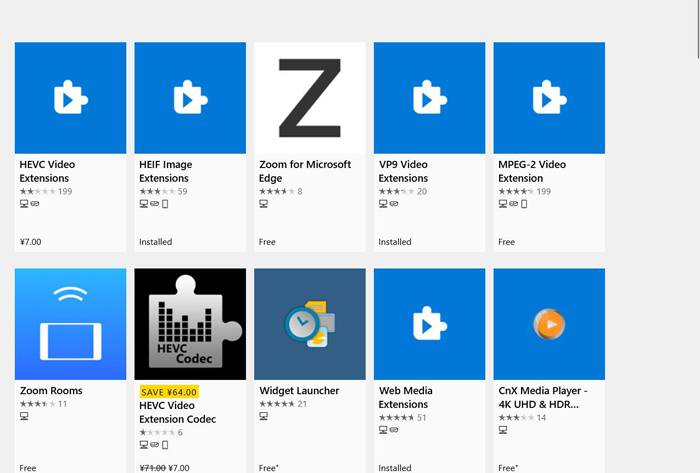
Étape 2 : Après l’installation, rouvrez les vidéos avec Windows Media Player. Mais notez qu’il reste encore de nombreux formats non pris en charge, notamment FLV, RMVB, etc.
Méthode 3 : réinstallez Windows Media Player.
Si la méthode mentionnée ne fonctionne pas, vous devriez essayer de réinstaller le logiciel lorsque Windows Media Player cesse de fonctionner.
Étape 1 : Appuyez sur les touches Windows et R de votre clavier pour ouvrir le programme Run. Saisissez ensuite optionalfeatures.exe dans la barre de recherche. Cliquez sur le bouton OK pour ouvrir ou désactiver une fonctionnalité. Vous pouvez alors décocher Windows Media Player.
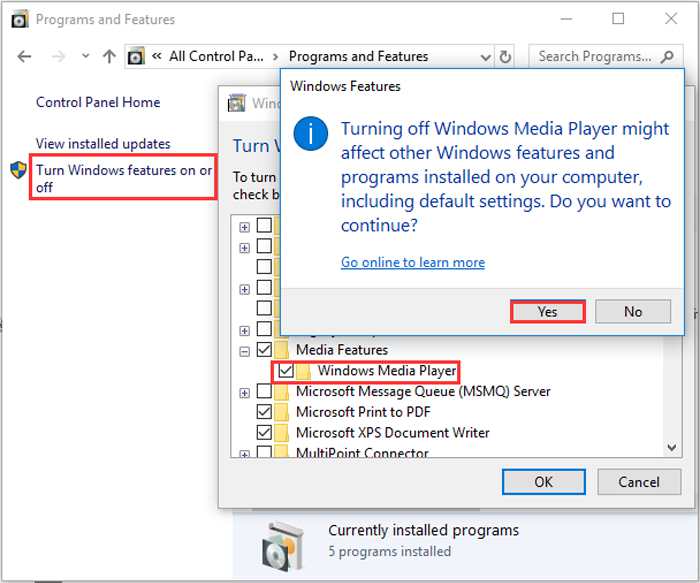
Étape 2 : Redémarrez votre ordinateur et répétez l’opération précédente. Cochez ensuite Windows Media Player. Après cela, redémarrez à nouveau votre ordinateur : le logiciel sera installé automatiquement sur votre machine.
Hormis ces problèmes, Windows Media Player présente également de nombreux inconvénients. Vous ne pouvez pas régler la vitesse de lecture vidéo et les raccourcis clavier sont toujours inutiles. Alors pourquoi ne pas choisir le lecteur vidéo en ligne gratuit pour résoudre tous les problèmes ?
Partie 3 : FAQ de Windows Media Player ne fonctionne pas
1. Pourquoi les fichiers vidéo FLV ne peuvent-ils pas être lus sur Windows Media Player ?
Bien que Windows Media Player permette d’installer plusieurs décodeurs pour lire des vidéos dans certains formats peu courants, le format FLV n’est pas pris en charge. Dans ce cas, vous pouvez essayer de télécharger des alternatives à Windows Media Player ou de convertir les formats vidéo.
2. Pourquoi mon Windows Media Player ne fonctionne-t-il pas après les mises à jour de Windows 10 ?
Peut-être que Windows Media Player a été corrompu après la mise à jour. Vous pouvez essayer la méthode mentionnée 3 pour réinstaller Windows Media Player.
3. Comment choisir les pistes de sous-titres sur Window Media Player ?
Malheureusement, il n'y a pas d'option pour choisir différents sous-titres, pistes vidéo et audio sur Windows Media Player. Vous pouvez choisir d'autres alternatives pour lire des vidéos.
Conclusion
Les raisons pour lesquelles Windows Media Player ne fonctionne pas seront très complexes, ce qui rend difficile la résolution de ce problème. Ainsi, vous pouvez simplement télécharger le meilleur lecteur multimédia alternatif - FVC Free Video Player pour lire des vidéos en douceur et de haute qualité. De cette façon, vous pouvez empêcher Windows Media Player de ne pas fonctionner indéfiniment.
-
 Comment lire un DVD sur Windows Media Player en 2021
 Pourquoi mon DVD ne peut-il pas être lu sur Windows Media Player? Comment lire un DVD sur un lecteur multimédia Windows 7? Cet article partage 3 façons de lire des DVD avec ou sans WMP.
-
 6 solutions vérifiées pour corriger les vidéos qui ne sont pas lues sur Chrome
 Pour résoudre le problème que les vidéos ne sont pas lues sur Chrome, il vous suffit de lire notre dépannage et d'appliquer les solutions vérifiées une par une.
-
 5 100% Solutions de travail pour corriger les vidéos qui ne sont pas lues sur iPad
 Vos vidéos ne sont pas lues sur iPad ? Voici cinq solutions pour vous aider à vous débarrasser de ce problème et vous pourrez ensuite profiter facilement de vos vidéos préférées sur le combiné.
