


 Video Converter Ultimate
 Enregistreur d'écran
 Réparation vidéo
 Téléchargement sécurisé
3 meilleurs enregistreurs d'appels Facebook - Comment enregistrer des appels vidéo Facebook
Comment enregistrer les appels vidéo Facebook pour conserver ces précieux moments entre vous, vos amis et votre famille ? Depuis que Facebook a ajouté la fonction d’appel vidéo, de plus en plus d’utilisateurs préfèrent contacter les autres via les appels Facebook plutôt que par téléphone. Mais en tant que fonction de communication supplémentaire d’une plateforme de réseaux sociaux, elle ne dispose pas de la fonction d’enregistrement comme les appels téléphoniques. De plus, l’application autonome dérivée — Facebook Messenger — ne possède pas d’enregistreur intégré. Dans ce cas, vous pouvez découvrir 3 enregistreurs d’appels Facebook simples à utiliser pour ordinateurs, appareils iOS et mobiles Android, avec des instructions détaillées dans cet article.

Partie 1 : Le meilleur enregistreur d'appels Facebook en ligne pour Windows/Mac
Sans télécharger de logiciel tiers, vous pouvez utiliser FVC Free Screen Recorder pour enregistrer gratuitement en ligne vos appels vidéo Facebook. Il s’agit d’un enregistreur d’appels Facebook convivial, doté d’une interface épurée et de multiples fonctions dont vous avez besoin.
- 1. Enregistrez gratuitement des appels et des vidéos Facebook en ligne en quelques étapes simples.
- 2. Enregistrement sans perte d'audios et de vidéos pour conserver des vidéos de haute qualité.
- 3. Pas de filigrane pour protéger votre propriété.
- 4. Les enregistrements seront automatiquement enregistrés dans la médiathèque et vous pouvez choisir de supprimer, télécharger et partager librement sur SNS.
Étape 1 : Rendez-vous sur le site de FVC Free Screen Recorder dans n’importe quel navigateur. Cliquez sur le bouton Start Recording pour installer le lanceur en quelques secondes, puis cliquez à nouveau sur le bouton Start Recording pour lancer l’enregistreur.

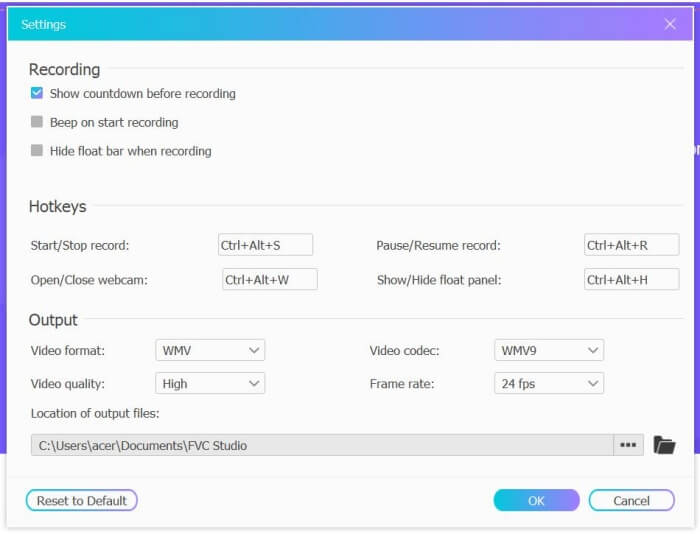
Étape 2 : Cliquez sur le menu Recording Area pour choisir l’écran entier ou sélectionner librement une zone. Activez ensuite le son du Microphone et du Speaker. Pour ajuster les paramètres vidéo, vous pouvez cliquer sur l’icône Setting. Vous pouvez choisir le format MP4, une qualité High et 24 fps afin de conserver une haute qualité d’enregistrement. Cliquez ensuite sur le bouton REC pour commencer à enregistrer les appels Facebook.
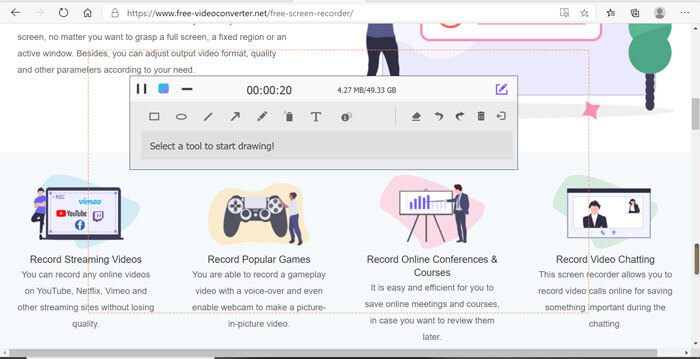
Étape 3 : Une boîte à outils avec plusieurs outils d’édition apparaîtra. Vous pouvez y ajouter des formes, du texte et des lignes selon vos besoins. Cliquez ensuite sur l’icône Stop pour enregistrer votre vidéo dans le cloud. Vous pouvez cliquer avec le bouton droit de la souris pour choisir de la télécharger sur votre ordinateur.
L'utilisation de cet enregistreur d'appels vidéo Facebook en ligne gratuit est le meilleur moyen pour les utilisateurs d'ordinateurs d'enregistrer des appels vidéo Facebook en ligne. En ajustant les paramètres d'enregistrement à l'avance, il peut enregistrer les appels Facebook au format MP4 avec une petite taille et une haute qualité. Si vous avez l'habitude d'avoir des appels Facebook sur mobile, continuez à lire cet article.
Partie 2 : Comment enregistrer un appel Facebook pour iOS via l'enregistreur par défaut
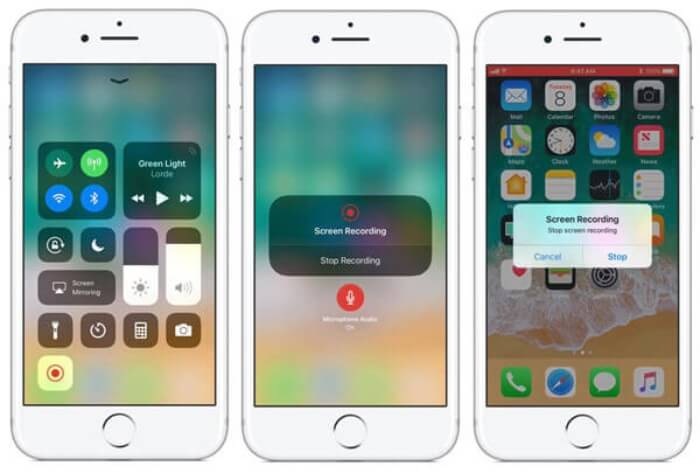
La version mise à jour d'iOS 11 ou supérieure dispose d'un nouvel enregistreur par défaut sur votre iPhone et iPad qui est le meilleur choix pour capturer des appels vidéo Facebook sans télécharger d'applications. Ici, vous pouvez apprendre comment ajouter l'enregistreur d'appels Facebook aux raccourcis du centre de contrôle et comment l'utiliser.
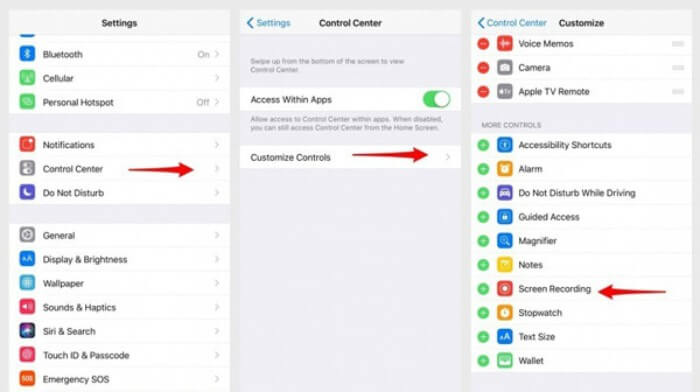
Étape 1 : Touchez l’app Réglages sur votre iPhone/iPad et faites défiler vers le bas pour choisir l’option Centre de contrôle. Touchez ensuite l’onglet Personnaliser les contrôles et trouvez la fonction Enregistrement de l’écran. Touchez l’icône Plus pour ajouter cette fonction au centre de contrôle.
Étape 2 : Faites glisser vers le bas depuis le haut de l’écran du téléphone pour ouvrir le centre de contrôle et vous verrez l’application d’enregistrement en bas. Touchez l’icône Enregistrement de l’écran pour lancer l’enregistrement, et vous pouvez choisir de capturer la vidéo ou seulement la piste audio. Pour terminer, touchez la Barre d’état rouge en haut, puis touchez l’option Stop dans la fenêtre pop-up.
Partie 3 : Un enregistreur Facebook Messenger facile pour Android
Certains téléphones Android n'ont pas d'enregistreurs intégrés, et il y a trop d'enregistreurs d'appels vidéo Facebook pour Android. Ainsi, vous pouvez apprendre l'un des meilleurs enregistreurs pour mobiles Android avec les étapes détaillées dans la partie suivante.
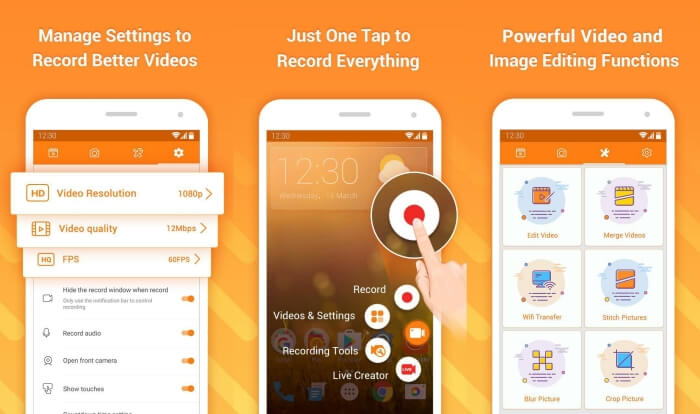
DU Recorder est un enregistreur d’appels Facebook simple à utiliser pour Android, réputé pour la fluidité de ses enregistrements. Sans root, tout le monde peut l’utiliser pour enregistrer les appels Messenger de Facebook en un seul geste.
Étape 1 : Lancez l’enregistreur : vous verrez quatre menus, notamment enregistrements, captures d’écran, outils d’édition et paramètres. Commencez par toucher le menu Settings pour ajuster les paramètres vidéo. Pour conserver une haute qualité, vous pouvez choisir une résolution de 1080p et une fréquence de 30 fps.
Étape 2 : Ne fermez pas l’enregistreur et lancez simplement Facebook Messenger. Vous verrez alors l’icône de l’enregistreur. Touchez cette icône et choisissez l’icône Recording pour commencer à capturer l’écran et le son. Vous pouvez la toucher à nouveau pour arrêter l’enregistrement. Ensuite, touchez l’icône Editing pour couper l’enregistrement et y ajouter de la musique.
Vous aimerez peut-être aussi :
Avis sur Action Screen Recorder
Partie 4 : FAQ de l'enregistreur d'appels Facebook
1. Dose Facebook a-t-il l'enregistreur par défaut pour enregistrer les appels vidéo sur PC ?
Non, ce n'est pas le cas. Ainsi, vous devez vous fier à d'autres enregistreurs d'appels Facebook professionnels. Si vous ne souhaitez pas télécharger d'autres logiciels qui occuperont l'espace de stockage sur votre ordinateur, FVC Free Screen Recorder est votre meilleur choix.
2. Comment démarrer une discussion avec un ami sur l'application Facebook Messager ?
Tout d'abord, ouvrez Facebook Messenger sur votre mobile, puis choisissez la chatbox de l'ami avec lequel vous souhaitez passer un appel Facebook. Et maintenant, vous pouvez voir l'icône Vidéo, vous pouvez donc cliquer dessus pour démarrer un appel vidéo.
3. Quel format dois-je choisir pour sauvegarder les enregistrements lors de l'utilisation des enregistreurs Facebook Messenger ?
Que vous utilisiez un enregistreur d'appels Facebook sur un ordinateur ou un mobile, le meilleur format pour enregistrer les appels vidéo Facebook est MP4. Il peut économiser plus d'espace de stockage et il est compatible avec tous les appareils.
Conclusion
L’article ci-dessus a présenté 3 enregistreurs d’appels vidéo Facebook. Pour l’iPhone, l’iPad et certains mobiles Android, vous pouvez facilement utiliser l’enregistreur intégré à votre téléphone. Sinon, vous pouvez choisir n’importe quel enregistreur, y compris DU Recorder sur Google Play. Pour PC, FVC Free Screen Recorder est votre meilleur choix pour capturer les appels Facebook. Si vous rencontrez d’autres problèmes lors de l’utilisation d’enregistreurs d’appels Facebook, veuillez laisser votre commentaire ci-dessous.
-
 Examen de Snagit 2021 - Avantages, inconvénients et la meilleure alternative
 Quelle est la meilleure alternative à Snagit? Existe-t-il un outil de capture d'écran comme Snagit? Cet article passera en revue Snagit et partagera la meilleure alternative à Snagit pour capturer l'écran.
-
 6 meilleurs enregistreurs WAV à ne pas manquer sur le bureau et en ligne
 Le meilleur logiciel d'enregistrement WAV que nous partageons dans cet article possède une variété de fonctionnalités utiles, qui vous aident à capturer l'audio et la voix comme des professionnels.
-
 Top 4 des enregistreurs de son AIFF gratuits qui produisent un son de haute qualité
 Cet article parle d'AIFF et de certains des outils les plus populaires que vous pouvez utiliser pour produire un format AIFF de haute qualité.
