


 Video Converter Ultimate
 Enregistreur d'écran
 Réparation vidéo
 Téléchargement sécurisé
Meilleur enregistreur audio MP2 avec des étapes et des conseils fiables pour PC et Mac
MP2 is another lossy compressed audio file. Although MP3 format is very popular other than the other audio formats, the standard is always the MP2. Because it is the standard audio format it is prone to lost data. So, transferring data over the internet will be no problem to you. In some cases, users have trouble deciding what is the best MP2 recorder that fits their demands. In that case, the list below provides detailed steps and information that you may like to use. Continue reading this article to tackle what are these audio recorders that can produce the MP2 file format.

Partie 1. Meilleur enregistreur MP2 pour Windows et Mac
FVC Enregistreur Audio Gratuit
One of the best online audio recorders may help you. FVC Free Audio Recorder as it is mentioned in its name, is a free tool used by many users over the internet. If the internet is not a problem to you, then you can rely on this online VHS MP2 recorder to produce a good output format. Not to mention, this tool is developed by the FVC so it is 100% malware free, so you're good-to-go if you use the tool. Moreover, here is the list of steps below so make sure you follow it thoroughly.
Step 1. Click this link provided to go to the website.
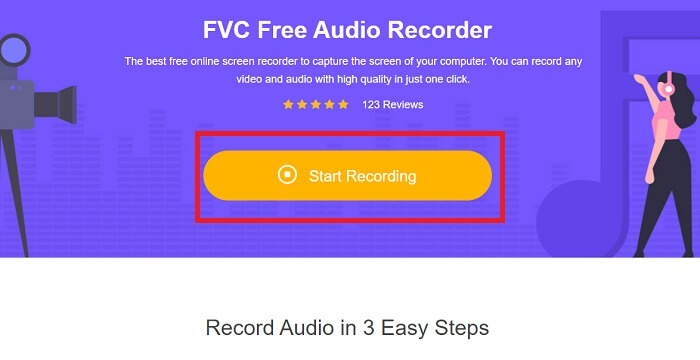
Step 2. Click Start Recording to launch the recorder.
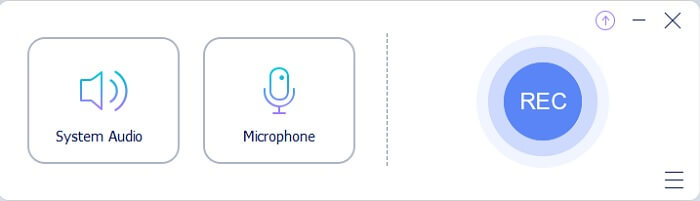
Step 3. A floating toolbar like this shows on your screen.
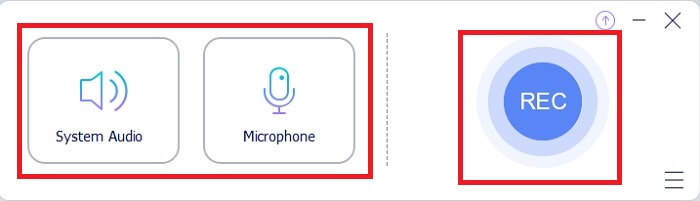
Step 4. Click the System Sound and Microphone to add system sound and your voice. If it is done then click the round REC to start recording.
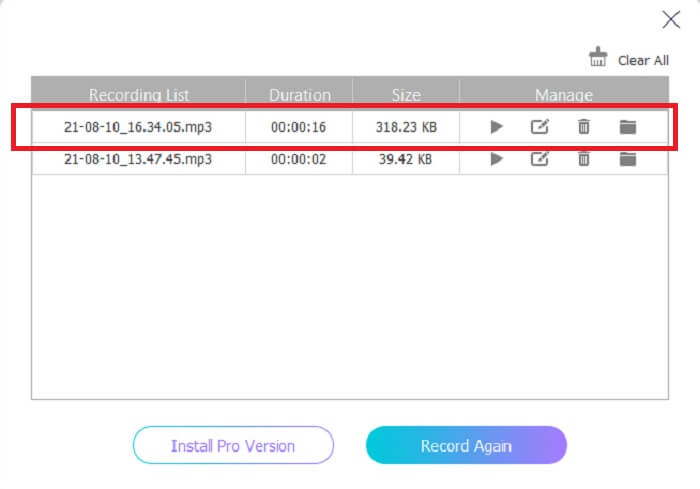
Step 5. If recording is already done, click the cube like button to stop recording. It automatically saves it to your pc and enjoys it.
Partie 2. Enregistreur MP2 étendu et facile à utiliser pour enregistrer de l'audio MP2
1. Enregistreur d'écran FVC
If the online tool makes you say wow, then this tool will make you say excellent. Unlike the online tool recorder, the FVC Screen Recorder is a multifunctional tool that never limits your creativity. While improving your audio recording that takes you to another level that the other tools can’t provide. Maybe you’re still wondering if this tool can be your MP2 recorder, let’s just say it is for you to find out. Without any more delays, let us proceed to prove to you that this tool is what you’re looking for. Read carefully the provided steps below.
Step 1. Download the tool on your PC or Mac. Install the tool to your desktop and modify the Preferences and if everything is already settled, click Finish to launch the tool.
Téléchargement gratuitPour Windows 7 ou version ultérieureTéléchargement sécurisé
Téléchargement gratuitPour macOS 10.7 ou version ultérieureTéléchargement sécurisé
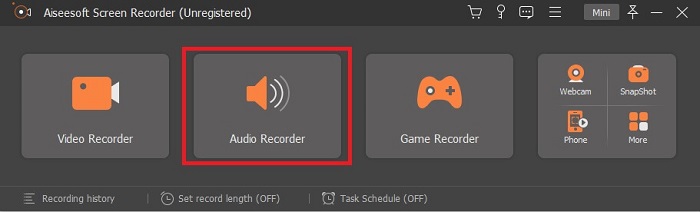
Step 2. The tool will automatically launch. A toolbar like this will show into your display. Click the Audio Recorder to proceed.
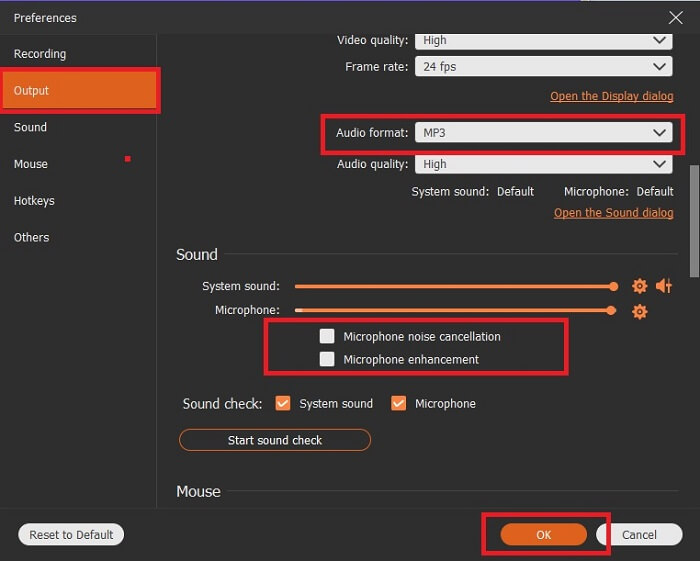
Step 3. Look for the gear icon and click it. Change the Output settings based on your wants. Click the OK to save the changes.
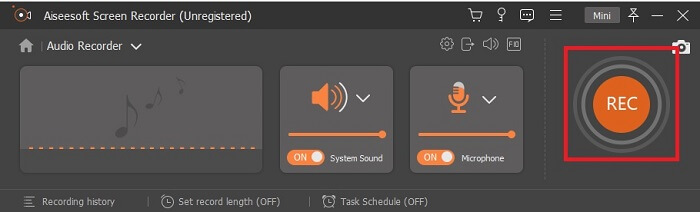
Step 4. Check if the System Sound and Microphone is on before recording. If it is already done click the disk-shape button to start recording.
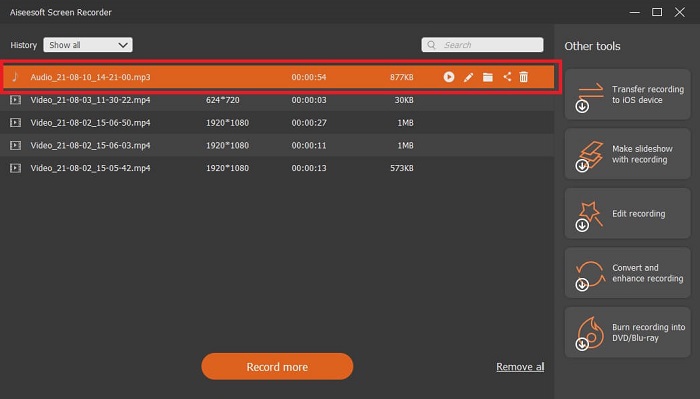
Step 5. If you're ready to end the recording click the box like button to stop. Then Save it and click Next to produce the recording. If you want to re-listened to the recording then click the parallel line button to check the recording you just made. The first file will be your latest recording and the last is the oldest recording.
2. Boo Audio
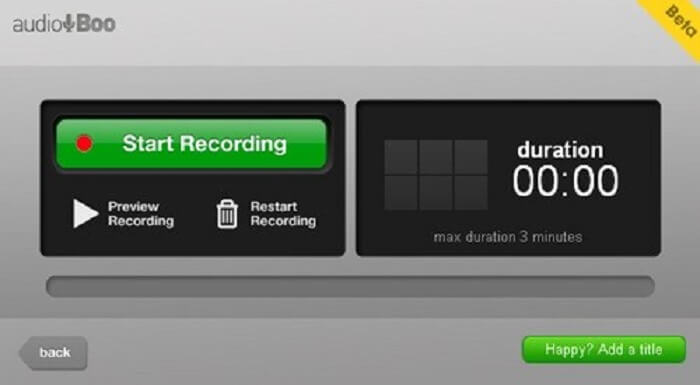
Another tool you may use in short recording is the Audio Boo. It allows the user to do a short type recording. For example, singing for your loved ones then sending it to them, audio diary, audio short reminder, and many more. But because of the limitation it gives you can record a full conversation, long jamming sessions, and etc. So, if you’re wondering how long is the available recording, 3 minutes is the maximum.
3. Audition Adobe
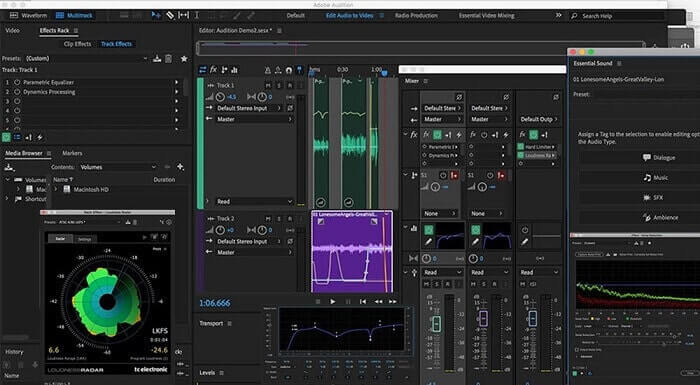
Un outil qui permet à l'utilisateur d'enregistrer un enregistrement de qualité. En outre, il est pris en charge par Adobe, alors attendez-vous à une sortie de bonne qualité qu'il produira. Ceci est le plus couramment utilisé par le producteur de musique, les chanteurs, l'arrangeur de musique et en tant que tel. Il s'agit d'un enregistreur plus industrialisé. Il est un peu écrasant pour le nouvel utilisateur d'utiliser ce type d'enregistreur MP2. Mais il produit une bonne qualité comme les autres enregistreurs MP2.
Further Reading
Partie 3. Tableau de comparaison
| Fonctionnalité(s) de l'outil | FVC Enregistreur Audio Gratuit | Enregistreur audio FVC (Premium) | Boo audio | Adobe Audition |
| Enregistreur audio | OUI | OUI | OUI | OUI |
| Suppression du bruit | NON | OUI | NON | OUI |
| Amélioration du microphone | NON | OUI | NON | OUI |
| Outils d'édition | NON | OUI | NON | OUI |
| Programme(s) disponible(s) | Tous les programmes sont pris en charge | Tous les programmes sont pris en charge | iPhone, iPod touch et iPad. | Windows 7, Windows 8.1 ou Windows 10 OS X Yosemite, OS X El Capitan ou macOS Sierra |
| Formats disponibles | MP3 et MP2 | MP3, MP2, WMA, AAC, M4A, FLAC, OGG, AMR, Opus et bien d'autres. | MP3 | AC3, M4A, MAT, VOX, W64, WAV et bien d'autres |
| Prix de l'Outil (s'il est payant) | Outil en ligne gratuit | Pour 1 mois : $25.00 Pour un an : $31.20 Pour la licence à vie : $55.20 | Outil téléchargeable gratuitement | $27,62/moment, pour annuel $315,61/ans, pour annuel $41.43/forfait mensuel |
Partie 4. FAQ sur MP2 Recorder
Puis-je convertir mon MP2 dans un autre format ?
Yes, you can by using this MP2 Converter that is available online and you may as well want to try to use this ultimate converter for a much better output.
Quel est le meilleur député ? 1, 2, 3 ou 4 ?
Ces formats de fichiers MP sont tous des conteneurs pour l'audio, la vidéo et le texte. Mais la principale différence entre eux est ce qu'ils contiennent. MP1 est le premier à être le premier à faire un format cassette. MP2 prend en charge 1 à 2 canaux et la norme pour la lecture des stations de télévision et de radio numériques. MP3 est le format le plus couramment utilisé qui enregistre l'enregistrement audio ou le format audio. MP4 contient des formats audio, vidéo et texte.
Je veux lire ma vidéo mais mon lecteur multimédia ne prend pas en charge le format, que dois-je faire ?
You may use this media player as it supports almost all different formats you may know.
Conclusion
At last, we now know the different tools over the web by the help of this article. So, if you are still having a hard time choosing which is the best tool for you. These tips might help you to decide what is the best. The recording tool you must use should be user-friendly, reliable, available to all platforms in case you change your device currently using, so it will not affect your audio recording, long-lasting, always receive updates, budget-friendly, and most of all malware free. If your guess is the FVC Screen Recorder then you are right. Because this tool never limits you, not so hard to use, and not too pricey. So, no need to look for another tool if this tool can do better than the others.
-
 Top 5 des meilleurs enregistreurs d'écran WebM pour Windows/Mac
 Apprenez-en plus sur les fichiers d'extension WebM en lisant l'article et découvrez les applications d'enregistrement d'écran WebM que vous pouvez utiliser pour enregistrer des vidéos WebM.
-
 4 meilleurs enregistreurs vidéo SWF accessibles en ligne gratuitement
 Avez-vous entendu parler du fichier SWF ?En savoir plus sur ce format de fichier et découvrir comment enregistrer des fichiers SWF à l'aide d'outils en ligne gratuits.
-
 Enregistreurs vidéo MTV incomparables compatibles sur ordinateur Mac/Windows
 Cet article vous aidera à en savoir plus sur le format de fichier MTV et une liste d'enregistreurs vidéo MTV que vous pouvez utiliser pour enregistrer facilement des écrans d'ordinateur.
