


 Video Converter Ultimate
 Enregistreur d'écran
 Réparation vidéo
 Téléchargement sécurisé
Le meilleur enregistreur vocal OGG permet d'enregistrer OGG sur toutes les plateformes
OGG est le meilleur format de fichier audio plutôt que le MP3. Ce format audio open source est maintenu par Xiph.org. Ce type de format est utilisé par l’industrie du jeu vidéo comme format audio, parce qu’il offre une meilleure qualité sonore et une compression bien plus élevée. Cependant, les utilisateurs le trouvent parfois difficile à utiliser, car certains enregistreurs ne prennent pas en charge ce format, le format audio standard restant le MP3. La liste ci‑dessous présente les meilleurs enregistreurs OGG qui prennent ce format en charge. Pour découvrir des étapes plus détaillées et davantage d’informations, lisez attentivement afin de comprendre les fonctionnalités des différents outils qui répondront à vos besoins d’utilisateur et, peut‑être à l’avenir, de client.

Partie 1. Meilleur logiciel d'enregistrement OGG pour les utilisateurs de PC et Mac
Dans la liste ci-dessous se trouvent les meilleurs enregistreurs OGG disponibles dans toutes les différentes fonctions avec des étapes et des informations.
FVC Enregistreur Audio Gratuit

Un outil spécialement conçu pour l’enregistrement audio. FVC Free Audio Recorder est considéré comme le meilleur outil en ligne que vous puissiez trouver sur le Web. Cet outil open source peut vous aider à enregistrer l’audio dont vous avez besoin, partout où vous disposez d’une connexion Internet. C’est également un très bon choix comme enregistreur OGG. Pour obtenir des informations plus détaillées sur cet outil remarquable, continuez à lire et suivez les étapes pour effectuer un enregistrement audio.
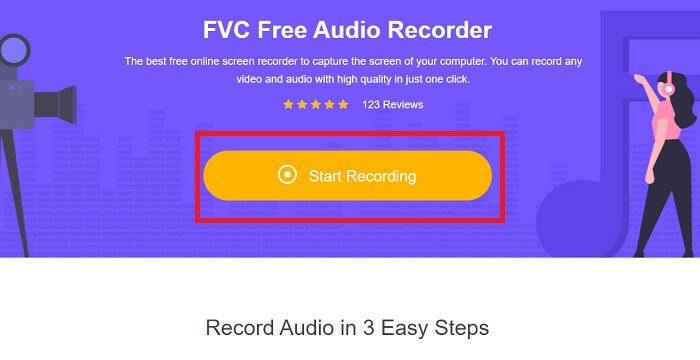
Étape 1. Cliquez sur ce lien pour accéder à la page Web de l’outil. Cliquez sur Start Recording et lancez l’outil.
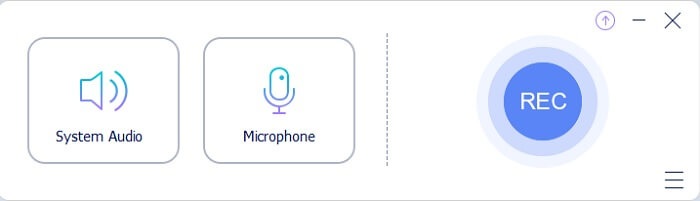
Étape 2. Une barre d’outils flottante comme celle‑ci apparaîtra à l’écran.
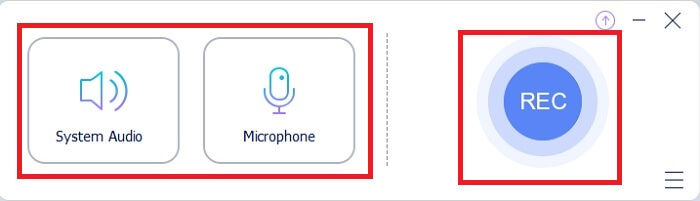
Étape 3. Activez le Speaker pour ajouter le son du système et le Mic pour ajouter votre voix. Cliquez sur le bouton Round pour commencer l’enregistrement.
Étape 4. Après avoir cliqué sur le bouton d’enregistrement, cet écran s’affiche, ce qui signifie que l’enregistrement a déjà commencé.
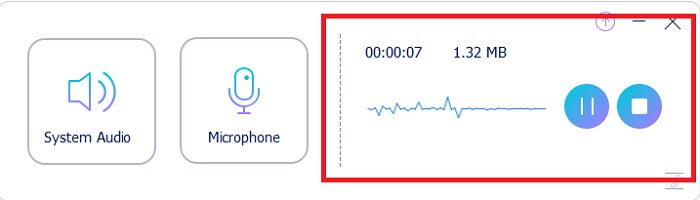
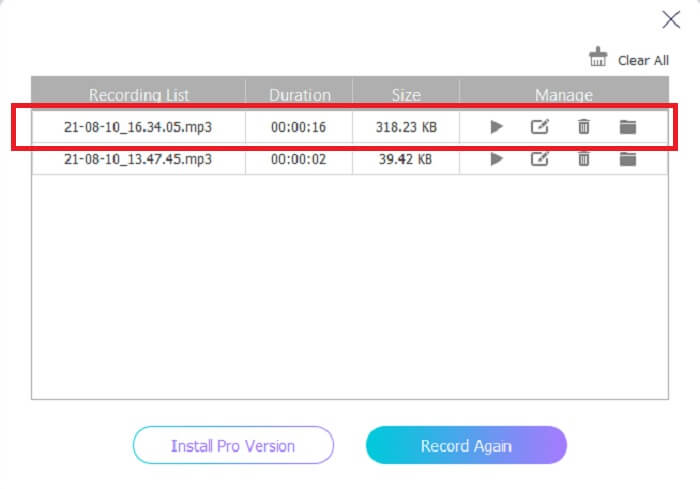
Étape 5. Lorsque l’enregistrement est terminé, cliquez sur le bouton Stop et le fichier est automatiquement enregistré sur votre appareil. L’historique de vos enregistrements s’affiche à l’écran. Profitez d’un résultat d’enregistrement optimal.
Avantages
- Convivial grâce à ses instructions précises.
- Il produit un format audio compressé, il est donc également convivial pour le stockage.
- Open-source, il est donc disponible pour tous ceux qui souhaitent utiliser l'outil.
Les inconvénients
- Il a besoin d'une connexion Internet avant de pouvoir l'utiliser.
- Il n'a pas d'annulation de bruit comme la prime.
Partie 2. Autres enregistreurs OGG utiles pour tous les systèmes d'exploitation
1. Enregistreur d'écran FVC
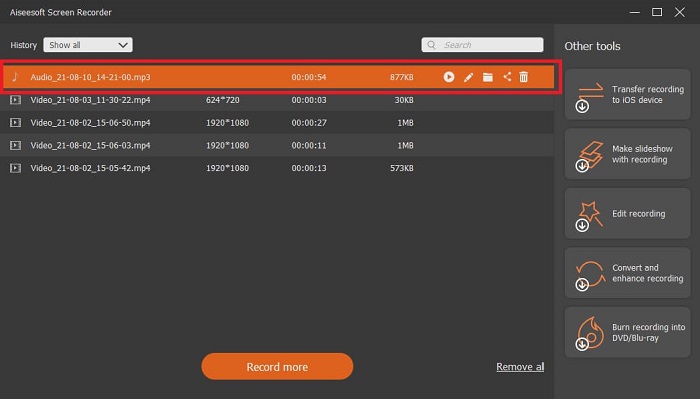
Si vous pensez que l’outil ci‑dessus est déjà très évolué, pour vous donner un exemple plus parlant, si Galilée est le père de la science moderne, alors cet outil est le père du système d’enregistrement moderne. FVC Screen Recorder est le meilleur enregistreur, qu’il s’agisse d’audio ou de vidéo. Il vous offre l’un des meilleurs rendus possibles tout en restant extrêmement simple à utiliser. Contrairement à d’autres outils, celui‑ci est conçu pour offrir à l’utilisateur la meilleure expérience imaginable. Donc maintenant, si vous faites partie des utilisateurs qui trouvent difficile d’enregistrer leur audio, suivez ces étapes simples ci‑dessous et respectez‑les attentivement.
Étape 1. Téléchargez l’outil en fonction des spécifications de votre système d’exploitation. Le téléchargement puis l’installation ne prennent que quelques secondes. Modifiez les Preference selon vos besoins et cliquez sur Finish pour continuer.
Téléchargement gratuitPour Windows 7 ou version ultérieureTéléchargement sécurisé
Téléchargement gratuitPour macOS 10.7 ou version ultérieureTéléchargement sécurisé
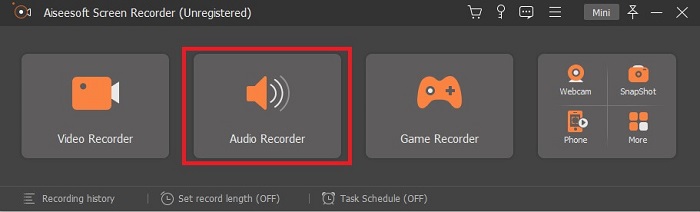
Étape 2. Dans la barre d’outils, cliquez sur Audio Recorder.
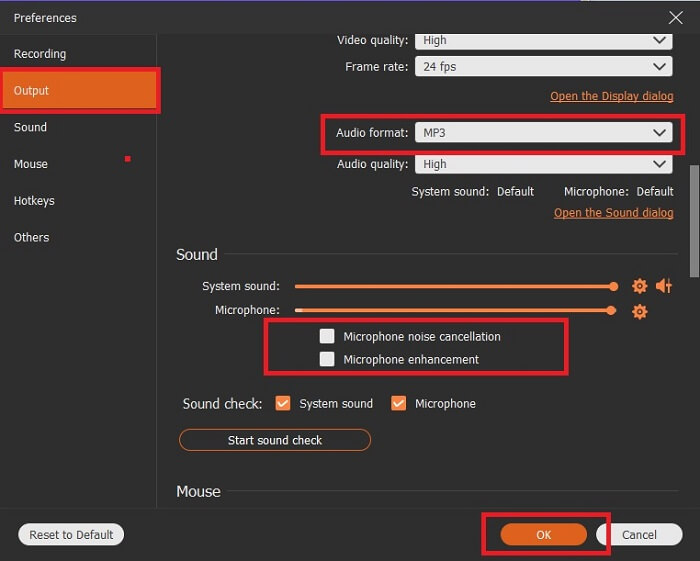
Étape 3. Recherchez l’icône en forme de Gear pour ajuster les autres options. Allez dans Output pour le changer en MP3, en format WMA ou en tout autre format souhaité en faisant défiler la molette de la souris. Parmi les autres options utilisables pendant l’enregistrement, on trouve Noise cancelling et Microphone enhancement. Cliquez sur OK pour continuer.
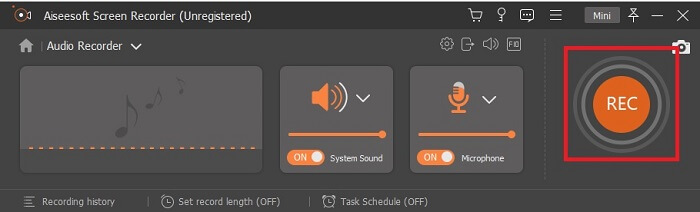
Étape 4. Après avoir ajusté les paramètres, dans la barre d’outils, activez votre Speaker et votre Microphone pour ajouter la sortie audio à votre enregistrement. Enfin, cliquez sur le bouton Round-shape pour commencer l’enregistrement.
Étape 5. Si vous souhaitez mettre fin à l’enregistrement, cliquez sur le bouton Square pour arrêter. Cliquez sur Save puis sur Next pour continuer. Ensuite, lisez votre enregistreur vocal OGG sur n’importe quelle plateforme multimédia.
Avantages
- Vous pouvez enregistrer n'importe quand n'importe où avec cet outil avec un son cristallin.
- Il offre une excellente expérience à l'utilisateur qui utilise déjà cet outil.
- Enregistrement tout-en-un.
Les inconvénients
- Payer à l'utilisation.
- Il a besoin de 2,4 Mo de votre stockage.
2. Screencast-O-Matic
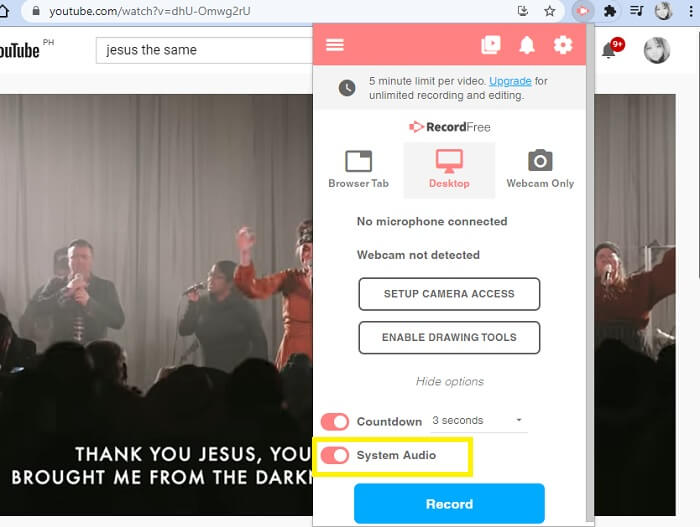
Un autre meilleur outil d'enregistrement d'écran qui fera le travail. Screencast-O-Matic est l'un des meilleurs outils que vous trouverez sur le Web. Cela rend votre enregistrement facile et efficace. Il dispose également de son outil en ligne si vous visitez le site Web en ligne, mais le processus prendra une minute ou deux pour terminer l'outil en ligne lui-même. Donc, si vous n'aimez pas faire la queue, ce n'est pas le meilleur choix pour vous. Mais si vous aimez attendre, cela en vaut la peine jusqu'au bout.
Avantages
- Il est plus facile à utiliser que Camtasia.
- Travaillez en tant qu'organisation plutôt qu'en tant qu'individu avec le mot de passe de sécurité.
- Très engageant et c'est un bon enregistreur.
Les inconvénients
- L'interface de l'outil est précise mais elle est monochromatique, alors attendez-vous à ce qu'elle soit de couleur fade, ce qui la rend moins intéressante à utiliser.
- Il permet seulement à l'utilisateur d'enregistrer 15 minutes maximum dans la version gratuite.
3. PartagerX
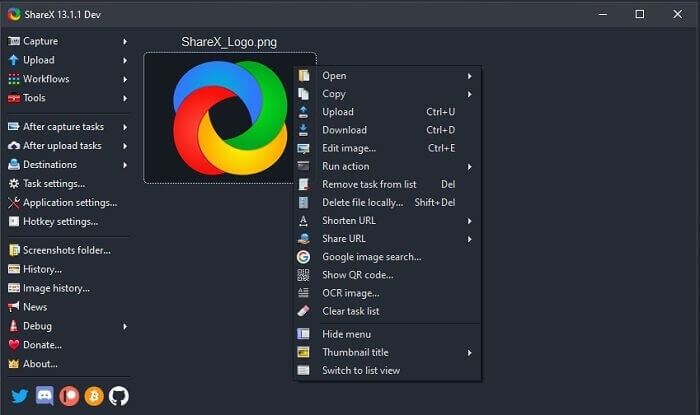
L’un des outils que vous pouvez rencontrer sur le Web lorsque vous cherchez un enregistreur d’écran. Il n’est disponible que pour Windows. Cela signifie simplement que si vous êtes utilisateur de Mac ou de Linux, cet outil ne fonctionnera pas sur votre système, car il ne prend pas ces programmes en charge. Share peut facilement être classé parmi les 20 meilleurs enregistreurs d’écran disponibles sur Internet, car il prend en charge plus de 80 destinations vers lesquelles vous pouvez transférer le fichier final.
Avantages
- Outil personnalisable.
- Fournit ses propres outils d'édition si nécessaire.
- Modifiez les touches de raccourci pour rendre l'enregistrement aussi facile.
Les inconvénients
- Accablant pour quelqu'un qui découvre cet outil. C'est une douleur dans le cul d'apprendre à utiliser cet outil.
- Non disponible pour les utilisateurs de Mac.
Partie 3. Tableau de comparaison
| Caractéristiques | FVC Enregistreur Audio Gratuit | Enregistreur d'écran FVC | Screencast-O-Matic | PartagerX |
| Enregistrement audio |  | | | |
| Suppression du bruit |  | | | |
| Amélioration du microphone | | | | |
| Complexité de l'outil | Instruction d'enregistrement en ligne sur le point. | Facile à utiliser car il est déjà indiqué dans l'outil quel est son objectif et comment il fonctionne. | C'est un outil facile à utiliser avec moins de détails. | La complexité de l'outil est difficile pour le nouvel utilisateur. |
| Plateformes disponibles | Tous les systèmes d'exploitation. | Tous les systèmes d'exploitation. | PC Windows, Mac et Chromebook. | Windows 7 SP1 ou version ultérieure. |
| Format audio disponible | MP3 et OGG | MP3, WMA, AAC, M4A, FLAC, OGG, Opus et bien d'autres. | Impossible d'enregistrer l'audio séparément. | MP3 et WAV |
| Échelle des prix | Outil en ligne gratuit | Pour 1 mois : $25.00 Pour un an : $31.20 Pour la licence à vie : $55.20 | Il a une version gratuite. Pour le solo premium. De luxe $1.65/mois Premier $4.00/mois Pour les plans d'équipe. Vous pouvez définir l'équipe de luxe ou l'équipe premier. | programme gratuit et open source. |
Partie 4. FAQ sur OGG Recorder
Comment faire un fichier OGG avec un magnétophone ?
Utilisez un enregistreur audio comme dans la liste ci-dessus. Pour plus d'informations, lisez l'article ci-dessus pour obtenir des informations et des étapes sur la façon d'enregistrer avec le format de sortie audio pour OGG.
Quel est le meilleur format audio ? MP3 ou OGG ?
OGG est le meilleur format de fichier audio. Mais les utilisateurs ont tendance à utiliser le MP3 car il est plus standard que l'OGG. Néanmoins, OGG contient des métadonnées avec moins de stockage et une meilleure sortie audio, par exemple le nom de l'artiste et les données de la piste.
Pourquoi mon format OGG ne peut-il pas être lu dans mon lecteur multimédia ?
Certains lecteurs multimédias ne prennent pas en charge ce type de format. Vous pouvez donc utiliser FVC Free Online Video Converter comme convertisseur. Il permettra à l’utilisateur de convertir le fichier OGG en MP3 ou en un autre format audio de votre choix afin qu’il puisse être lu. Vous pouvez aussi utiliser FVC Free Video Player ou d’autres lecteurs OGG pour lire ce type de format, car cet outil lit presque tous les types de formats audio et vidéo.
Conclusion
À la fin de la discussion, vous avez maintenant acquis une nouvelle connaissance simplement en la lisant et en sélectionnant l'outil qui correspond à votre demande. Différents choix sont répertoriés dans cet article avec des étapes et quelques informations sur l'outil. Suivez simplement les étapes et prenez le temps de le lire afin que vous le compreniez. Vous devez choisir judicieusement.
Mais pour prendre un exemple concret, FVC Screen Recorder répond parfaitement aux exigences des utilisateurs. En tant qu’utilisateur, vous devez donner la priorité à vos besoins et à vos attentes vis‑à‑vis d’un enregistreur. Par exemple, qu’il soit facile à utiliser, excellent pour l’enregistrement audio, disponible sur presque toutes les plateformes, et que, s’il est payant, il reste abordable tout en offrant une qualité de sortie optimale. Tous ces critères se retrouvent dans FVC Screen Recorder. Ne vous contentez pas de moins, car vous méritez mieux.
-
 Test de Snagit 2025 : avantages, inconvénients et meilleure alternative
 Quelle est la meilleure alternative à Snagit? Existe-t-il un outil de capture d'écran comme Snagit? Cet article passera en revue Snagit et partagera la meilleure alternative à Snagit pour capturer l'écran.
-
 Enregistrement d'écran QuickTime - Enregistrez une vidéo avec audio sur Mac et PC
 L'écran d'enregistrement avec audio sur Mac est pratique. Le lecteur intégré, QuickTime Player peut le faire. Lisez son article et sachez comment capturer un écran avec du son sur Mac et PC.
-
 Test de l'enregistreur DU 2025 : sécurité, prix, fonctionnalités, utilisation et notes
 DU Recorder est un enregistreur d'écran et audio pour iPhone et Android. Vaut-il la peine d'être téléchargé? Est-ce sûr? Lisez la critique complète pour voir si l'application vous convient.
