


 Video Converter Ultimate
 Enregistreur d'écran
 Réparation vidéo
Le meilleur des meilleurs convertisseurs que vous pouvez utiliser pour convertir 3GP en AVI en ligne et hors ligne
Le format 3GP est un format flexible qui transfère les flux audio et vidéo vers les téléphones mobiles de 3ᵉ génération utilisant le GSM. Il correspond à la connectivité 3G pour une transmission plus rapide des fichiers. Ce format était le plus couramment utilisé sur les anciens modèles de téléphones, car il est polyvalent et se transfère rapidement. Cependant, de nos jours, les fichiers 3GP ne peuvent plus être lus sur votre lecteur multimédia local, car ce format n’autorise pas les nouveaux lecteurs à interpréter correctement sa structure. La meilleure façon de regarder tous vos fichiers 3GP sur votre téléphone ou votre ordinateur de bureau est donc de les convertir. Au lieu de chercher sur Internet le meilleur convertisseur à utiliser, nous avons réuni quatre convertisseurs parmi lesquels vous pouvez choisir. Les outils mentionnés ci‑dessous sont parfaits et peuvent convertir le 3GP en AVI sans aucune perte de qualité.

Partie 1. Convertir 3GP en AVI hors ligne avec le convertisseur ultime
Convertisseur vidéo FVC Ultimate
Si vous ne voulez faire aucun effort pour convertir vos fichiers 3GP, nous vous recommandons vivement d’utiliser FVC Video Converter Ultimate. Ce logiciel est l’un des meilleurs choix pour convertir des fichiers, et il effectue la conversion en quelques secondes seulement. De plus, de nombreux utilisateurs qui l’ont essayé partagent le même avis. En résumé, ils indiquent clairement que cet outil les a aidés à résoudre leur problème de conversion en un clin d’œil.
Plus d'explications, cet outil n'est pas seulement le meilleur pour convertir le fichier ; il possède également les fonctionnalités les plus avancées que vous aimeriez essayer. Les exemples sont l'éditeur, le créateur de GIF, l'amplificateur de volume, la synchronisation audio et vidéo, l'inversion, etc. Si vous achetez cet outil, vous obtiendrez tous les outils mentionnés plus tôt, et il y a beaucoup plus à venir. Alors maintenant, essayons de suivre étape par étape pour convertir 3GP en AVI sur Mac et PC sans perdre sa qualité.
Étape 1. Cliquez sur le bouton de téléchargement et choisissez si vous êtes utilisateur PC ou Mac, puis installez le programme.
Téléchargement gratuit pour Windows 7 ou version ultérieure Téléchargement sécurisé
Téléchargement gratuit pour macOS 10.7 ou version ultérieure - Téléchargement sécurisé
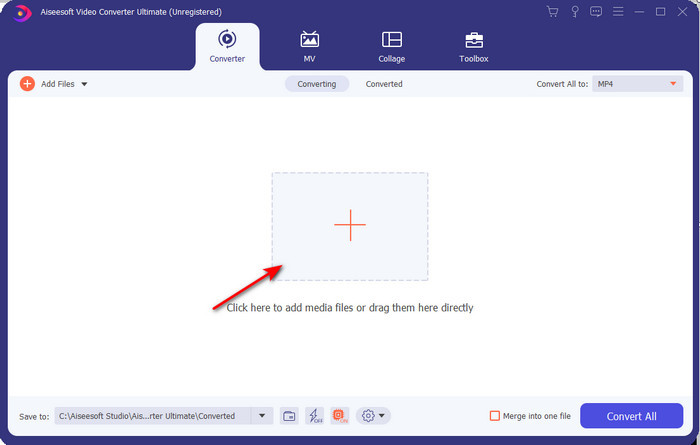
Étape 2. Lancez l’outil, cliquez sur le signe + au centre de l’interface, sélectionnez le fichier .3gp dans votre dossier et cliquez sur Ouvrir. Vous pouvez également effectuer une conversion par lots ici si vous le souhaitez : cliquez sur Ajouter des fichiers pour en ajouter d’autres.
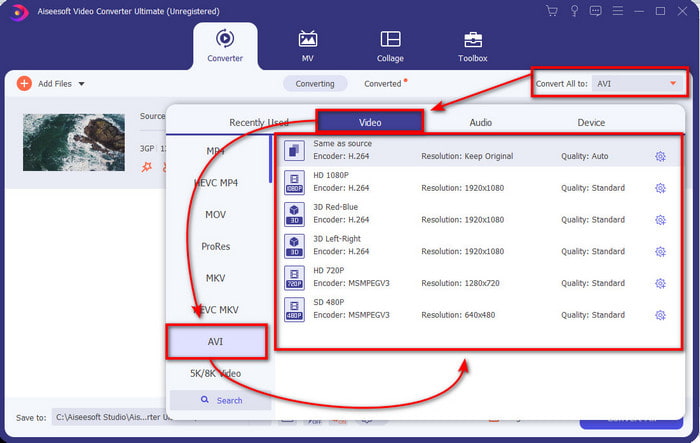
Étape 3. Pour modifier le 3GP, cliquez sur l’option Convertir tout en et choisissez le format AVI dans la catégorie Vidéo.
Étape 4. Pour démarrer le processus de conversion, cliquez sur Convertir tout, et la conversion de vos fichiers 3GP commencera immédiatement.

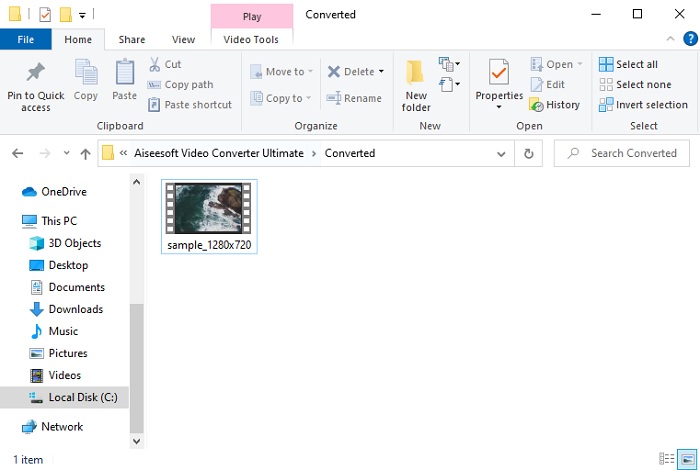
Étape 5. Après la conversion, un dossier s’ouvrira sur votre écran avec le fichier 3GP converti. Cliquez sur le nouvel AVI que vous venez de créer pour le regarder et l’éditer plus tard si vous le souhaitez.
Partie 2. 3 convertisseurs en ligne disponibles pour convertir 3GP en AVI
1. Convertisseur vidéo gratuit FVC en ligne

Nous vous garantissons que l’outil de cette liste qui est le meilleur convertisseur 3GP vers AVI en ligne est FVC Free Video Converter Online. Toutes les fonctionnalités que vous attendez d’un convertisseur en ligne s’y trouvent. C’est le meilleur convertisseur en ligne que nous mentionnons, sous tous les aspects : par exemple, si vous voulez un convertisseur en ligne efficace, un processus de conversion sécurisé et aucune publicité, alors c’est l’outil web qu’il vous faut. Même si l’outil en ligne est très bien conçu et fonctionne parfaitement, il ne prend en charge qu’un nombre de formats moyen. Les fonctions avancées que vous pouvez rencontrer dans FVC Video Converter Ultimate ne sont pas disponibles ici. Mais l’avantage par rapport à la version logicielle est que cet outil est totalement gratuit. Sans plus attendre, passons aux étapes pour convertir votre fichier dans un nouveau format.
Étape 1. Cliquez sur ce lien pour accéder au site web.
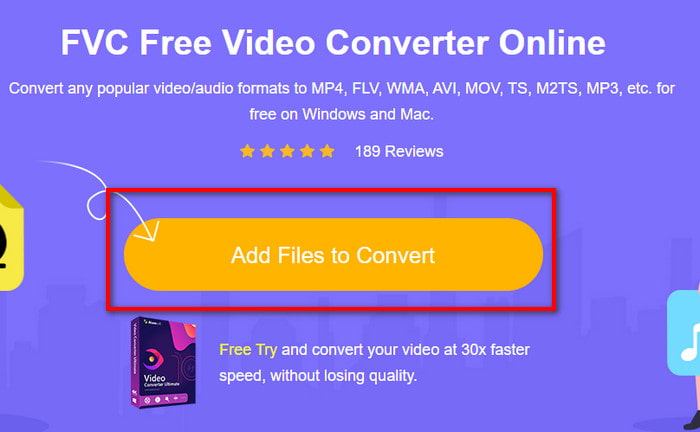
Étape 2. Appuyez sur Ajouter des fichiers à convertir pour lancer l’outil en ligne, un dossier s’ouvrira, puis recherchez le fichier .3gp. Si c’est la première fois que vous utilisez cet outil, vous devrez télécharger le lanceur en cliquant sur Ajouter des fichiers à convertir, puis cliquer à nouveau pour le lancer.
Étape 3. Après avoir sélectionné le fichier, choisissez le format AVI dans la section située en dessous.
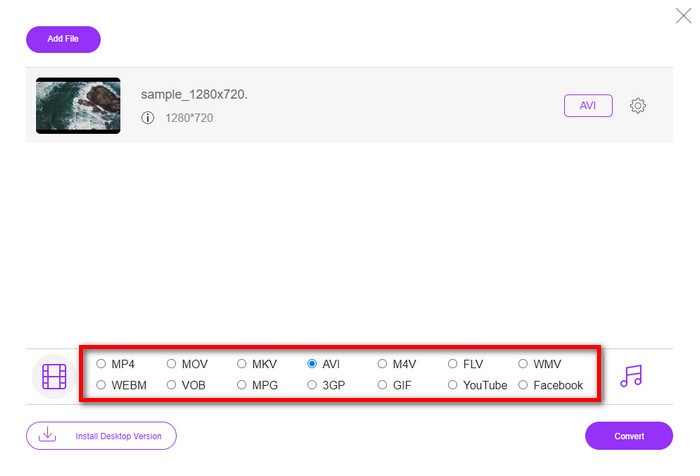
Étape 4. Lorsque vous êtes prêt à convertir le fichier, cliquez sur Convertir.
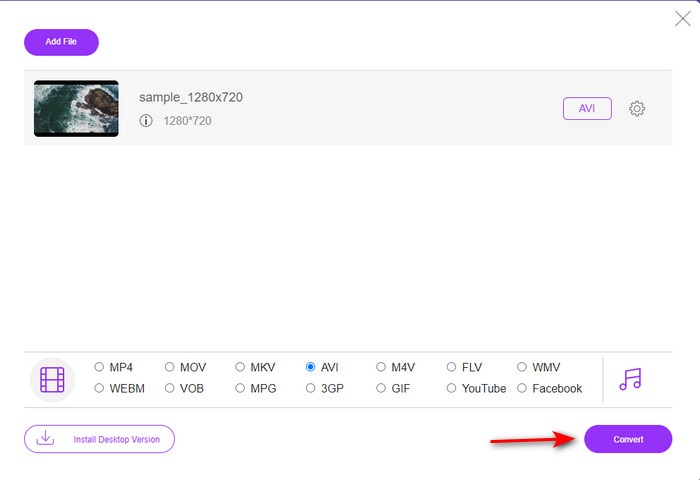
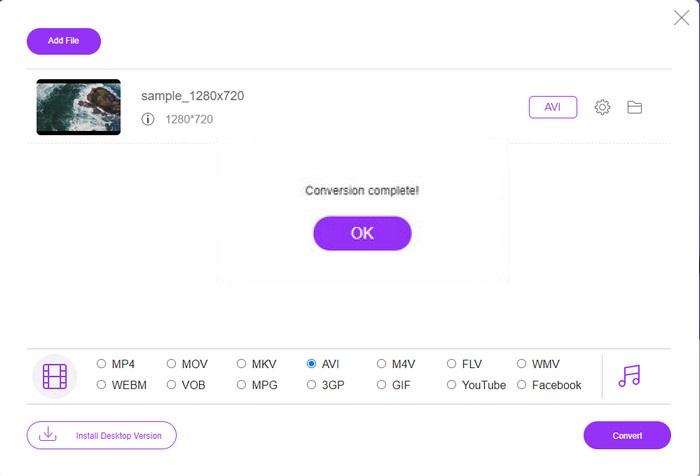
Étape 5. Après la conversion, un dossier s’affichera de nouveau, cette fois avec le fichier que vous avez converti précédemment.
2. Fconvert.com
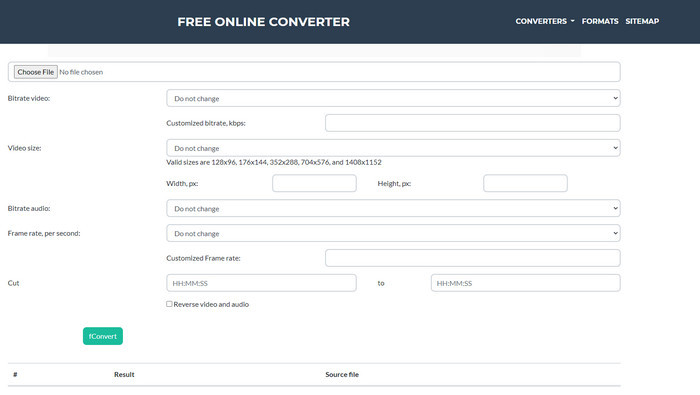
Dans le domaine de la conversion de fichiers, Fconvert.com doit figurer dans la liste, car cet outil en ligne est l’un des convertisseurs fantastiques que vous pouvez utiliser gratuitement. Ce convertisseur peut convertir presque tous les formats que vous connaissez, et probablement l’un de vos fichiers. Cependant, il y a un problème avec cet outil : les publicités. En effet, chaque fois que vous cliquez sur quelque chose sur le site, une publicité apparaît avant de passer à ce que vous avez sélectionné. Même si ces annonces sont agaçantes, l’application reste propre et fonctionne très bien pour la conversion de formats. Donc, si vous voulez découvrir à quel point cet outil est performant, suivez les étapes ci‑dessous et apprenez à convertir 3GP en AVI gratuitement.
Étape 1. Recherchez le site principal de cet outil dans votre navigateur.
Étape 2. Cliquez sur AVI sous la section vidéo, cliquez sur Choisir un fichier, localisez le .3gp, puis faites défiler vers le bas et cliquez sur fConvert.
Étape 3. Faites défiler vers le bas, puis vous verrez la section Résultat ; cliquez sur le fichier pour le télécharger.
3. Anyconv
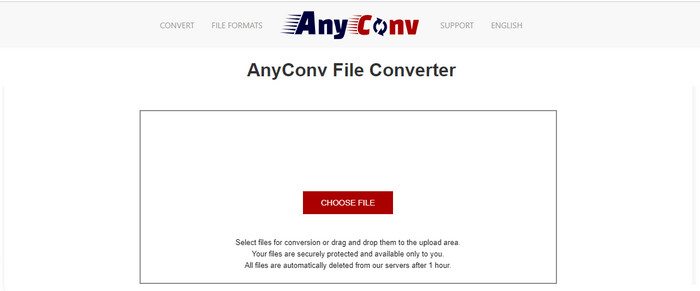
Un autre outil spécialisé dans la conversion de formats est Anyconv. Cet outil en ligne est très différent de Fconvert.com, car il est bien meilleur et plus rapide. Il comporte également moins de publicités que l’outil précédent. Même s’il y a moins de pubs, elles sont plus imposantes que sur Fconvert.com, mais en termes de performances, cet outil s’en sort très bien. Testons‑le pour voir s’il fonctionne pour convertir gratuitement le 3GP en AVI sans plus attendre.
Étape 1. Ouvrez votre moteur de recherche et trouvez le site web Anyconv.
Étape 2. Appuyez sur Choisir un fichier et un dossier s’ouvrira ; insérez le fichier .3gp dans l’outil en ligne et continuez. Pour changer de format, vous devez cliquer sur le bouton déroulant et trouver AVI. Pour lancer le processus de conversion, cliquez sur Convertir.
Étape 3. Attendez la fin du processus, puis cliquez sur Télécharger AVI pour télécharger le fichier converti.
Partie 3. Quel format est le meilleur ? 3GP ou AVI
Si vous utilisez un téléphone de 3e génération et souhaitez stocker une vidéo de haute qualité, transférez-la plus rapidement dans la 3e génération de téléphone, alors 3GP est le format pour le travail. Cependant, si vous essayez d'envoyer le format AVI aux téléphones de 3e génération, le fichier ne s'ouvrira pas car ce format n'est pas pris en charge. Mais dans le cas d'aujourd'hui, AVI est bien meilleur. Il a déjà gagné beaucoup de soutien de la part de tous les lecteurs et éditeurs de médias par rapport au 3GP. Bien que le format AVI soit le meilleur choix aujourd'hui, la taille du fichier est énorme par rapport au 3GP, et si vous étiez sur le point de l'enregistrer sur votre téléphone, cela prendrait beaucoup d'espace. De plus, les deux formats sont excellents, mais ils ont des objectifs et des utilisations différents.
Partie 4. FAQ sur 3GP et AVI
Puis-je utiliser FFmpeg pour convertir 3GP en AVI ?
Vous pouvez utiliser FFmpeg pour convertir votre fichier 3GP ; toutefois, c’est une opération difficile, mais gérable si vous prenez votre temps. La première étape consiste à télécharger le fichier zip de FFmpeg sur votre ordinateur, puis à le décompresser. La deuxième étape consiste à ouvrir votre CMD pour communiquer avec l’outil. Ensuite, localisez votre fichier via l’invite de commandes, copiez ce code ffmpeg -i input.3gp -vn -ar 44100 -ac 2 -b:a 192k output.avi, collez‑le dans le CMD et appuyez sur Entrée pour lancer le processus de conversion.
Le 3GP peut-il être lu sur les téléphones de 4e génération ?
Ce format est utilisé sur les téléphones de 3ᵉ génération, et vous pouvez encore lire des vidéos au format 3GP sur certains téléphones de 4ᵉ génération, mais pas tous. Car, comme indiqué précédemment, le 3GP est destiné aux appareils de 3ᵉ génération et pas à tous les téléphones de 4ᵉ génération. Vous pouvez aussi vous tourner vers des lecteurs 3GP professionnels pour profiter de vos vidéos.
Quel format est le meilleur : 3GP ou MP4 ?
En termes de qualité et de compatibilité, le MP4 est bien meilleur dans ce domaine. Cependant, le 3GP est beaucoup plus léger et fonctionne mieux sur les réseaux 3G pour un transfert plus rapide de ce type de fichier. Vous souhaitez convertir MP4 en 3GP ou l’inverse ? Cliquez ici pour en savoir plus.
Conclusion
Chaque voyage doit avoir une fin, et maintenant vous pouvez facilement convertir 3GP en AVI à l'aide des outils mentionnés ci-dessus. De plus, tous les outils présentés ci-dessus, incluons FFmpeg, fonctionnent très bien. Pourtant, le meilleur choix revient toujours au FVC Video Converter Ultimate. Cet outil surpasse tous les convertisseurs en ligne peuvent faire dans la conversion et bien d'autres aspects. Alors maintenant, si vous souhaitez obtenir le logiciel, cliquez sur le bouton de téléchargement et effectuez la conversion rapidement.
-
 [En ligne et gratuit] 3 méthodes pour convertir MP4 en 3GP sans tracas
 Vous voulez convertir MP4 en 3GP de manière simple et rapide? Ici, nous partagerons 3 convertisseurs MP4 vers 3GP pour changer MP4 en 3GP pour jouer sur divers téléphones mobiles.
-
 Top 3 des moyens gratuits pour convertir FLV en 3GP sur Windows / Mac
 Impossible d'ouvrir les fichiers FLV sur smartphone ou tablette ? Ne vous inquiétez pas! Nous partageons ici trois méthodes pour convertir FLV en 3GP sans perte de qualité pour jouer sur mobile.
-
 Excellent choix pour convertir MKV en format AVI
 Apprenez à convertir des vidéos MKV avec des étapes simples fournies exclusivement pour vous. Voulez-vous savoir comment? Cliquez ensuite sur ce lien pour en savoir plus.
