


 Video Converter Ultimate
 Enregistreur d'écran
 Réparation vidéo
 Téléchargement sécurisé
Procédures détaillées pour convertir des fichiers AVI au format M4V
Le format de conteneur multimédia AVI, qui signifie Audio Video Interleaved, est une fonctionnalité des logiciels vidéo Windows. Il permet la lecture simultanée des données audio et vidéo réunies dans un seul fichier. Grâce à ses capacités particulières, notamment le contrôle synchronisé et l’affichage en temps réel, AVI s’est rapidement hissé parmi les formats vidéo les plus utilisés. Cependant, si vous souhaitez lire votre vidéo sur votre Mac, vous devez convertir AVI en M4V, car M4V est un format Apple compatible avec iTunes, Apple QuickTime Player et les appareils iOS. Il se peut que vous souhaitiez parfois convertir des fichiers .avi sur un Mac vers un format universel comme M4V. Dans ce cas, il est recommandé de convertir AVI en M4V pour garantir un bon fonctionnement sous Mac OS. Nous allons vous montrer les meilleures méthodes pour convertir AVI en M4V à l’aide d’applications en ligne et hors ligne.

Partie 1 : Introduction à AVI et M4V
| AVI | M4V | |
| Nom de fichier | Intercalaire audio-vidéo | Vidéo MPEG-4 |
| Extension de fichier | .avi | .m4v |
| La description | Le format de fichier AVI est l'un des conteneurs multimédias les plus populaires jamais créés. L'acronyme AVI, qui signifie audio vidéo entrelacé, a été initialement mis à la disposition du public par Microsoft en 1992 en tant que composant de leur cadre multimédia, "vidéo pour Windows". Un fichier AVI avec l'extension de nom de fichier .avi peut avoir à la fois du contenu vidéo et audio synchronisé car il s'agit d'un format de conteneur. Ainsi, les auteurs peuvent éditer et encoder des séquences audio-vidéo ou des séquences vidéo en utilisant le standard. | Apple a créé l'extension de fichier M4V, qui est remarquablement similaire à l'extension de fichier MP4, pour le contenu de la boutique iTunes. Les appareils Apple sont les seuls à pouvoir lire les fichiers M4V. Pour lire sur les appareils Apple, d'autres formats vidéo tels que MP4 et MOV peuvent être convertis en M4V. La principale distinction entre les formats de fichier M4V et MP4 est que le premier prend en charge la protection DRM-Copyright, qui interdit la violation du droit d'auteur sur le contenu multimédia. L'ordinateur doit accorder l'autorisation en se connectant au compte iTunes pour acheter le fichier multimédia afin de lire un fichier M4V protégé par DRM. Cependant, si les fichiers ne sont pas protégés par DRM, l'utilisateur peut simplement renommer l'extension de fichier M4V en MP4 pour la rendre compatible avec les appareils non Apple. |
| Développé par | Microsoft | Apple Inc. |
| Programmes associés | VLC Media Player Lecteur Apple QuickTime Adobe Première Pro 2020 Lecteur Windows Media | KMPlayer Media player classique Lecteur Zoom \VLC Media Player |
| Catégorie de fichier | Vidéo | Vidéo |
| Type MIME | vidéo/x-vidéo | vidéo/x-m4v |
Partie 2 : Meilleure façon de convertir AVI en M4V
Vous voulez convertir AVI en M4V gratuitement ? Vous pouvez utiliser FVC Free Video Converter Online. Cet outil peut facilement convertir votre fichier AVI en M4V. Il prend également en charge de nombreux autres formats vidéo, tels que FLV, MP4, MOV, WMA, et bien d’autres. De plus, si vous prévoyez de convertir plusieurs fichiers AVI en différents formats, vous pouvez utiliser cette application, car elle propose un processus de conversion par lots. Vous pouvez aussi modifier vos vidéos avant la conversion, par exemple en changeant la fréquence d’images, la résolution et le débit binaire. En outre, FVC Free Video Converter Online peut convertir des fichiers audio comme MP3, AAC, AC3, FLAC, etc.
traits
◆ Convertir de nombreux formats de fichiers vidéo, tels que M4V, AVI, MP4, MOV, VOB, FLV, WMV, etc.
◆ Peut modifier la résolution, le débit binaire et la fréquence d'images de la vidéo.
◆ Convertir des fichiers audio tels que MP3, AAC, AC3, FLAC, etc.
Suivez les guides simples ci-dessous pour convertir facilement AVI en M4V.
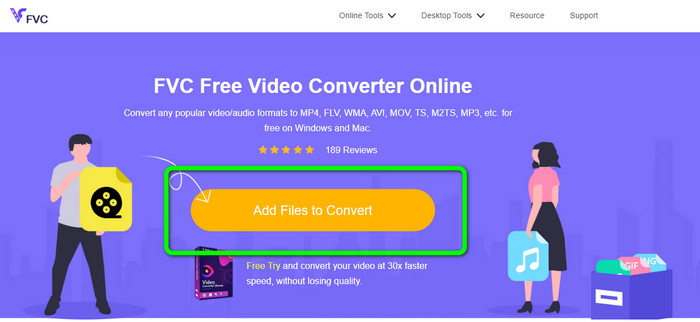
Étape 1 : Commencez par ouvrir votre navigateur et rendez-vous sur le site FVC Free Video Converter Online. Appuyez sur le bouton Add Files to Convert pour importer votre fichier AVI.
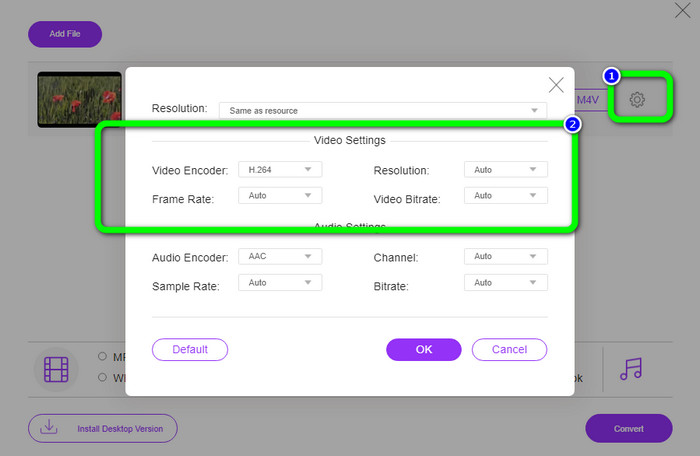
Étape 2 : Si vous souhaitez modifier la résolution, la fréquence d’images et le débit binaire de votre vidéo, cliquez sur l’icône Paramètres sur la partie gauche de l’interface. Lorsque vous avez terminé les réglages, appuyez sur OK.
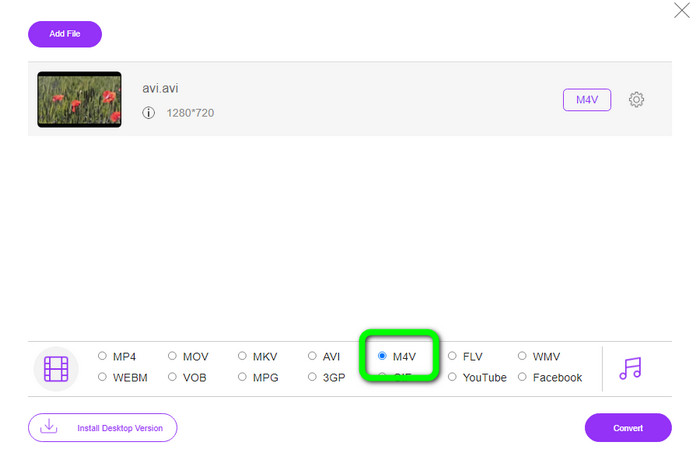
Étape 3 : Ensuite, dans la partie inférieure de l’interface, sélectionnez le fichier M4V comme format de sortie.
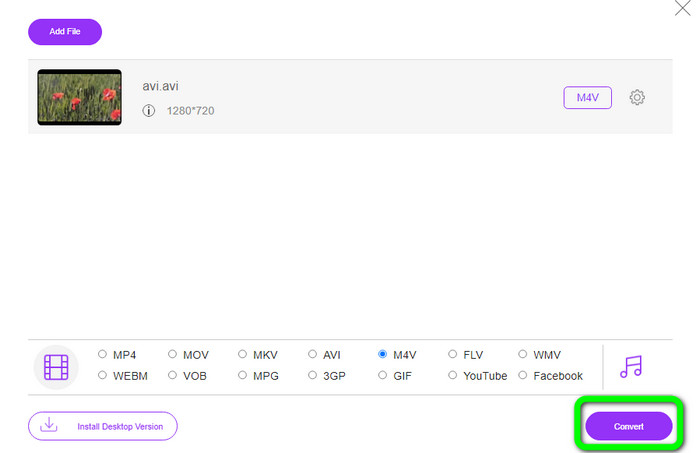
Étape 4 : Enfin, pour enregistrer votre fichier vidéo, cliquez sur le bouton Convert. Patientez pendant le processus de conversion et téléchargez votre fichier final.
Partie 3 : Méthode simple pour convertir AVI en M4V sous Windows et Mac
Un autre excellent convertisseur que vous pouvez utiliser est FVC Video Converter Ultimate. Cet outil peut convertir AVI en M4V sous Windows. Il peut convertir vos fichiers instantanément grâce à un processus de conversion ultra-rapide, jusqu’à 30 fois plus rapide. De plus, vous pouvez convertir plusieurs fichiers en même temps grâce à la conversion par lots. En outre, sa méthode de base avec une interface intuitive est parfaite pour les débutants. Par ailleurs, cet outil hors ligne n’est pas uniquement accessible sous Windows. Il est également disponible sur Mac. De plus, vous pouvez apporter certaines modifications à vos vidéos pendant la conversion. Vous pouvez les éditer en les améliorant, en les découpant, en ajoutant des filtres, et bien plus encore.
Fonctionnalités
◆ Convertit plus de 100 fichiers vidéo, y compris M4V, MP4, AVI, FLV, MKV, MOV, VOB, WMV, etc.
◆ Faire un collage avec des modèles et des filtres gratuits est disponible.
◆ Offres Music Video Maker.
◆ Montez vos vidéos à l’aide d’un outil d’amélioration vidéo, d’un découpeur, d’un suppresseur de filigrane, d’un compresseur, etc.
◆ Convertir les formats de fichiers image, tels que BMP, JPG, PNG, etc.
◆ Accélérer et ralentir une vidéo.
Utilisez les guides détaillés ci-dessous pour savoir comment convertir AVI en M4V sur Windows et Mac à l'aide de FVC Video Converter Ultimate. Nous utiliserons la version Windows.
Étape 1 : Téléchargez FVC Video Converter Ultimate sur votre Windows ou votre Mac en cliquant sur le bouton de téléchargement.
Téléchargement gratuit pour Windows 7 ou version ultérieure Téléchargement sécurisé
Téléchargement gratuit pour macOS 10.7 ou version ultérieure - Téléchargement sécurisé
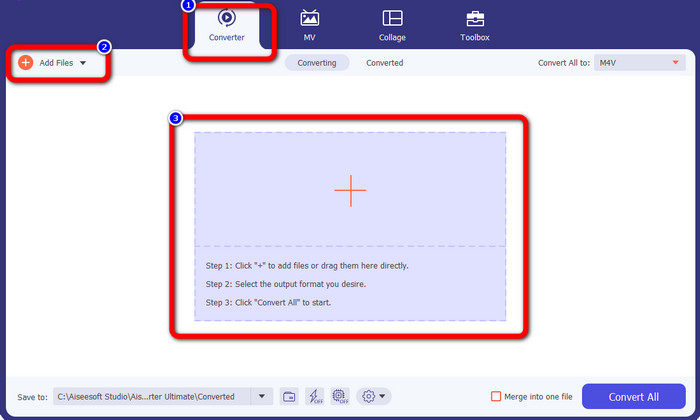
Étape 2 : Accédez au panneau Converter après avoir ouvert l’application. Vous avez ensuite trois options pour insérer votre fichier AVI. D’abord, vous pouvez cliquer sur le bouton Add File dans la deuxième boîte. La deuxième option consiste à cliquer sur le signe Plus dans la troisième boîte. Enfin, vous pouvez déposer le fichier directement au centre.
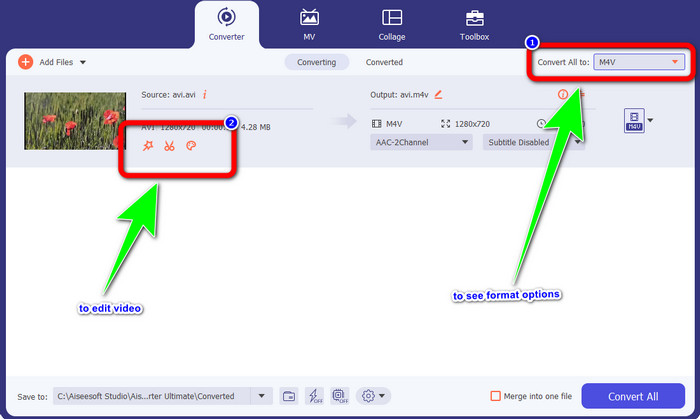
Étape 3 : Après avoir ajouté votre fichier AVI, cliquez sur le bouton Convert All to pour afficher les options de format, puis sélectionnez le format de fichier M4V. Ensuite, si vous souhaitez éditer votre vidéo, vous pouvez aller dans la deuxième boîte. Vous pouvez utiliser les outils pour modifier votre vidéo, comme ajouter des filtres, faire pivoter et recadrer les vidéos, couper, et plus encore.
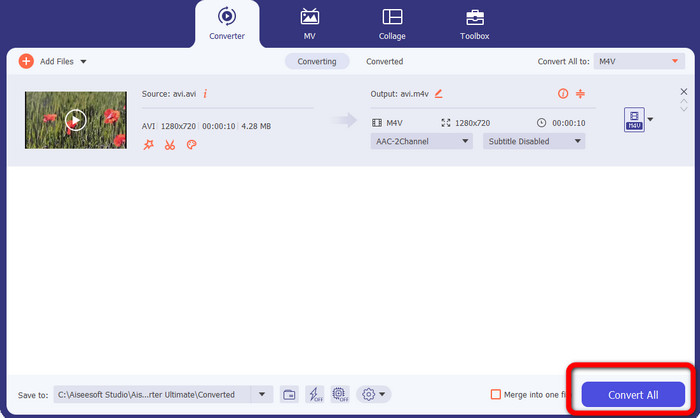
Étape 4 : Pour la dernière étape, cliquez sur le bouton Convert. Attendez la conversion rapide et enregistrez votre vidéo convertie.
Partie 4 : Comment convertir AVI en M4V à l'aide de Handbrake
Handbrake est un autre convertisseur permettant de convertir gratuitement AVI en M4V. Il peut convertir plusieurs formats de fichiers comme WEBM, M4V, MP4, MKV, etc. Avec l’aide de cet outil, vous pouvez facilement convertir de nombreux fichiers. Cependant, Handbrake est compliqué à utiliser. Vous devez avoir suffisamment de connaissances sur ce convertisseur. De plus, son processus d’installation est déroutant. Vous devez suivre de nombreuses étapes avant de pouvoir l’utiliser, ce qui est chronophage pour les utilisateurs.
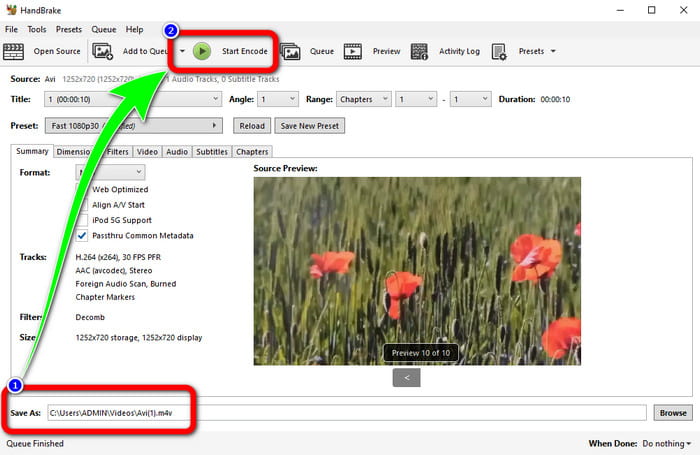
Étape 1 : Téléchargez Handbrake sur votre ordinateur.
Étape 2 : Sélectionnez le fichier AVI que vous souhaitez convertir.
Étape 3 : Allez dans Format et sélectionnez M4V. Puis lancez le processus de conversion en cliquant sur le bouton Start.
Partie 5 : FAQ sur la conversion d'AVI en M4V
1. Comment convertir AVI en M4V sur Mac ?
Vous pouvez utiliser le FVC Video Converter Ultimate. Ce convertisseur peut facilement convertir votre AVI en M4V en utilisant votre Mac.
2. Quelle est la taille d'un fichier AVI ?
Comme les vidéos AVI ne sont pas compressées, elles occupent plus d'espace sur le disque dur. Par exemple, une seule heure de séquences vidéo AVI 352x288 peut utiliser jusqu'à 33 Go (3300 Mo) d'espace disque.
3. Le fichier AVI est-il universel ?
Oui. Même si des formats plus modernes comme MP4, MOV ou WMV ont supplanté le format AVI, certains utilisent encore AVI en raison de sa grande portabilité. Presque n’importe quel ordinateur ou appareil peut lire des fichiers AVI.
Conclusion
Ce guide vous présente d’excellentes méthodes pour convertir des fichiers AVI en M4V à l’aide de trois convertisseurs. Cependant, si vous voulez un processus de conversion ultra-rapide, utilisez FVC Video Converter Ultimate. Et si vous préférez une méthode plus simple, utilisez FVC Free Video Converter Online.
-
 Top 5 des lecteurs M4V pour Windows / Mac / Android / iOS à connaître
 Lorsque vous ne pouvez pas lire vos vidéos M4V sur le lecteur QuickTime, vous devriez en savoir plus sur les 5 excellents lecteurs M4V pour Windows, Mac, Android et iOS à partir de cet article.
-
 AVI VS MP4 - Différences et similitudes entre les formats AVI et MP4
 Quel est le meilleur format vidéo, AVI ou MP4 ? Si vous souhaitez obtenir la comparaison détaillée, vous pouvez consulter cet article AVI VS MP4. Vous pouvez connaître les différences et les similitudes entre AVI et MP4 sous de nombreux aspects
-
 3 Programme de conversion vidéo utilisé pour convertir iTunes M4V en AVI sur Mac
 Vous ne savez pas comment convertir MKV au format AVI ? En continuant à lire cet article, nous connaîtrons les 3 outils qui peuvent vous aider à convertir ce format de fichier
