


 Video Converter Ultimate
 Enregistreur d'écran
 Réparation vidéo
 Téléchargement sécurisé
Les moyens les plus rapides de convertir FLAC et WAV (hors ligne/en ligne)
Le Free Lossless Audio Codec, plus connu sous le nom de FLAC, est un format de fichier audio qui ressemble fortement au MP3. Il offre une excellente qualité sonore tout en occupant relativement peu d’espace sur votre disque. En outre, ce format est sans perte, ce qui signifie qu’une grande partie de vos données audio est conservée malgré le processus de compression. Par ailleurs, il existe des cas où vous devez convertir des fichiers FLAC vers un autre format comme le WAV si vous souhaitez optimiser au maximum votre expérience d’écoute et atteindre une qualité supérieure. Faut‑il choisir entre les deux ? Découvrez ci‑dessous comment profiter des deux grâce aux meilleurs outils de conversion FLAC en WAV disponibles.

Partie 1. Convertir FLAC et WAV hors ligne
Video Converter Ultimate est un outil de premier ordre pour transformer des fichiers vers n’importe quel format audio, y compris WAV et FLAC. Ce programme propose une fonction de conversion par lots qui vous permet de convertir une collection de fichiers audio en une seule opération. De plus, vous pouvez optimiser la qualité de chaque morceau sur lequel vous travaillez, puisque le programme permet d’ajuster des paramètres techniques de sortie comme la fréquence d’échantillonnage et le débit binaire. Si vous souhaitez convertir en lot des fichiers WAV en FLAC ou inversement, lisez le guide rapide que nous avons préparé ci‑dessous.
Étape 1. Lancez le programme sur votre appareil en cliquant sur le bouton Téléchargement gratuit approprié ci‑dessous. Ensuite, suivez les instructions à l’écran pour ouvrir le programme. Une fois installé, vous pourrez facilement prendre en main son interface.
Téléchargement gratuit pour Windows 7 ou version ultérieure Téléchargement sécurisé
Téléchargement gratuit pour macOS 10.7 ou version ultérieure - Téléchargement sécurisé
Étape 2. Cliquez sur l’icône Ajouter sur l’écran principal et importez le fichier audio sur lequel vous souhaitez travailler. Vous serez ensuite dirigé vers un aperçu du fichier importé. Vous pouvez téléverser un dossier si vous souhaitez convertir en masse. Sélectionnez dans votre répertoire le dossier contenant tous les fichiers audio dont vous avez besoin.
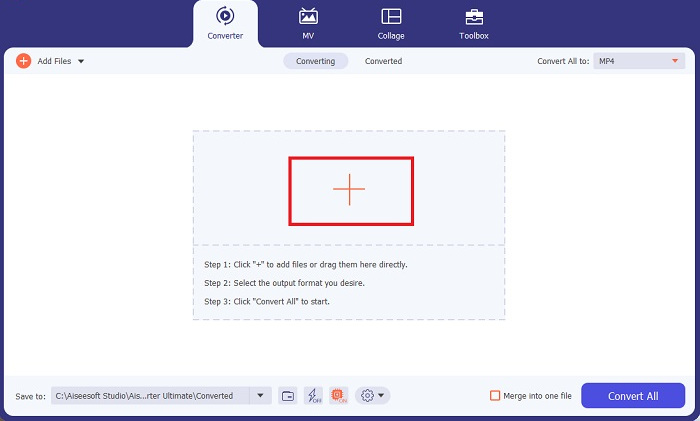
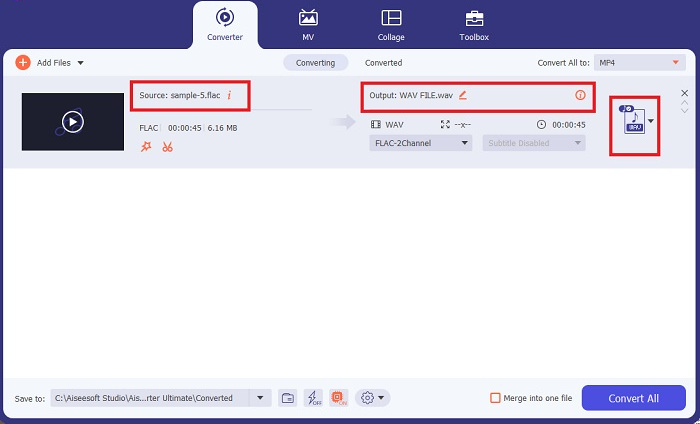
Étape 3. Vous pouvez maintenant modifier le format de sortie en cliquant sur le bouton Convertisseur en haut de l’écran du programme. À partir de là, choisissez WAV dans l’onglet de sélection Sortie audio. Par ailleurs, vous pouvez ajuster la fréquence d’échantillonnage et le débit binaire de votre fichier de sortie pour qu’ils correspondent à la qualité souhaitée.
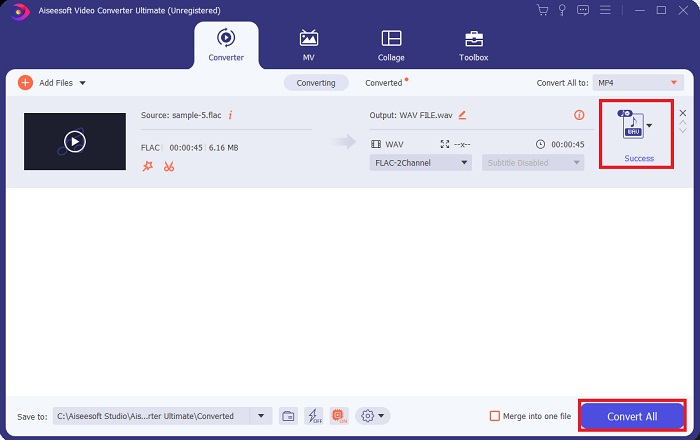
Étape 4. Pour la dernière étape, lancez le processus de conversion en cliquant sur le bouton Tout convertir en bas. Ensuite, le programme ouvrira automatiquement le dossier de sortie afin que vous puissiez vérifier le nouveau format de votre fichier.
Avantages
- Il peut convertir par lots le format de fichier audio FLAC en WAV.
- Le programme fonctionne bien avec Windows et Mac OS.
- Il a une vitesse de conversion rapide.
Les inconvénients
- Il nécessite des frais d'abonnement payants après l'essai gratuit.
- Le programme ne fonctionne pas sur les appareils Linux OS.
Partie 2. Convertir FLAC en WAV ou WAV en FLAC en ligne
Même si votre moteur de recherche peut vous proposer une multitude de convertisseurs FLAC en WAV ou WAV en FLAC en ligne, voici ce que nous pouvons faire pour vous simplifier la tâche. Free Audio Converter Online est une excellente option pour vous éviter d’installer un programme sur ordinateur. Ce convertisseur en ligne fonctionne de manière fluide tout en garantissant la sécurité et la confidentialité de vos données personnelles pendant la conversion. De plus, vous pouvez profiter de la fonction de conversion par lots du logiciel comme si vous utilisiez un programme de bureau.
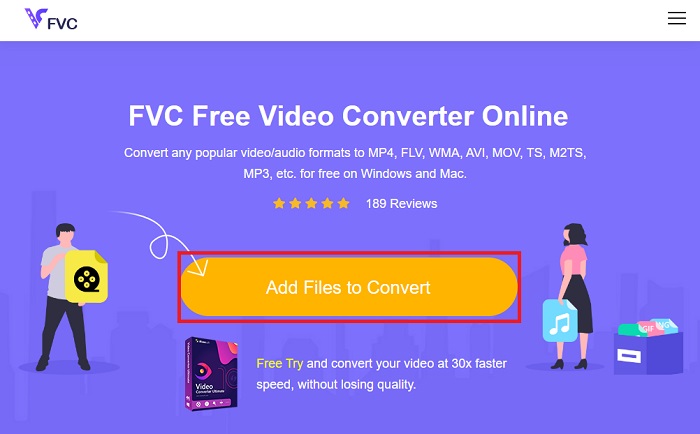
Étape 1. Cliquez sur le lien ci‑dessus pour accéder au site principal de Free Online Video Converter. Sélectionnez Ajouter des fichiers à convertir sur l’écran principal et téléversez votre fichier audio.
Étape 2. L’aperçu de votre fichier original s’affichera à l’écran. Depuis ce même panneau, descendez et choisissez le format de sortie souhaité.
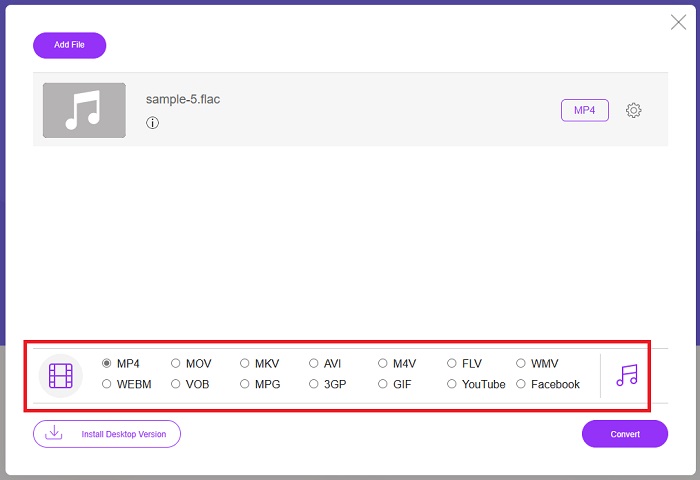
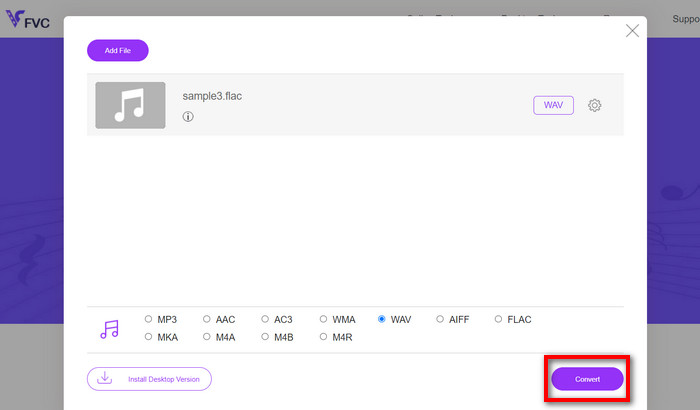
Étape 3. Cliquez sur le bouton Convertir pour transformer le format FLAC en WAV. Si vous souhaitez convertir un autre fichier, répétez ce guide depuis le début.
Avantages
- Il fonctionne sur n'importe quel moteur de recherche comme Google Chrome, Safari, Firefox, etc.
- Il propose divers formats de fichiers audio populaires tels que MP3, AAC et WMA.
- Les utilisateurs peuvent profiter de conversions illimitées par jour.
Les inconvénients
- La vitesse de conversion dépend de la puissance de la connexion Internet.
Pour aller plus loin :
Convertir FLAC en MP3 pour préserver la qualité audio
Étapes simples pour convertir WAV en OGG et optimiser la taille audio
Partie 3. FAQ sur la conversion FLAC et WAV
La qualité de la conversion d'un fichier FLAC en WAV diminuera-t-elle ?
La conversion de vos fichiers audio de FLAC en WAV ne se dégradera pas en qualité puisque sa résolution n'est pas compressée. Cependant, supposons que vous convertissiez un fichier de WAV en FLAC. Dans ce cas, vous remarquerez peut-être de légers changements, en particulier pour ceux dont les oreilles sont très attentives aux détails. Si vous avez besoin d'aide pour décider lequel retenir, voici une perspective que vous pouvez examiner ; Les formats audio FLAC sont un bon choix pour stocker une multitude de chansons, tandis que la taille des fichiers WAV est plus grande mais adaptée à l'édition audio.
WAV est-il le format audio à la plus haute résolution ?
WAV est l'abréviation Waveform Audio File Format développée par IBM et Microsoft. Ce format est considéré comme le format à plus haute résolution dans l'industrie de la musique numérique car il contient des fréquences audio brutes et sans compromis.
Quel est le meilleur convertisseur FLAC en WAV en ligne ?
Sans aucun doute, FVC Free Online Video Converter est le meilleur convertisseur FLAC en WAV gratuit en ligne. Vous n'avez pas besoin d'acquérir des prouesses techniques pour transformer des fichiers vidéo et audio à l'aide du logiciel. Il peut faire votre travail efficacement car il est convivial et a une vitesse de conversion inégalée. De plus, ce programme en ligne fournit, sinon tous, mais la plupart des formats audio populaires que nous connaissons.
Conclusion
La conversion peut se faire dans les deux sens, de FLAC vers WAV et de WAV vers FLAC. Comme ces deux formats sont très répandus dans la musique numérique actuelle, le choix de l’un ou de l’autre dépendra de l’usage que vous souhaitez en faire. Avec les outils mentionnés ci‑dessus, vous pouvez passer d’un format à l’autre à tout moment. Suivez les étapes indiquées plus haut pour convertir FLAC en WAV ou WAV en FLAC, et vous ne devriez rencontrer aucune difficulté.
-
 Découvrez comment convertir un MP3 en format WAV
 Voulez-vous savoir comment convertir MP3 en WAV ? Déterminez lequel des outils produit la meilleure qualité de conversion possible.
-
 WAV Player - Top 5 des applications de lecteur WAV pour Android, iPhone, PC et Mac
 Comment lire des fichiers WAV sur un téléphone Android? Quel joueur peut jouer au WAV? Cet article partage 5 meilleurs lecteurs WAV gratuits pour Android, iPhone, Mac et PC.
-
 Top 3 des éditeurs de métadonnées FLAC sur Mac et Windows [Mise à jour 2023]
 Voulez-vous modifier les métadonnées FLAC ? Dans ce cas, vous devez lire cet article car nous fournissons des connaissances suffisantes sur le dernier éditeur de métadonnées FLAC à utiliser.
