


 Video Converter Ultimate
 Enregistreur d'écran
 Réparation vidéo
Comprendre quels sont les convertisseurs prêts à être utilisés pour convertir DivX en AVI
DivX et AVI ne sont pas des concurrents, même s’ils sont tous deux associés aux fichiers vidéo : ces deux formats présentent en réalité de nombreuses différences. Par exemple, DivX est utilisé pour compresser le contenu de longues vidéos et le réduire autant que possible sans perdre la qualité de l’image. En revanche, l’AVI est l’un des exemples de conteneurs vidéo que vous pouvez utiliser pour stocker une vidéo haute définition, mais avec une taille de fichier plus importante. Nous connaissons donc désormais brièvement ces deux technologies. Voyons maintenant plus en détail leurs spécificités et apprenons comment convertir gratuitement DivX en AVI en continuant la lecture de cet article.
Partie 1. DivX contre AVI
Comme dit précédemment, DivX et AVI ne sont pas vraiment des concurrents en eux-mêmes car ils peuvent être utilisés à la fois dans un fichier ou dans un autre. De plus, DivX est un compresseur de fichiers développé par DivX, Inc. lui-même. Ce compresseur est propriétaire et on dit qu'il s'agit de la prochaine génération de location vidéo de DVD. Mais maintenant, le DivX a été arrêté en raison de l'échec de la tentative de remplacement des DVD. Mais maintenant, vous pouvez toujours accéder à l'outil et le regarder dans certains anciens lecteurs multimédias qui prennent en charge le type de compression fourni par DivX.
AVI est un format de fichier multimédia utilisé pour contenir des fichiers vidéo et audio avec différents codecs. Ce format a été développé par Microsoft pour la lecture de tout flux vidéo ou audio. À la fin de l’année 1992, AVI a été créé pour offrir une expérience vidéo et audio plus avancée, destinée à l’origine uniquement aux systèmes d’exploitation Windows. Mais aujourd’hui, vous pouvez utiliser l’AVI sur Mac, Linux et même sur vos téléphones. Cependant, il reste un point sur lequel le format AVI ne s’est pas encore vraiment amélioré : la compression et donc la taille des fichiers.
DivX
◆ Compresseurs utilisés pour réduire la taille du fichier d'un conteneur sans en affecter la qualité.
◆ Il s'agit d'un compresseur propriétaire de DivX Inc.
◆ On a dit que c'était la meilleure version des DVD, mais sa tentative a échoué.
◆ De nos jours, la plupart des nouveaux lecteurs multimédias ne prennent pas en charge DivX.
AVI
◆ Il est connu comme l'un des conteneurs vidéo et audio révolutionnaires de cette ère moderne.
◆ Ce format est pris en charge par la plupart des plates-formes et logiciels.
◆ Aucune compression exacte n'est prise en charge car elle est sans perte.
Et maintenant que nous connaissons la différence entre les deux, il est maintenant temps de connaître le convertisseur DivX en AVI en ligne et hors ligne que vous pouvez utiliser pour regarder le fichier DivX.
Partie 2. 4 des meilleurs convertisseurs et apprenez à convertir DivX en AVI
Top 1. Convertisseur vidéo FVC ultime
Si la conversion de vos fichiers DivX vous pose problème, alors FVC Video Converter Ultimate est sans doute la solution. Contrairement à de nombreux autres convertisseurs, ce logiciel a été constamment amélioré au fil des ans, au point de devenir l’un des convertisseurs les plus remarquables. En plus de faire partie des meilleurs, il propose également l’un des processus de conversion les plus rapides que vous puissiez expérimenter, car il est optimisé par l’accélération matérielle et la conversion rapide. Et grâce à ses fonctionnalités intégrées, il s’est facilement hissé au sommet. Même s’il s’agit d’un logiciel payant, son coût reste raisonnable à l’usage. Donc, si vous voulez apprendre à convertir DivX en AVI sur Mac ou PC, suivez les étapes ci‑dessous pendant que nous l’essayons nous‑mêmes.
Étape 1. Avant toute chose, avant même de pouvoir utiliser cet outil, vous devez d’abord le télécharger sur votre disque. Ensuite, installez‑le, effectuez le paramétrage initial et cliquez sur Start Now pour continuer.
Téléchargement gratuit pour Windows 7 ou version ultérieure Téléchargement sécurisé
Téléchargement gratuit pour macOS 10.7 ou version ultérieure - Téléchargement sécurisé
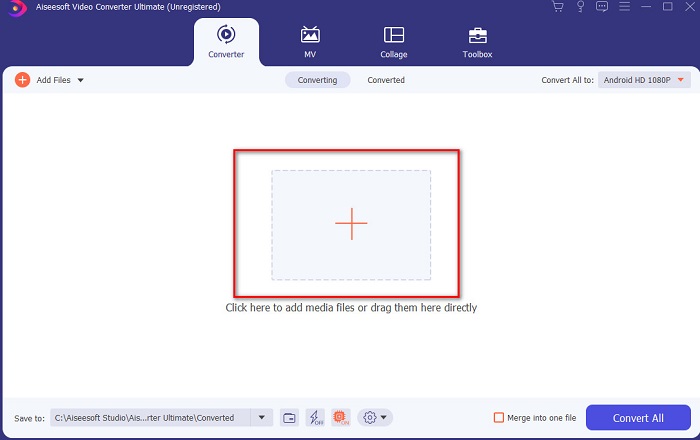
Étape 2. Lancez l’outil pour continuer, puis une interface comme celle‑ci apparaîtra. Au centre, cliquez sur le bouton +, recherchez le fichier DivX que vous souhaitez importer, puis cliquez sur Open.
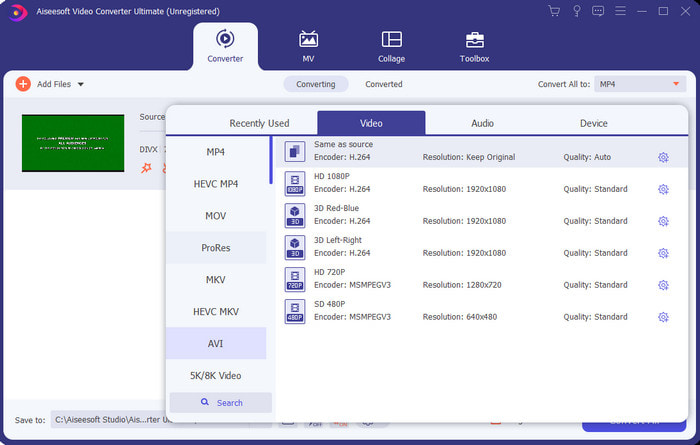
Étape 3. Pour modifier le format DivX en AVI, cliquez sur Convert All to, recherchez le format AVI et cliquez dessus.
Étape 4. Pour lancer la conversion, cliquez sur Convert All et attendez que le processus soit terminé.
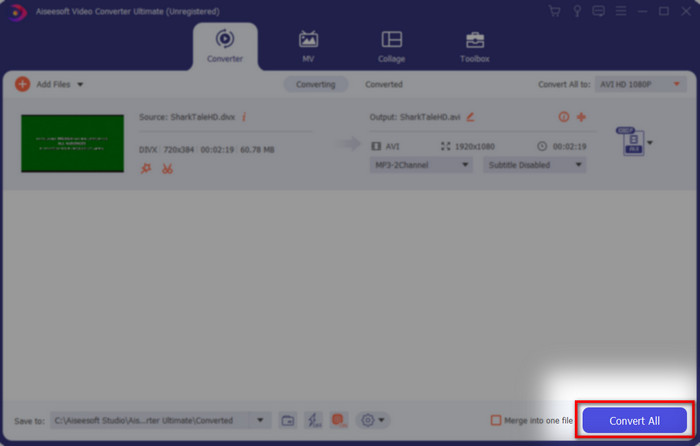
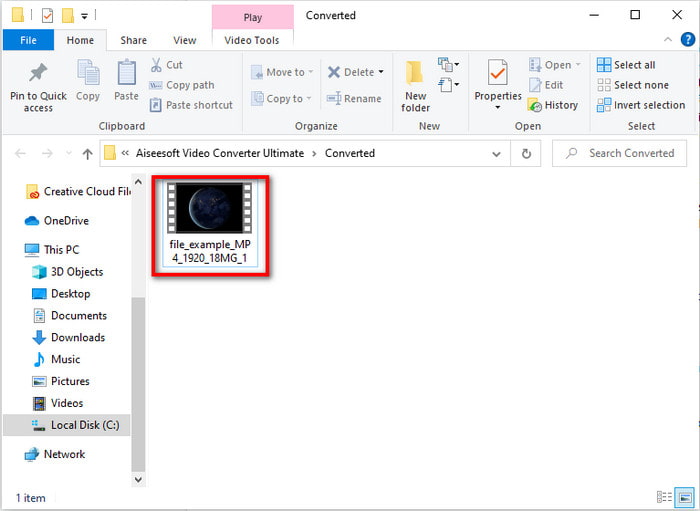
Étape 5. Patientez jusqu’à la fin du processus de conversion. Une fois celui‑ci terminé, un dossier s’affichera à l’écran contenant le fichier converti : cliquez dessus pour le lire et en profiter.
Top 2. Convertisseur vidéo Freemake
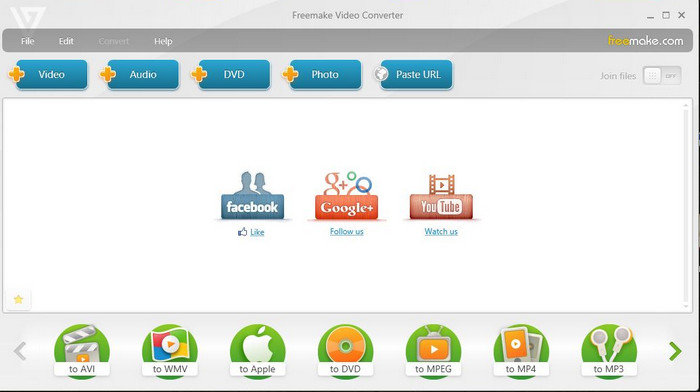
Un autre logiciel téléchargeable que vous pouvez utiliser pour convertir des formats est Freemake Video Converter. Cet outil a déjà aidé de nombreux utilisateurs à convertir n’importe quel fichier multimédia vers un nouveau format. Il est également largement considéré comme l’un des meilleurs logiciels à télécharger et sur lequel vous pouvez compter. Cependant, même si l’outil est performant, il ne prend pas encore en charge certains formats et son processus de conversion est très lent, car il ne dispose pas d’accélération matérielle comme FVC Video Converter Ultimate. Donc, si vous souhaitez convertir DivX en AVI gratuitement, ce logiciel peut être votre solution privilégiée.
Avantages
- Gratuit pour télécharger n'importe quel logiciel.
- L'apparence est simple.
Les inconvénients
- N'a pas d'accélération matérielle.
- Certains formats ne sont pas pris en charge ici.
Top 3. Convertisseur vidéo gratuit FVC
Que faire si vous voulez convertir un fichier multimédia dans un nouveau format sans rien télécharger ? Dans ce cas, FVC Free Video Converter est là pour vous aider. Contrairement aux deux outils mentionnés précédemment, celui‑ci est accessible sans installation. Même si le logiciel est gratuit à l’usage, il ne prend toutefois pas en charge certains formats. De plus, le choix des formats de conversion reste limité. En revanche, la vitesse de conversion est nettement plus élevée si on la compare à celle de Freemake Video Converter. Donc, si vous souhaitez savoir comment convertir DivX en AVI en ligne, suivez les étapes ci‑dessous.
Étape 1. Rendez‑vous sur le site principal de FVC Free Video Converter en cliquant sur ce lien.
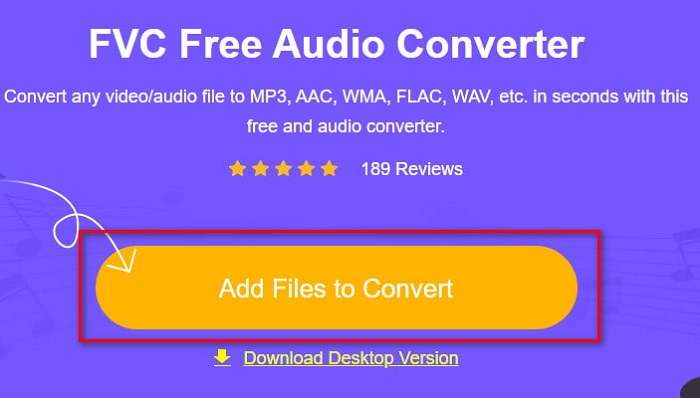
Étape 2. Cliquez sur Add Files to Convert pour télécharger le lanceur si c’est votre première utilisation. Et si le lanceur est déjà installé, cliquez à nouveau sur Add Files to Convert, recherchez le fichier dans le dossier, sélectionnez‑le et appuyez sur Open.
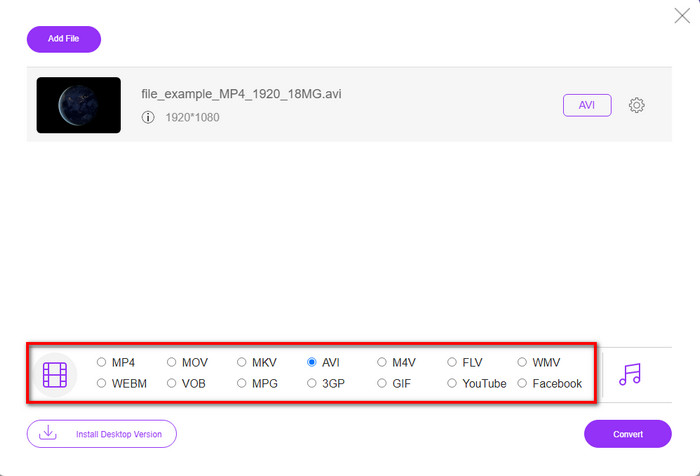
Étape 3. Sélectionnez le format AVI dans la liste des options ci‑dessous, ou tout autre format dans lequel vous souhaitez convertir votre fichier.
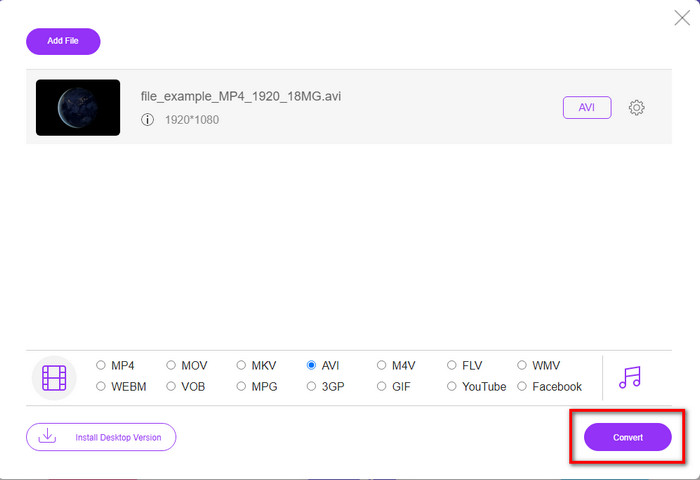
Étape 4. Une fois le format choisi, il est temps d’enregistrer le fichier sur votre disque en cliquant sur Convert.
Étape 5. Une fois le processus lancé, attendez que le dossier contenant le fichier apparaisse à l’écran. Ouvrez le fichier en cliquant dessus et lisez le média converti.
Haut 4. Online-Convert.com
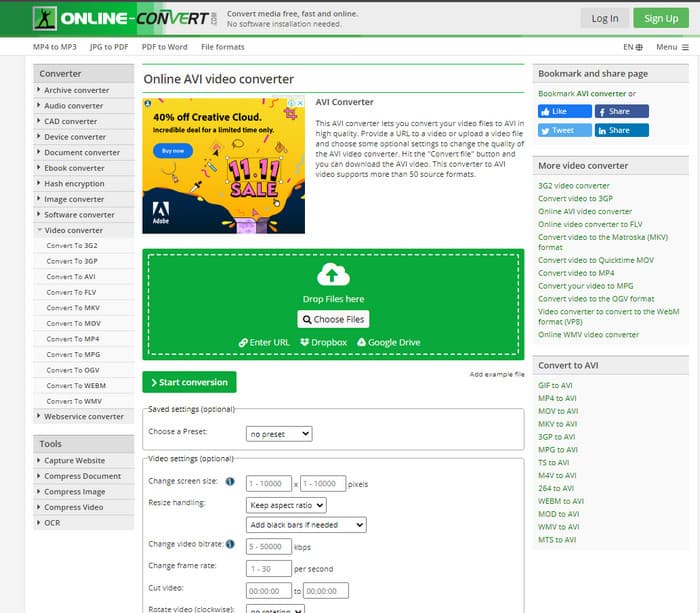
Un autre outil en ligne que vous pouvez utiliser pour convertir tout fichier multimédia est Online-Convert.com. Comme certains autres convertisseurs en ligne, cet outil ne prend en charge qu’un nombre limité de formats. Cependant, il propose des réglages vidéo intégrés que vous pouvez utiliser, mais ils sont difficiles à maîtriser, surtout si vous n’y êtes pas familiarisé. De plus, l’envoi et le téléchargement des fichiers y sont très lents comparés à FVC Free Video Converter.
Avantages
- Libre d'accès sur le web.
- L'interface de l'outil est excellente et il y a peu ou pas de publicités.
- Le processus de conversion dépendra de la connectivité Internet.
Les inconvénients
- Impossible d'y accéder sans internet.
- Le processus d'importation et d'exportation prendra beaucoup de temps par rapport aux autres outils.
Partie 3. Lequel est le meilleur pour convertir DivX en AVI ?
| Caractéristiques | Convertisseur vidéo FVC Ultimate | Convertisseur vidéo Freemake | FVC Convertisseur Vidéo Gratuit | Online-Convert.com |
| Convertir la vidéo et l'audio |  | | | |
| Conversion par lots | |  | | |
| Accélération matérielle | | | | |
| Outil basé sur le programme | Outil basé sur le bureau | Outil basé sur le bureau | Outil Web | Outil Web |
| Connectivité réseau | N'est pas requis | N'est pas requis | Obligatoire | Obligatoire |
Partie 4. FAQ sur les convertisseurs DivX vers AVI
Ce qui est mieux? DivX et XviD ?
DivX est un codec propriétaire bien connu pour le fichier conteneur vidéo et audio et il est également spécialisé dans l'extraction du fichier sur le disque tout en le compressant sans perdre la qualité. Alors que XviD est la version contrefaite du DivX et qu'il est un peu meilleur que le DivX. De plus, il n'est pas exclusif, ce qui signifie que n'importe qui peut l'utiliser quand ou comme vous le souhaitez.
Que sont les codecs ?
Un codec est utilisé pour compresser un fichier et distribuer n'importe lequel des fichiers audio et vidéo beaucoup plus rapidement dans une taille de fichier plus petite. En outre, il est utilisé pour décompresser un fichier lié audit codec pour ouvrir le fichier compressé que vous avez créé sans détruire sa crédibilité.
Pour avoir une taille de fichier plus petite, est-il idéal de compresser ou de convertir ?
Si vous souhaitez conserver la qualité d’une vidéo tout en réduisant sa taille, il est recommandé de la compresser à l’aide de ce lien. Mais si vous préférez une méthode encore plus simple, vous pouvez envisager de convertir vos vidéos en MP4 en lisant cet article pour comprendre comment procéder.
Conclusion
En conclusion, il est maintenant plus facile pour nous de savoir ce qu’est DivX et ce qu’est un fichier AVI. Nous vous avons également présenté 4 outils utiles que vous pouvez utiliser pour lire vos fichiers DivX en les convertissant au format AVI. Donc, si vous voulez vivre une réussite totale, utilisez FVC Video Converter Ultimate pour garantir votre succès.
Téléchargement gratuit pour Windows 7 ou version ultérieure Téléchargement sécurisé
Téléchargement gratuit pour macOS 10.7 ou version ultérieure - Téléchargement sécurisé
-
 [Gratuit et en ligne] 7 façons de convertir MTS en AVI sur un ordinateur Mac/Windows
 Comment convertir facilement MTS en AVI? Dans ce guide, vous trouverez 7 moyens gratuits et simples de convertir des fichiers MTS en AVI sur Windows ou Mac sans perte de qualité.
-
 Tutoriel pour convertir des fichiers MP4 en AVI avec 7 convertisseurs vidéo gratuits
 Vous voulez obtenir tous les moyens gratuits de convertir une vidéo AVI en MP4 ? Vous ne devriez pas manquer cet article. Voici 7 façons de convertir gratuitement des fichiers AVI en MP4 sur Windows, Mac, iPhone, Android et en ligne.
-
 3 méthodes simples pour convertir FLV en AVI sur le bureau et en ligne
 Voici trois méthodes pour vous aider à convertir efficacement vos fichiers vidéo FLV au format AVI sur Windows et Mac, afin que vous puissiez les regarder en haute qualité.
