


 Video Converter Ultimate
 Enregistreur d'écran
 Réparation vidéo
 Convertissez MOD en n'importe quel format comme MP4, MOV, AVI, MP3, etc.
7 convertisseurs MOD gratuits disponibles sur votre plate-forme pour transformer facilement le format MOD
Vous devez modifier votre fichier MOD ? Si c’est le cas, vous n’avez plus besoin de vous inquiéter ni de perdre du temps à essayer différents convertisseurs. Ne vous stressez pas, car aujourd’hui, nous avons la solution qu’il vous faut. Dès maintenant, nous allons vous présenter les meilleures façons de convertir un MOD en MP4, MOV, MPEG2, DVD ou en n’importe quel format vidéo que vous souhaitez, avec des étapes claires pour vous aider à suivre.

Partie 1. Top 7 des convertisseurs MOD gratuits pour convertir des fichiers MOD en ligne et hors ligne
1. FVC Video Converter Ultimate - Meilleur convertisseur MOD sur Windows et Mac
En tête de notre liste se trouve le convertisseur MOD le plus plébiscité sur toutes les plateformes, le FVC Video Converter Ultimate. Ce convertisseur offre à ses utilisateurs un processus de conversion ultra-rapide et, comme toujours, il ne les déçoit jamais. Même si la conversion avec cet outil est rapide, la qualité n’est pas altérée, car elle est préservée pendant le changement de format.
Quoi de plus que son processus ultra-rapide ? Il prend également en charge les formats massifs que vous pouvez importer ou exporter, tels que MOD, MP4, MOV, MKV, FLV, WMV et bien d'autres. En raison du format pris en charge, les clients sont devenus friands de l'outil, et beaucoup d'entre eux le recommandent à d'autres utilisateurs qui ont besoin de convertir leur format. Donc, si vous avez besoin d'aide pour convertir MOD en MP4 ou quel que soit le format vidéo que vous souhaitez, cet outil est une excellente aide en suivant les étapes indiquées ci-dessous.
Étape 1. Pour télécharger le convertisseur sur votre ordinateur, cliquez sur le bouton de téléchargement ci-dessous, puis choisissez la plateforme que vous utilisez actuellement. Ensuite, suivez rapidement le processus d’installation et lancez le logiciel. Si vous débutez dans la conversion, n’ayez aucune crainte, car les étapes fournies ici vous garantiront une conversion correcte de votre fichier MOD.
Téléchargement gratuit pour Windows 7 ou version ultérieure Téléchargement sécurisé
Téléchargement gratuit pour macOS 10.7 ou version ultérieure - Téléchargement sécurisé
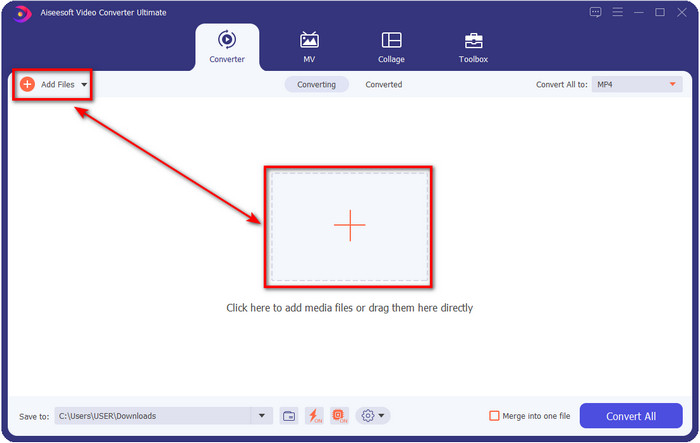
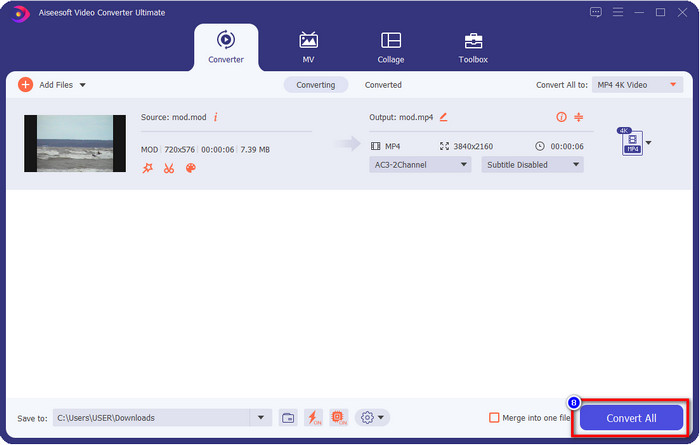
Étape 2. Importez le fichier MOD en cliquant sur Ajouter des fichiers, ou en appuyant sur le gros bouton + au centre de l’interface. Après cela, une fenêtre de votre ordinateur s’affichera ; parcourez alors vos dossiers, cliquez sur le fichier MOD, puis appuyez sur Ouvrir pour passer à l’étape suivante.
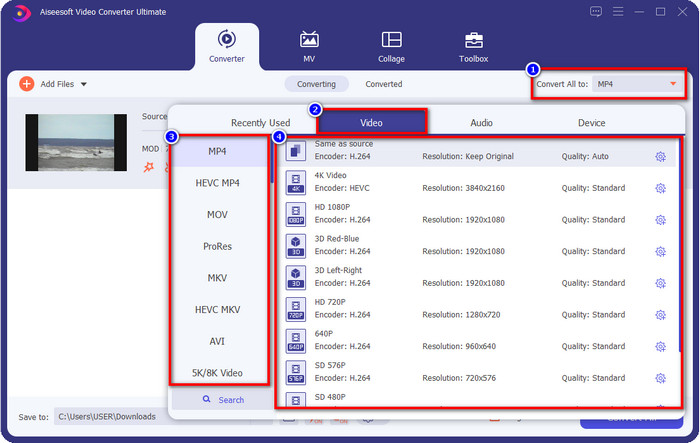
Étape 3. Pour modifier le format en MP4, MOV, MKV ou tout autre format dont vous avez besoin, cliquez sur Convertir tout en et choisissez.
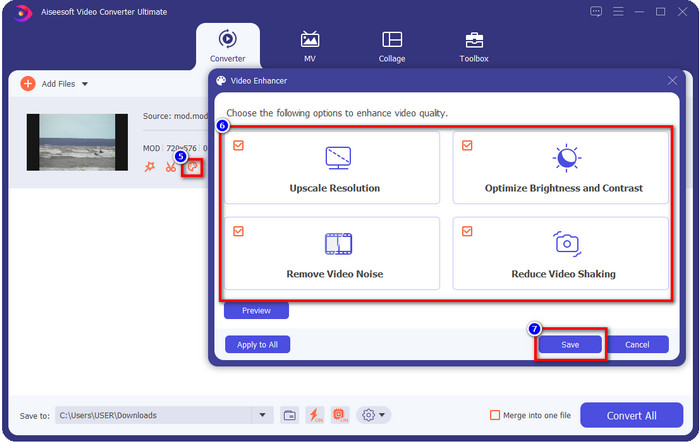
Optionnel. L’une des fonctionnalités remarquables offertes par cet outil est l’optimisation vidéo. Si vous cliquez sur l’icône palette de peinture, une nouvelle mini‑interface s’ouvrira ; vous pourrez alors effectuer des ajustements importants sur votre vidéo en cochant les cases. Cliquez sur Enregistrer pour appliquer les modifications apportées à votre vidéo MOD.
Étape 4. Après toutes ces étapes, il est temps de convertir votre MOD en cliquant sur Tout convertir. Aussi simple que 1‑2‑3, vous savez désormais convertir le format MOD vers un nouveau format.
Avantages
- Convertissez MOD en MP4, MOV, MKV, FLV, AVI ou en format 200+ disponible efficacement.
- Les fonctionnalités d'édition avancées incluent le rognage, la découpe, le recadrage, etc.
- Il est sûr et sans malware à télécharger.
- Disponible en téléchargement sur toutes les plateformes de bureau comme Windows et Mac.
Les inconvénients
- Pour profiter de toutes les fonctionnalités avancées, vous devrez acheter l'outil.
2. Convertisseur TOD gratuit iMovieSoft
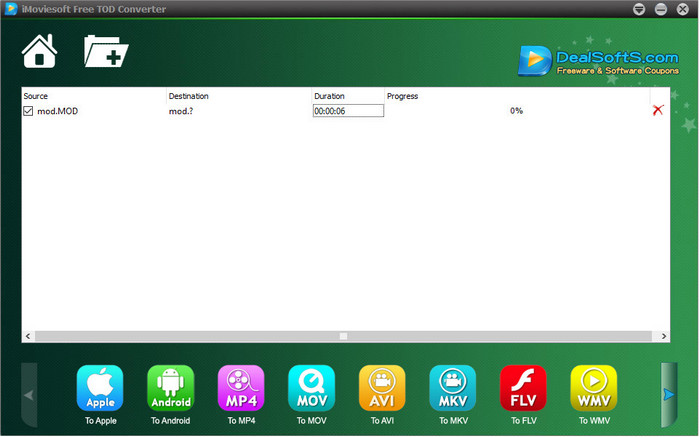
Un autre convertisseur que vous pouvez télécharger sur votre ordinateur est le iMoiveSoft Free TOD Converter. Avec lui, vous pouvez facilement convertir votre format MOD dans les formats disponibles. Cependant, le nombre de formats pris en charge par cet outil n’est pas très élevé, même si les formats les plus courants sont proposés. De plus, le site officiel de l’outil n’est pas sécurisé ; malgré l’avertissement, nous avons tout de même essayé de le télécharger sur notre système afin de vous fournir les étapes pour convertir des fichiers MOD en MOV, MP4, AVI, etc.
Étape 1. Téléchargez le convertisseur sur votre ordinateur et ouvrez‑le.
Étape 2. Cliquez sur Dossier et recherchez les fichiers MOD à importer.
Étape 3. Cliquez sur le format en bas, puis appuyez sur Convertir.
Avantages
- Il est téléchargeable gratuitement sur Windows et Mac.
- Facile à utiliser.
- Des fonctions d'édition de base sont disponibles.
Les inconvénients
- Le site Web principal n'est pas sécurisé.
- Il a une option de format que vous pouvez choisir.
- L'interface utilisateur doit être améliorée.
3. Convertisseur iOrgSoft
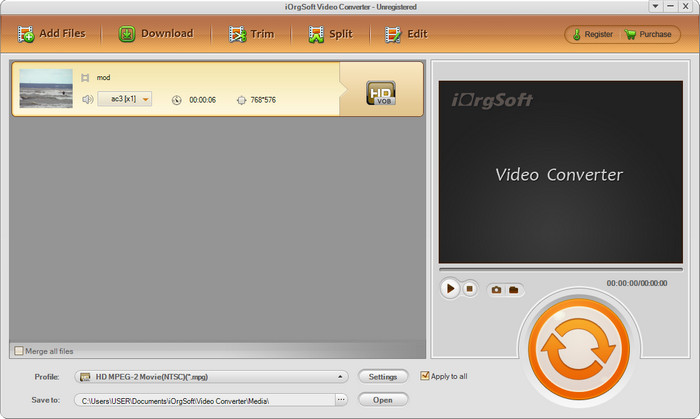
iOrgSoft Converter est une option si vous avez besoin de convertir un MOD en MPEG2 facilement. Le site principal de ce convertisseur présente également une connexion non sécurisée, comme iMovieSoft. Vous pouvez aussi utiliser un lien externe pour télécharger le logiciel. Bien que l’outil propose quelques options, son interface utilisateur n’est pas prioritaire, ce qui signifie qu’il ne faut pas s’attendre à une interface très soignée. De plus, des plantages et des bugs peuvent survenir au moment de la conversion.
Étape 1. Recherchez la page principale du convertisseur et téléchargez‑le depuis celle‑ci.
Étape 2. Ouvrez le convertisseur, cliquez sur Ajouter des fichiers pour insérer les fichiers MOD, cliquez sur la liste des formats et choisissez celui que vous souhaitez.
Étape 3. Appuyez sur le bouton Convertir pour lancer la conversion.
Avantages
- Il prend en charge plus de formats qu'iMovieSoft.
- Simple à utiliser et facile à comprendre.
- Téléchargez-le sur Windows et Mac.
Les inconvénients
- Connexion non sécurisée à son site Web principal.
- L'interface utilisateur est terrible.
4. FFmpeg
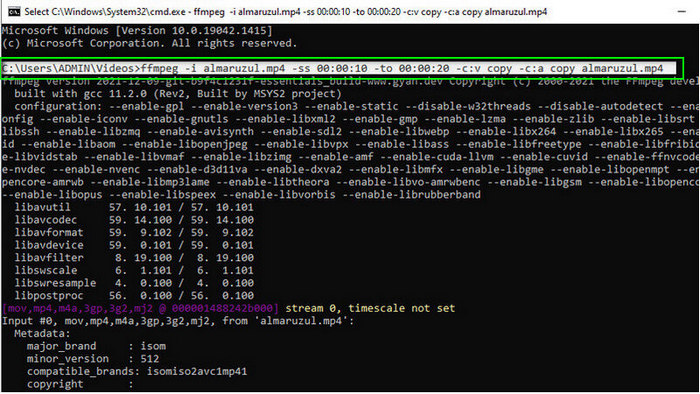
Si vous avez besoin d’un convertisseur gratuit de MOD en MOV, alors FFmpeg est là pour vous aider. Contrairement aux autres convertisseurs de cette liste, il utilise une interface en ligne de commande (CLI) pour communiquer avec l’outil par du texte. Même si ce n’est pas très familier pour tout le monde, certains utilisateurs continuent de l’utiliser comme convertisseur. Donc, si cet outil a retenu votre attention, suivez les étapes ci‑dessous.
Étape 1. Téléchargez FFmpeg et exécutez le fichier .exe.
Étape 2. Ouvrez le CMD ; vous pourrez ainsi communiquer avec l’outil.
Étape 3. Recherchez l’emplacement du fichier à l’aide de l’invite de commande. Ensuite, copiez et collez ce texte : ffmpeg -i input.mod -vn -ar 44100 -ac 2 -b:a 192k output.mp4 pour obtenir un MP4. Vous pouvez aussi changer le format en MOV, MKV, AVI et bien d’autres. Pour lancer le processus, appuyez sur Entrée sur votre clavier.
Avantages
- Convertisseur vidéo unique disponible sur la plupart des plateformes.
- Sûr à utiliser.
- Il est fiable pour convertir votre format.
Les inconvénients
- Ce n'est pas très facile à utiliser.
- Ce n'est pas le meilleur choix pour les débutants ou les débutants pour convertir le format.
5. CloudConvert
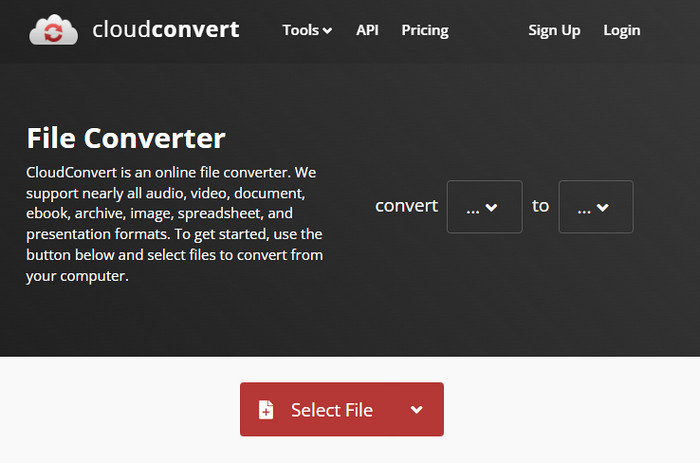
Vous ne souhaitez pas télécharger un convertisseur sur votre ordinateur ? Dans ce cas, vous pouvez tout de même convertir un format MOD en ligne avec CloudConvert. Cet outil en ligne offre à ses utilisateurs un processus de conversion simple mais efficace. Il prend aussi en charge la conversion d’autres types de fichiers comme les PDF, archives, livres électroniques, etc., vers un nouveau format.
Étape 1. Recherchez CloudConvert dans votre navigateur préféré.
Étape 2. Cliquez sur Select File et importez le fichier MOD. Appuyez sur le bouton déroulant et choisissez votre format idéal. Ensuite, cliquez sur Convert.
Étape 3. Après la conversion, cliquez sur Download pour enregistrer le nouveau format de fichier sur votre disque.
Avantages
- Le téléchargement de l'outil n'est pas nécessaire.
- Outil web en ligne gratuit.
- Convivial.
Les inconvénients
- Dépendant du réseau.
- Le déroulement du processus dépendra de la vitesse de votre connexion Internet.
6. Convertisseur365
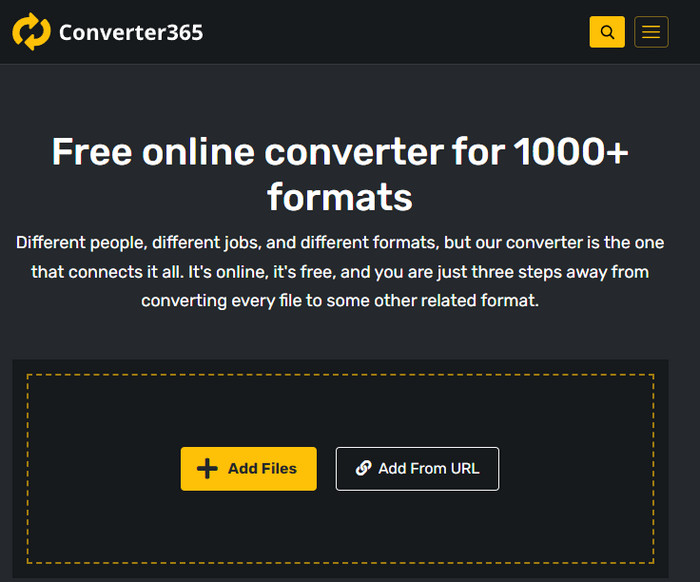
Un autre convertisseur MOD vers MP4 gratuit en ligne que vous pouvez utiliser est Converter365. C’est l’un des outils en ligne qui offre une interface au design élégant. Grâce à cela, son utilisation donne une impression très professionnelle ; toutefois, nous avons rencontré des difficultés lors de la conversion de fichiers vidéo, car l’outil avait tendance à planter. Néanmoins, si vous devez convertir facilement votre fichier MOD, cela peut vous être utile.
Étape 1. Ouvrez votre navigateur et recherchez Converter365.
Étape 2. Cochez Add Files, puis cherchez le fichier .mod. Une fois le fichier trouvé, choisissez le format en cliquant sur le bouton déroulant.
Étape 3. Appuyez sur Start Conversion, et la conversion commencera.
Avantages
- Le convertisseur est accessible via le Web.
- Il fournit une conversion simple mais efficace.
- L'interface utilisateur semble professionnelle.
Les inconvénients
- Il a besoin d'une connexion Internet à utiliser.
- Parfois, des erreurs se produisent lors de la conversion du format.
7. Zamzar
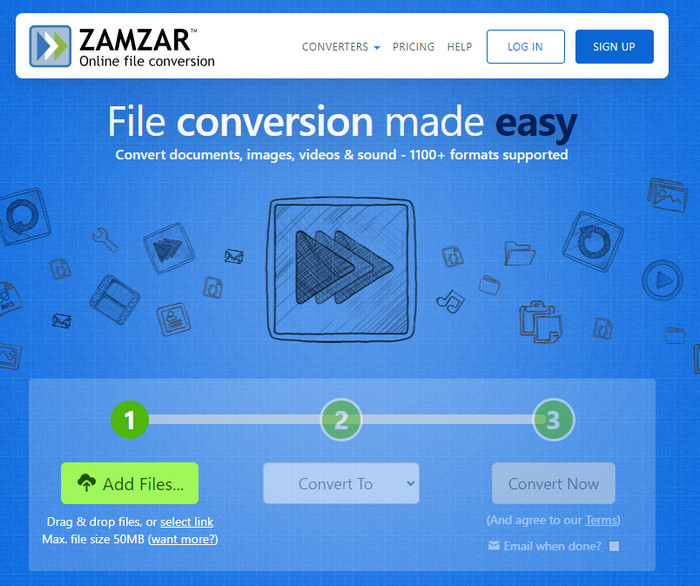
Si vous avez besoin d’un convertisseur MOD en ligne simple et pratique, alors Zamzar est une bonne solution. Cet outil propose un processus de conversion clair et direct pour vos fichiers .mod. De plus, c’est sans aucun doute l’un des convertisseurs les plus sûrs disponibles sur le web. Donc, si vous souhaitez essayer cet outil, vous pouvez suivre les étapes ci‑dessous.
Étape 1. Accédez à Zamzar en le recherchant dans votre navigateur préféré.
Étape 2. Appuyez sur Add File pour insérer le fichier MOD que vous devez convertir. Cliquez sur Convert To et choisissez le format dont vous avez besoin.
Étape 3. Cliquez sur Convert Now et patientez pendant le processus. Ensuite, appuyez sur Download pour l’enregistrer sur le disque de votre ordinateur.
Avantages
- L'une des meilleures options si vous avez besoin de convertir un format.
- Il fournit un processus simple de conversion.
- Disponible dans tous les navigateurs Web.
Les inconvénients
- Dépendant d'Internet, pas d'Internet, vous ne pouvez pas l'utiliser.
- Il prend en charge moins d'options de format.
En rapport:
Partie 2. FAQ sur les convertisseurs MOD
Qu'est-ce que MOD ?
MOD est un format bidirectionnel qui pourrait être utilisé comme audio pour les applications de suivi de musique numérique standard. Il contient des motifs de notes, des numéros d'instruments et des contrôleurs de messages avec différentes pistes pour les échantillons de sons. Comme il est mentionné, il est bidirectionnel; vous pouvez également l'utiliser comme format vidéo pour les caméscopes numériques fabriqués par Panasonic et JVC. Bien que ce format soit pris en charge par des marques connues, il est un peu dépassé si nous étions sur le point de le comparer avec l'autre conteneur vidéo.
Les lecteurs multimédias prennent-ils en charge l'extension .mod ?
Tous les lecteurs multimédias ne prennent pas en charge ce format, surtout si votre lecteur n'a pas de codec vidéo MPEG-2 à l'intérieur. C'est tout un problème pour tout le monde; vous pouvez télécharger une extension vidéo MPEG-2 si vous en avez besoin pour jouer. Mais vous pouvez également convertir le fichier dans un format pris en charge sur vos plates-formes, c'est jusqu'à présent le moyen le plus simple et le plus sûr. Alors maintenant, si vous avez besoin de convertir votre fichier MOD, vous pouvez utiliser FVC Video Converter Ultimate à la place. Vous n'avez aucune idée de l'outil ? Dans ce cas, lisez les détails ci-dessus.
Le MOD est-il compatible avec le lecteur DVD ?
Il n'est pas compatible avec le lecteur DVD ; cependant, vous pouvez le graver sur DVD pour le rendre compatible avec le lecteur DVD.
Conclusion
Ces sept outils sont les meilleurs choix si vous avez besoin d’un convertisseur MOD, en raison de leurs performances et de leur efficacité. Nous avons testé soigneusement tous ces logiciels et nous avons constaté que le FVC Video Converter Ultimate offre un rendu et des fonctionnalités exceptionnels que les autres outils ne peuvent pas égaler. Donc, si vous souhaitez profiter pleinement de cet outil, vous pouvez d’abord le télécharger sur votre ordinateur et l’utiliser comme bon vous semble.

Convertisseur vidéo FVC Ultimate
2 999 368+ téléchargements- Convertissez MOD en n'importe quel format populaire.
- Améliorez naturellement la qualité vidéo
- Créez un collage vidéo fluide avec une sortie de haute qualité
- Éditez des vidéos comme un pro, y compris le recadrage, la rotation, l'ajout de filtres, etc.
Téléchargement gratuit pour Windows 7 ou version ultérieure Téléchargement sécurisé
Téléchargement gratuit pour macOS 10.7 ou version ultérieure - Téléchargement sécurisé
-
 2 convertisseurs MPG ultimes pour convertir MPG en WMV gratuitement
 Voulez-vous convertir MPG en WMV gratuitement ? Dans ce cas, vous avez de la chance car nous avons découvert qu'il existe deux outils que vous pouvez utiliser pour convertir vos fichiers MPG.
-
 Comment changer iTunes M4V en MKV sur Mac et Windows de la manière la plus rapide
 Si vous avez besoin de convertir M4V en MKV sur Mac, vous devez lire cet article. Comme nous fournissons des faits sur les convertisseurs qui vous aideront dans votre processus de conversion.
-
 Top 5 des convertisseurs MPEG vers MKV gratuits disponibles sur toutes les plateformes
 Quels sont les convertisseurs MPEG vers MKV disponibles ? Besoin d'en savoir plus sur les convertisseurs MPEG disponibles sur votre plateforme ? Alors cet article est pour vous.
