


 Video Converter Ultimate
 Enregistreur d'écran
 Réparation vidéo
Détails dont vous avez besoin pour être éclairé sur la conversion de MPG en AVI
D’une manière générale, un fichier MPG est un fichier vidéo classique qui utilise un format vidéo numérique normalisé par le Moving Picture Experts Group (MPEG). Il stocke la vidéo, l’audio et les métadonnées dans un seul fichier entrelacé. Il est courant d’utiliser des fichiers MPG pour créer des vidéos diffusées sur Internet. Ce type de format vidéo n’est pas facile à convertir si vous n’avez aucune connaissance ni expérience des convertisseurs qui prennent en charge ou réalisent la conversion de MPG en AVI. Poursuivez la lecture de cet article pour mieux comprendre les détails et les options à prendre en compte afin de mener à bien le processus de conversion souhaité.

Partie 1. MPG et AVI - Un aperçu
MPEG est un format de fichier vidéo développé par le Moving Picture Experts Group, le même groupe qui a créé les formats MP3 et MP4. Selon l’usage prévu, MPEG utilise une compression de fichiers MPEG-1 ou MPEG-2.
Pour compresser une vidéo brute de qualité VHS et de la musique de CD à 1,5 mégabit par seconde sans trop sacrifier la qualité, le MPEG-1 a été créé. Il est ainsi devenu l’un des formats vidéo/audio les plus répandus et les plus compatibles au monde. Les données vidéo en MPEG-1 sont généralement transmises à 30 images par seconde, avec une résolution d’environ 352 × 240 pixels.
Cependant, les ordinateurs Windows utilisent AVI comme format vidéo par défaut. Dans un format de conteneur multimédia, comme DivX ou XviD, l’audio et la vidéo peuvent être stockés à l’aide de plusieurs codecs. De nombreux formats vidéo alternatifs, comme MPEG et MOV, utilisent moins de compression et davantage d’espace de stockage qu’un fichier AVI. Il est également possible de produire des fichiers AVI sans compression. Il en résulte des tailles de fichiers très importantes — environ 2 à 3 Go par minute de vidéo — car les fichiers sont alors sans perte. Quel que soit le nombre de fois où vous ouvrez ou enregistrez le fichier, un fichier sans perte conserve sa qualité. Parmi les avantages supplémentaires, on trouve une lecture ne nécessitant aucun codec.
Partie 2. Logiciel le plus efficace pour convertir MPG en AVI
Si vous vous êtes déjà demandé comment convertir gratuitement un fichier vidéo MPG en AVI, ce nouveau logiciel, présenté comme le meilleur, est celui que cet article vous recommande d’utiliser. Video Converter Ultimate est un logiciel téléchargeable gratuitement sur Windows et Mac, qui peut convertir votre fichier MPG en AVI beaucoup plus rapidement que les convertisseurs en ligne. En plus de ces deux formats vidéo, ce logiciel prend également en charge de nombreux autres formats parmi lesquels vous pouvez choisir. Il est considéré comme le meilleur en raison de la qualité de sortie que vous obtiendrez en l’utilisant. Maintenant que vous avez un aperçu de ce que ce logiciel peut faire, accrochez‑vous et découvrons comment il fonctionne :
Étape 1. Pour commencer, cliquez simplement sur le bouton Téléchargement gratuit ci‑dessous. Une fois le téléchargement terminé, vous pouvez choisir d’installer le logiciel sur Windows ou sur Mac. Une fois le logiciel installé sur le bureau de votre ordinateur, vous pouvez commencer à l’utiliser en cliquant sur le bouton Commencer maintenant.
Téléchargement gratuit pour Windows 7 ou version ultérieure Téléchargement sécurisé
Téléchargement gratuit pour macOS 10.7 ou version ultérieure - Téléchargement sécurisé
Étape 2. Ouvrez le logiciel que vous venez de télécharger. Lorsque vous l’ouvrez pour la première fois, une fenêtre avec l’interface Convertisseur s’affiche. C’est ici que vous commencerez le processus de transcodage de votre vidéo.
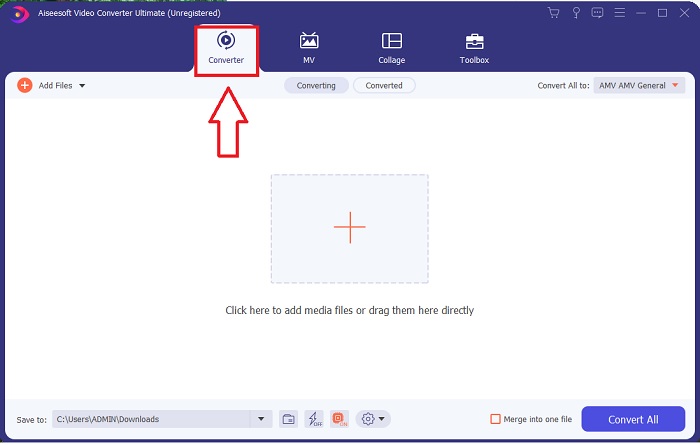
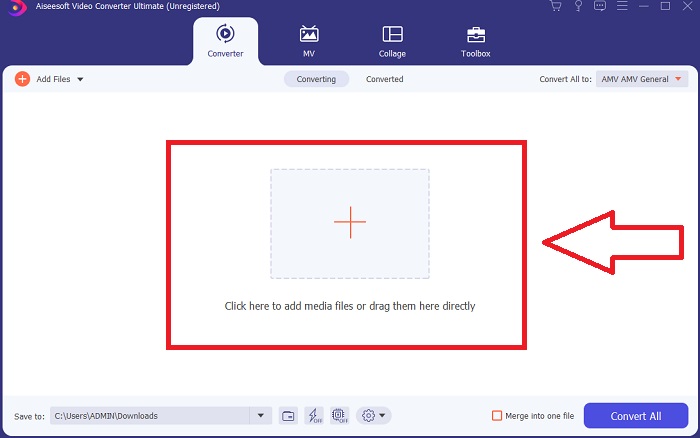
Étape 3. Vous pouvez lancer le processus de conversion en important vos fichiers dans le logiciel. Convertir une vidéo est aussi simple que de la faire glisser sur le symbole Plus.
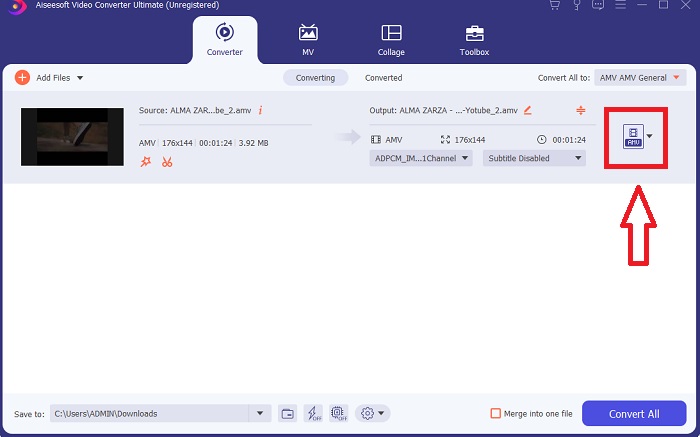
Étape 4. Faites un clic droit sur un format vidéo et choisissez Enregistrer vers ou Enregistrer vers un stockage externe. Recherchez puis sélectionnez le type de fichier AVI dans le menu déroulant. Une fois le type de fichier vidéo AVI choisi, de nombreux réglages de qualité vidéo sont disponibles. Vous pouvez modifier les paramètres de qualité si le rendu souhaité ne figure pas dans la liste. L’icône en forme d’engrenage vous permet de changer la résolution de l’affichage, la fréquence d’images et la qualité audio. Pour enregistrer vos modifications, cliquez sur le bouton Créer un nouveau.
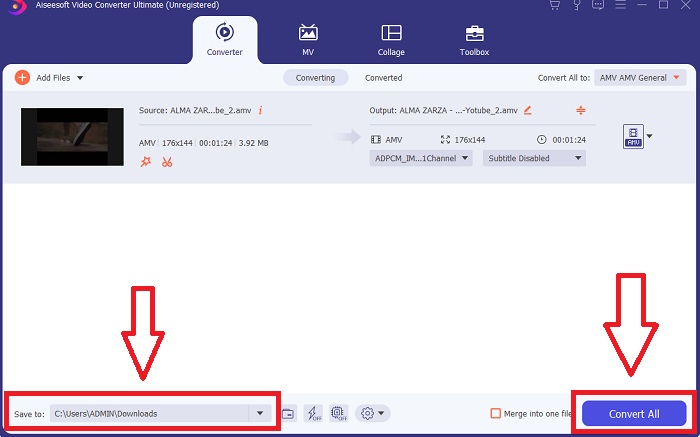
Étape 5. Cliquez sur Tout convertir une fois que vous avez modifié la vidéo choisie et qu’elle est prête à être transférée sur votre ordinateur.
Partie 3. Conseils rapides : autres outils efficaces à prendre en compte
Méthode 1. Utiliser CloudConvert
CloudConvert est un convertisseur vidéo en ligne. Ce convertisseur en ligne prend également en charge les formats MP4, WEBM et AVI, entre autres. Vous pouvez choisir la qualité, la résolution et la taille du fichier de la vidéo. Si vous réfléchissez à la façon de convertir MPG en AVI dans cet outil en ligne, voici la procédure à suivre pour l'utiliser :
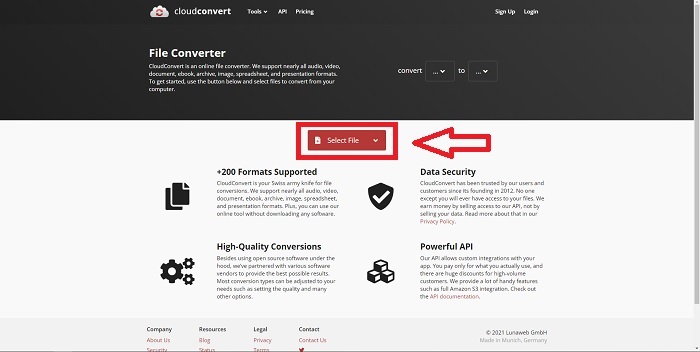
Étape 1. Importez un fichier depuis votre ordinateur en cliquant sur Sélectionner le fichier.
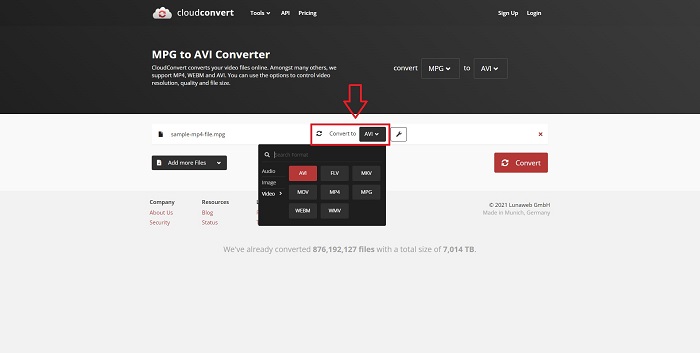
Étape 2. Ensuite, choisissez le format vers lequel votre fichier sera converti en cliquant sur la section de format à côté de l’icône clé/clef. Vous avez également la possibilité d’ajouter d’autres fichiers à convertir.
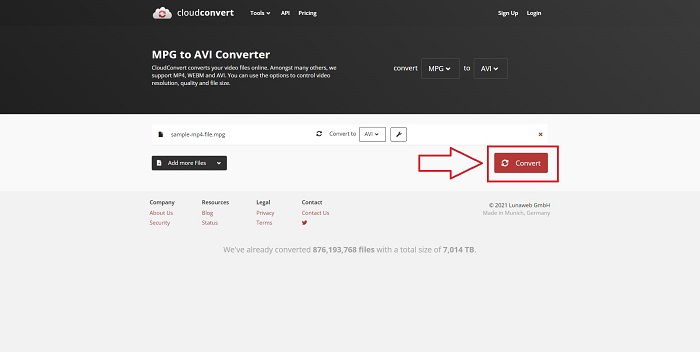
Étape 3. Cliquez sur Convertir pour convertir tous les fichiers que vous avez importés.
Méthode 2. Utiliser Zamzar
Zamzar est un outil Web pour convertir des fichiers. Les conversions peuvent être effectuées dans une variété de formats sans avoir besoin de télécharger de logiciel. Zamzar peut convertir un fichier d'un format à un autre, tel qu'un Adobe PDF en un document Microsoft Word, en tapant une URL ou en téléchargeant un ou plusieurs fichiers (tant qu'ils sont tous dans le même format). Afin d'acquérir des connaissances sur cet outil en ligne, voici les étapes fournies pour vous :
Étape 1. Recherchez Zamzar avec n’importe quel moteur de recherche. Après avoir cliqué sur le site, vous pouvez télécharger un fichier dans son interface en cliquant sur Ajouter des fichiers.
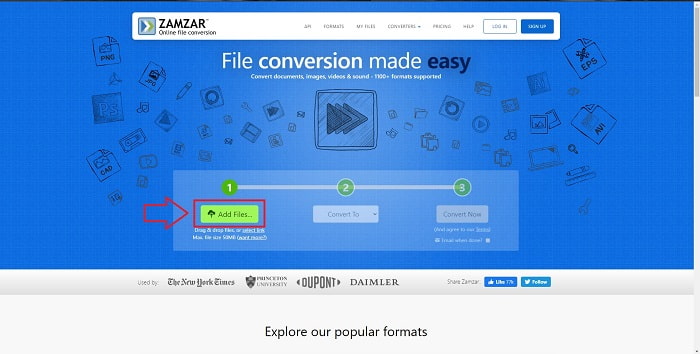
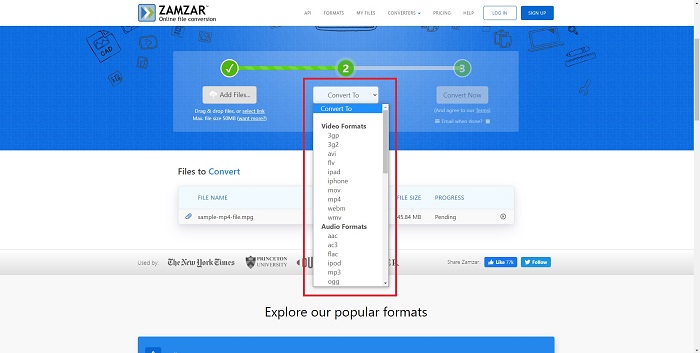
Étape 2. Ensuite, vous pouvez convertir le fichier en choisissant le format souhaité. Cliquez sur Convertir en pour afficher tous les formats pris en charge par cet outil en ligne.
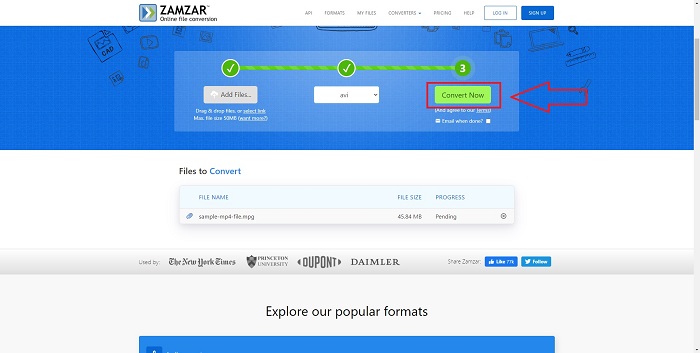
Étape 3. Pour convertir le fichier, cliquez sur Convertir maintenant.
Partie 4. FAQ sur MPG et AVI
AVI ou MPG sont-ils meilleurs ?
Le stockage est possible avec des fichiers AVI, tandis que l'enregistrement vidéo est réalisé avec des fichiers MPEG. AVI est légèrement supérieur au MPEG ; cependant, si MPEG est le format à utiliser, vous souhaitez graver des vidéos DVD. Microsoft Windows a développé le format de fichier AVI en réponse au format de fichier MOV d'Apple, tandis que Moving Picture Group a développé le format MPG.
Quels sont les avantages et les inconvénients d'AVI ?
Par rapport aux autres formats de fichiers, les fichiers AVI peuvent être extrêmement volumineux s'ils ne sont pas compressés. Vous devez être prêt à céder de l'espace disque en échange des avantages du fichier AVI, car vous ne pourrez pas stocker autant de fichiers que vous le feriez autrement. Si vous compressez un fichier AVI en ligne au-delà d'un certain point, la qualité vidéo sera réduite en conséquence.
Quel est le format AVI ou MPG plus petit ?
Sur Internet, plus les fichiers sont volumineux, plus le téléchargement est long. Il est logique d’encoder les vidéos dans des fichiers de plus petite taille, même si cela entraîne une légère perte de qualité. Pour la lecture, l’AVI reste toutefois préférable au MPG, car davantage de lecteurs de salon sont capables de lire les fichiers AVI que les fichiers MPG. Vous voulez lire vos fichiers MPG sur votre ordinateur ? Cliquez ici pour en savoir plus.
Conclusion
Pour conclure tout ce que nous avons abordé, Video Converter Ultimate est le meilleur convertisseur que vous devriez envisager d’utiliser, plutôt que tous les convertisseurs MPG en AVI en ligne mentionnés ci‑dessus. Ce logiciel est gratuit et il offre un processus de conversion plus rapide que les outils de conversion en ligne. Il prend également en charge de nombreux formats et vous garantit une excellente qualité de sortie vidéo. À part cela, il n’y a aucune raison de ne pas utiliser ce logiciel.
-
 Comment convertir des fichiers MPEG en MP4 gratuitement sur Windows, Mac, en ligne
 Lisez et obtenez 3 façons gratuites de convertir des fichiers MPEG en fichiers MP4 sur votre ordinateur. Vous pouvez utiliser des convertisseurs vidéo en ligne et de bureau pour transformer facilement le format MPEG en MP4.
-
 [2025] Meilleurs outils et méthodes simples pour convertir un fichier MPEG en MP3
 Cet article explique principalement comment convertir vos vidéos MPEG en MP3 à l'aide des outils les plus fiables de la liste.
-
 4 méthodes efficaces pour convertir des fichiers MOV en AVI sur PC et Mac [2025]
 Voulez-vous savoir quel est le meilleur convertisseur MOV en AVI sur le Web ? Et pourquoi le FVC Ultimate Video Converter pourrait être celui qu'il vous faut.
