


 Video Converter Ultimate
 Enregistreur d'écran
 Réparation vidéo
 Téléchargement sécurisé
Méthodes en ligne et hors ligne les plus efficaces pour convertir MTV en MKV
Il existe des cas où votre fichier au format MTV est incompatible avec votre appareil ou votre programme. La meilleure solution consiste à changer le format de votre fichier vidéo. Heureusement, nous avons les meilleures méthodes pour vous. Cet article va vous présenter plusieurs applications que vous pouvez utiliser pour convertir un fichier MTV en MKV instantanément. Ne sautez aucune partie de cet article afin de découvrir le meilleur convertisseur MTV vers MKV.

Partie 1 : Informations détaillées sur MTV et MKV
Qu'est-ce que MTV ?
MTV signifie Music Television. Le 1er août 1981, MTV a été lancé en tant que chaîne câblée américaine. Ce format de fichier a été créé pour permettre la lecture vidéo sur des lecteurs MP4 portables bon marché fabriqués en Chine, sans augmenter le coût de ces appareils par l’ajout de licences. Le lecteur MTV était fabriqué en Chine et pouvait afficher des vidéos, des fichiers texte et des images. Enfin, il fonctionne en affichant une série d’images brutes non compressées au format rgb565/555 tout en lisant de l’audio MP3.
Qu'est-ce que MKV ?
MKV signifie Matroska Video. Il s’agit d’un conteneur multimédia, similaire aux formats MOV et AVI. Cependant, il prend en charge davantage de pistes de sous-titres et de pistes audio dans un même fichier. Ce conteneur multimédia Matroska est utilisé pour la vidéo. Il est également basé sur l’Extensible Binary Meta Language. La différence entre le format MKV et d’autres formats vidéo est que les autres formats sont des codecs, tandis que le MKV est un conteneur.
Partie 2 : Comment convertir MTV en MKV sans perte
Convertir un fichier MTV en MKV sans perte est simple à réaliser avec Video Converter Ultimate. Cette application peut convertir de nombreux formats, tels que MOV, MTS, XVID, FLV, AVI, MP4, et bien d’autres. Concernant le processus, elle offre une vitesse de conversion 30 fois plus rapide, ce qui est incomparable par rapport aux autres convertisseurs. Vous pouvez aussi convertir plusieurs fichiers simultanément grâce à la conversion par lots. De plus, si vous souhaitez améliorer votre vidéo et la rendre plus attrayante, vous pouvez utiliser cet outil. Il propose de nombreux outils pour éditer et optimiser votre vidéo, comme un amélioreur vidéo qui vous permet d’augmenter la résolution de votre vidéo, de supprimer le bruit, d’optimiser la luminosité et le contraste et de réduire les tremblements. Avec ces fonctions, vous pouvez être sûr que votre vidéo sera plus satisfaisante. En outre, si vous voulez ajouter un filigrane à votre vidéo, vous pouvez aussi utiliser cet outil, car il est capable d’en insérer un dans votre vidéo. Ce ne sont là que quelques-unes des fonctions de cet outil ; si vous voulez en découvrir d’autres encore plus intéressantes, vous devez essayer d’utiliser Video Converter Ultimate.
Fonctionnalités :
◆ Capable de créer un collage.
◆ Offrir des outils d'édition vidéo, tels que Enhancer, Watermark Remover, Compressor, etc.
◆ Vous permet de créer des vidéos musicales.
◆ Convertir de nombreux formats de fichiers vidéo.
Avantages
- A un processus de conversion 30 fois plus rapide.
- Parfait pour les utilisateurs non professionnels.
- Peut convertir plusieurs formats de fichiers, tels que MP4, MOV, MTV, MKV, etc.
- Aucun filigrane appliqué.
- Accessible sur Windows et Mac.
Les inconvénients
- Vous devez acheter l'application pour découvrir d'autres fonctionnalités intéressantes.
Suivez ces guides détaillés pour convertir MTV en MKV instantanément.
Étape 1 : Téléchargez Video Converter Ultimate sur votre ordinateur Windows ou Mac en cliquant sur le bouton Télécharger ci‑dessous. Ensuite, installez le logiciel sur votre appareil puis ouvrez l’application.
Téléchargement gratuit pour Windows 7 ou version ultérieure Téléchargement sécurisé
Téléchargement gratuit pour macOS 10.7 ou version ultérieure - Téléchargement sécurisé
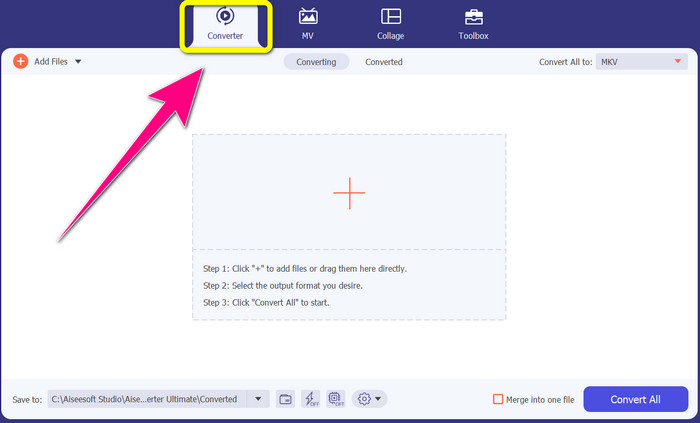
Étape 2 : Vous verrez quatre options dans la partie supérieure de l’interface : Converter, MV, Collage et Toolbox. Sélectionnez l’onglet Converter.
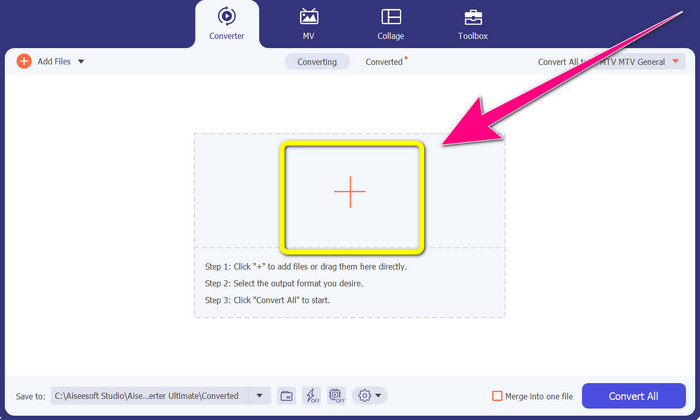
Étape 3 : Cliquez ensuite sur l’icône + pour ajouter le fichier vidéo MTV que vous souhaitez convertir.
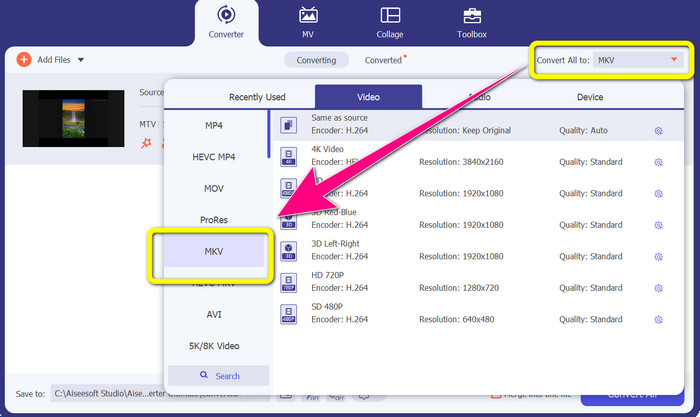
Étape 4 : Une fois votre vidéo ajoutée, cliquez sur l’option Convert all to. Puis, cherchez le format de fichier MKV dans les options de format et cliquez dessus.
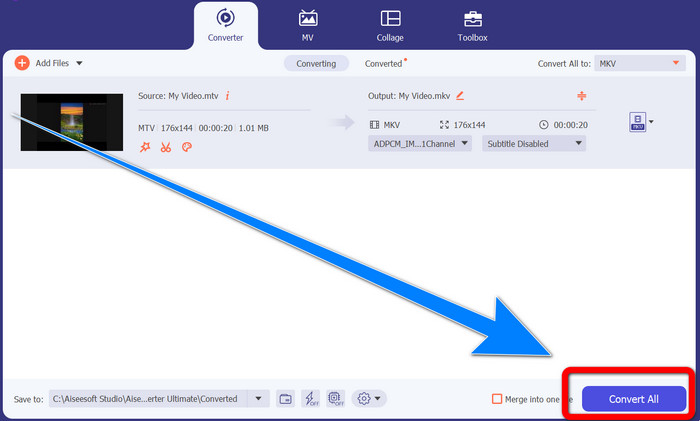
Étape 5 : Après avoir sélectionné le format de fichier MKV, vous pouvez cliquer sur le bouton Convert All pour convertir et enregistrer votre vidéo finale.
Partie 3 : Logiciel en ligne pour convertir MTV en MKV
Utiliser Converthelper
Vous avez appris à convertir un fichier MTV en MKV sur Windows et Mac. Vous allez maintenant découvrir la procédure pour convertir des fichiers en ligne. L’un des convertisseurs utiles que vous pouvez utiliser est Converthelper. Cet outil en ligne est gratuit et vous permet de convertir différents formats de fichiers, comme MTV, MKV, DDAT, AVE, PS GFP, WMF, etc. De plus, il ne nécessite que quelques étapes pour convertir, ce qui convient parfaitement aux débutants. Et vous pouvez convertir de nombreux fichiers sans limite avec Converthelper. Cependant, ce convertisseur en ligne gratuit est lent lors du processus de conversion : il lui faut un certain temps pour convertir complètement les fichiers. En outre, les performances de cet outil dépendent de votre connexion Internet. Donc, pour convertir des fichiers avec Converthelper, vous devez disposer d’une bonne connexion Internet. Suivez les étapes ci‑dessous pour convertir un fichier MTV en MKV en ligne.
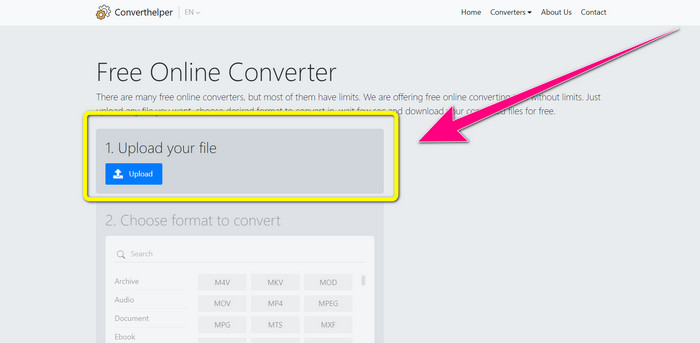
Étape 1 : Rendez‑vous sur le site Converthelper dans votre navigateur. Puis, cliquez sur le bouton de téléchargement (Upload) et ajoutez la vidéo au format MTV.
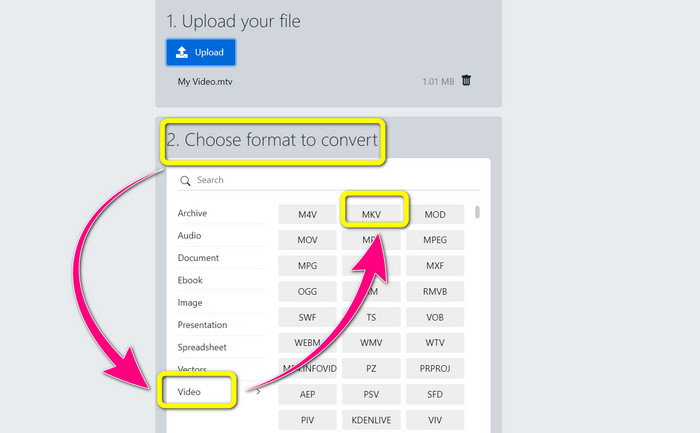
Étape 2 : Après avoir importé votre fichier, passez au numéro 2. Choisissez les options de format. Cliquez sur le bouton Video, recherchez le fichier MKV et cliquez dessus.
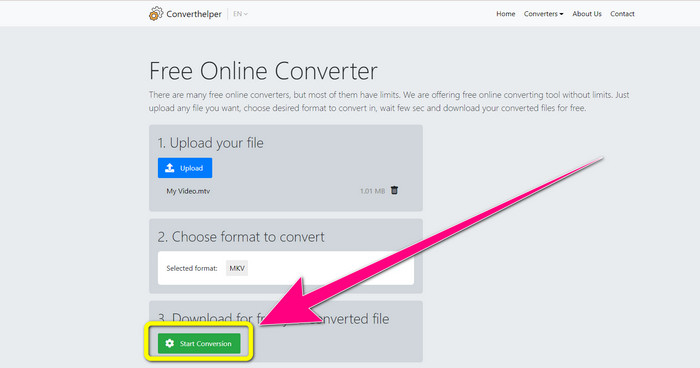
Étape 3 : Pour la dernière étape, cliquez sur le bouton Start Conversion pour convertir votre fichier MTV au format MKV. Attendez la fin du processus de conversion, puis téléchargez votre vidéo finale au format MKV.
Utilisation de la conversion en ligne
Un autre outil en ligne que vous pouvez utiliser pour convertir MTV en MKV est Online Convert. Outre les formats MTV et MKV, il prend en charge davantage de formats, tels que MP4, AVI, GIF, FLAC, FLV, VOB, DIVX, MOV, WMV, etc. Il n'est pas seulement fiable pour convertir des fichiers vidéo. Vous pouvez également convertir des images, des documents, de l'audio et d'autres formats. Cet outil en ligne convient également aux nouveaux utilisateurs car il est facile à utiliser et ne comporte que quelques étapes pour convertir différents fichiers. Cependant, cet outil en ligne a une limite de taille de fichier, qui est de 3 Mo maximum. De plus, comme les autres outils Web, vous ne pouvez pas l'utiliser si vous n'avez pas de connexion Internet. Il y a des moments où ce logiciel ne fonctionne pas bien. Pour convertir votre fichier MTV au format de fichier MKV, suivez les étapes ci-dessous.
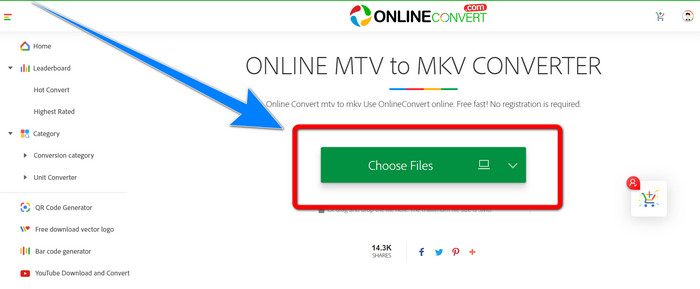
Étape 1 : Allez sur le site Online Convert. Cliquez sur le bouton Choose Files pour importer votre vidéo au format MTV.
Étape 2 : Lorsque vous téléchargez votre vidéo au format MTV, allez dans les options de format et sélectionnez le format MKV.
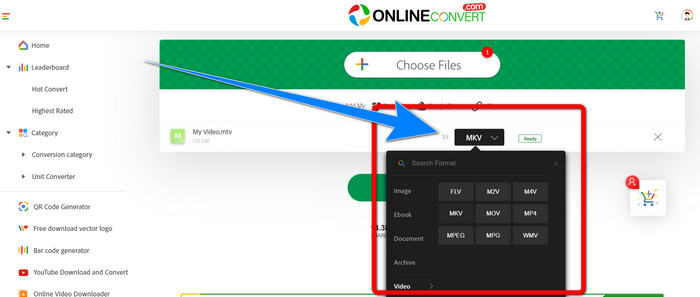
Étape 3 : Pour la dernière étape, cliquez sur le bouton Convert pour convertir votre fichier au format MTV en format MKV. Ensuite, attendez la fin du processus de conversion et enregistrez votre vidéo convertie.
Pour aller plus loin :
Les meilleures méthodes pour convertir gratuitement AMV en MKV
[En ligne & Gratuit] Comment convertir MKV en MP4 sur Windows/Mac
Partie 4 : FAQ sur la conversion de MTV en MKV
Le format MKV est-il le même que le MP4 ?
Non, ils ne le font pas. MKF a plus de fonctionnalités supplémentaires comme plusieurs sous-titres et pistes audio, donc MKV a une taille de fichier plus grande que le format MP4. De plus, MKV a une résolution plus élevée que MP4 car il possède un codec avancé avec un taux de compression plus élevé.
Puis-je également convertir le MKV dans un autre format ?
Absolument, oui ! Vous pouvez convertir un fichier MKV vers d’autres formats à l’aide de logiciels qui prennent en charge les fichiers MKV, comme Video Converter Ultimate. Téléchargez l’application sur votre Windows ou Mac et profitez de la conversion de vos fichiers.
Le format MKV est-il génial ?
Oui c'est le cas. Il n'a aucune exigence de licence. Il prend en charge d'excellentes fonctionnalités, telles que plusieurs pistes et sous-titres, etc.
Conclusion
Ce sont les meilleures méthodes pour convertir un fichier MTV en MKV à l’aide d’excellents convertisseurs. Si vous souhaitez convertir plusieurs fichiers facilement et sans perte, utilisez Video Converter Ultimate.
-
 Convertisseur MP4 en MKV gratuit - Comment convertir facilement MP4 en MKV
 Lorsque vous souhaitez convertir gratuitement MP4 en MKV, vous pouvez en savoir plus sur les 4 méthodes les plus efficaces pour transformer les fichiers MP4 en une vidéo MKV pour différents scénarios.
-
 Comment convertir MKV en DivX en ligne et hors ligne gratuitement
 Cherchez-vous les meilleurs moyens de convertir gratuitement le format MKV au format DivX. Continuez à lire pour connaître les meilleurs convertisseurs MKV vers DivX en ligne et hors ligne
-
 4 des meilleurs convertisseurs MKV vers 3GP pour Windows et Mac
 Si vous recherchez des convertisseurs MKV vers 3GP faciles à utiliser, vous avez de la chance ! Nous avons trouvé les meilleurs convertisseurs MKV vers 3GP gratuits que vous devez essayer
