


 Video Converter Ultimate
 Enregistreur d'écran
 Réparation vidéo
Comment convertir VOB en MKV gratuitement avec ces 3 convertisseurs [Meilleurs outils]
Le VOB, ou Video Object, est un format de fichier généralement utilisé par les DVD. Ce fichier est habituellement stocké dans le dossier VIDEO_TS, situé à la racine du DVD. Cependant, de nombreux fichiers multimédias sont désormais disponibles sur Internet. L’utilisation des DVD est aujourd’hui peu répandue et n’est pas prise en charge par de nombreux appareils. Vous avez donc besoin d’un format de fichier compatible avec un large éventail de dispositifs. MKV est un format largement pris en charge par de nombreux appareils. Vous trouverez ci‑dessous les meilleures façons de convertir gratuitement un VOB en MKV.

Partie 1. Convertir VOB en MKV sans perte
Pour convertir vos fichiers VOB en MKV, vous avez besoin d’un convertisseur bien adapté à cette tâche. FVC Video Converter Ultimate est un convertisseur actuellement très populaire sur le marché. Ce convertisseur propose de nombreuses fonctionnalités avancées : vous pouvez éditer, améliorer, compresser et effectuer une conversion par lots de vos fichiers VOB. De plus, cet outil prend en charge une conversion ultra‑rapide, afin que vous puissiez convertir votre fichier VOB en MKV très rapidement, sans perte de qualité.

Convertisseur vidéo FVC Ultimate
Plus de 5 689 200 téléchargements- Il offre une conversion par lots pour fusionner plusieurs fichiers en un seul.
- Il dispose d'une interface graphique facile à utiliser, adaptée aux débutants.
- Il a une fonctionnalité pour créer des GIF et faire des vidéos 3D.
- Vous permet de convertir rapidement grâce à son processus de conversion ultra-rapide intégré.
- Disponible sur diverses plateformes, y compris Windows et Mac.
Téléchargement gratuit pour Windows 7 ou version ultérieure Téléchargement sécurisé
Téléchargement gratuit pour macOS 10.7 ou version ultérieure - Téléchargement sécurisé
Voici les étapes à suivre pour convertir VOB en MKV à l'aide de FVC Video Converter Ultimate :
Étape 1. Téléchargez cette application en cliquant sur le bouton Télécharger ci‑dessous pour Windows ou Mac. Suivez le processus d’installation, puis passez à l’étape suivante.
Téléchargement gratuit pour Windows 7 ou version ultérieure Téléchargement sécurisé
Téléchargement gratuit pour macOS 10.7 ou version ultérieure - Téléchargement sécurisé
Étape 2. Après avoir téléchargé le convertisseur, cliquez sur le bouton Ajouter des fichiers ou sur le bouton + pour importer votre fichier VOB dans la file d’attente.
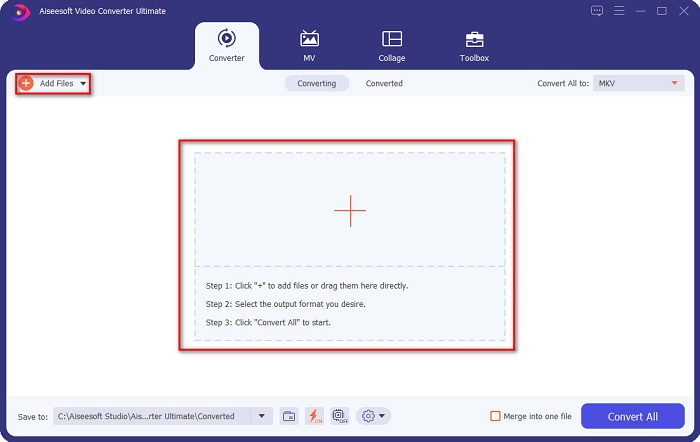
Étape 3. Cliquez ensuite sur le bouton Tout convertir en situé dans le coin supérieur droit de l’interface du logiciel. Une liste de formats de fichiers va s’afficher, puis choisissez le format de sortie souhaité.
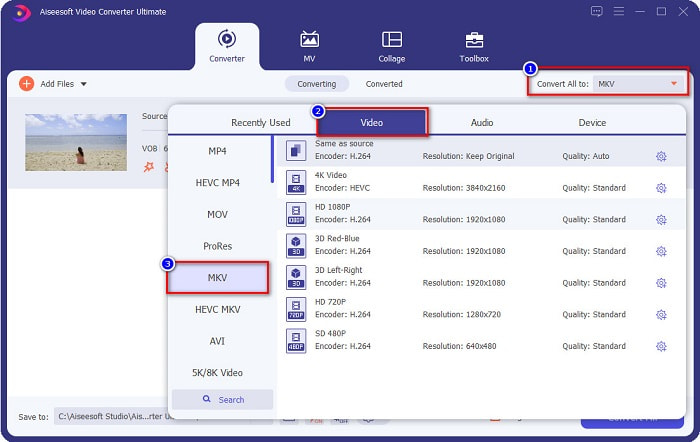
Étape 4. Après avoir sélectionné MKV comme format de sortie, cliquez sur le bouton Tout convertir pour convertir votre VOB en fichier MKV. Patientez ensuite quelques secondes le temps que la conversion se termine.
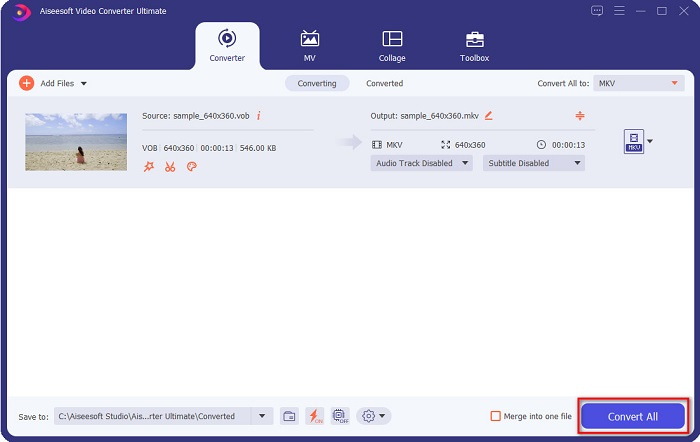
En suivant ces étapes simples, vous pouvez convertir VOB en MKV sans perte.
Partie 2. Convertir VOB en MKV à l'aide de convertisseurs gratuits
Vous pouvez également convertir VOB en MKV en utilisant un logiciel gratuit. L'utilisation d'un logiciel gratuit comme convertisseur pourrait vous faire gagner beaucoup de temps car vous n'aurez pas besoin d'une connexion Internet pour l'utiliser. Et lorsqu'il s'agit de télécharger des convertisseurs de logiciels gratuits, vous n'avez rien à acheter. Voici les meilleurs convertisseurs gratuits que vous pouvez essayer.
VLC Media Player
Lors du choix du meilleur convertisseur de logiciel gratuit, il est indéniable que VLC Media Player le sera. De nombreuses personnes utilisent ce convertisseur gratuit en raison de sa commodité d'utilisation. Ce lecteur multimédia est très célèbre pour les utilisateurs de Windows et s'est avéré être un excellent moyen de convertir des fichiers.
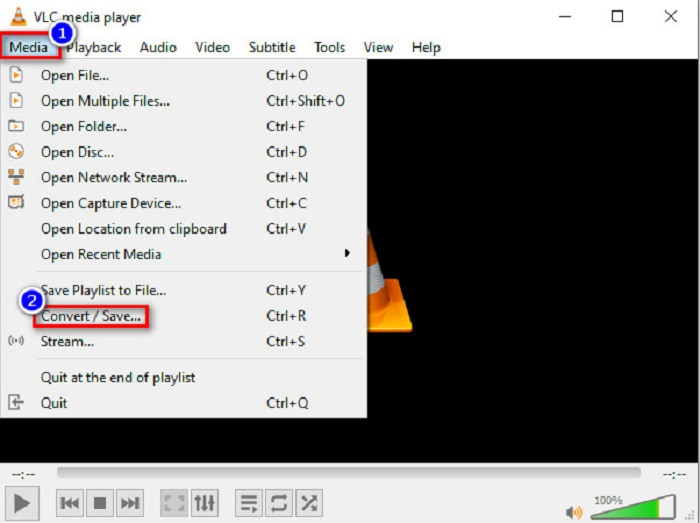
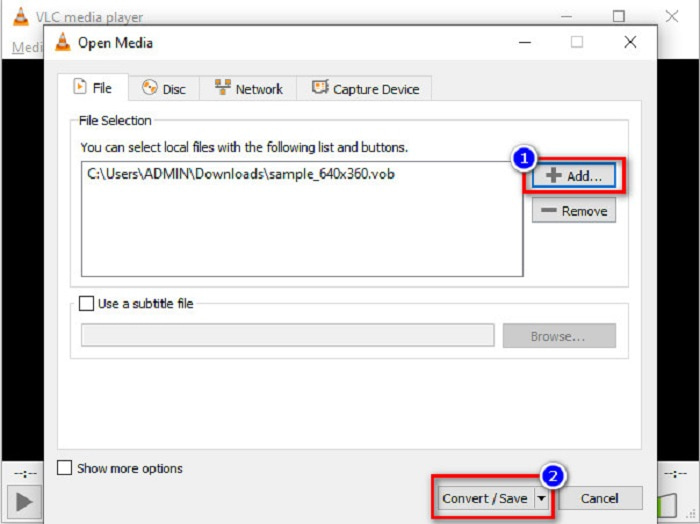
Étape 1. Tout d’abord, si vous n’avez pas VLC Media Player sur votre appareil, téléchargez‑le en le recherchant dans votre navigateur. Après le téléchargement, ouvrez l’application. Une fois l’appli ouverte, cliquez sur le bouton Média, puis sélectionnez le bouton Convertir/Enregistrer. Vous serez alors dirigé vers une autre interface.
Étape 2. Cliquez ensuite sur le bouton + Ajouter pour importer votre fichier VOB. Puis, cliquez sur le bouton Convertir/Enregistrer. Passez ensuite à l’étape suivante.
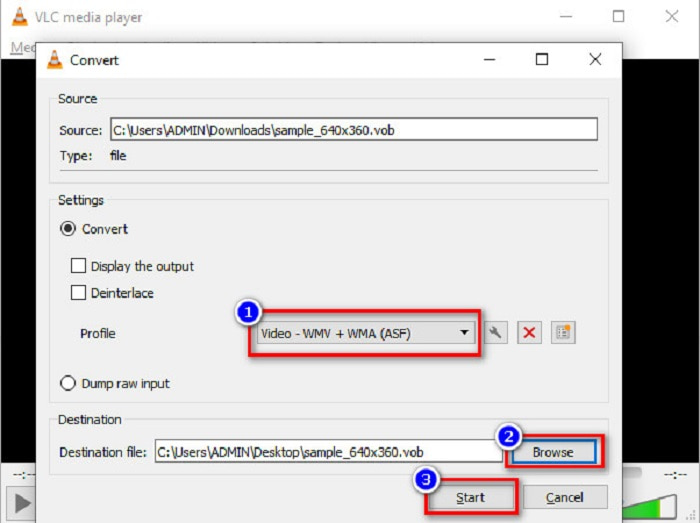
Étape 3. Enfin, en cliquant sur le bouton liste déroulante à côté de Profil, sélectionnez le fichier MKV comme format de sortie. Pour choisir le dossier de destination de votre fichier, cliquez sur le bouton Parcourir. Et pour finir, cochez le bouton Démarrer pour lancer la conversion.
Frein à main
Un autre convertisseur gratuit que vous pouvez utiliser pour convertir un VOB de DVD en fichier MKV est HandBrake. Ce convertisseur est gratuit au téléchargement. Il prend également en charge de nombreux formats disponibles sur le web. Toutefois, son interface est assez complexe à comprendre pour les débutants. Malgré tout, ce convertisseur vous offre des fonctionnalités spécifiques qui aident à convertir votre fichier VOB en MKV.
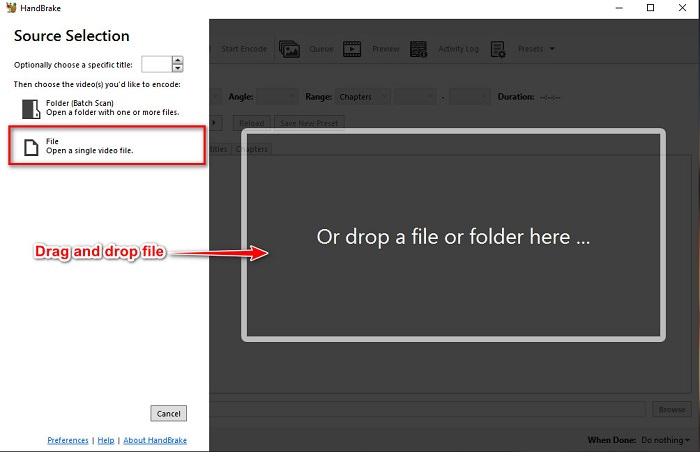
Étape 1. Téléchargez l’application en recherchant HandBrake dans le navigateur que vous utilisez. Après le téléchargement, ouvrez l’application. Puis cliquez sur Fichier, ou déposez votre fichier VOB dans le rectangle au centre de l’interface du logiciel pour le télécharger.
Étape 2. Après avoir importé votre fichier VOB, choisissez MKV comme format de sortie en cliquant sur le bouton liste déroulante à côté de Format. Pour modifier l’emplacement de destination de votre fichier dans l’explorateur de votre ordinateur, cliquez sur le bouton Parcourir.
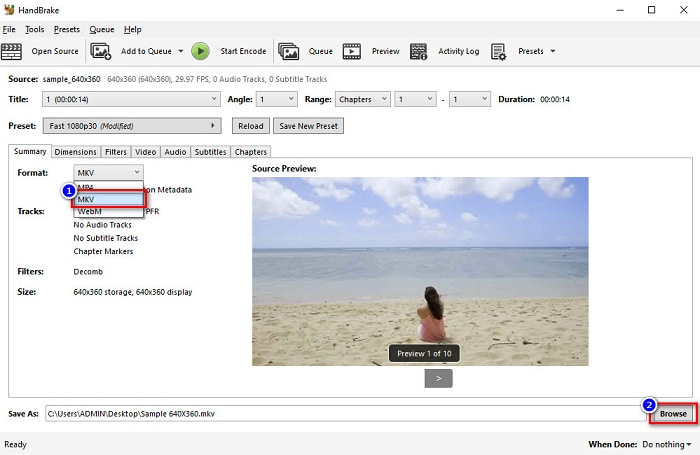
Étape 3. Pour la dernière étape, cliquez sur le bouton Démarrer l’encodage pour convertir votre VOB en MKV avec HandBrake.
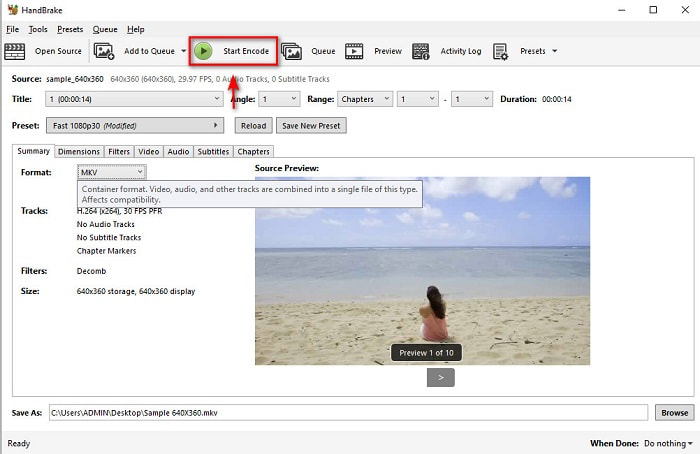
Et c'est ainsi que vous convertissez VOB en MKV en utilisant un logiciel gratuit.
Partie 3. Convertir un fichier VOB en fichier MKV à l'aide d'un outil en ligne
Les convertisseurs en ligne sont plus pratiques, car vous n’avez rien à télécharger. Parmi les nombreux convertisseurs en ligne gratuits disponibles sur le web, Onlinefreeconvert.com fait partie de ceux que nous considérons comme les meilleurs. Ce convertisseur en ligne est simple d’utilisation et gratuit. Même si la conversion peut parfois être lente, puisqu’elle se fait via le web, beaucoup de personnes l’utilisent encore pour sa grande praticité.
Étapes pour convertir votre fichier VOB en fichier MKV en ligne :
Étape 1. Pour convertir un fichier VOB au format MKV, recherchez Onlinefreeconvert.com dans votre navigateur, puis vous serez redirigé vers le site du convertisseur.
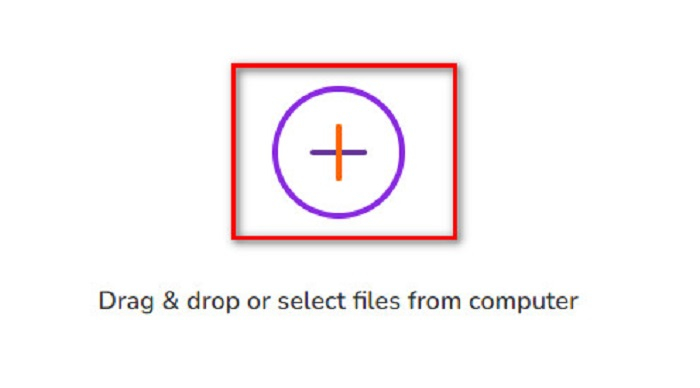
Étape 2. Glissez‑déposez votre fichier VOB ou sélectionnez des fichiers depuis votre ordinateur en cliquant sur le bouton +.
Étape 3. Puis, à côté de Format de sortie, cliquez sur le bouton liste déroulante pour sélectionner MKV comme format de sortie. Enfin, cliquez sur le bouton Start Now pour convertir votre fichier VOB en MKV.
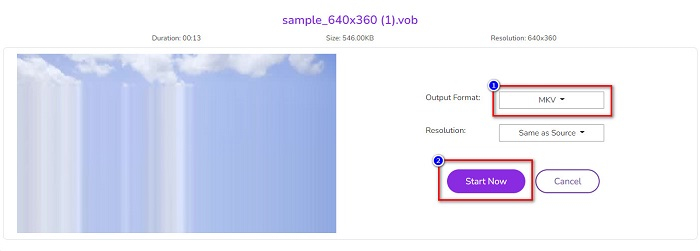
Et c'est ainsi que vous convertissez VOB en MKV en ligne à l'aide d'un convertisseur en ligne.
Partie 4. Plus de connaissances sur VOB et MKV
VOB ou Video Object est le format de fichier lu par les vidéos DVD. Il contient des données qui incluent l'audio, la vidéo et les sous-titres. Ce type de format de fichier est protégé par le droit d'auteur pour les empêcher d'être copiés directement. En revanche, les fichiers MKV ou Matroska sont un format de fichier couramment utilisé pour stocker de courts clips vidéo et des films. Il est également pris en charge par de nombreux codecs vidéo et audio. De plus, c'est un fichier à l'épreuve du temps ; par conséquent, il est conçu pour ne pas être obsolète à l'avenir.
Partie 5. FAQ sur la conversion de VOB en MKV
Lequel a une taille de fichier plus grande, VOB ou MKV ?
Les fichiers MKV ont des tailles de fichier plus importantes que VOB. Bien qu'il n'y ait pas beaucoup de différence, MKV est légèrement plus grand.
Pouvez-vous lire des fichiers vidéo VOB sur Mac ?
macOS ne prend pas en charge les fichiers VOB ; vous ne pouvez donc pas les lire directement sur Mac. Toutefois, vous pouvez utiliser un convertisseur pour transformer votre fichier VOB en un format pris en charge par macOS. Le fichier MOV est un format largement compatible avec ce système. De plus, lisez cet article pour en savoir plus sur la manière de convertir un VOB en MOV.
La taille du fichier sera-t-elle affectée lors de la conversion de VOB en MKV ?
Pas forcément. Lors de la conversion d’un VOB en MKV, la taille du fichier ne sera pas forcément modifiée, en particulier si vous utilisez FVC Video Converter Ultimate comme outil de conversion.
Conclusion
Tous les convertisseurs en ligne, freeware et hors ligne présentés ci-dessus affichent des performances prometteuses. Bien qu'ils aient des caractéristiques distinctes les uns par rapport aux autres, ils restent un outil efficace et efficient pour convertir VOB en MKV sans. Mais si vous voulez un convertisseur ultra-rapide avec de nombreuses fonctionnalités exceptionnelles à essayer, FVC Video Converter Ultimate est l'outil le mieux adapté. Donc, si vous souhaitez essayer ce convertisseur, téléchargez-le maintenant !
-
 Meilleures façons de convertir VOB en FLV [Gratuit et en ligne inclus]
 Vous voulez convertir un fichier VOB en fichier FLV ? Vous pouvez facilement effectuer la tâche avec des convertisseurs de bureau ou en ligne. Lisez ce guide et découvrez comment transformer facilement et rapidement VOB en FLV.
-
 Qu'est-ce qu'un fichier VOB et comment transformer un fichier VOB en GIF gratuitement
 Voulez-vous en savoir plus sur les fichiers VOB et comment les partager après avoir été extraits ? ou Pourquoi avez-vous besoin de convertir VOB en GIF ? Alors lisez attentivement cet article.
-
 3 convertisseurs pratiques disponibles pour changer le fichier VOB au format AVI [2021]
 Vous avez un problème car les fichiers VOB ne sont pas pris en charge pour être lus ? Essayons ensuite de le convertir avec les 3 méthodes présentées ci-dessous avec des étapes détaillées sur chaque convertisseur.
