


 Video Converter Ultimate
 Enregistreur d'écran
 Réparation vidéo
 Téléchargement sécurisé
4 méthodes simples pour convertir WEBM en DIVX
La conversion de fichiers vidéo est la meilleure solution lorsque la vidéo n’est pas prise en charge par un certain programme. Dans cet article, vous allez découvrir les méthodes les plus simples pour transformer votre fichier WEBM en format DIVX. Vous pouvez trouver de nombreux convertisseurs WEBM vers DIVX en ligne et hors ligne, mais certains ne sont pas efficaces et sont compliqués à utiliser. C’est pourquoi nous avons testé de nombreuses applications afin de vous présenter les convertisseurs les plus utiles et performants, avec des méthodes claires, que vous pouvez télécharger sur Mac, Windows, ou utiliser en ligne. Vous avez hâte de découvrir ces méthodes remarquables ? Alors, allons‑y et lisez cet article informatif.

Partie 1 : Convertir WEBM en DIVX hors ligne avec la meilleure qualité
Convertir différents fichiers peut être difficile, surtout lorsque vous ne connaissez ni la procédure ni l’application à utiliser. Vous voulez convertir un fichier WEBM en DIVX avec une excellente qualité ? Alors téléchargez Video Converter Ultimate sur Windows et Mac. Cette application est facile à utiliser pour convertir divers fichiers, car elle propose des méthodes de base et une interface conviviale, ce qui évite de compliquer les opérations. De plus, elle prend en charge plus de 1000 formats, dont WEBM, DIVX, ASF, OGV, MTV, GIF, MPEG, DPG, MOV, M4V, MP4, FLV, etc. En outre, Video Converter Ultimate peut améliorer vos vidéos grâce à ses excellents outils de montage vidéo. Vous pouvez faire encore plus avec votre vidéo WEBM. Pour compresser votre vidéo, allez dans la Boîte à outils et sélectionnez Compresseur vidéo. Pour ajouter des filigranes à votre vidéo WEBM, choisissez l’outil Filigrane vidéo.
Fonctionnalités
◆ Convertissez de nombreuses vidéos jusqu'à plus de 1000 formats de fichiers.
◆ Convertissez les fichiers 30 fois plus rapidement que les autres convertisseurs.
◆ Offre aux créateurs de collages des filtres et des thèmes gratuits.
◆ Capable de créer une vidéo musicale.
◆ Offre une boîte à outils pour l'amélioration d'une vidéo, telle qu'un compresseur vidéo, une correction des couleurs, une synchronisation audio, un amplificateur, etc.
Avantages
- Il a une interface facile à utiliser et convient aux débutants.
- C'est une application de téléchargement gratuit.
- Il permet la conversion par lots.
- Capable de convertir des fichiers sans perte de qualité.
Les inconvénients
- Pour utiliser la version pro, achetez un abonnement.
Convertissez WEBM en DIVX à l'aide de Video Converter Ultimate.
Étape 1 : Installez Video Converter Ultimate sur votre ordinateur. Puis lancez‑le.
Téléchargement gratuit pour Windows 7 ou version ultérieure Téléchargement sécurisé
Téléchargement gratuit pour macOS 10.7 ou version ultérieure - Téléchargement sécurisé
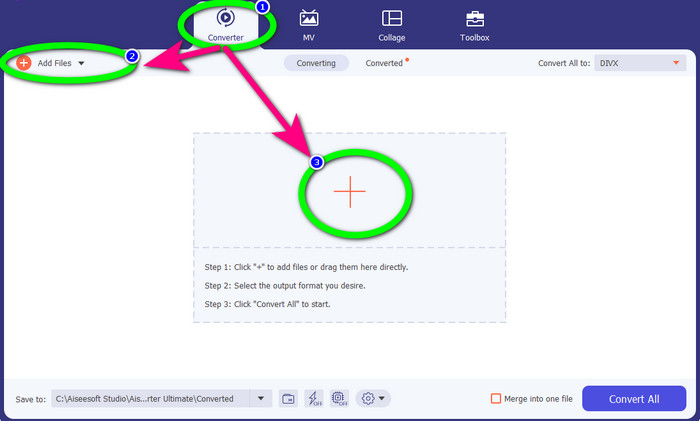
Étape 2 : Lorsque l’interface apparaît, sélectionnez l’onglet Convertisseur et cliquez sur le bouton Ajouter des fichiers ou sur l’icône Plus pour ajouter le fichier WEBM.
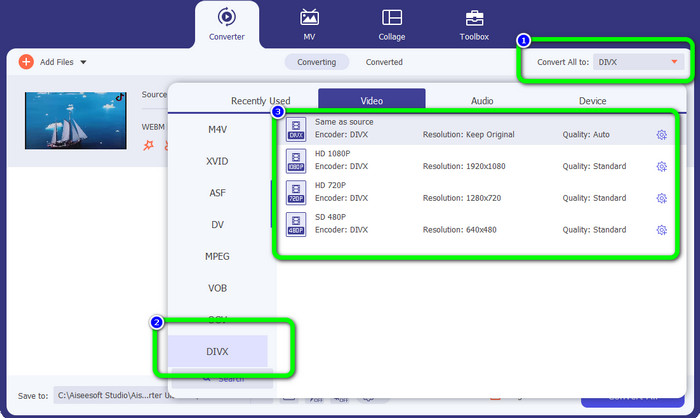
Étape 3 : Après avoir ajouté le fichier WEBM, cliquez sur le bouton Tout convertir en. Sélectionnez le format souhaité, c’est‑à‑dire le format de fichier DIVX. Vous pouvez également choisir la qualité de votre vidéo, de 480p à 1080p.
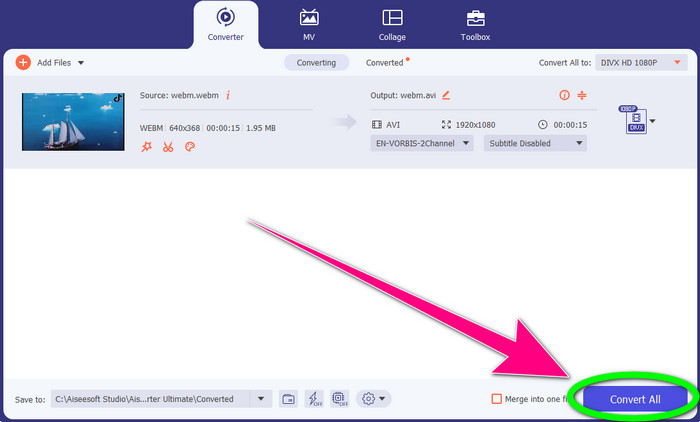
Étape 4 : Vous pouvez enfin cliquer sur le bouton Tout convertir pour convertir le fichier WEBM au format DIVX.
Partie 2 : 3 façons de convertir WEBM en DIVX en ligne
Utilisation de WEBM.to
Vous cherchez un convertisseur WEBM vers DIVX en ligne ? WEBM.to est l’outil à ne pas manquer. Il peut convertir différents fichiers directement dans votre navigateur, comme Google Chrome, Mozilla Firefox, Microsoft Edge, etc. Il prend en charge des formats tels que MOV, FLV, M4V, TS, M2TS et bien d’autres. Comme le convertisseur présenté plus haut, WEBM.to est facile à utiliser car il se concentre uniquement sur la conversion de fichiers. Enfin, vos fichiers sont en sécurité car ils sont automatiquement supprimés après 24 heures. Cependant, le processus de conversion est lent. De plus, il ne fonctionne pas bien si vous ne disposez pas d’une connexion Internet stable. Convertissons maintenant votre fichier WEBM en DIVX avec cet outil en ligne.
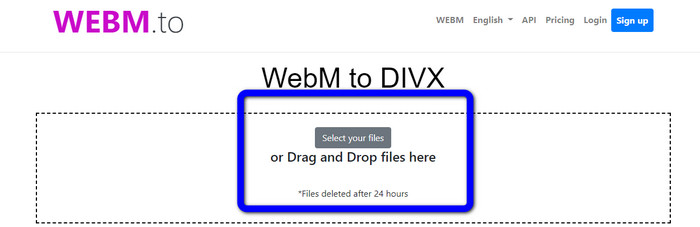
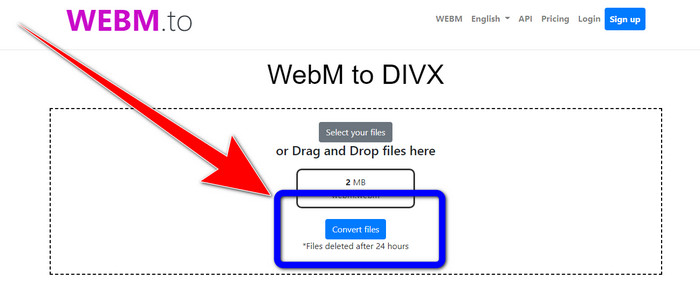
Étape 1 : Rendez‑vous sur le site WEBM.to. Cliquez sur le bouton Select your files pour importer votre fichier WEBM. Vous pouvez également faire glisser votre fichier dans la zone prévue.
Étape 2 : Cliquez sur le bouton Convert Files après avoir ajouté le fichier WEBM. Attendez la fin du processus de conversion, puis enregistrez la vidéo finale.
Utilisation d'Evano
Vous pouvez également utiliser Evano pour convertir un fichier WEBM en DIVX. Cet outil en ligne est lui aussi fiable. Il peut convertir différents formats de fichiers, comme MP4, AVI, DIVX, XVID, 3GP, FLV, VOB, MOV, etc. Vous pouvez donc convertir un fichier WEBM en FLV avec cet outil. De plus, EVANO n’est pas seulement un convertisseur, mais aussi un éditeur et un optimiseurr audio, ce qui vous permet d’en faire davantage avec cet outil. Cependant, la version gratuite de cette application impose une limite : vous ne pouvez convertir que des fichiers d’une taille maximale de 100 Mo. Cela signifie que vous devez souscrire un abonnement pour bénéficier d’une taille de fichier illimitée. De plus, vous devez disposer d’une connexion Internet rapide. Étant une application web, une connexion Internet est vivement recommandée. Suivez les étapes ci‑dessous pour convertir un fichier WEBM en DIVX avec Evano.
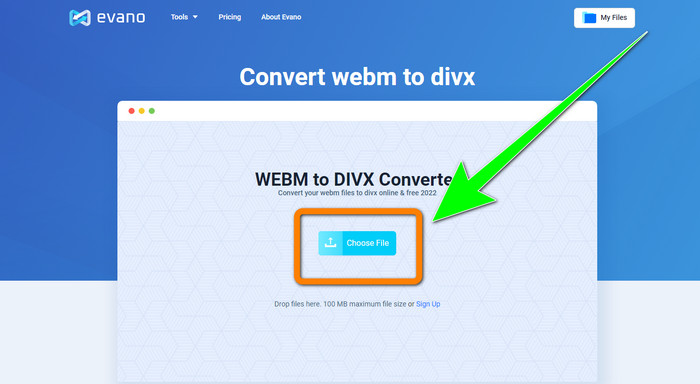
Étape 1 : Rendez‑vous sur le site d’Evano. Appuyez sur le bouton Choose File pour ajouter le fichier WEBM.
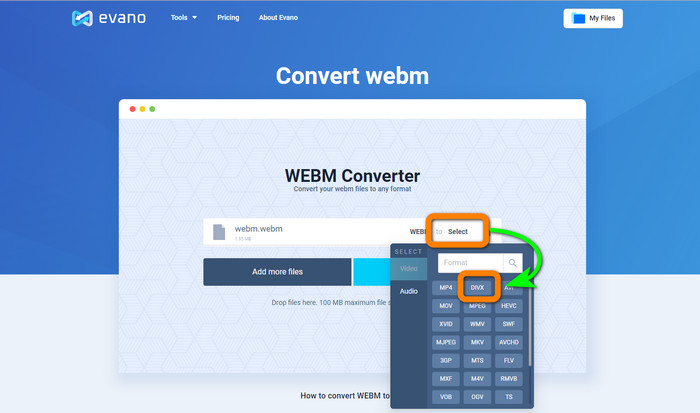
Étape 2 : Cliquez sur le bouton Select pour accéder aux options de format. Puis sélectionnez le format de fichier DIVX.
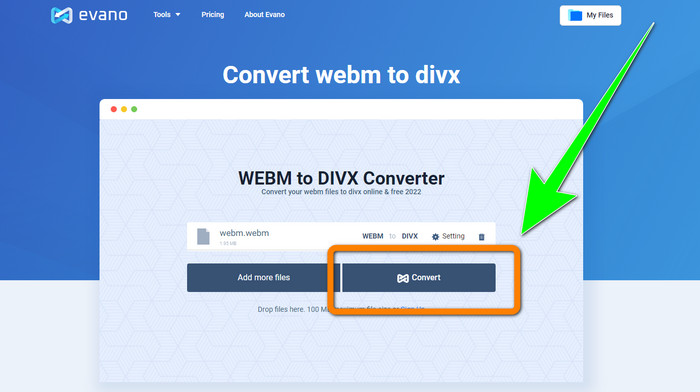
Étape 3 : Pour la dernière étape, cliquez sur le bouton Convert. Patientez pendant le processus de conversion et enregistrez la vidéo au format de fichier DIVX.
Utilisation de FileProInfo
FileProInfo est l’un des convertisseurs en ligne que vous pouvez utiliser facilement pour convertir un fichier WEBM en DIVX. Grâce à cet outil en ligne, vous n’avez plus à vous soucier de la manière de convertir votre fichier vers d’autres formats. Vous pouvez également l’utiliser pour convertir un fichier WEBM en MKV. De plus, il propose des méthodes simples pour la conversion de fichiers. En outre, au‑delà de la conversion, vous pouvez utiliser cet outil pour la détection de plagiat, l’analyse complète de sites web, les outils de ping de sites, et bien plus encore. Cependant, il arrive que FileProInfo ne fonctionne pas. De plus, le processus de conversion de fichiers est très lent. Comme les autres convertisseurs en ligne, il impose une taille maximale de fichier de 150 Mo. Passons donc à la conversion du fichier WEBM en DIVX avec cet outil en ligne.
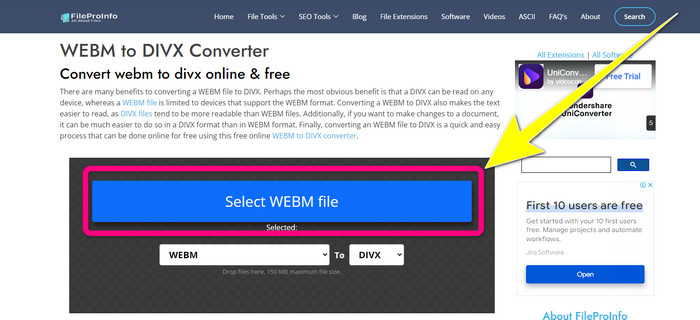
Étape 1 : Allez sur le site FileProInfo. Cliquez sur le cadre bleu pour insérer le fichier WEBM.
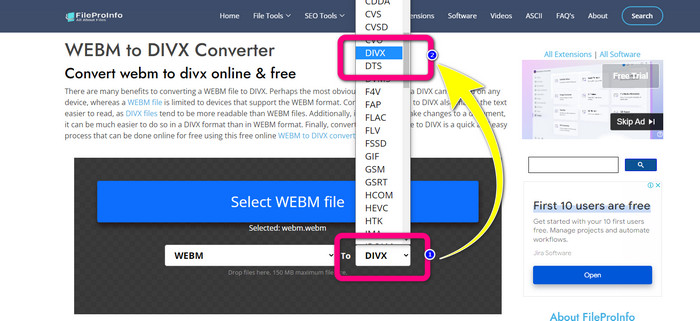
Étape 2 : Après avoir inséré le fichier WEBM, accédez aux options de format et sélectionnez le format de fichier DIVX.
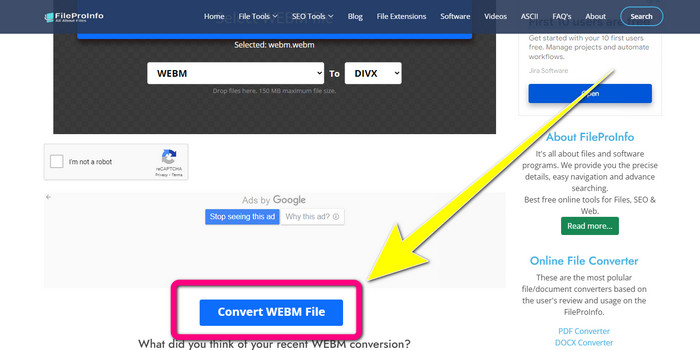
Étape 3 : Faites défiler la page vers le bas et cliquez sur le bouton Convert WEBM file.
Partie 3 : WEBM contre DIVX
| WEBM | DIVX | |
| Extension de fichier vidéo | Un format multimédia open source et non payant appelé WebM est utilisé pour la diffusion de contenu Internet. Il comprend des flux audio compressés à l'aide des codecs Oupus ou Vorbis et des flux vidéo compressés à l'aide du VP8 ou du VP9. En raison de sa conception légère et de ses capacités de distribution en temps réel, il est devenu l'un des formats de fichiers les plus populaires pour le streaming de vidéos en ligne. | Un codec vidéo haute qualité à haute compression qui prend en charge des résolutions allant jusqu'à 1080 HD et compresse les vidéos à une fraction de leur taille standard sans sacrifier une grande partie de leur qualité. |
| Développé par | Google Inc. | Réseau DIVX inc. |
| Avantages | Fidélité gratuite et open source, prend en charge la plupart des codecs. | De petite taille, gratuit à utiliser |
| Les inconvénients | Manque d'éléments interactifs | |
| Programmes associés | Lecteur multimédia VLC, Mozilla Firefox, Google Chrome, Lecteur multimédia Windows | XBox 360, Autoradio, Lecteurs DVD, Lecteurs Blu-ray |
Partie 4 : FAQ sur la conversion de WEBM en DIVX
1. Quels sont les avantages de convertir WEBM en DIVX ?
Le format de fichier DIVX est plus lisible et largement accepté que le fichier WEBM. De plus, la conversion en fichiers DIVX peut contribuer à la sécurité.
2. Quel est le meilleur, WEBM ou MP4 ?
En ce qui concerne la taille du fichier vidéo, WEBM est plus petit que MP4. Mais, en termes de qualité et de compatibilité, MP4 est meilleur.
3. WEBM a-t-il un son ?
Oui bien sûr. Le projet WebM open source promeut WebM, un format de fichier conteneur multimédia numérique pouvant contenir à la fois de l'audio et de la vidéo. WEBM est simplement un format de conteneur. Un sous-ensemble du format de conteneur multimédia Matroska y est contenu.
Conclusion
Voici les meilleures applications que vous pouvez utiliser pour convertir WEBM en DIVX avec des méthodes efficaces. Alors, qu’attendez‑vous ? Téléchargez et utilisez Video Converter Ultimate dès maintenant. Il peut convertir vos fichiers plus rapidement et plus facilement.
-
 Méthodes faciles à apprendre pour convertir Xvid en DivX
 Vous cherchez la meilleure solution pour convertir Xvid en DivX gratuitement ? Cet article vous aidera à résoudre votre problème. Alors, lisez le message en permanence.
-
 Comment convertir MPG en DivX sans perte de qualité
 Êtes-vous à la recherche d'une application sans problème que vous pouvez utiliser pour convertir MPG en DivX ? Cet article vous fournira différentes méthodes efficaces que vous devez essayer.
-
 Comment convertir DIVX en 3GP sur Windows, Mac et en ligne
 Comment convertir DIVX en 3GP ? Si vous cherchez une réponse, lisez cet article. Nous vous montrerons d'excellentes procédures à l'aide de différents convertisseurs.
