


 Video Converter Ultimate
 Enregistreur d'écran
 Réparation vidéo
Apprenez les façons de convertir WebM en MKV avec les meilleurs convertisseurs
De nombreux formats vidéo existent sous forme de fichiers WebM, et de nombreux navigateurs comme Google Chrome, Mozilla Firefox, Opera et Microsoft Edge prennent en charge ce type de fichier. Cependant, les fichiers WebM sont des conteneurs qui ne peuvent stocker que des flux vidéo compressés avec les codecs vidéo VP8 ou VP9. Donc, si vous voulez convertir votre fichier WebM en un conteneur capable de contenir un nombre illimité de pistes audio, vidéo et de sous-titres, vous devez changer votre fichier WebM au format de fichier MKV. De plus, cet article va présenter les meilleurs convertisseurs WebM vers MKV.

Partie 1. Pourquoi avez-vous besoin de convertir WebM en MKV
Les fichiers WebM sont des formats de fichiers vidéo largement pris en charge par presque tous les navigateurs web. C’est un format que HTML5 utilise souvent pour la diffusion de vidéos en streaming. En outre, il s’agit d’un format sans redevances, principalement conçu pour le web. Ce type de fichier est également utilisé comme conteneur pour des formats audio et vidéo. En revanche, les fichiers MKV, ou Matroska, peuvent contenir un nombre illimité de pistes audio, vidéo et de sous-titres. Alors, pourquoi avons-nous besoin de convertir WebM en MKV ? Tout simplement parce que les fichiers WebM ne peuvent contenir que des vidéos compressées avec les codecs VP8 et VP9. Tandis que les fichiers MKV peuvent gérer plusieurs flux de sous-titres et de pistes audio dans différentes langues, ce qui est très utile pour les amateurs de films.
Partie 2. Convertir des fichiers WebM en fichiers MKV à l'aide d'un convertisseur ultra-rapide
Tout le monde veut un convertisseur capable de transformer les fichiers rapidement. Heureusement, nous avons trouvé un outil qui peut convertir des fichiers en un clin d’œil. FVC Video Converter Ultimate est un convertisseur hors ligne qui vous permet de convertir rapidement WebM en MKV. Il prend également en charge presque tous les formats courants comme WebM, MKV, AVI, MP4, MOV, M4V, FLV, et bien d’autres. Et si vous souhaitez fusionner plusieurs fichiers en un seul, ce convertisseur dispose d’une fonction de conversion par lots.

Convertisseur vidéo FVC Ultimate
Plus de 5 689 200 téléchargements- Il vous permet de faire une conversion par lots.
- Vous pouvez améliorer, éditer, compresser votre fichier.
- Il a une fonctionnalité qui peut convertir votre fichier en quelques secondes.
- Il a une interface facile à utiliser.
Téléchargement gratuit pour Windows 7 ou version ultérieure Téléchargement sécurisé
Téléchargement gratuit pour macOS 10.7 ou version ultérieure - Téléchargement sécurisé
Étape 1. Pour télécharger l’application, cliquez sur le bouton Télécharger ci-dessous. Suivez ensuite la procédure d’installation, puis ouvrez l’application.
Téléchargement gratuit pour Windows 7 ou version ultérieure Téléchargement sécurisé
Téléchargement gratuit pour macOS 10.7 ou version ultérieure - Téléchargement sécurisé
Étape 2. Après avoir ouvert l’application, cliquez sur le bouton Ajouter des fichiers ou sur le signe + pour importer votre fichier WebM dans la première interface du logiciel.
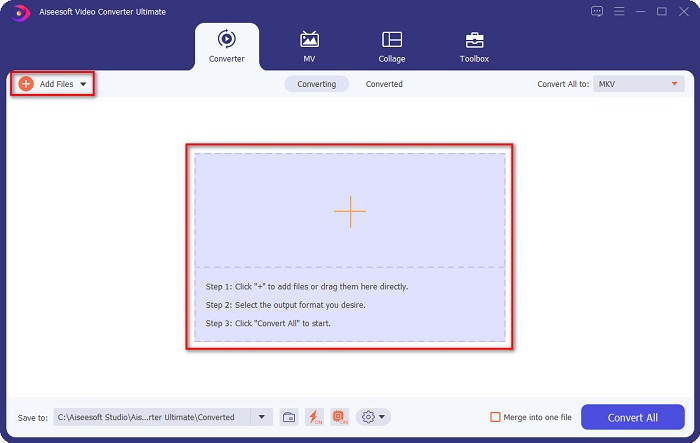
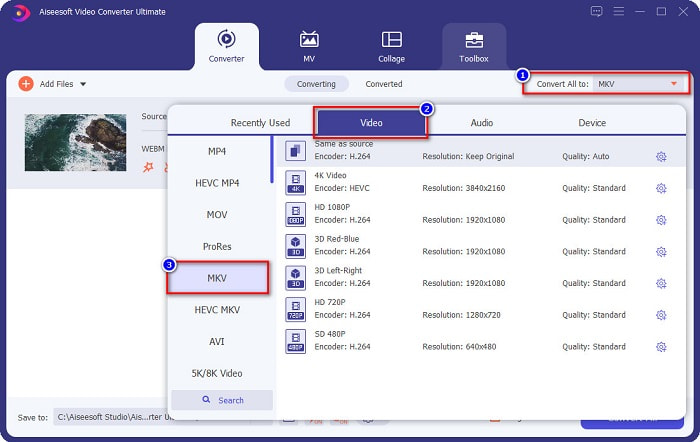
Étape 3. Pour choisir le format de sortie souhaité, cliquez sur le bouton Tout convertir en dans le coin supérieur droit de l’interface du logiciel. Sélectionnez MKV, puis passez à l’étape suivante.
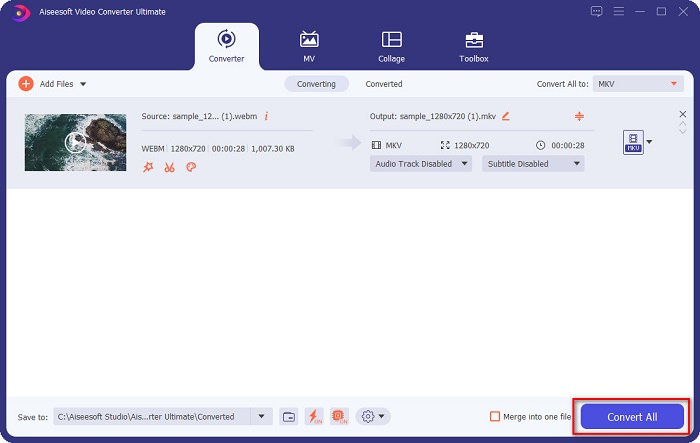
Étape 4. Pour la dernière étape, cliquez sur le bouton Tout convertir pour commencer à convertir votre fichier WebM en fichier MKV. Patientez quelques secondes, et voilà ! Votre fichier MKV est prêt.
En suivant ces étapes simples et en utilisant ce convertisseur WebM vers MKV, vous pouvez convertir des fichiers sans effort. Vous pouvez également l’utiliser pour convertir WebM en MP3 ou en d’autres fichiers audio.
Partie 3. Convertir des fichiers WebM en fichiers MKV à l'aide de FFMPEG
FFMPEG est un utilitaire de ligne de commande couramment utilisé pour les formats de transcodage, le montage vidéo, la mise à l'échelle et les effets de post-production vidéo. De plus, ce logiciel vous permet également de convertir des formats de fichiers. Parce qu'il s'agit d'un convertisseur basé sur du texte, de nombreuses personnes qui souhaitent l'utiliser ont du mal à utiliser ce convertisseur. Néanmoins, c'est aussi un moyen efficace et efficient de convertir WebM en MKV sur FFmpeg.
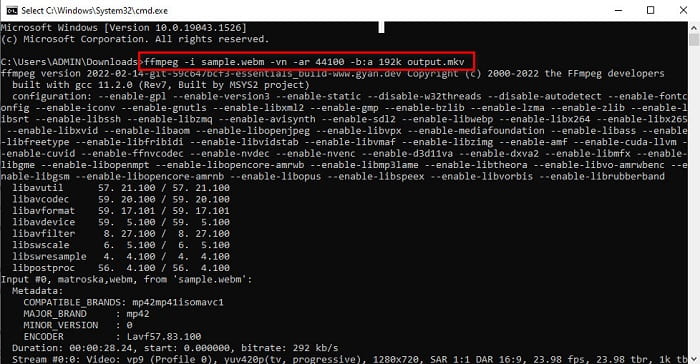
Étape 1. Pour utiliser ce convertisseur, téléchargez FFMPEG sur votre ordinateur. Suivez le processus d’installation, puis exécutez ffmpeg.exe sur votre système.
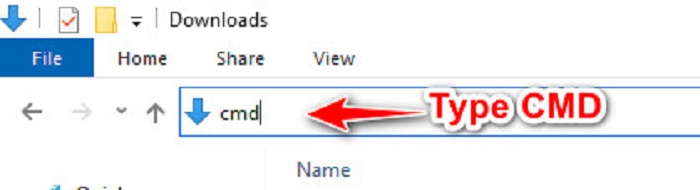
Étape 2. Repérez votre fichier WebM dans vos dossiers, puis, dans le dossier où se trouve votre fichier, tapez CMD pour ouvrir l’invite de commandes afin d’effectuer la conversion.
Étape 3. Enfin, tapez la commande suivante : ffmpeg -i sample.webm -vn -ar 44100 -b:a 192k output.mkv. Puis appuyez sur la touche Entrée de votre clavier ; une liste de lignes de code va apparaître, ce qui signifie que votre conversion est terminée.
Partie 4. Convertir des fichiers WebM en MKV en ligne à l'aide du meilleur convertisseur en ligne
L’un des meilleurs convertisseurs en ligne disponibles actuellement sur le web est FVC Free Online Video Converter. Ce convertisseur vous permet de convertir de nombreux fichiers, notamment WebM, MKV, MP4, AVI, MOV, WMA, MP3, etc. Ce convertisseur en ligne est très facile à utiliser grâce à son interface simple. Cependant, comme il s’agit d’un outil basé sur le web, il se peut que vous subissiez un ralentissement de la conversion en raison de problèmes de connexion Internet. Néanmoins, beaucoup l’utilisent toujours pour convertir WebM en MKV en ligne, et les utilisateurs sont satisfaits de ses performances.
Étape 1. Dans votre navigateur, cherchez FVC Free Online Video Converter ou cliquez sur ce lien pour accéder à leur page web.
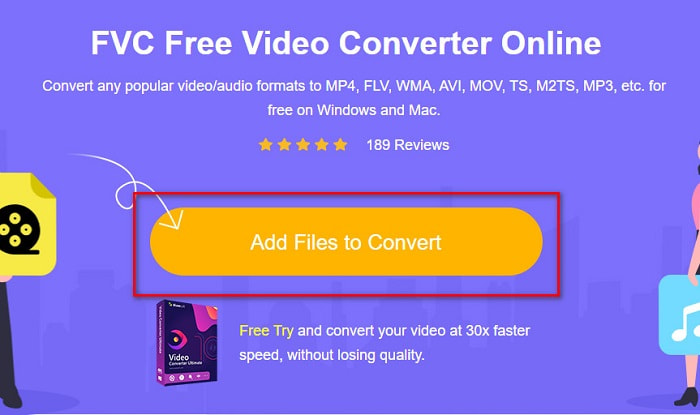
Étape 2. Cliquez ensuite sur Ajouter des fichiers à convertir et lancez l’application. Après le lancement de l’application, les fichiers de votre ordinateur apparaîtront afin que vous puissiez choisir votre fichier WebM.
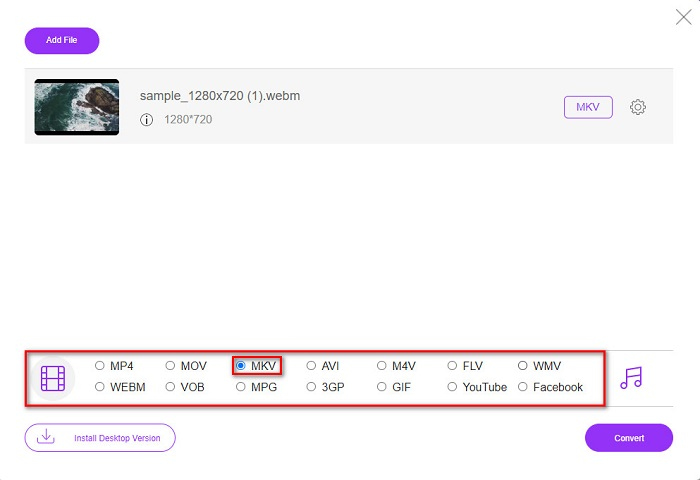
Étape 3. Ensuite, choisissez le fichier MKV comme format de sortie souhaité. La liste des formats de fichiers se trouve sous la deuxième interface du logiciel.
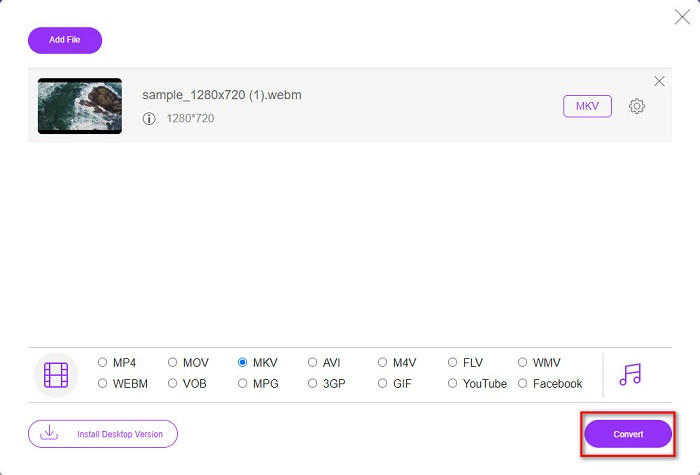
Étape 4. Enfin, cliquez sur le bouton Convertir, puis votre fichier commencera à être converti.
Partie 5. Tableau de comparaison
| traits | Convertisseur vidéo FVC Ultimate | FFMPEG | Convertisseur vidéo en ligne gratuit FVC |
| Conversion ultra-rapide |  | – | – |
| Conversion par lots | | – | – |
| Formats de fichiers pris en charge | Peut convertir WebM en MKV, MP4, MOV, AVI, M4V, FLV, +1000 autres formats. | Il prend en charge divers formats de fichiers tels que AIFF, AVI, FLV, GIF et certains formats de fichiers. | Vous permet de convertir presque tous les formats connus tels que FLV, AVI, MP4, MOV, MP3, etc. |
| Interface facile à utiliser | | – | |
| Connexion Internet | – | – | |
Partie 6. FAQ sur la conversion de WebM en MKV
Puis-je convertir WebM en MKV sans perte ?
Oui. En utilisant FVC Converter Ultimate comme convertisseur, vous pouvez changer WebM en MKV sans perte de qualité.
Pourquoi MKV a-t-il une taille de fichier énorme ?
Les fichiers MKV ont une taille de fichier énorme car ils prennent en charge des fonctionnalités supplémentaires de diverses pistes audio et vidéo.
Puis-je convertir WebM en MP4 ?
Oui, il est possible de décoder WebM en MP4 en utilisant divers convertisseurs de fichiers disponibles sur le marché. Vous pouvez également lire cet article pour en savoir plus sur le sujet de la conversion de WebM en MP4.
Conclusion
Bien que WebM et MKV soient tous deux des conteneurs de fichiers, il est prudent de dire que la conversion de votre fichier WebM en MKV est une bonne décision. Et tous les convertisseurs gratuits en ligne et hors ligne présentés ci-dessus présentent des fonctionnalités distinctes. Mais si vous voulez un convertisseur avec de nombreuses fonctionnalités uniques qui peuvent convertir votre fichier WebM en MKV ultra-rapidement, nous pensons que FVC Video Converter Ultimate est le meilleur outil pour vous !
-
 3 superbes logiciels utilisés pour convertir un fichier WebM au format AVI
 Vous ne savez pas comment convertir WebM en AVI ? Alors commençons à lire cet article. Comme nous spécifions tous les détails sur WebM et les trois convertisseurs que vous pouvez utiliser pour convertir.
-
 Méthodes faciles à suivre sur la façon de convertir WEBM en MOV
 Vous rencontrez des difficultés que vos vidéos WebM ne puissent pas être lues par safari, et vous ne souhaitez pas basculer sur un navigateur prenant en charge ce format ? Lisez cet article pour savoir comment changer facilement WebM en MOV.
-
 Meilleur convertisseur WebM en FLV gratuit sur le Web et le bureau
 Avez-vous le même problème pour lire des fichiers WebM sur vos smartphones ? Passez ensuite 5 minutes à lire cet article pour savoir comment convertir WebM en FLV.
