


 Video Converter Ultimate
 Enregistreur d'écran
 Réparation vidéo
Un guide rapide sur la conversion facile de WMV en MKV sur Mac et Windows
Si vous êtes un passionné de cinéma et que vous souhaitez un format de fichier capable de gérer diverses pistes audio avec sous-titres, vous pouvez convertir votre fichier WMV en fichier MKV. Et si vous rencontrez des difficultés pour rechercher un convertisseur WMV vers MKV compatible avec Windows et Mac, nous avons trouvé les meilleurs convertisseurs que vous pouvez utiliser en ligne et hors ligne. Cet article vous présente les meilleurs convertisseurs pour convertir WMV en MKV sur Mac et Windows.

Partie 1. Pourquoi convertir WMV en MKV
WMV ou Windows Media Video est un format de fichier largement pris en charge par presque tous les lecteurs multimédias. C'est un format de fichier qui peut stocker des clips vidéo, des animations, des épisodes télévisés et des films. De plus, il s'agit d'un fichier compressé ; par conséquent, il a une petite taille de fichier. Alors pourquoi avez-vous besoin de convertir WMV en MKV ? MKV ou Matroska est un conteneur de fichiers qui peut incorporer un nombre illimité de pistes audio, vidéo et de sous-titres.
De plus, ce format de fichier est évolutif, ce qui signifie qu'il ne sera pas obsolète à l'avenir. Il peut également gérer plusieurs flux de sous-titres et pistes audio dans de nombreuses langues. Par conséquent, si vous êtes un passionné de cinéma, vous souhaiterez peut-être convertir votre fichier WMV au format de fichier MKV.
Partie 2. Convertir WMV en MKV en utilisant le meilleur convertisseur hors ligne
Ce convertisseur est reconnu comme le meilleur convertisseur hors ligne disponible sur le marché. FVC Video Converter Ultimate est un outil hors ligne gratuit qui peut fournir des résultats de qualité professionnelle sans difficulté. Il prend également en charge divers formats de fichiers pour convertir votre fichier WMV en MKV, AVI, MP4, MOV, FLV et bien d’autres. Vous n’êtes toujours pas satisfait de ce qu’il peut faire ? Vous pouvez aussi monter votre vidéo grâce à ses fonctions avancées d’édition vidéo. Suivez les étapes simples ci‑dessous pour apprendre à utiliser gratuitement ce convertisseur WMV vers MKV.
Étape 1. Téléchargez l’application en cliquant sur le bouton Télécharger ci‑dessous. Vous pouvez choisir entre deux options pour la télécharger sur Mac ou Windows. Ensuite, ouvrez l’application.
Téléchargement gratuit pour Windows 7 ou version ultérieure Téléchargement sécurisé
Téléchargement gratuit pour macOS 10.7 ou version ultérieure - Téléchargement sécurisé
Étape 2. Après avoir ouvert l’application, cliquez sur le bouton Ajouter des fichiers ou sur le bouton + pour importer votre fichier dans la première interface du logiciel. Une nouvelle fenêtre apparaîtra alors, dans laquelle vous sélectionnerez votre fichier WMV.
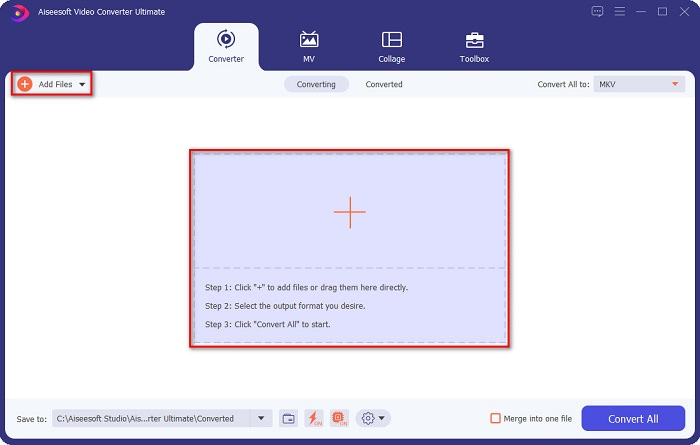
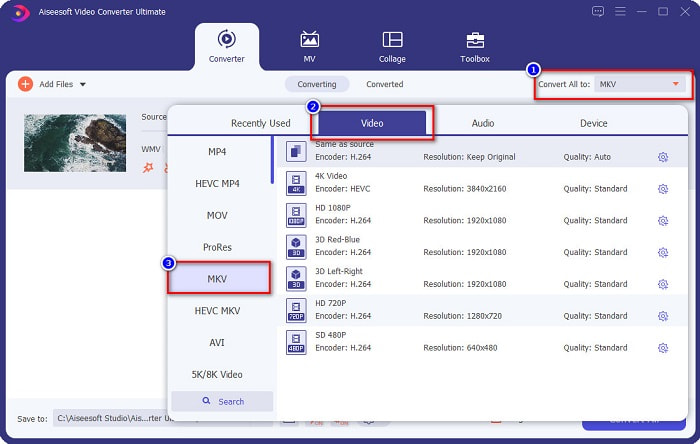
Étape 3. Cliquez ensuite sur le bouton Tout convertir en pour sélectionner le format de sortie souhaité. Dans votre cas, choisissez le format MKV.
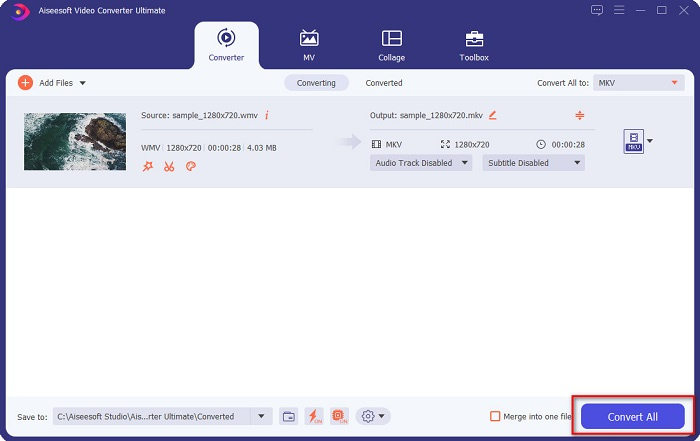
Étape 4. Enfin, cliquez sur le bouton Tout convertir pour convertir votre WMV en fichier MKV. Attendez quelques secondes. Et voilà ! Au fait, vous pouvez aussi rapidement convertir des fichiers WMV en MOV en suivant ces étapes simples.
Partie 3. Convertir WMV en MKV à l'aide des 3 meilleurs outils en ligne
Il ne fait aucun doute que les outils en ligne sont les meilleurs pour la commodité car vous n'aurez rien à télécharger. Cette partie présente les meilleurs convertisseurs WMV vers MKV disponibles sur le web.
Convertisseur vidéo en ligne gratuit FVC
FVC Free Online Video Converter est un convertisseur en ligne doté d’une interface facile à utiliser. Il prend en charge divers formats de fichiers et peut convertir WMV en MKV, AVI, MOV, MP4, MP3, TS, et plus encore. Cependant, ce transcodeur dépend d’Internet, ce qui signifie que la vitesse de conversion dépendra de votre connexion. Néanmoins, c’est sans aucun doute l’un des meilleurs convertisseurs WMV vers MKV en ligne.
Voici les étapes pour convertir des fichiers WMV en MKV via FVC Free Online Video Converter :
Étape 1. Rendez‑vous sur leur page web en cliquant sur ce lien, ou cherchez FVC Free Online Video Converter dans votre navigateur.
Étape 2. Pour l’étape suivante, cliquez sur le bouton Add Files to Convert, puis lancez l’application. Une fois l’application lancée, sélectionnez votre fichier WMV lorsque les fichiers de votre ordinateur s’affichent.
Téléchargez la version de bureau pour convertir des fichiers par lots.
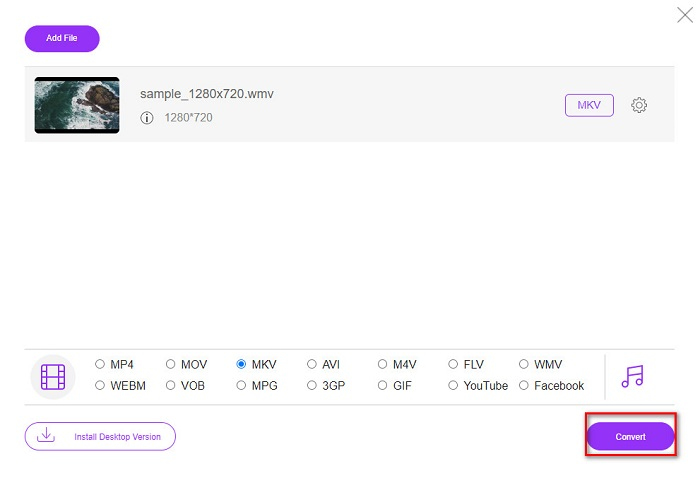
Étape 3. Puis, pour sélectionner le format de fichier de sortie souhaité, cliquez sur MKV, situé sous la deuxième interface du logiciel.
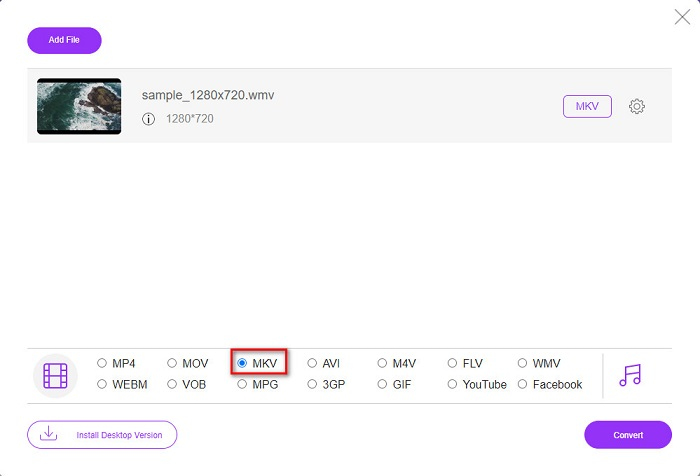
Étape 4. Pour terminer, cliquez sur le bouton Convert, et la conversion de votre fichier WMV en MKV commencera. Attendez la fin de la conversion, et c’est tout ! En suivant ces étapes, vous pouvez facilement convertir WMV en MKV en ligne.
Convertio
Un autre convertisseur en ligne qui fait le buzz sur le web est Convertio. Ce convertisseur en ligne gratuit est également facile à utiliser. Cependant, il contient des publicités susceptibles de vous déranger. Malgré cela, ce convertisseur reste très pratique pour convertir votre fichier WMV en MKV.
Étape 1. Dans votre navigateur, recherchez Convertio. Puis, cliquez sur le bouton Choose Files dans l’interface principale du logiciel pour sélectionner votre fichier WMV.

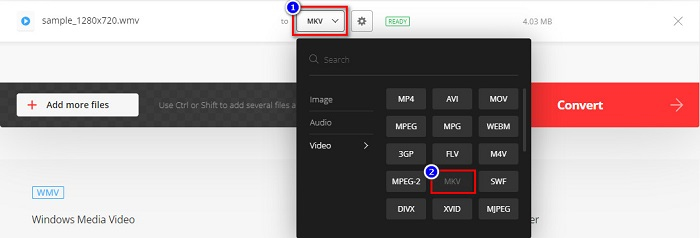
Étape 2. Ensuite, cliquez sur le bouton drop-down pour sélectionner le fichier MKV comme format de sortie.
Étape 3. Pour la dernière étape, cliquez sur le bouton Convert situé dans le coin inférieur droit de l’interface du logiciel. Votre fichier commencera alors à être converti.

Convertisseur MC
MConverter est un convertisseur en ligne WMV vers MKV qui prend en charge différents fichiers audio, vidéo et image. Les étapes pour convertir votre WMV en fichier MKV sont simples. Toutefois, il existe une limite de taille de fichier pour l’utilisation de ce convertisseur. Néanmoins, il peut convertir efficacement votre fichier WMV en MKV en toute simplicité.
Étape 1. Tapez MConverter dans le navigateur que vous utilisez, puis vous serez redirigé vers leur page web.
Étape 2. Ensuite, déposez votre fichier WMV dans le cadre rectangulaire, ou choisissez de cliquer sur le mot browse pour sélectionner votre fichier WMV.

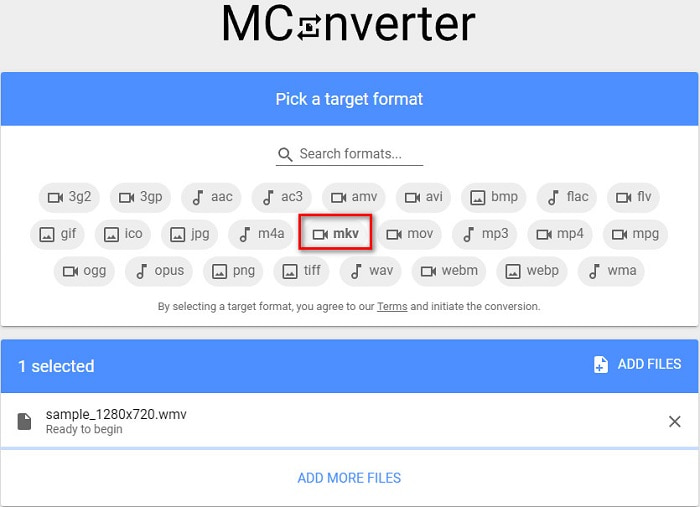
Étape 3. Après avoir sélectionné votre fichier WMV, choisissez le fichier MKV comme format de sortie en cliquant sur le bouton MKV. Juste après avoir cliqué sur MKV, la conversion de votre WMV en MKV commencera. Attendez ensuite que votre fichier soit converti.
WMV contre MKV
Produit par Microsoft, WMV était l'un des formats vidéo les plus courants dans les années 2000. Il peut être vu sur le Web et lu par divers lecteurs multimédias sous Windows. Et c'est aussi le format de fichier vidéo par défaut de Windows Media Player. Mais il a été repris par d'autres formats récemment.
Le format de conteneur multimédia Matroska, sorti en 2002, est un format open source qui peut inclure un certain nombre de pistes vidéo, audio, image et sous-titres. Ainsi, vous pouvez l'utiliser pour stocker facilement de courts clips vidéo, des émissions de télévision et des films. Il est très populaire pour les fans d'anime.
Partie 4. FAQ sur la conversion de WMV en MKV
Pouvez-vous lire MKV sur Mac?
Non. macOS ne prend pas en charge le format de fichier MKV. Cependant, vous pouvez utiliser un lecteur tiers ou convertir votre fichier MKV dans un format de fichier pris en charge par Mac. MP4 est l’un des formats les plus courants pris en charge par Mac. Pour en savoir plus sur la conversion de MKV en MP4, cliquez sur ce lien.
Pouvez-vous compresser la taille de fichier des fichiers MKV ?
Oui. Vous pouvez compresser vos fichiers à l’aide d’un compresseur. FVC Video Converter Ultimate propose également une fonction qui permet de compresser des fichiers.
Windows Media Player prend-il en charge les fichiers MKV ?
Windows Media Player ne prend pas en charge les fichiers MKV. Vous risquez de n’avoir que le son ou de rencontrer des problèmes de lecture lorsque vous lisez un fichier MKV dans Windows Media Player. Pour lire des fichiers MKV dans Windows Media Player, vous devez télécharger et installer le codec MKV.
Conclusion
Il existe de nombreuses façons de convertir WMV en MKV sur Mac et Windows pour résumer. Les outils en ligne et hors ligne présentés ci-dessus affichent des performances prometteuses lorsqu'il s'agit de convertir vos fichiers WMV en MKV. Cependant, si vous voulez un convertisseur qui vous permette d'avoir un format de sortie splendide, utilisez FVC Video Converter Ultimate car il possède toutes les fonctionnalités spéciales dont vous avez besoin lors de la conversion de fichiers.
-
 WMV en MP3 - Comment convertir une vidéo en audio gratuitement [Desktop/Online ]
 En regardant une vidéo WMV, vous trouvez la partie audio fascinante. Ainsi, vous souhaitez le lire sur votre lecteur MP3. Mais il est clair que votre lecteur ne prend pas en charge le format WMV. Cela vous fait vous demander s'il existe un moyen de convertir WMV en MP3.
-
 2 façons les plus simples de convertir des fichiers WMV en FLV sur PC/Mac
 Comment convertir WMV en FLV ? Tout d'abord, vous devez lire nos recommandations et trouver votre méthode préférée, puis suivre notre guide pour faire le travail rapidement.
-
 [2 Solutions] Comment convertir gratuitement des vidéos WMV en fichiers GIF
 Si vous souhaitez couper les parties merveilleuses des vidéos WMV et en faire des GIF, vous pouvez découvrir 2 méthodes simples pour transférer des vidéos WMV en GIF dans cet article.

