


 Video Converter Ultimate
 Enregistreur d'écran
 Réparation vidéo
5 éditeurs de balises vidéo AVI les plus sélectionnés sur les systèmes Windows et Mac [Facile à utiliser]
La balise AVI peut vous aider à déterminer ce que contient ce fichier en l’analysant. Cependant, toutes les balises de vos fichiers AVI ne sont pas correctes, vous aurez donc besoin d’un outil pour les corriger vous‑même. Mais le marché des éditeurs de balises est tellement vaste sur le web, n’est‑ce pas dommage ? Nous savons ce que l’on ressent quand on cherche l’outil idéal à utiliser. Par chance, nous avons sélectionné le meilleur éditeur de métadonnées que vous pouvez utiliser pour modifier, ajouter ou supprimer les balises de vos fichiers AVI. Dans cet article, nous allons faire en sorte que vous découvriez le meilleur éditeur de balises vidéo AVI que vous pouvez installer sur votre ordinateur.

Partie 1. Les 5 meilleurs éditeurs de balises AVI disponibles sur Windows et Mac
Video Converter Ultimate [Meilleur éditeur de métadonnées AVI pour 2023]
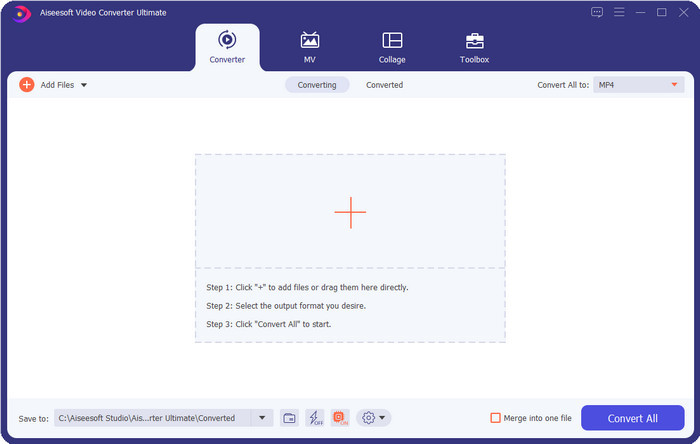
C’est le meilleur éditeur de balises vidéo AVI que vous pouvez utiliser pour modifier ou supprimer facilement les balises de vos fichiers AVI. Si vous souhaitez des fonctions logicielles à la fois avancées et simples qui vous séduisent, alors Video Converter Ultimate est le bon choix. En outre, vous pouvez utiliser ici plusieurs fonctions d’édition de métadonnées pour organiser, corriger ou mettre à jour correctement vos balises. Avant de télécharger et d’essayer un autre éditeur de bureau, nous vous recommandons fortement d’utiliser cet outil, car en le téléchargeant vous disposez d’un logiciel tout‑en‑un. Vous voulez savoir pourquoi vous devriez utiliser cet outil ? Nous avons listé ci‑dessous 5 raisons que vous pouvez lire pour vous aider à décider de le télécharger.

Convertisseur vidéo FVC Ultimate
Plus de 5 689 200 téléchargements- C'est le meilleur logiciel que vous puissiez utiliser qui prend en charge une multitude de formats tels que MP4, MOV.
- Pour le processus rapide d'édition des métadonnées, cet outil fonctionne parfaitement bien.
- Apprenez à ajouter les balises essentielles sur vos fichiers ou à les supprimer en quelques clics.
- Il prend en charge toutes les plates-formes de bureau telles que Windows et Mac.
Téléchargement gratuit pour Windows 7 ou version ultérieure Téléchargement sécurisé
Téléchargement gratuit pour macOS 10.7 ou version ultérieure - Téléchargement sécurisé
AVI MetaModifier
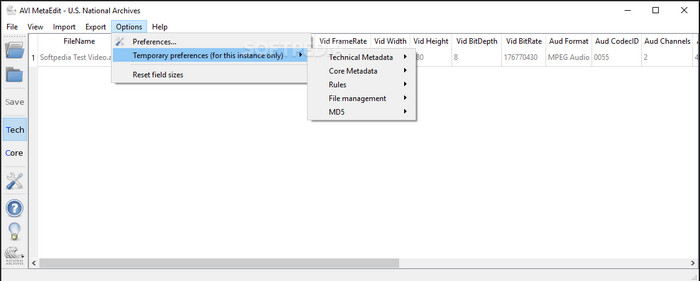
Si vous recherchez un éditeur de métadonnées AVI sur Mac et Windows, alors AVI Meta Edit pourrait être l’outil qu’il vous faut. Cet outil permet à ses utilisateurs de modifier les balises ou les informations contenues dans un fichier multimédia, en particulier les fichiers AVI. Avec cet outil, vous pouvez éditer séparément les métadonnées techniques et les métadonnées de base de vos fichiers, qui incluent toutes deux différentes informations sur le fichier. Même si l’outil propose des fonctions d’édition poussées, il reste difficile à utiliser en raison des abréviations et termes raccourcis présents dans l’interface.
Machette Video Editor Lite
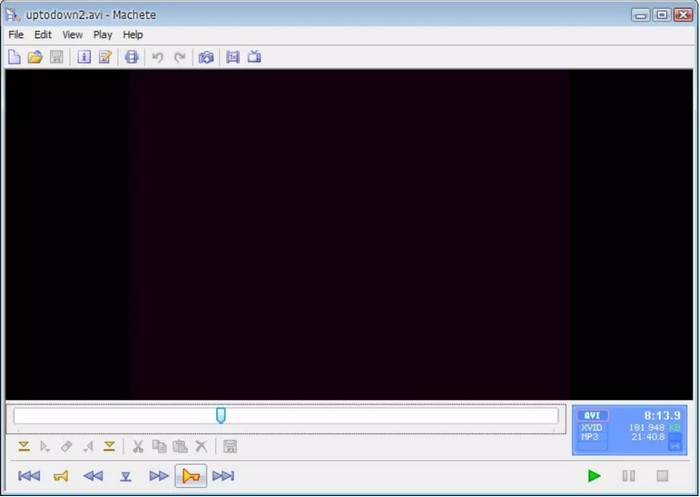
Si vous souhaitez modifier les métadonnées AVI sous Windows 10, vous devez essayer d’utiliser Machete Video Editor Lite. Avec cet outil, vous pouvez facilement éditer les balises de vos fichiers AVI et WMV. Il propose également une interface simple et générée de manière claire pour aider les utilisateurs à comprendre les fonctions disponibles dans ce programme. En raison de cette interface épurée, certains utilisateurs ne le considèrent comme une option que lorsqu’ils n’ont pas d’autre choix pour modifier leurs métadonnées. De plus, les informations de métadonnées que vous pouvez renseigner dans cet outil sont limitées, tout comme les formats pris en charge.
Éditeur de balises abcAVI
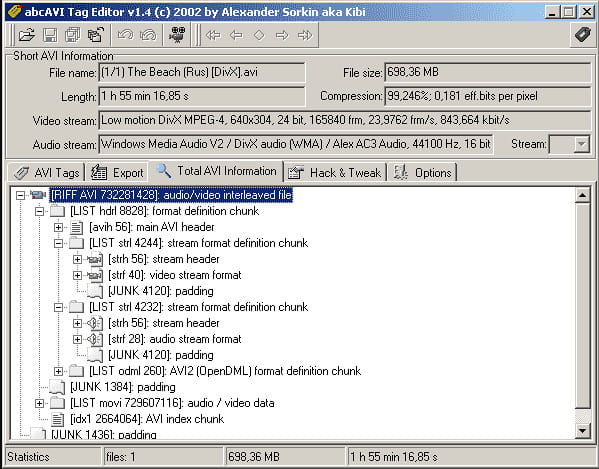
Vous pouvez télécharger un autre éditeur de balises AVI open source pour Windows : abcAVI Tag Editor. Avec cet outil, vous pouvez facilement ajuster les métadonnées de vos fichiers AVI, mais il ne prend en charge que le format AVI. De plus, vous pouvez ajouter ou mettre à jour les balises dont vous avez besoin sur vos fichiers AVI en quelques clics. Même si l’outil offre de bonnes performances, on constate que son interface graphique est vraiment médiocre ; son agencement est très loin de ce que proposent les autres outils. En outre, il ne prend pas en charge d’autres formats d’importation que le format AVI uniquement.
FFmpeg
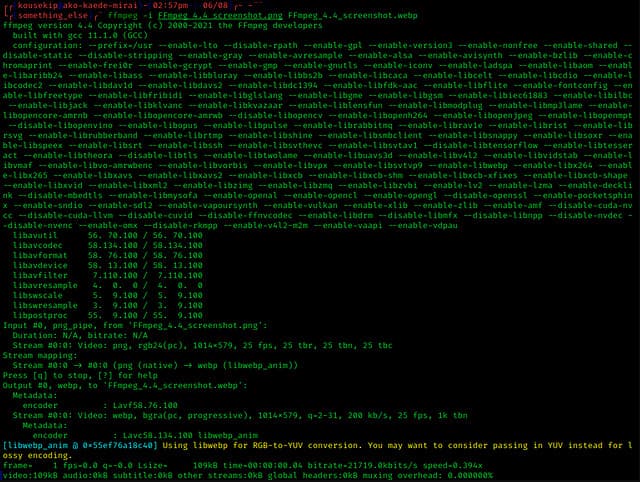
Enfin, nous avons FFmpeg, le logiciel en ligne de commande que vous pouvez utiliser pour modifier les propriétés de fichiers AVI sous Windows et Mac. Cet outil sert à convertir, monter et lire des fichiers multimédias, mais il permet aujourd’hui aussi de modifier les métadonnées de n’importe quel fichier média. Contrairement aux autres outils, celui‑ci n’a aucun bouton sur lequel cliquer pour lancer les commandes : il utilise un langage de commande pour effectuer les tâches. Pour interagir avec l’outil, vous devez ouvrir l’invite de commandes et saisir un code spécifique afin d’achever l’édition dont vous avez besoin. Il est difficile à utiliser, mais c’est un outil professionnel que vous pouvez installer sur votre ordinateur.
En rapport:
Partie 2. Tableau de comparaison sur le Top 5 des éditeurs de métadonnées AVI
| traits | Video Converter Ultimate [Meilleur éditeur de métadonnées AVI pour 2022] | AVI MetaModifier | Machette Video Editor Lite | Éditeur de balises abcAVI | FFmpeg |
| Convivial |  | | | |  |
| Utilisation sûre | | | | | |
| Disponible sur les deux OS | | | | | |
| Interface intuitive | | | | | |
| Formats pris en charge | Commence à partir d'AVI, MP4, MKV, FLV, MOV et plus de 1000 autres formats de fichiers | AVI | AVI et WMV | AVI | AVI, MOV, MP4, FLV, etc. |
Partie 3. FAQ sur l'éditeur de métadonnées AVI
Est-il sûr d'utiliser un éditeur de métadonnées AVI en ligne ?
Supposons que vous n'ayez pas assez d'espace sur le bureau que vous utilisez actuellement ; nous vous recommandons d'utiliser un outil en ligne pour effectuer la tâche. Cependant, tous les outils auxquels vous pouvez accéder gratuitement sur Internet ne sont pas fiables ou dignes de confiance. Mais si vous souhaitez utiliser un outil en ligne, vous devez respecter les trois directives que nous recherchons toujours sur le site Web que nous visitons. Avant tout, nous vous recommandons fortement de regarder en haut près de votre barre de recherche ; il y a une icône de verrouillage, ce qui signifie qu'il est sûr à utiliser, donc si ce verrou est cassé, cela signifie que votre connexion n'est pas protégée. Vérifiez l'activité publicitaire des annonces ; parfois, les publicités peuvent contenir des logiciels malveillants sur votre bureau, entraînant la corruption de vos fichiers sur votre disque. N'autorisez pas les cookies ; les cookies sont parfois un excellent moyen de savoir combien d'utilisateurs visitent le site Web, mais votre emplacement est souvent visible avec les cookies. Gardez cela à l'esprit pour éviter de choisir le mauvais éditeur en ligne.
Quel outil est le plus performant pour éditer les balises AVI ?
Selon nos recherches, nous pouvons voir que le Video Converter Ultimate fonctionne très bien dans tous les aspects sans transpirer en l'utilisant. Si vous avez besoin de plus d'informations sur l'éditeur, vous pouvez lire les informations suivantes ci-dessus pour en savoir plus et le télécharger.
Y a-t-il une limitation à l'ajout de métadonnées sur AVI ?
Jusqu'à présent, nous ne voyons aucune limitation sur les informations que vous pouvez ajouter à vos fichiers AVI ou dans tout fichier multimédia. Cependant, certains éditeurs de métadonnées ne peuvent pas insérer les informations dont vous avez besoin dans le fichier. L'ajout de métadonnées sur votre AVI n'a pas de limites, mais c'est l'outil qui limite les informations que vous pouvez ajouter à un seul fichier.
Conclusion
N’est‑ce pas formidable que nous disposions de différentes options pour modifier les métadonnées de nos fichiers AVI ? En effet, les cinq éditeurs de métadonnées AVI présentés dans cet article peuvent être l’outil idéal dont vous avez besoin pour éditer les balises ou les métadonnées de vos fichiers AVI. Même si nous proposons cinq options, il est facile de déterminer quel outil a l’avantage pour la modification des métadonnées de vos AVI : il s’agit de Video Converter Ultimate. Avec cet éditeur, vous pouvez faire bien plus que modifier, ajouter ou supprimer les métadonnées de vos fichiers AVI. Vous voulez savoir ce que vous pouvez encore faire avec lui ? Dans ce cas, cliquez sur le bouton de téléchargement et découvrez‑le par vous‑même.
-
 5 façons les plus simples de supprimer les métadonnées de tous les fichiers multimédias
 Comment supprimer les métadonnées ? Est-ce difficile de le faire ? Dois-je acheter ou utiliser un outil gratuit pour supprimer les balises ? Toutes ces questions ont des réponses dans cet article.
-
 Top 5 des extracteurs de métadonnées disponibles en ligne et hors ligne [2025]
 Vous pouvez trouver plusieurs extracteurs de métadonnées sur le marché, mais aujourd'hui, nous ne choisissons que les cinq extracteurs de balises les plus sélectionnés en fonction de l'audience.
-
 Top 5 des éditeurs de métadonnées vidéo pour 2025 [Évaluation impartiale]
 Voulez-vous voir les métadonnées de votre vidéo ? Si tel est le cas, lisez les détails ci-dessous pour bien saisir le sujet et savoir quel outil vous convient le mieux.
