


 Video Converter Ultimate
 Enregistreur d'écran
 Réparation vidéo
 Téléchargement sécurisé
Comment réduire la taille de la vidéo GoPro facilement et rapidement
Vous avez une caméra GoPro? Ensuite, vous devez être un grand passionné d'athlétisme extrême et d'aventures. GoPro est en fait une société fondée par Nick Woodman en 2002. Elle produit principalement des caméras d'action, des applications mobiles et des logiciels de montage vidéo.
Avec une caméra GoPro, vous pouvez enregistrer des vidéos en haute résolution jusqu’en 4K ou en HDR. Cependant, cela pose aussi un problème : les fichiers peuvent parfois être trop volumineux. En plus de provoquer de sérieux problèmes d’espace de stockage, une taille de fichier trop importante peut vous empêcher d’envoyer la vidéo sur Instagram, WhatsApp, Dailymotion, par e‑mail ou sur d’autres plateformes.
Pour résoudre ce problème, nous vous proposons un guide complet expliquant comment compresser des vidéos GoPro sous Windows et Mac.

Partie 1. Comment compresser gratuitement une vidéo GoPro en ligne
Même si GoPro est un bon choix pour enregistrer des clichés et des séquences vidéo époustouflants, vous constaterez peut-être que les vidéos enregistrées occupent beaucoup trop d'espace de stockage. Cependant, l'espace pour stocker des vidéos sur chaque caméra GoPro est limité, même sur la dernière HERO9 Black, ce qui signifie que vous devez transférer la vidéo sur votre ordinateur, carte SD, lecteur flash ou disque dur pour une sauvegarde ou une édition ultérieure. Dans ce cas, cela prendra beaucoup de place sur votre appareil.
Vous avez donc besoin d’un puissant compresseur vidéo pour réduire la taille de vos enregistrements. FVC Free Video Compressor vous permet de compresser gratuitement les grandes vidéos 4K et HDR filmées avec une caméra GoPro sur n’importe quel navigateur populaire comme Google Chrome, Microsoft Edge ou Mozilla Firefox.
Suivez les étapes ci-dessous pour réduire la taille de la vidéo GoPro au minimum en quelques secondes en ligne.
Étape 1 : Cliquez sur le lien ci‑dessus pour ouvrir FVC Free Video Compressor dans votre navigateur. Puis cliquez sur le bouton Add Files to Compress au centre de la bannière. Suivez les instructions à l’écran pour télécharger et installer le lanceur sur votre ordinateur.
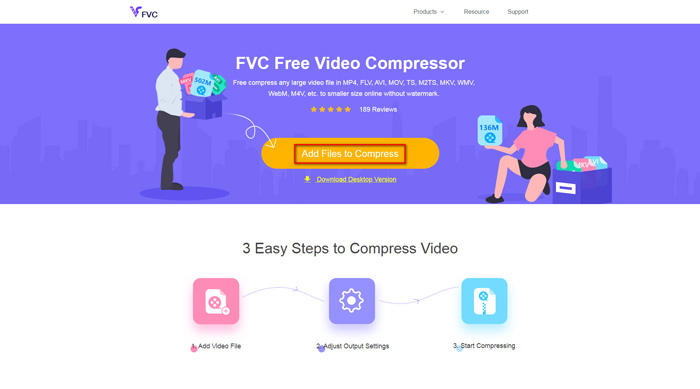
Étape 2 : Sélectionnez maintenant le fichier vidéo GoPro que vous souhaitez compresser après avoir connecté l’appareil à l’ordinateur. Pour compresser la vidéo, utilisez simplement le curseur derrière la case Size. Faites‑le glisser et ajustez la taille du fichier comme vous le souhaitez. Vous pouvez même personnaliser séparément la résolution et le débit binaire.
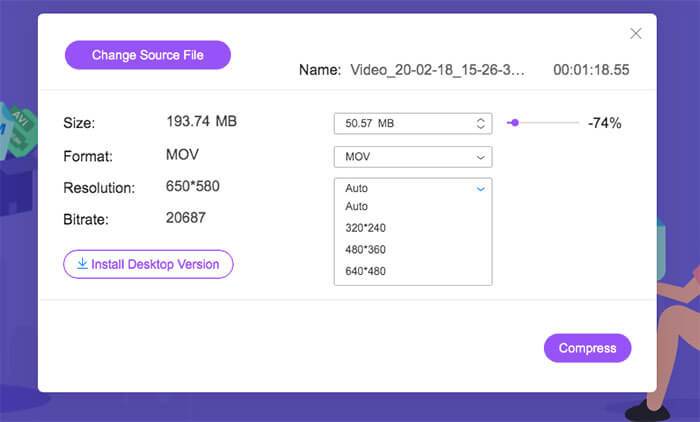
Étape 3 : Choisissez un format de sortie. Puis cliquez sur Compress dans le coin droit. Sélectionnez un dossier pour enregistrer la vidéo compressée. Patientez quelques instants et vous obtiendrez la vidéo souhaitée en haute qualité.
Partie 2. Comment redimensionner une vidéo GoPro pour la mise en ligne
Mais que faire si vous souhaitez partager la vidéo GoPro sur YouTube, Instagram, WhatsApp, Facebook, Twitter, Snapchat ou TikTok? Et y a-t-il une exigence stricte de durée / taille lors du téléchargement de vidéos sur ces plateformes?
| Youtube | Snapchat | TIC Tac | |||||
| Durée | ≤ 12 heures | ≤ 2 minutes | ≤ 3 minutes | ≤ 240 minutes | ≤ 40 secondes | ≤ 60 secondes | ≤ 60 secondes |
| Taille | ≤ 128 Go | — | ≤ 16 Mo | ≤ 4 Go | — | — | — |
Comme vous pouvez le voir, presque toutes les plateformes ont leurs propres exigences en matière de durée de vidéo, ce qui signifie que vous devez couper la vidéo avant de la partager. Vous pouvez alors essayer Video Converter Ultimate. Avec cet éditeur vidéo, vous pouvez rogner la vidéo à la longueur désirée. Il vous permet également de fusionner plusieurs clips vidéo en une seule vidéo complète.
Téléchargement gratuit pour Windows 7 ou version ultérieure Téléchargement sécurisé
Téléchargement gratuit pour macOS 10.7 ou version ultérieure - Téléchargement sécurisé
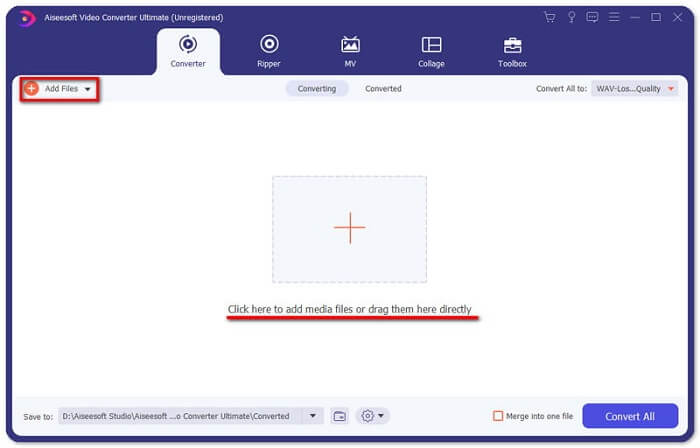
Étape 1 : Téléchargez et installez le convertisseur vidéo professionnel sur votre ordinateur. Lancez le programme après l’installation. Cliquez sur Add Files pour ajouter la vidéo GoPro que vous souhaitez monter. Vous pouvez aussi faire glisser directement le fichier dans le programme.
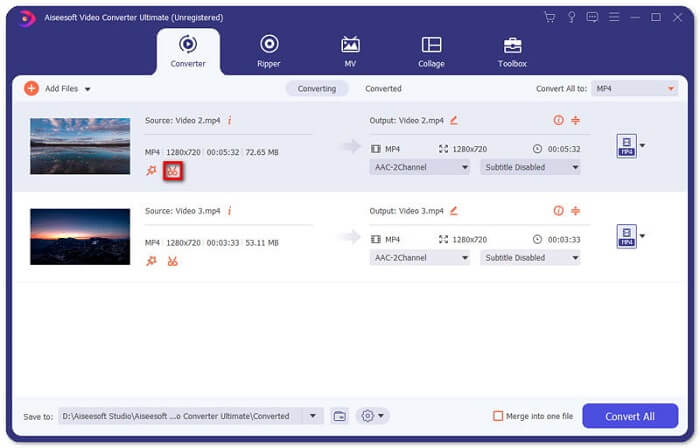
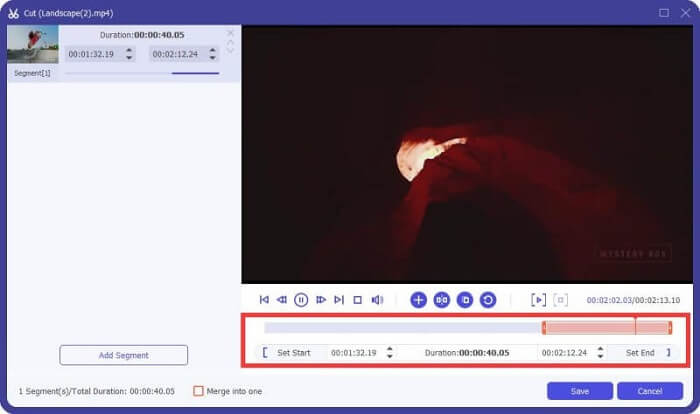
Étape 2 : Après le téléchargement de la vidéo, cliquez sur l’icône Cut. Elle a la forme de ciseaux et se trouve à côté de l’aperçu de votre vidéo.
Étape 3 : Pour couper les parties indésirables, il vous suffit de faire glisser le curseur sur la barre de progression. Vous pouvez également saisir directement l’heure de début et de fin dans la case Duration située en dessous. Après le rognage, cliquez simplement sur Save pour enregistrer toutes les modifications.
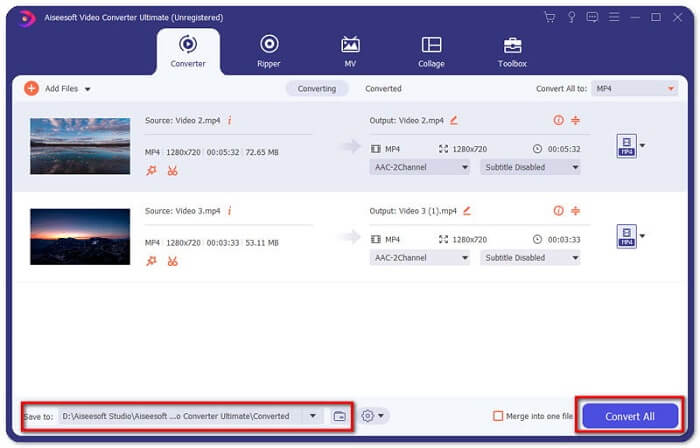
Étape 4 : Revenez à l’interface principale. Cliquez sur Convert All pour exporter la vidéo rognée vers votre ordinateur. Si vous avez plusieurs clips vidéo à combiner en un seul, cochez simplement la case devant l’option Merge into one file.
Après avoir rogné la vidéo GoPro d’origine, vous pouvez facilement partager vos meilleurs moments avec les autres. Mais si vous utilisez WhatsApp, il se peut que vous deviez encore compresser la vidéo découpée avant de la mettre en ligne, en raison de la taille maximale autorisée pour le téléversement.
Partie 3. FAQ sur la compression de vidéo GoPro
Pourquoi les vidéos GoPro sont-elles si volumineuses?
C'est parce que vous filmez à 60 images par seconde en 1080p ou même en 4K. Par exemple, une vidéo de 1 minute à 60 images par seconde en résolution 4K occupera environ 600 Mo de mémoire.
Pourquoi ma vidéo de rupture GoPro?
C’est ce qu’on appelle le chapitrage. Lorsque vous filmez une vidéo, votre caméra peut automatiquement la segmenter en un nouveau fichier‑chapitre lorsqu’elle atteint une certaine taille.
Quel est le format vidéo de GoPro?
Le format par défaut des vidéos GoPro est le type de fichier MP4, ce qui signifie que vous pouvez le lire sur presque tous les appareils et lecteurs.
Conclusion
Vous savez maintenant comment compresser des vidéos GoPro aussi bien sur Mac que sur Windows. Si vous n’avez pas besoin de téléverser sur des plateformes avec des contraintes strictes, vous pouvez simplement utiliser FVC Free Video Compressor pour redimensionner la vidéo GoPro. Pour couper la vidéo, vous pouvez également essayer Video Converter Ultimate.
-
 De 50 Mo à 5 Mo - Comment compresser un fichier MP4 en quelques secondes
 La vidéo MP4 est trop volumineuse pour être téléchargée? Vous souhaitez réduire la taille de la vidéo? Voici 3 façons efficaces de compresser un fichier MP4 à une taille plus petite sans limite.
-
 Comment compresser une vidéo pour un e-mail et la réduire à moins de 25 Mo
 Vous ne pouvez pas envoyer une vidéo trop volumineuse par e-mail? Si vous rencontrez ce problème, vous pouvez trouver ici des moyens pratiques de compresser une vidéo pour un e-mail. Cet article vous montrera comment réduire gratuitement de gros fichiers vidéo en détail.
-
 Compression GIF - Comment compresser un GIF animé en petite taille de fichier
 Voici 2 façons simples de compresser des GIF sur votre ordinateur ou votre téléphone portable. Vous pouvez utiliser FVC Free Online Video Compressor et Photoshop pour réduire la taille du fichier GIF sous différents aspects.
