


 Video Converter Ultimate
 Enregistreur d'écran
 Réparation vidéo
 Téléchargement sécurisé
2 façons simples de compresser MXF avec une taille de fichier plus petite
MXF is an industry standard file format which supports full timecode and metadata. It is mainly designed for professional use of the video contents, especially in TV broadcasting. MXF is a video container format for SMPTE standard professional video and audio content. You may easily get a high quality MXF video from your digital camera. Meanwhile, MXF file usually takes a large file size.
When you want to share a big MXF video, it’s quite necessary to compress MXF with smaller file size. The question is, do you know how to compress MXF files?

In fact, there are many video compressing and editing tools offered on the market that can help you compress MXF and reduce the file size. This post will show you how to compress MXF with Adobe Premiere Pro and free online video compressor.
Partie 1. Comment compresser des fichiers MXF gratuitement en ligne
To compress MXF with smaller file size, you can choose the popular MXF video compressing software, Free Video Compressor. It has the capability to reduce the file size of MXF video while keeping the original image and sound quality. This video compressor highly supports any frequently-used video formats including MXF, MP4, MOV, AVI, MKV, FLV and more. It enables you to compress MXF on both Windows PC and Mac.
Step 1. When you want to compress a MXF file, you can go to the official site of this MXF file compressor. Click the Add Files to Compress button to install a small file size launcher for the MXF files compressing.

Step 2. Select and add the MXF file you want to compress to this free online video compressor. Here you can freely adjust the video compression based on your need. In addition, you are allowed to custom the video resolution, frame rate and bitrate and video name. You can also select another output format like MP4 for your compressed video.

Step 3. After that, you can simply click the Compress button to start compressing MXF file free online.

Contrairement à de nombreux autres compresseurs vidéo en ligne, ce compresseur vidéo gratuit n'ajoutera aucun filigrane à votre fichier MXF compressé.
Partie 2. Comment compresser MXF dans Adobe Premiere Pro
Adobe Premiere Pro is a common professional video production suite for Mac and Windows users. If you have Premiere Pro installed on your computer, you can use it to compress MXF files.
Step 1. Launch Premiere Pro on your computer. When you enter the main interface, click New Project to create a new project. You can custom various settings in the window.
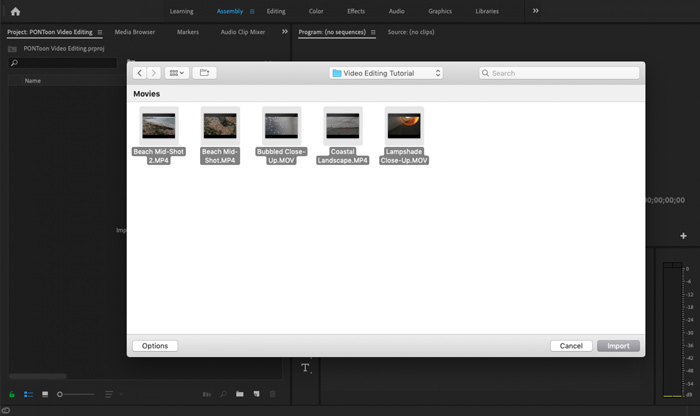
Step 2. Click File, Import and then Media to select and import your MXF file to it. If you want to compress a MXF file in your digital camera, here you can connect your camera to computer. Also, you are allowed to drag and drop MXF video directly from a folder.
Step 3. Switch over to the Editing workspace for better compressing your MXF file.
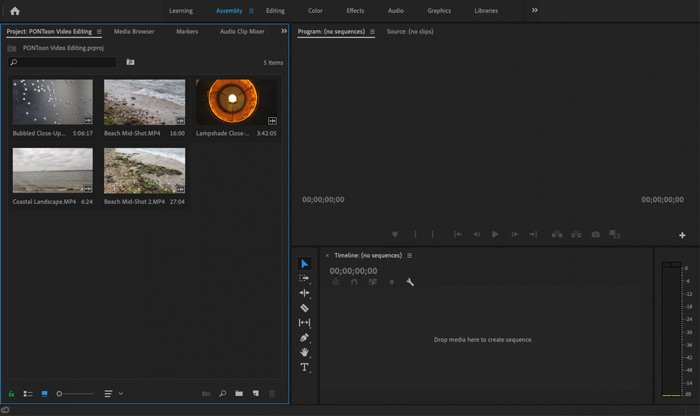
Step 4. Now you can edit your MXF file on the timeline. Just drag and drop a MXF clip from your imported media into the timeline to create a new sequence. Then you are able to trim MXF file to reduce the file size.

Vous pouvez également choisir de personnaliser la résolution vidéo et d'autres pour compresser le fichier MXF. De plus, vous pouvez produire du MXF dans un format vidéo dont la taille de fichier est plus petite.
Partie 3. FAQ sur la compression de fichiers MXF
Question 1. Quel est le format vidéo MXF?
MXF, signifie Material eXchange Format, est un format de conteneur qui stocke la vidéo, l'audio et les métadonnées. Il s'agit d'un format de conteneur vidéo pour le contenu vidéo et audio professionnel standard SMPTE. De nombreux caméscopes numériques professionnels tels que Sony, Panasonic, Canon et d'autres stockent des vidéos au format MXF.
Question 2. Comment convertir gratuitement MXF en MP4 en ligne?
MP4 is no doubt the most popular format which can be supported by almost all players, editors and devices. So in many cases, you need to convert MXF to MP4 for better playback or editing. You can choose the Free Online Video Converter to make the MXF to MP4 converting with ease.
Question 3. MXF est-il un format vidéo sans perte?
MXF peut stocker des séquences RAW sans perte, ce qui offre aux studios de post-production professionnels des capacités avancées dans les flux de travail pour l'étalonnage des couleurs et le montage vidéo. Le format MXF peut totalement prendre en charge le timecode SMPTE.
Conclusion
We have mainly talked about how to compress MXF files in this post. You have to admit that, compressing MXF files with Adobe Premiere Pro is too complex. So you are suggested using the recommended Free Video Compressor to reduce your MXF file size.
-
 Comment compresser une vidéo MP4 à une taille plus petite
 La vidéo MP4 est trop volumineuse pour être téléchargée? Vous souhaitez réduire la taille de la vidéo? Voici 3 façons efficaces de compresser un fichier MP4 à une taille plus petite sans limite.
-
 Tutoriel pour compresser un GIF et réduire sa taille de fichier avec une haute qualité
 Voici 2 façons simples de compresser des GIF sur votre ordinateur ou votre téléphone portable. Vous pouvez utiliser FVC Free Online Video Compressor et Photoshop pour réduire la taille du fichier GIF sous différents aspects.
-
 4 façons de compresser des fichiers MOV QuickTime volumineux sans perte de qualité
 Cet article explique en détail comment compresser des vidéos QuickTime MOV sur votre téléphone ou ordinateur. Si votre vidéo MOV est trop volumineuse pour être envoyée, partagée ou enregistrée, vous pouvez obtenir 4 solutions viables ici.
