


 Video Converter Ultimate
 Enregistreur d'écran
 Réparation vidéo
[Éprouvé] Comment modifier les propriétés des fichiers WAV sur Windows 10/11 et Mac sans effort
Si vous souhaitez stocker un flux binaire audio sur PC, alors, sans aucun doute, le WAV est le format audio standard que vous devez utiliser. Imitant le format RIFF, les fichiers WAV contiennent leurs métadonnées dans des blocs INFO. Bien qu’il puisse stocker plus que de l’audio, il arrive que les données présentes dans les fichiers WAV soient inexactes. Donc, si les données de vos fichiers WAV sont erronées, vous devez utiliser ce guide pour savoir comment modifier les propriétés des fichiers WAV sous Windows 10/11 et sur Mac, avec des étapes détaillées faciles à suivre.

Partie 1. Comment modifier les propriétés des fichiers WAV avec les meilleurs outils sous Windows
Meilleur éditeur de métadonnées sur Windows et Mac - FVC Video Converter Ultimate
Apprendre à modifier les propriétés des fichiers WAV sur Windows 10/11 et Mac n'est pas un gros problème avec l'aide du meilleur éditeur de métadonnées que vous pouvez télécharger sur ladite plate-forme. FVC Video Converter Ultimate présente le meilleur convertisseur et l'un des meilleurs éditeurs de métadonnées que vous pouvez utiliser et télécharger sur votre bureau. Contrairement aux autres outils du marché et à cette liste, cet outil présente un puissant éditeur de balises sur plus de 1000 fichiers multimédias, y compris WAV.
En plus de cela, même vous avez ou n'avez pas expérimenté l'édition des balises de métadonnées ; vous pouvez rapidement tout comprendre en utilisant le convertisseur ultime. Aucun travail compliqué ne peut être rapidement en reste avec cet outil, ce qui rend le logiciel unique et puissant. Vous voulez savoir comment utiliser l'outil ? Vous pouvez suivre le guide que nous ajoutons ci-dessous et copier les étapes pour terminer la tâche avec succès.
Étape 1. Veuillez cliquer sur le bouton de téléchargement présenté ci‑dessous et choisir le bouton de téléchargement approprié. Ensuite, installez et configurez l’outil, puis lancez‑le.
Téléchargement gratuit pour Windows 7 ou version ultérieure Téléchargement sécurisé
Téléchargement gratuit pour macOS 10.7 ou version ultérieure - Téléchargement sécurisé
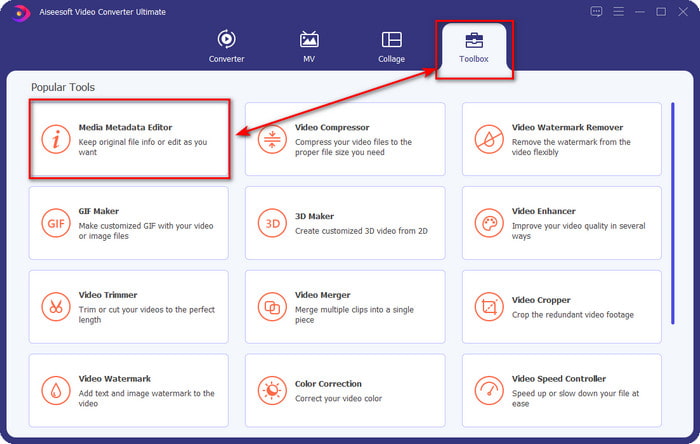
Étape 2. Une fois le logiciel ouvert, allez dans la section Boîte à outils, puis sélectionnez le Éditeur de métadonnées multimédia dans la liste ci‑dessous.
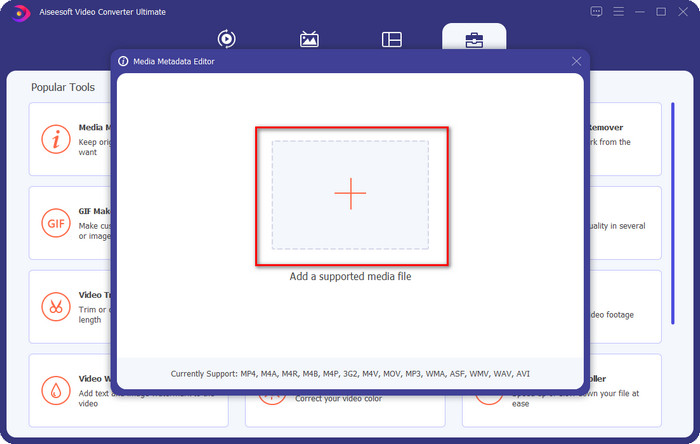
Étape 3. Ajoutez le fichier en cliquant sur le bouton + affiché à l’écran, recherchez dans le dossier de votre ordinateur le fichier WAV auquel vous voulez ajouter des métadonnées, puis appuyez sur Ouvrir.
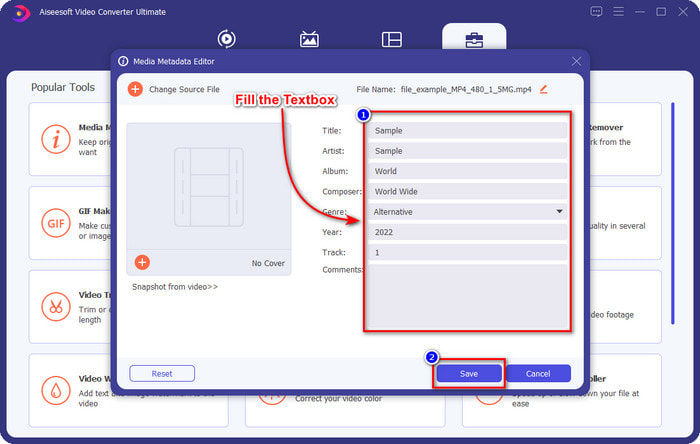
Étape 4. Modifiez ou supprimez les informations dans la zone de texte ; si vous les avez toutes correctement remplies, vous pouvez cliquer sur Enregistrer pour appliquer les changements. Ainsi, vous avez appris à modifier les tags des fichiers WAV à l’aide de l’outil ultime.
Audace
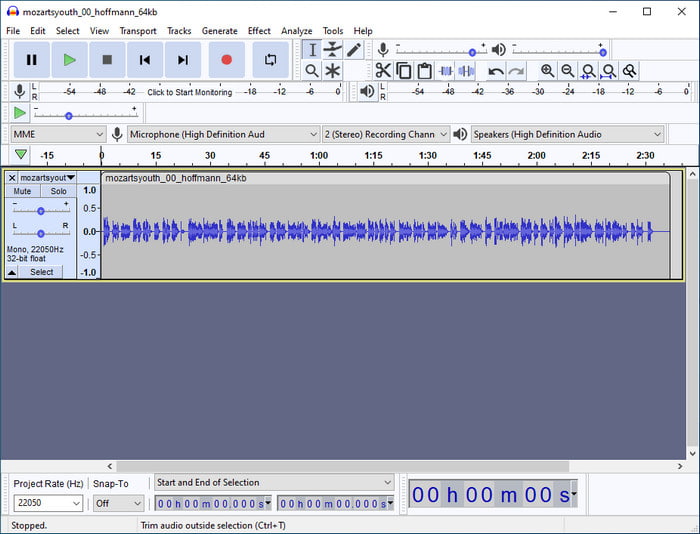
L’un des meilleurs logiciels que vous pouvez utiliser pour améliorer votre audio est Audacity. Ce logiciel Windows offre un puissant rehausseur et un éditeur que vous apprécierez d’utiliser gratuitement. Bien qu’il puisse améliorer votre fichier audio, il peut également modifier les tags de votre fichier audio si nécessaire. Vous pouvez suivre le guide ci‑dessous si vous voulez savoir comment modifier les propriétés des fichiers WAV avec cet outil.
Étape 1. Téléchargez Audacity sur Windows, puis ouvrez‑le.
Étape 2. Ensuite, glissez‑déposez le fichier WAV que vous voulez, cliquez sur Édition, puis, dans ce menu, cliquez sur Métadonnées.
Étape 3. Touchez chaque case sous Valeur pour modifier les tags de votre fichier WAV, puis cliquez sur OK pour appliquer, cliquez sur Fichier, puis sur Enregistrer le projet.
Partie 2. Comment modifier les propriétés des fichiers WAV avec le meilleur logiciel sur Mac
Étiquette de musique Pro
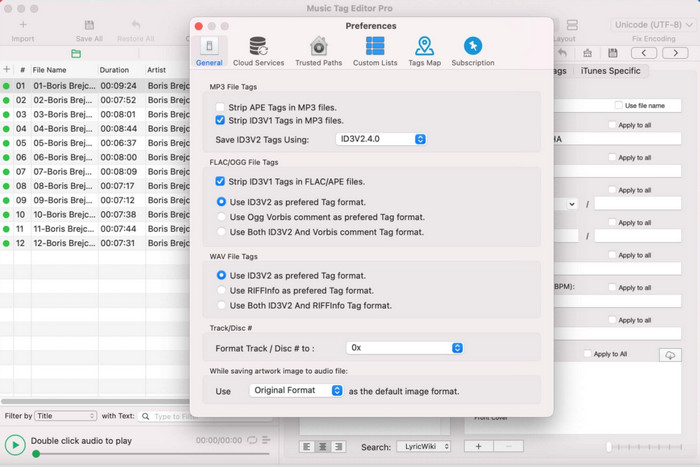
Music Tag Pro est un logiciel que vous pouvez télécharger sur votre Mac pour modifier les métadonnées des fichiers audio et vidéo. Il peut également modifier en lot les tags de métadonnées afin de changer efficacement les métadonnées des fichiers. Grâce aux performances globales de cet éditeur de tags sur Mac, de nombreux utilisateurs aiment l’utiliser et laissent de nombreux commentaires positifs sur l’App Store, si vous allez y jeter un œil. Cependant, les informations sur votre fichier multimédia restent limitées, mais cela reste faisable avec cet outil. Si vous souhaitez l’utiliser, ce tutoriel vous apprendra comment modifier les propriétés des fichiers WAV sur Mac.
Étape 1. Recherchez l’outil sur l’App Store, puis téléchargez‑le.
Étape 2. Cliquez sur le bouton Importer pour ajouter les fichiers WAV.
Étape 3. Cliquez sur les fichiers WAV, modifiez les tags dans chaque colonne, puis cliquez sur Tout enregistrer une fois que vous avez terminé de modifier le fichier WAV.
Éditeur de balises pour Mac
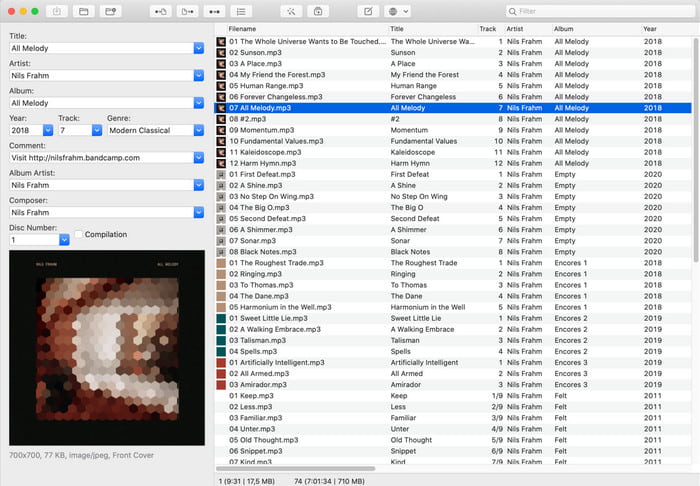
Tag Editor for Mac est un logiciel pratique pour ajouter des tags à vos fichiers audio, comme les fichiers WAV. Avec ce logiciel, vous pouvez facilement ajouter des métadonnées à n’importe quel fichier audio sans les dégrader, comme le fait l’outil ultime. De plus, il est non seulement salué par les utilisateurs pour ses capacités d’édition de tags, mais aussi pour la rapidité du service client qu’il offre aux utilisateurs qui ont besoin d’aide. Si vous avez besoin d’un tutoriel étape par étape expliquant comment modifier les propriétés des fichiers WAV avec ce logiciel, lisez ce qui suit.
Étape 1. Ouvrez votre App Store et téléchargez‑y Tag Editor, puis ouvrez‑le.
Étape 2. Cliquez sur le bouton + en haut pour ajouter les fichiers WAV ; ils seront automatiquement placés dans la liste ci‑dessous.
Étape 3. Cliquez sur Modifier pour changer les métadonnées, puis, pour enregistrer les changements, cliquez sur Enregistrer.
Partie 3. FAQ sur la modification des propriétés des fichiers WAV
Pourquoi la qualité audio de WAV diminue-t-elle après la modification des métadonnées ?
Certains outils peuvent réduire la qualité audio de votre fichier WAV ; de nombreux utilisateurs se plaignent de ce problème même s'ils n'en ont pas modifié la qualité. Donc, si vous n'êtes pas sûr du logiciel que vous utilisez, il est préférable de lire une critique fiable pour déterminer s'il perdra la qualité audio une fois que vous l'aurez exporté.
Puis-je voir mes métadonnées WAV ?
Absolument, oui, vous le pouvez. Cliquez sur ce lien si vous ne savez pas comment afficher les métadonnées de vos fichiers multimédias avec Windows, Mac et des services en ligne.
Les métadonnées sont-elles nécessaires sur WAV ?
Bien sûr que oui. Les métadonnées sont essentielles pour chaque fichier multimédia que vous possédez, qu’il s’agisse d’audio ou de vidéo. Ainsi, ajouter des métadonnées à votre fichier WAV peut vous aider, vous et votre bibliothèque, à organiser chaque fichier WAV selon le nom de l’auteur, le titre, l’heure, la date, le lieu, et bien plus encore. Si vous n’êtes pas convaincu de l’intérêt d’ajouter des métadonnées à votre fichier WAV, nous vous suggérons de lire cet article pour en savoir plus sur les métadonnées.
Conclusion
Avec l’aide de cet article, nous savons désormais comment modifier les propriétés des fichiers WAV sous Windows 10/11 et Mac. Si vous utilisez les deux systèmes, vous pouvez employer ces solutions gratuitement, mais certaines sont payantes. Quel que soit votre choix, nous pensons que la modification des métadonnées est facile. Mais si vous voulez disposer d’un éditeur de métadonnées économique à vos côtés, capable de modifier les tags WAV sans effort, alors vous devez choisir l’outil ultime. Le FVC Video Converter Ultimate est l’éditeur de métadonnées professionnel et abordable que vous pouvez utiliser à la fois sous Windows et Mac. Vous pouvez découvrir les fonctionnalités fantastiques qu’il offre en le téléchargeant, alors cliquez sur le bouton de téléchargement et utilisez‑le.
-
 Comment éditer et réparer les métadonnées MP4 d'une manière très intelligente
 Voulez-vous savoir comment réparer les métadonnées MP4 ? Dans ce cas, lisez tout le contenu de cet article pour connaître les astuces pour réparer facilement les balises MP4.
-
 4 meilleures méthodes pour réparer et modifier les métadonnées MP3 sur Windows et Mac
 Vous voulez connaître facilement les secrets de l'édition de métadonnées MP3 ? Ce blog vous apprendra différentes techniques avec les différents outils auxquels vous accéderez facilement.
-
 2 meilleures façons de modifier les métadonnées OGG que vous devriez essayer gratuitement
 Besoin de modifier les métadonnées OGG ? Eh bien, vous pouvez facilement gérer la modification des balises en utilisant le bon logiciel. Si vous n'en avez pas, la lecture de cet article est un must.
