


 Video Converter Ultimate
 Enregistreur d'écran
 Réparation vidéo
 Téléchargement sécurisé
Comment supprimer facilement le filigrane Fiverr hors ligne et en ligne
En raison de la pandémie, de nombreuses personnes préfèrent travailler depuis chez elles. Pour cette raison, de nombreux sites de travail en freelance sont apparus en ligne, dont Fiverr. Fiverr est un marché en ligne et un site de freelances. Cependant, les acheteurs et les vendeurs rencontrent un problème pour supprimer le filigrane Fiverr. Nous avons cherché des solutions et trouvé ces outils remarquables qui peuvent facilement retirer le filigrane Fiverr. Lisez donc cet article si vous voulez supprimer le filigrane Fiverr.

Partie 1. Introduction à Fiverr
Mais qu'est-ce que Fiverr ? Comme mentionné ci-dessus, Fiverr est une place de marché en ligne et un site Web indépendant utilisé par les vendeurs et les acheteurs pour acheter et vendre des produits en ligne. Fiverr est l'un des célèbres sites de freelance en raison de sa grande communauté. Il offre des services de haute qualité sans taux horaire. En plus de cela, si vous possédez une entreprise et que vous souhaitez promouvoir et vendre vos produits, Fiverr peut facilement trouver le bon pigiste pour faire le travail à votre place. Fiverr est également un site Web sécurisé et vous assure que tous les paiements sont protégés car ils ne débloqueront aucun paiement tant que vous n'aurez pas approuvé le travail.
De plus, vous pouvez promouvoir un produit en utilisant ces options : graphisme et conception, marketing numérique, rédaction et traduction, vidéo et animation, musique et audio, programmation et technologie, etc. Vous n'aurez également aucune difficulté à utiliser ce site Web indépendant car il a un interface simple.
Maintenant que vous connaissez Fiverr, passons à la partie suivante, où vous apprendrez à supprimer le filigrane Fiverr.
Partie 2. Supprimer le filigrane Fiverr à l'aide de l'outil en ligne ultime
De nombreuses personnes recherchent des méthodes pour supprimer le filigrane Fiverr. Nous avons cherché des solutions et des outils pour vous aider à résoudre ce problème. Heureusement, nous avons trouvé le meilleur dissolvant de filigrane Fiverr que vous pouvez utiliser en ligne.
FVC Free Watermark Remover est l’outil le plus performant pour vous aider à supprimer le filigrane Fiverr de votre image. Ce logiciel est réputé pour son interface intuitive, qui en fait un outil idéal pour les débutants. Quel que soit le format de votre image, vous pouvez la téléverser sur cette application, car elle prend en charge de nombreux formats d’image, notamment PNG, JPG, JPEG, BMP, et bien d’autres. De plus, elle vous permet de tracer un contour polygonal ou d’utiliser un outil lasso pour supprimer n’importe quel filigrane, logo ou texte sur votre image. Elle propose également différents préréglages de pinceaux pour choisir la largeur du pinceau selon vos besoins. En outre, cet outil en ligne dispose d’une gomme pour enlever d’autres éléments indésirables de votre image.
Avantages
Il est 100% gratuit à utiliser.
Il est sûr à utiliser.
Il vous permet de supprimer facilement tous les filigranes, tels que les textes, les logos, les images, etc.
Accessible sur tous les navigateurs Web, y compris Google, Mozilla Firefox et Safari.
Comment supprimer le filigrane Fiverr à l'aide du dissolvant de filigrane gratuit FVC :
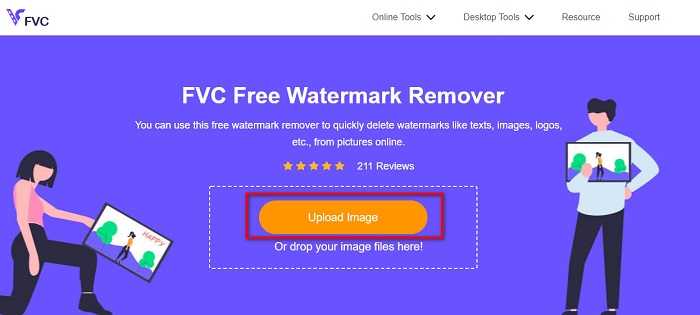
Étape 1. Commencez par rechercher FVC Free Watermark Remover dans votre navigateur ou rendez-vous directement sur leur site en cliquant sur ce lien.
Étape 2. Puis cliquez sur le bouton Upload Image dans l’interface principale du logiciel. Les fichiers de votre ordinateur s’ouvriront. Sélectionnez votre image Fiverr, puis cliquez sur Open pour la téléverser.
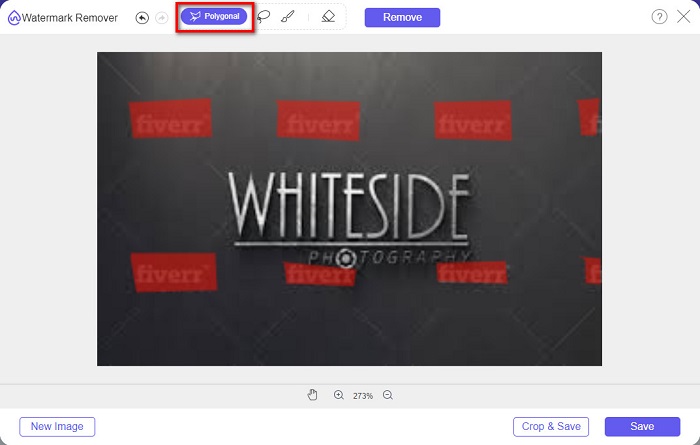
Étape 3. Ensuite, choisissez l’outil de suppression que vous souhaitez (Polygonal, Lasso, Brush). Sélectionnez ensuite la zone du filigrane que vous voulez enlever. Ici, nous utilisons l’outil Polygonal comme exemple.
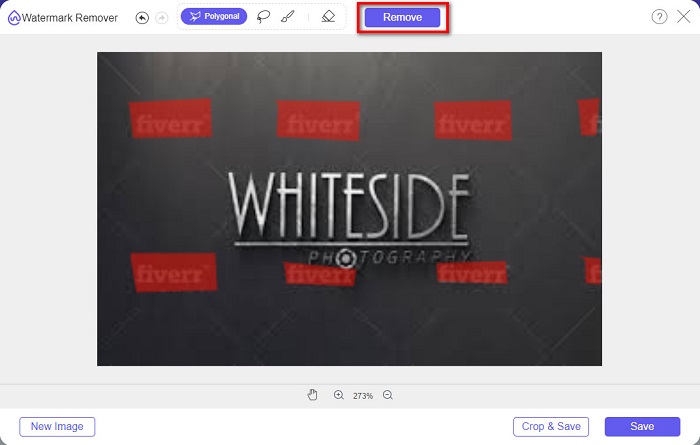
Étape 4. Cliquez ensuite sur le bouton Remove pour supprimer le filigrane que vous avez sélectionné.
Étape 5. Vous constaterez que le filigrane sur votre image a été supprimé. Puis, cliquez sur le bouton Save pour enregistrer votre image sur votre appareil.
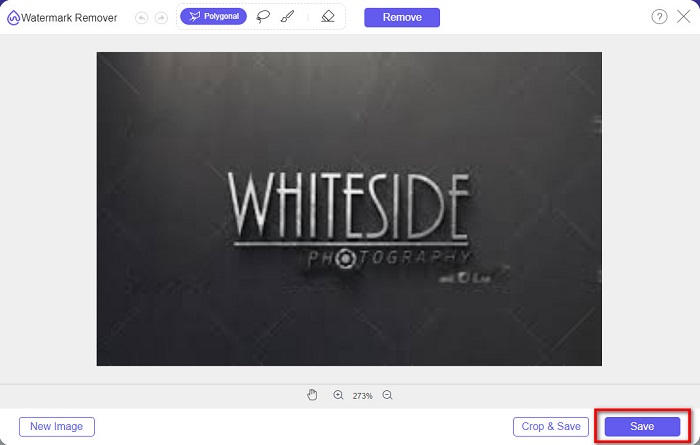
Et voilà ! Vous pouvez supprimer le filigrane Fiverr sur votre image aussi facilement que A-B-C. Vous pouvez également utiliser ce logiciel pour supprimer les filigranes sur des photos de remise de diplôme.
Partie 3. Autres moyens de supprimer le filigrane Fiverr
Il existe également des outils que vous pouvez utiliser pour supprimer le filigrane Fiverr sur votre image. Cette partie vous donnera plus de choix pour choisir l'outil que vous voulez. Par conséquent, lisez attentivement cette partie.
WatermarkRemover.io
WatermarkRemover.io est un outil en ligne qui supprime aisément le filigrane de votre image. Ce suppresseur de filigrane en ligne utilise un algorithme d’IA capable de détecter la position du filigrane sur votre image. Il dispose également d’une fonction de séparation des couleurs qui isole la couleur du filigrane de celle de l’arrière-plan. Mais ne vous inquiétez pas, l’arrière-plan est recréé après le traitement. Ce qui est remarquable avec cet outil, c’est qu’il peut supprimer différents types de filigranes présents sur votre image.
Avantages
- Il utilise la détection automatique des filigranes.
- C'est un outil convivial.
- Aucune installation n'est requise.
- Il ne contient aucune publicité dérangeante.
Les inconvénients
- Vous rencontrerez un processus de chargement lent si votre connexion Internet est lente.
Étape 1. Dans votre navigateur, recherchez WatermarkRemover.io. Puis, sur l’interface principale, cliquez sur le bouton Upload Image.
Étape 2. Ensuite, attendez que votre image soit téléversée. Vous verrez que le filigrane de votre image sera automatiquement supprimé.
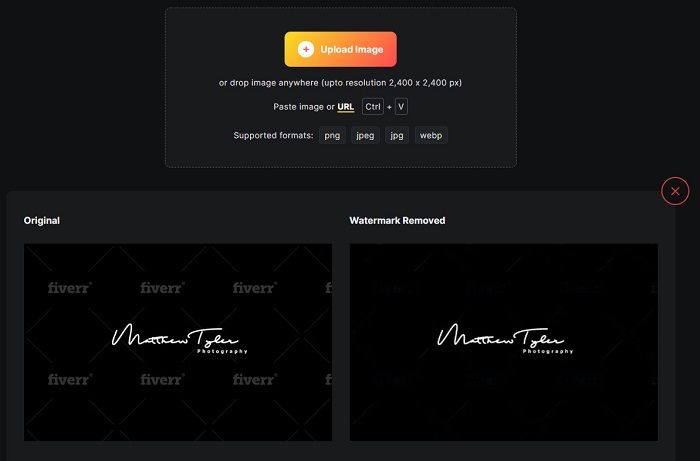
Étape 3. Enfin, cliquez sur le bouton Download Image pour télécharger l’image sur votre appareil.
Kits d'images
Un autre suppresseur de filigrane en ligne que vous devriez essayer est Imgkits. Cet outil en ligne est connu pour son interface simple, ce qui le rend très facile à utiliser. Il propose également de nombreux préréglages d’outils de suppression, tels que réparation par étalement, réparation par clic et polygonal. Et si vous faites une erreur, vous pouvez simplement restaurer votre image. De plus, contrairement à d’autres outils en ligne, Imgkits ne contient aucune publicité. Toutefois, de nombreux utilisateurs sont parfois déçus, car il arrive que le filigrane ne disparaisse pas complètement. Néanmoins, il reste pratique pour supprimer le filigrane de votre image. Cet outil fait aussi office de suppresseur de filigrane pour Photobucket.
Avantages
- Il prend en charge les formats d'image les plus courants, tels que PNG, JPG, BMP et WEBP.
- Il a une interface utilisateur intuitive.
- Il est gratuit et sûr à utiliser.
Les inconvénients
- Il dépend d'Internet.
Étape 1. Recherchez Imgkits dans votre navigateur, puis accédez à leur page d’accueil. Sur l’interface principale du logiciel, cliquez sur le bouton Upload Image.
Étape 2. Puis choisissez le préréglage de suppression que vous souhaitez. Ensuite, sélectionnez la zone du filigrane sur votre image. Vous verrez que le filigrane sera effacé automatiquement.
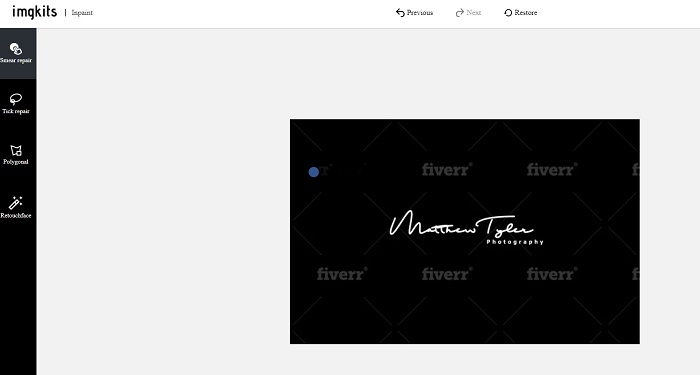
Étape 3. Cliquez sur le bouton Download pour terminer le processus et télécharger votre image.
Partie 4. FAQ sur la suppression du filigrane Fiverr
Existe-t-il des applications capables de supprimer les filigranes ?
Oui. Vous pouvez télécharger des applications sur votre Android qui peuvent supprimer les filigranes. Certains d'entre eux sont PicLab, Photo Retouch, AirBrush, etc.
La suppression du filigrane sur votre image nuit-elle à la qualité ?
Il existe des dissolvants de filigrane qui affecteront la qualité de votre image lorsque vous supprimerez le filigrane. Certains outils laisseront des marques sur la zone du filigrane que vous avez supprimée.
Pourquoi ne pas mettre de filigrane sur vos photos ?
De nombreux photographes ne mettent pas de filigrane sur leurs photos car les filigranes sont une horreur et peuvent réduire l'attrait de votre photo. Cependant, les filigranes sont également nécessaires car ils indiquent l'originalité de votre image ou vidéo.
Conclusion
Et voilà ! Ce sont les outils qui vous aideront à supprimer le filigrane Fiverr. À vous maintenant de choisir l’outil que vous utiliserez pour enlever le filigrane Fiverr. Chacun des outils présentés ci-dessus vous permettra de retirer les filigranes de manière pratique. Mais si vous souhaitez un suppresseur de filigrane avec les meilleures fonctionnalités et l’interface la plus simple, utilisez FVC Free Watermark Remover.
-
 Comment supprimer facilement le filigrane Lumion sur Windows et Mac
 Besoin de supprimer le filigrane Lumion pour le présenter de manière professionnelle ? Eh bien, il existe des outils que vous pouvez utiliser pour vous aider à vous débarrasser du filigrane qu'il laisse.
-
 Comment supprimer facilement le filigrane Weibo sur les vidéos et les images
 Vous rencontrez des difficultés pour supprimer le filigrane Weibo sur la vidéo et l'image exportées ? Dans ce cas, vous devez un dissolvant de filigrane que nous énumérons ci-dessous qui pourrait vous aider.
-
 Apprenez à supprimer gratuitement le filigrane Movavi [Must Have!]
 Exporter une vidéo ou une image sur Movavi laissera un filigrane, mais est-il possible de le supprimer ? Pour apprendre à supprimer le filigrane gratuitement, lisez ceci.
