


 Video Converter Ultimate
 Enregistreur d'écran
 Réparation vidéo
 Téléchargement sécurisé
Comment fonctionne le coloriseur vidéo : les 3 meilleurs outils à utiliser en 2023
Avez-vous encore ces anciennes vidéos capturées en noir et blanc ? Si se remémorer le passé pouvait autrefois se faire en un seul visionnage, vous pouvez désormais transformer vos vidéos en œuvres intemporelles en les colorisant. Heureusement, l’ère numérique a vu naître de nombreuses innovations technologiques, dont un outil capable de coloriser des vidéos en noir et blanc. Dans ce guide, nous allons vous présenter les meilleurs programmes performants qui exploitent la couleur et des algorithmes intelligents pour ajuster en toute fluidité les couleurs de vos séquences.

Partie 1. Coloriser la vidéo hors ligne
Transformer d’anciens films en versions colorisées ne devrait plus être une corvée grâce à un logiciel puissant comme Video Converter Ultimate. Si cet outil est principalement utilisé pour convertir des vidéos et de l’audio, il intègre également un éditeur vidéo qui vous permet de redonner vie à des vidéos en noir et blanc. En plus de cela, Video Converter Ultimate propose un panneau d’aperçu en temps réel où vous pouvez voir les modifications apportées au cours du montage. Par ailleurs, vous pouvez recadrer, faire pivoter et ajouter d’innombrables filtres à vos séquences pour une touche de créativité supplémentaire. Suivez le guide simple ci‑dessous pour coloriser une vidéo en noir et blanc avec cet excellent outil.
Étape 1. Lancez le meilleur coloriseur de vidéos
Tout d’abord, téléchargez le programme d’installation de Video Converter Ultimate en cliquant sur le meilleur système d’exploitation pour votre appareil. Ensuite, exécutez l'assistant d'installation pour lancer le programme sur votre ordinateur.
Téléchargement gratuitPour Windows 7 ou version ultérieureTéléchargement sécurisé
Téléchargement gratuitPour macOS 10.7 ou version ultérieureTéléchargement sécurisé
Étape 2. Importez le fichier dans le programme
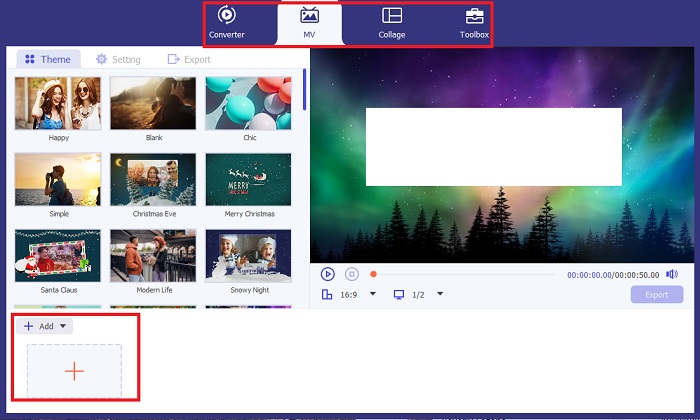
Ensuite, allez dans la section MV de Video Converter Ultimate pour accéder à l’éditeur vidéo. De là, cliquez sur le bouton Plus pour importer vos séquences brutes et attendez qu’elles se chargent à l’écran.
Étape 3. Colorisez les séquences
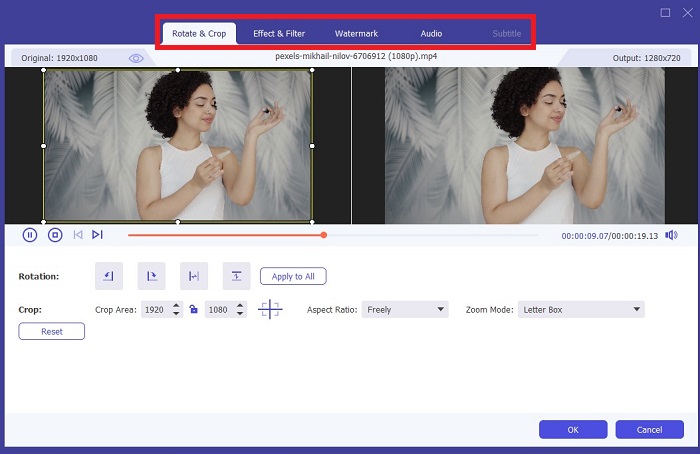
Après avoir téléchargé votre fichier, ajoutez les ajustements de couleur en faisant glisser la flèche. Il existe également des filtres prédéterminés pour ajouter un effet instantané à votre vidéo.
Étape 4 : Enregistrer le résultat
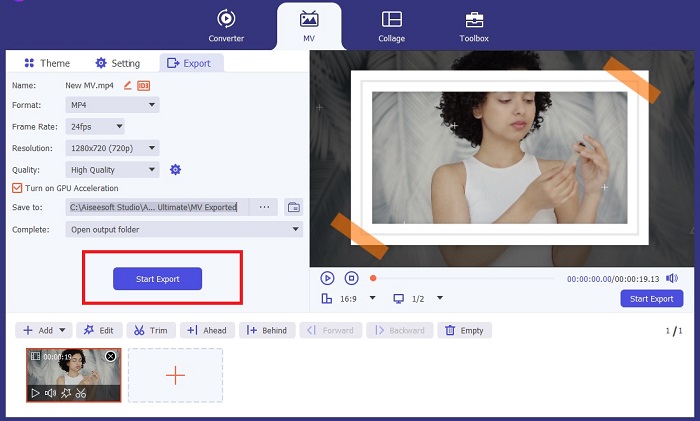
Une fois satisfait de votre vidéo colorisée, cliquez sur le bouton Exporter pour passer à l’étape finale. Modifiez ensuite les images par seconde (fps), le nom, la résolution et le format de votre fichier, puis cliquez sur Lancer l’exportation pour enregistrer votre résultat dans un dossier local.
Partie 2. Coloriser une vidéo en ligne gratuitement
Les outils en ligne sont d'excellents moyens si vous manquez de stockage pour installer des programmes hors ligne. Grâce à la technologie IA, vos vidéos ou photos ennuyeuses reprendront vie instantanément. PickFrom est une vidéo colorisée en ligne gratuite qui aide les utilisateurs à ajouter de la teinte à leurs images à l'aide d'un algorithme d'étalonnage des couleurs. Il fonctionne sur la plupart des navigateurs Web, notamment Opera, Chrome, Safari et Internet Explorer. En plus de cela, ce programme est sécurisé à 100%, grâce aux canaux de cryptage des données, pour empêcher l'invasion des données.
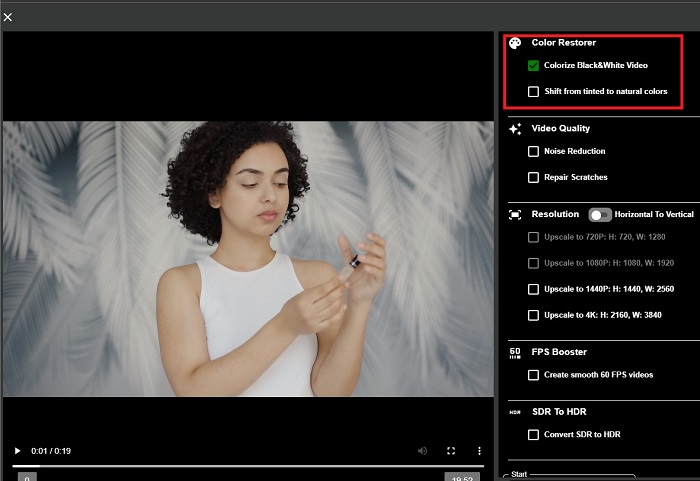
Étape 1. Commencez par ouvrir votre navigateur web et rendez-vous sur le site de PickFrom. Ensuite, allez dans la section Video Colorizer et cliquez sur Add Files pour téléverser votre vidéo source.
Étape 2. Après le téléversement de la vidéo, l’outil génère automatiquement un résultat colorisé par l’IA. Vous pouvez également dérouler les Settings de l’outil Colorize Video et choisir la résolution de votre fichier entre 780p et 1080p.
Étape 3. Enfin, choisissez le format de sortie de votre fichier en développant l’onglet Format. Vous pouvez opter pour MP4, AVI ou MKV. Une fois satisfait du résultat, cliquez sur le bouton Start pour télécharger votre vidéo noir et blanc colorisée.
Partie 3. Coloriser la vidéo sur mobile
Transformez intelligemment vos images à l'aide d'un outil d'application développé par Google nommé Colorize ! Comme son nom l'indique, ce programme est un excellent choix pour les utilisateurs iOS et Android en termes d'application de couleurs à vos images obsolètes. En plus de cela, vous pouvez maximiser l'application de colorisation vidéo en noir et blanc en ajoutant des filtres et des effets spéciaux à votre sortie et en personnalisant le taux de sélection de votre sortie. Voici le guide rapide pour ajouter de la couleur à une vidéo en noir et blanc avec cette application mobile.
Étape 1. Cliquez sur le bouton Upload dans le programme et choisissez le fichier noir et blanc que vous devez corriger.
Étape 2. Pendant le téléversement, l’outil applique automatiquement la couleur à votre projet, et le temps nécessaire dépendra uniquement de la durée ou de la taille du fichier.
Étape 3. Une fois la photo colorisée affichée, vous pouvez en ajuster les détails en vous rendant dans la section Enhance. Vous pouvez modifier la teinte, la saturation et la vibrance de votre image. Ensuite, appuyez sur le bouton Download pour enregistrer le fichier sur votre appareil.
Pour aller plus loin :
Solutions efficaces pour éclaircir une vidéo en moins d’une minute
5 meilleurs éditeurs vidéo pour Windows avec conseils pour professionnels et débutants [2023]
Partie 4. FAQ sur le logiciel vidéo AI Colorize
Comment les gens colorisent-ils les anciennes vidéos ?
La colorisation de vidéos et de photos en noir et blanc est désormais rendue possible grâce à des outils de manipulation numérique, comme le coloriseur vidéo ou les éditeurs vidéo. Parfois, vous devez ajuster manuellement les paramètres pour obtenir vos préférences ou utiliser un logiciel de colorisation vidéo AI.
Est-il possible de coloriser une vidéo en noir et blanc ?
Définitivement oui! Fixer le ton visuel de vos images est 100% possible aujourd'hui. A titre de conseil, mieux vaut normaliser la couleur de vos vidéos avant de les éditer.
Pourquoi dois-je étalonner les couleurs d'une vidéo ?
L'étalonnage des couleurs est un processus essentiel que les cinéastes doivent exécuter lors de la finalisation de leur production. Grâce à ce processus, ils peuvent obtenir une tonalité de couleur cohérente pour ajouter un effet visuel exceptionnel à leur public.
Combien de temps faut-il pour coloriser des photos et des vidéos ?
Tant que vous disposez des bons outils sur votre appareil, la colorisation d’anciennes photos et vidéos peut être effectuée instantanément. D'un autre côté, tenez compte de la taille et de la durée de votre vidéo.
Mes vidéos colorisées sont-elles exactes ?
Le coloriseur vidéo vous donne une couleur presque précise de la vidéo. Vous pouvez également demander conseil à des experts pour vous aider à déterminer quelle est la couleur d'origine en cartographiant la vidéo.
Conclusion
Et voilà ! Maintenant que vous connaissez les 3 meilleures façons de coloriser une vidéo en noir et blanc à l’aide d’outils hors ligne, en ligne et mobiles, votre choix est grandement facilité. Avec un coloriseur vidéo basé sur l’IA, l’outil ajoutera automatiquement des couleurs à vos vidéos. En revanche, il ne vous permettra pas d’ajuster les principaux paramètres de couleur, contrairement aux solutions hors ligne comme Video Converter Ultimate.
-
 Méthodes sans problème pour convertir des images en noir et blanc
 Vous voulez rendre vos photos nostalgiques ? Nous avons une réponse pour vous. Cet article proposera des moyens notables de convertir une image couleur en noir et blanc.
-
 Un guide pas à pas : les 7 meilleurs boosters de volume disponibles sur toutes les plateformes
 Vous souhaitez connaître les boosters de volume disponibles sur PC, Mac, Online, Android et iOS ? Alors lisez cet article avec différents outils parmi lesquels vous pouvez choisir.
-
 Meilleurs redimensionneurs de vidéos Instagram pour optimiser votre contenu Instagram
 Consultez notre guide pour redimensionner les vidéos pour Instagram. Apprenez à peaufiner votre contenu et à stimuler l'engagement sur la plate-forme de médias sociaux la plus populaire au monde.
