


 Video Converter Ultimate
 Enregistreur d'écran
 Réparation vidéo
Examen de l'importance de l'éditeur de balises ID3 en 2022
Songs that you've downloaded on music websites do have metadata or known as ID3 tags. Usually, all the information you need about that song is in the tag information. On some occasions, the music doesn't come with tags or has wrong information. In this type of situation, you will need to use software that can help you easily handle the task. In this situation, we are gladly present to you the best ID3 tag editor you can download on your Windows, Mac, iOS, and Android to edit the tags on your songs.

Partie 1. Qu'est-ce qu'une balise ID3
ID3 tags are essential for every user who want to know more about the song in-detailed information. A great example of tags that you can see without viewing the exact tags is the name of the artist and the title of the song. Although we didn't add it to the audio file, it is still embedded to help us know if we play the correct music accordingly.
Néanmoins, si vous n'avez pas de balise sur vos chansons ou votre podcast, il est possible que les fichiers soient brouillés dans toute la bibliothèque ou le dossier où ils sont stockés. L'ajout de balises sur votre fichier peut vous aider à déterminer le fichier et à l'organiser pour qu'il ait l'air organisé. Si votre fichier n'en a pas, alors vous devez ajouter des données. Gardez le bal pour vous aider à rechercher l'éditeur de balises ID3 que vous devriez utiliser et qui répondra à vos besoins.
Mais avant de commencer, veuillez préparer les métadonnées que vous souhaitez ajouter à votre fichier audio ; ceux-ci incluent le titre, l'auteur, le chapitre, les pages, les commentaires, les paroles, etc. Après avoir lu ceci, vous serez surpris par notre avis sur les meilleurs éditeurs de balises que vous pouvez utiliser sur tous les appareils.
Partie 2. Meilleur éditeur de balises ID3 sur Windows/Mac pour modifier facilement les métadonnées
FVC Video Converter Ultimate - Meilleur éditeur de balises ID3
One of the common knowledge you should know on selecting an ID3 tag editor on Mac or Windows is that it should be on-point, user-friendly, and accessible; all of these can be found on FVC Video Converter Ultimate. It is known as the first-class metadata editor that is easy to handle even the users don't know how to adjust them correctly. Unlike any other tag editor, you wouldn't need to do many complicated things to add or fix your audio or video tags. So, if you are new in this area of editing or fixing the ID3 tags, then without a doubt that this is your one-stop software.
De plus, nous ne l'avons pas appelé un éditeur à guichet unique sans raison ; peut-être que vous pensez pourquoi. Si nous explorons plus en détail l'outil, vous verrez que vous pouvez effectuer ici un montage vidéo avancé et de base pour rendre votre vidéo exceptionnelle en ajoutant des effets et des filtres. Il y a encore trop de fonctionnalités non mentionnées que vous pouvez dévoiler si vous téléchargez l'outil. Mais aujourd'hui, nous allons nous concentrer sur l'utilisation de ce logiciel d'édition de balises ID3 pour vous aider à modifier et corriger rapidement les balises de vos chansons.
Step 1. First, download the software on your selected operating system; there are two options available Windows and Mac. Next is to install it correctly, follow the set-up process, then open the tool once you've done all of this.
Téléchargement gratuit pour Windows 7 ou version ultérieure Téléchargement sécurisé
Téléchargement gratuit pour macOS 10.7 ou version ultérieure - Téléchargement sécurisé
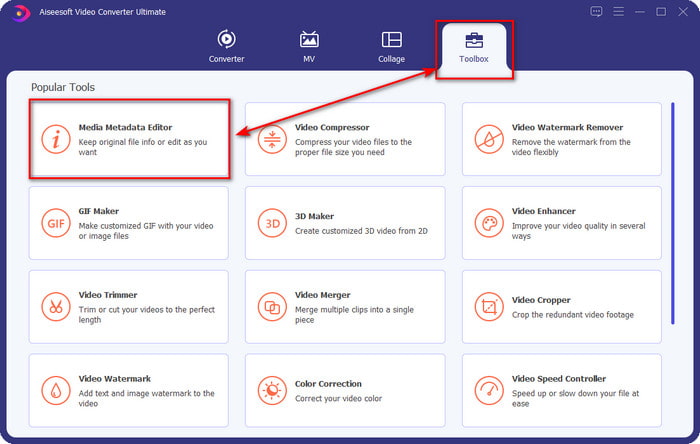
Step 2. Once you've opened the tool, you must proceed to the Toolbox section and open the Media Metadata Editor by clicking it.
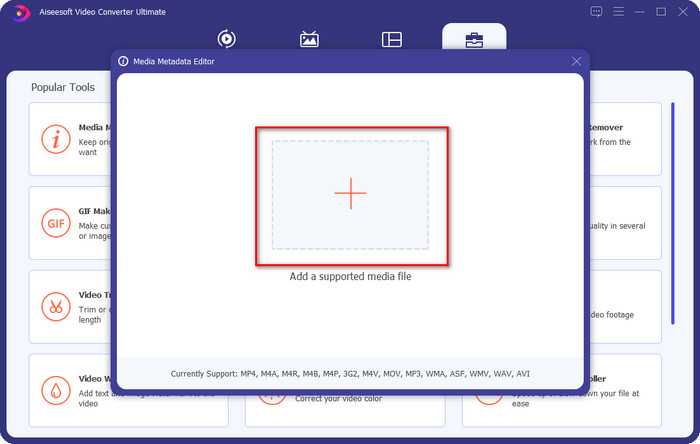
Step 3. Press the + icon on the new window that will show on your screen, select the audio file you want to change the ID3 tags, press Open to upload it.
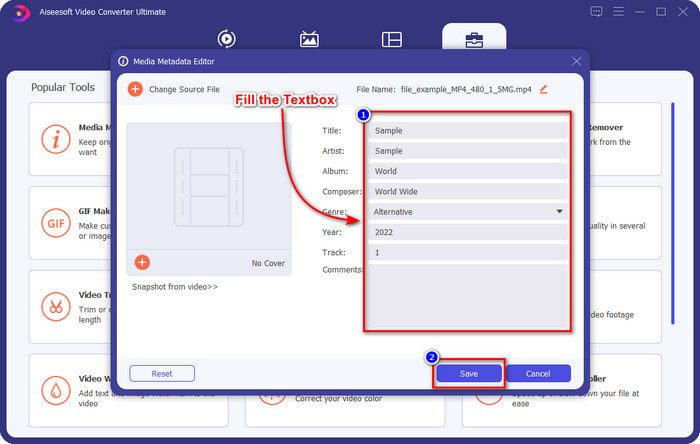
Step 4. You can now type the information you want to add to your audio file and click Save if you are done on each textbox. As easy as that, you have now added tags on the audio file with the assistance of this software.
Avantages
- Il prend en charge la modification sans effort des métadonnées MP3, WMA, WAV et plus de 1000.
- La conversion ultra-rapide et l'accélération matérielle sont prises en charge pour un processus ultra-rapide.
- Les fonctionnalités de montage vidéo primaires à avancées sont disponibles sur Toolbox.
- C'est le premier choix de millions d'utilisateurs dans le monde pour entreprendre cette tâche.
Les inconvénients
- L'achat de l'outil est nécessaire pour disposer de toutes les fonctionnalités d'édition sophistiquées.
- Non disponible sur Android et iOS.
VLC Media Player
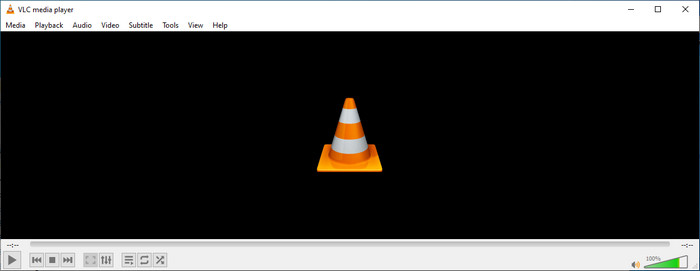
VLC Media Player is a top-notch media player you can download on Windows and Mac. This tool can help you play the video without downloading any codecs on your system, but you can use this as well to edit the ID3 tags of your audio file. Although the tool isn't a dedicated metadata editor, it can still fix the incorrect tags. So, if you have this tool, you can easily adjust the metadata of your song, but don't expect too much on the tool because it is not as good as the first-class iD3 tag editor on a desktop.
Avantages
- Un lecteur multimédia et un éditeur de métadonnées que vous pouvez utiliser sur n'importe quel appareil.
- Il prend en charge un format média moyen pour changer les balises.
- L'interface graphique est claire et simple.
Les inconvénients
- Ce n'est pas un éditeur de métadonnées professionnel.
- Prend en charge des fonctions limitées concernant l'édition des balises.
Partie 3. Top 3 des éditeurs de balises ID3 sur les appareils mobiles iOS/Android
Éditeur de balises musicales Star
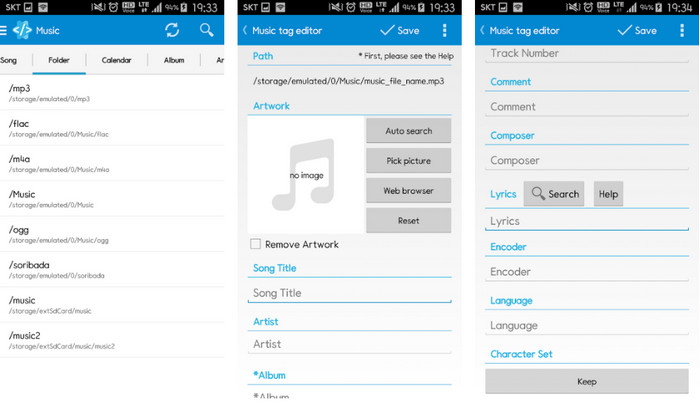
Star Music Tag Editor is one of the most used iD3 tag editors on Android. This app can show you different information on your music, and you can change them if you need to. Its GUI is straightforward, so you can easily learn how to use it even if you aren't familiar with using a tool for editing tags. Even though the app is excellent, it still has some flaws in adding metadata, especially on the album cover. Although problems may occur, it is still a dependable tag editor you can download on your Android phone.
Avantages
- Gratuit pour télécharger l'éditeur de métadonnées sur Android.
- L'interface graphique est simple et facile à comprendre.
- Ajoutez facilement les balises sur le fichier audio.
Les inconvénients
- Il y a un problème pour ajouter une couverture d'image sur le fichier audio.
- Parfois, des bugs se produisent encore.
Clouds Music Player pour les nuages
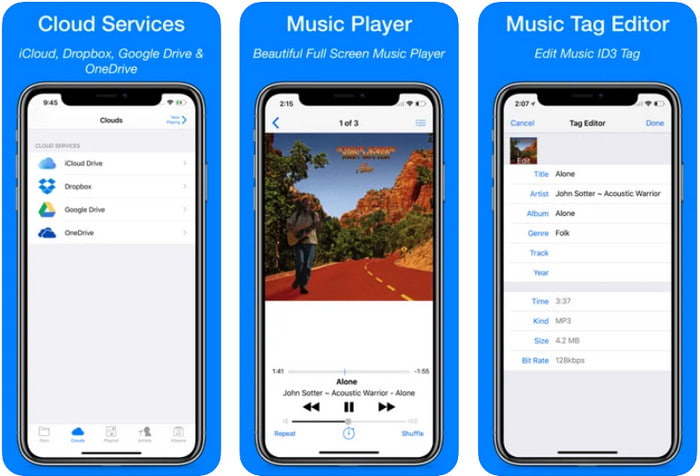
Clouds Music Player for Clouds is a multipurpose app you can download on your iOS devices. It can edit id3 tags on iPhone, play music, and create a ringtone out of the music. With its features, its GUI is plain and simple, and you can access your cloud service through the app. Even with its user-friendly interface, some information you can add as metadata on your audio file is insufficient, which means only the basic tags are available to edit. Nevertheless, it is excellent to download if you are an iOS user.
Avantages
- Disponible sur n'importe quel appareil iOS à télécharger.
- Éditeur de musique multifonctionnel et éditeur de balises.
- Éditeur de métadonnées intuitif sur iOS.
Les inconvénients
- Il ne prend pas en charge l'ajout de métadonnées supplémentaires.
- Les bogues et les problèmes de modification des métadonnées se produisent, mais pas souvent.
Dash - Application d'infodivertissement
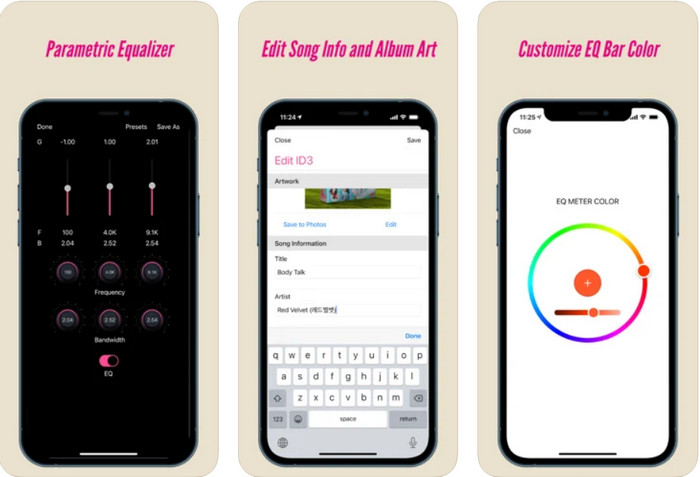
Dash- Infotainment App is another tool you can download and edit ID3 tags on iPhone whether you need one. There isn't much learning you'll need before using the app with its simple and streamlined user interface. You can use this tool to change the parameters of your FLAC and ALAC easily with its easy-to-use equalizer. Also, you can see the speed and compass of the song you upload here. Same as the first iPhone tag editor, you can only add title, artist, and album art here, but remember that your format must be FLAC or ALAC only; if it isn't in this format, then you can't upload it.
Avantages
- La courbe d'apprentissage n'est pas trop raide.
- Un égaliseur audio innombrables est disponible.
- L'interface graphique n'est pas beaucoup, et ce n'est pas moins.
Les inconvénients
- Il ne prend en charge que les formats FLAC et ALAC.
- Il n'y a pas grand-chose à offrir en ce qui concerne l'édition des métadonnées.
Partie 4. FAQ sur l'éditeur de balises ID3
Quel est le meilleur éditeur de balises ID3 en ligne de commande que je puisse utiliser ?
If you are looking for a command-line ID3 tag editor, you must know that FFmpeg is a command-line editor. With this tool, you can convert, rotate, cut, trim, and edit your metadata tags. If you want to know more about FFmpeg, you might want to read how to use it by clicking the link to edit FFmpeg metadata easily.
Quels sont les autres types de métadonnées ?
There are six metadata types: descriptive, administrative, reference or explanatory, statistical, legal, and structural metadata. If you want to know more about these types and their information, you can click this link and read more about them.
Est-il possible d'afficher les balises sans application ?
Yes, instead of downloading software, you can use an online tool to view your file's tags. Click on this link to view metadata on your desktop online, but we will also introduce some tools that you would love to download.
Conclusion
Avec les informations que nous énumérons ci-dessus, il est devenu possible de modifier les balises ID3 à l'aide des éditeurs que nous avons présentés ci-dessus, quel que soit l'appareil que vous utilisez actuellement. De plus, l'application et le logiciel sont parfaits pour les utilisateurs qui ont besoin de modifier leurs métadonnées. Même si les outils ouvrent une excellente opportunité aux utilisateurs d'éditer les métadonnées, il ne fait aucun doute que l'outil ultime présente un moyen efficace d'éditer les balises ID3 sur n'importe quel fichier musical. Si vous souhaitez disposer du meilleur éditeur de balises ID3 sur Windows et Mac, vous pouvez le télécharger immédiatement en cliquant sur le bouton de téléchargement présenté ci-dessus, puis profiter de sa grandeur.
-
 2 meilleures façons de modifier les métadonnées OGG que vous devriez essayer gratuitement
 Besoin de modifier les métadonnées OGG ? Eh bien, vous pouvez facilement gérer la modification des balises en utilisant le bon logiciel. Si vous n'en avez pas, la lecture de cet article est un must.
-
 Un aperçu absolu de Pentaho Metadata Editor [Mise à jour 2022]
 Vous ne trouvez pas d'article fiable sur Pentaho Metadata Editor ? Heureusement, nous avons examiné l'outil nous-mêmes pour fournir les faits que vous saurez sur l'outil.
-
 Trucs et astuces sur l'éditeur de métadonnées VLC que vous devez connaître en 2022
 Voulez-vous utiliser le VLC comme éditeur de métadonnées ? Dans ce cas, vous pouvez lire cet article car nous fournissons un examen impartial de l'éditeur de métadonnées VLC.
