


 Video Converter Ultimate
 Enregistreur d'écran
 Réparation vidéo
Ajoutez votre propre magie à la vidéo avec l'aide des éditeurs vidéo Mac
De nos jours, le partage de vidéos a gagné beaucoup plus d’attention et de popularité que jamais. À l’heure actuelle, les plateformes de partage de médias dominent déjà le monde et rien ne semble pouvoir les arrêter. Quand l’ennui nous gagne, nous cherchons à nous divertir en regardant ou en créant des vidéos. C’est pourquoi la demande en monteurs vidéo a également augmenté, afin d’améliorer vos vidéos et de les rendre plus attractives. Mais si vous cherchez sur le marché le meilleur éditeur vidéo pour Mac, le choix est immense. Au lieu de tenter votre chance en essayant au hasard différents outils, nous avons réuni pour vous plusieurs options parmi lesquelles choisir. Ainsi, laissez-nous faire le travail de recherche afin de vous faciliter, plus que jamais, la sélection de votre logiciel de montage. Sans plus attendre, découvrons les meilleurs outils qui offrent des résultats remarquables et des fonctions de montage fiables.

Partie 1. Phenomenal Premium Video Editor pour Mac (version payante)
Ce convertisseur phénoménal est désormais prêt à vous aider à faire vos premiers pas dans le montage vidéo. FVC Video Converter Ultimate est le meilleur pour convertir et monter des vidéos. Cet éditeur pour PC et Mac aide déjà les utilisateurs qui rencontrent des difficultés à améliorer leurs vidéos et leurs pistes audio. De plus, cet outil est un éditeur tout-en-un, ce qui signifie qu’il propose des fonctionnalités avancées uniques, accompagnées d’instructions claires. Donc, si vous souhaitez vivre une expérience de montage exceptionnelle même en tant que débutant, essayez cet outil. Il vous suffit de suivre les étapes ci-dessous, destinées aux utilisateurs qui veulent que leurs vidéos se distinguent de celles des autres.
Étape 1. Cliquez sur le bouton de téléchargement pour Mac et installez le logiciel. Procédez à la configuration rapide, puis lancez-le immédiatement.
Téléchargement gratuit pour Windows 7 ou version ultérieure Téléchargement sécurisé
Téléchargement gratuit pour macOS 10.7 ou version ultérieure - Téléchargement sécurisé
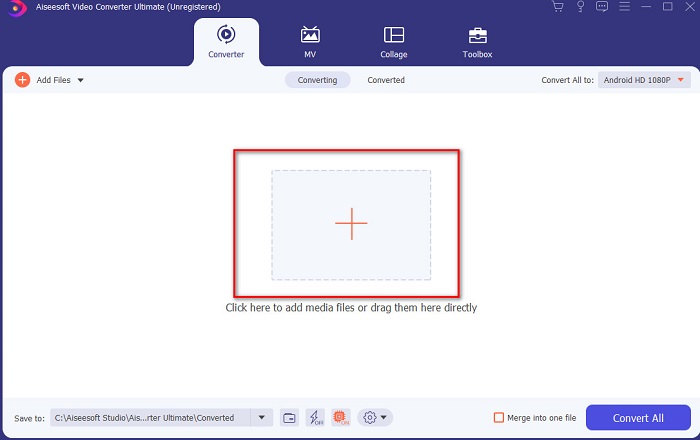
Étape 2. Lorsque le convertisseur Ultimate est lancé sur votre système, cliquez sur le bouton Add Files ou sur l’icône + au centre pour ajouter la vidéo que vous souhaitez monter.
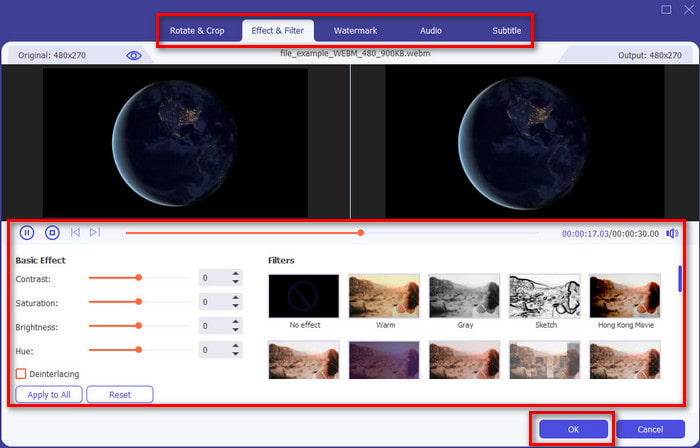
Étape 3. Cliquez ensuite sur le bouton en forme de baguette magique pour monter la vidéo et y apporter vos touches personnelles. Vous pouvez ajouter de nombreux éléments à vos vidéos, comme des filtres, des effets, du recadrage, etc. Pour enregistrer les modifications effectuées, cliquez sur OK.
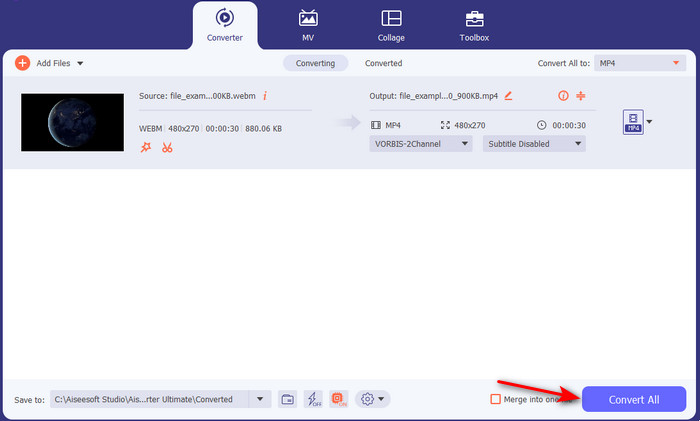
Étape 4. Pour exporter la vidéo que vous venez de monter, cliquez sur Convert All et patientez une minute le temps que l’opération se termine.
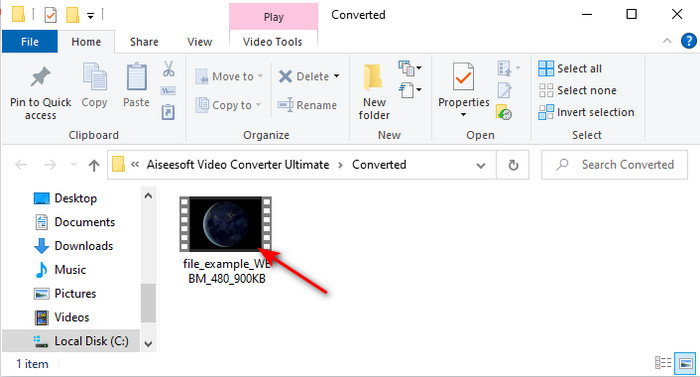
Étape 5. Un dossier contenant votre vidéo montée s’affichera à l’écran. Cliquez dessus pour la visionner et, si vous souhaitez la fusionner avec une autre vidéo, vous pouvez également essayer l’excellent module de fusion vidéo disponible dans la boîte à outils.
Partie 2. Autres éditeurs vidéo utiles pour Mac (version gratuite et outil pré-installé)
1. iMovie
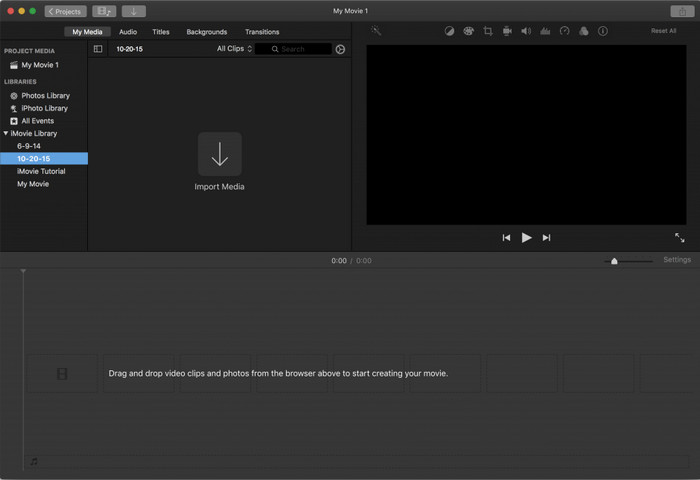
iMovie est un éditeur vidéo gratuit pour Mac préinstallé, donc si vous avez un budget serré, vous pouvez l’utiliser. Bien que cet outil offre un éventail moyen de fonctions de montage, il manque encore des fonctionnalités avancées comme le suivi de mouvement. Cela reste un bon éditeur, même si ce n’est pas le meilleur, et vous pouvez l’utiliser gratuitement sur Mac. En revanche, si vous souhaitez obtenir un résultat véritablement professionnel, iMovie devrait être votre ultime recours, car il ne propose que des fonctions de base adaptées au montage de vidéos simples. De plus, il étant préinstallé et gratuit, vous n’avez pas besoin de télécharger d’application tierce pour monter vos vidéos.
Avantages
- Outil facile à comprendre.
- Éditeur natif pour les utilisateurs de Mac.
Les inconvénients
- Il manque la plupart des fonctionnalités avancées dont un professionnel a besoin.
- Pas le meilleur outil si vous voulez partager une vidéo de qualité.
2. Avidemux
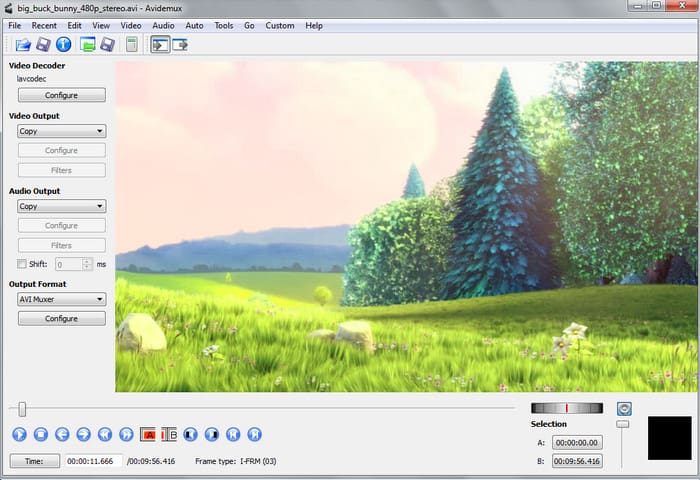
Avidemux est un éditeur de vidéo au ralenti pour Mac qui offre également une certaine efficacité. Il propose des fonctions de montage simples, mais iMovie reste plus complet que cet éditeur. Lors de l’accès à la page principale de cet outil, il n’est toutefois pas recommandé de fournir des informations personnelles, car la protection est insuffisante. Si vous entrez des données sensibles, comme un numéro de compte bancaire, le risque de piratage est élevé. Malgré cela, il permet un montage correct pour les vidéos dont vous avez besoin ; en revanche, pour un utilisateur professionnel, son niveau reste simplement acceptable.
Avantages
- L'édition des fonctionnalités est très bien.
- Il prend en charge de nombreux types de fichiers à modifier.
Les inconvénients
- Pas le meilleur choix si vous êtes un pro de l'édition car il manque de fonctionnalités avancées.
- L'interface de l'outil est aussi terne.
3. Kdenlive
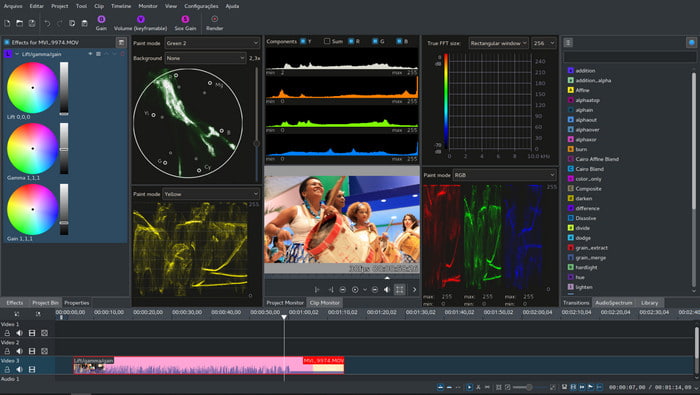
Un autre éditeur vidéo pour Mac que vous pouvez facilement télécharger sur votre ordinateur de bureau est Kdenlive. Cet outil dispose des capacités essentielles d’un logiciel de montage. Cependant, des erreurs et bugs, mineurs comme majeurs, se produisent encore lorsque vous l’utilisez. Il est plutôt recommandé sur PC, où il bénéficie d’un plus grand nombre d’utilisateurs. Sur Mac, seule une ancienne version est disponible, mais elle fonctionne. Même si, à première vue, les bugs et le manque de certaines fonctions de montage peuvent laisser penser qu’il ne vous sera pas très utile, il reste néanmoins intéressant d’apprendre à l’utiliser.
Avantages
- Il prend en charge toutes les plates-formes connues.
- Pas besoin de payer car c'est gratuit.
Les inconvénients
- Les vidéos que vous éditerez ici ont peu de chances de se démarquer.
- A beaucoup de problèmes techniques qui n'ont pas encore été résolus.
Partie 3. FAQ sur Mac Video Editor
Comment combiner différentes vidéos sur iMovie ?
Si vous souhaitez combiner deux vidéos ou plus que vous avez tournées séparément avec votre iPhone, essayez d’utiliser iMovie pour les fusionner. Pour en savoir davantage sur la fusion de vidéos avec iMovie, consultez ce lien.
Pourquoi éditons-nous nos vidéos ?
Le montage vidéo est connu sous le nom de post-production où vous améliorez votre vidéo et supprimez les clips inutiles. Cette étape est très cruciale, car cela aidera votre vidéo à être plus impressionnante et à se démarquer que les autres. Même si vous avez un contenu incroyable, si votre vidéo montée n'est pas très bonne, elle attirera moins l'attention des autres.
Comment éditer des GIF sur Mac ?
Même si iMovie vous permet de monter des vidéos, il ne gère pas les GIF. Nous avons donc rassemblé différents outils que vous pouvez utiliser pour monter des GIF sur Mac. Voici donc les 9 meilleurs logiciels pour monter des GIF.
Conclusion
Pour conclure, vous pouvez désormais réaliser vos propres montages grâce aux outils présentés dans cet article. Certes, tous ne proposent pas les fonctions de montage spectaculaires que vous recherchez. Mais ne mettez pas Video Converter Ultimate dans le même panier : cet outil offre bien plus de possibilités. Si vous voulez impressionner les spectateurs de vos vidéos, utilisez l’outil ultime pour obtenir un résultat incroyable.
-
 Tutoriel concret - Comment fusionner deux pistes audio dans Audacity
 Audacity est réputé pour l'édition audio. Vous avez téléchargé Audacity mais ne savez pas comment fusionner des pistes audio dans Audacity ? Cet article vous expliquera comment fusionner des pistes dans Audacity.
-
 2 méthodes efficaces pour fusionner des fichiers MPEG afin de combiner d'anciennes séries télévisées
 Lorsque vous avez de vieilles séries télévisées en MPEG, vous pouvez en savoir plus sur les 2 méthodes efficaces pour fusionner des fichiers MPEG en un seul film en fonction de vos besoins.
-
 [Mise à jour 2025] Les 9 meilleurs éditeurs GIF pour PC, Mac, iOS et Android
 Besoin d'ajouter une touche personnelle à votre GIF pour qu'il devienne plus expressif ? Continuez à lire cet article pour savoir comment éditer et le meilleur outil pour le travail.
