


 Video Converter Ultimate
 Enregistreur d'écran
 Réparation vidéo
 Téléchargement sécurisé
Comment fusionner des vidéos 3GP d'un téléphone portable en un seul fichier
Lorsque vous filmez plusieurs vidéos pendant votre voyage avec votre smartphone, vous souhaiterez peut-être fusionner des fichiers 3GP en une seule vidéo. Quelles sont les meilleures méthodes pour combiner les clips vidéo ? Que vous rejoigniez simplement les vidéos 3GP ou que vous réalisiez des films avec les fichiers du smartphone, vous pouvez en savoir plus sur les 2 méthodes les plus fréquemment utilisées dans l'article.

Partie 1 : Comment fusionner 3GP en ligne gratuitement
To merge your 3GP files without editing, you only need a convenient tool that can merge 3GP videos free online. FVC Free Online Video Merger is one of the best 3GP video mergers with a simple interface. It enables you to combine 3GP files without a number or size limit. Moreover, you can adjust the resolution and video format.
Step 1: Go to the Free Online Video Merger with any web browser. You can click the Upload Videos to Merge button to load one 3GP file into the online video merger. It will direct you to an online video joiner interface.
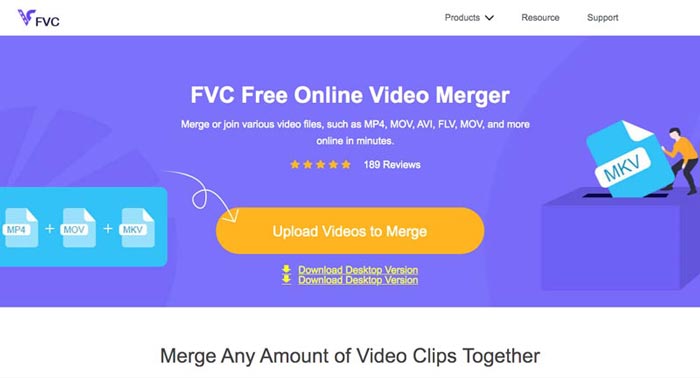
Step 2. Just upload more 3GP files that you need to combine. Then you can change the resolution and the format of your video by clicking the Resolution and Format fields. You can merge your 3GP files into popular video files like MP4 or MKV.
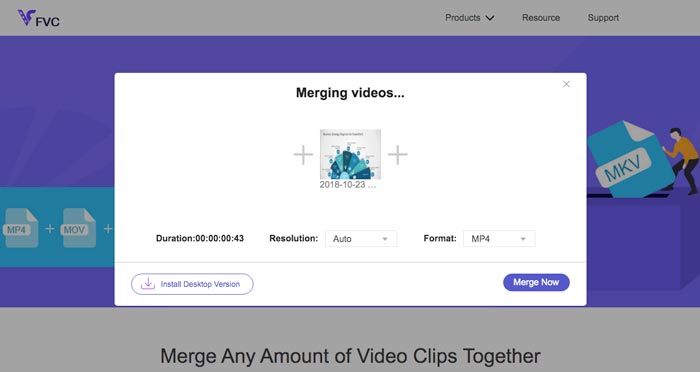
Step 3. Once you are satisfied with the output video, you can click the Merge Now button to start the combination process. When the merging is finished, the joined video will be saved on your hard drive.
C'est un moyen simple et gratuit de joindre des fichiers 3GP en ligne. Mais si vous voulez faire plus d'édition pour vos fichiers vidéo, vous avez besoin d'un outil plus professionnel.
Partie 2. Comment combiner des vidéos 3GP dans un film
Whether you need to combine 3GP videos into a movie with some stunning filters, or simply join 3GP files into one, Video Converter Ultimate is a versatile video converter you should take into consideration. It enables you to split and merge video clips, select the video themes, add watermarks to videos, and even convert 3GP videos to other video formats for social media websites directly.
- 1. Vous permet de découper les pièces souhaitées ou de combiner plusieurs 3GP en un seul.
- 2. Fournir des fonctionnalités d'édition vidéo de base, telles que couper, diviser, recadrer et faire pivoter.
- 3. Rejoignez des clips vidéo 3GP dans un film avec différents filtres, thèmes, fichiers musicaux, etc.
- 4. Ajoutez des sous-titres, des pistes audio, des effets 3D, un filigrane, compresser la vidéo, et plus.
Téléchargement gratuit pour Windows 7 ou version ultérieure Téléchargement sécurisé
Téléchargement gratuit pour macOS 10.7 ou version ultérieure - Téléchargement sécurisé
Méthode 1 : Comment combiner directement plusieurs vidéos 3GP
Step 1: Download and launch Video Converter Ultimate from the official website. Choose the Converter interface and click the Add Files button to add the 3GP files you want to merge. Moreover, you can also drag the 3GP videos into the program.

Step 2: Once you have imported the 3GP files, you should choose the format of the output file. Click the scissors icon to cut out the desired part. Moreover, you can rotate/crop the videos, apply filters, add a watermark, or adjust audio tracks for the output video.

Step 3: Go to the bottom of the user interface to choose the destination folder for the merged 3GP files. After that, you can click the Merge into One File box and click the Convert All to start to merge 3GP files.

Méthode 2 : Comment joindre des fichiers 3GP dans un film
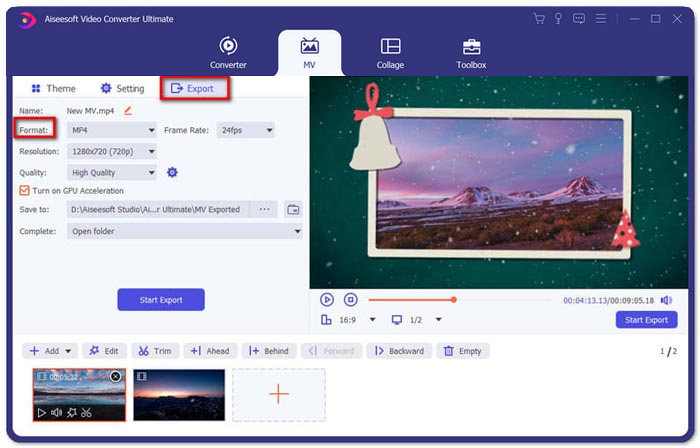
Step 1: When you need to join 3GP files into a movie, you can choose the MV menu, and then you will enter into the MV creating interface. Click the Add button from the lower left of the window to import your 3GP videos and pictures.
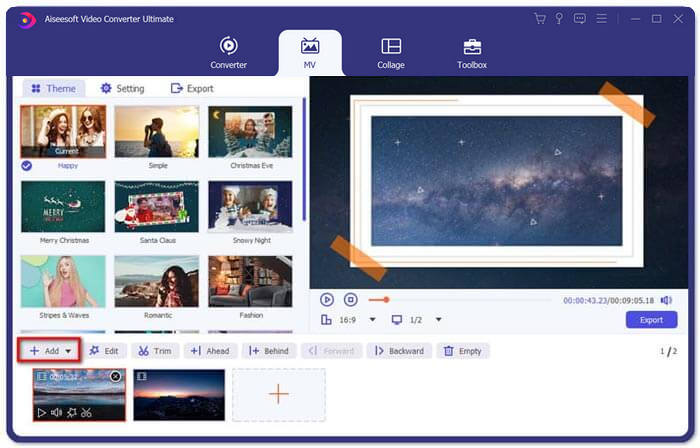
Step 2: After that, you can click the Edit button to apply the video effects. Moreover, you can also select a theme for your MV movie. On the left section, click the Theme tab and then choose your desired theme for your MV.
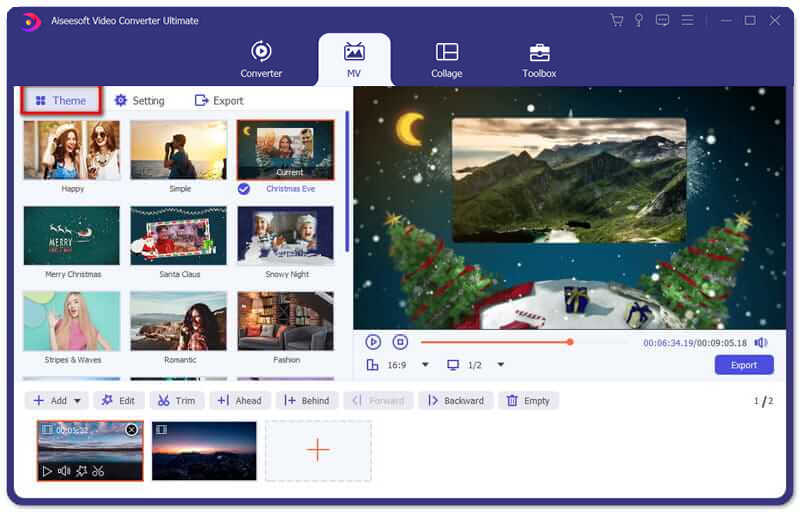
Step 3: If you are satisfied with the combined 3GP file, you can click the Export button to save the video file. By default, the output format is MP4. Of course, you can also choose the preferred video format according to your requirement.
Partie 3. FAQ sur la fusion de 3GP
1. Qu'est-ce qu'un format 3GP ?
3GP est un format de fichier multimédia conçu pour économiser le stockage de données. Il est largement utilisé sur les appareils mobiles. Lorsque vous prenez des photos ou filmez des vidéos avec votre téléphone portable, le fichier est généralement enregistré au format 3GP. Normalement, le 3GP est utilisé sur les téléphones mobiles 3G et peut également être lu sur certains téléphones 2G et 4G.
2. Comment fusionner des fichiers 3GP sur un smartphone ?
Lorsque vous souhaitez fusionner des fichiers 3GP sur un iPhone ou un téléphone Android, vous pouvez utiliser Video Merger pour un téléphone Android, VivaVideo pour un iPhone ou télécharger d'autres applications pour combiner les vidéos. Mais lorsque vous devez joindre les fichiers 3GP en tant que film, vous devez toujours utiliser une fusion vidéo professionnelle.
3. Puis-je combiner des vidéos 3GP avec des fichiers audio ?
Oui. Mais vous ne pouvez pas utiliser les fichiers audio comme arrière-plan pour la vidéo 3GP. Que vous ayez besoin de combiner deux fichiers ou d'utiliser l'audio comme arrière-plan d'une vidéo 3GP, le combineur 3GP professionnel devrait être votre choix.
Conclusion
When you need to merge 3GP video files on your mobile devices into one video file, you can learn 2 efficient methods from this article. You can merge 3GP free online by using Free Online Video Joiner. If you need to edit and put some special effects in your video, Video Converter Ultimate should be an ideal tool for you. If you have any questions about merge 3GP files, you can feel free to contact us.
-
 Top 3 des moyens gratuits pour convertir FLV en 3GP sur Windows / Mac
 Impossible d'ouvrir les fichiers FLV sur smartphone ou tablette ? Ne t'inquiète pas! Nous partageons ici trois méthodes pour convertir FLV en 3GP sans perdre en qualité pour jouer sur mobile.
-
 3 méthodes pour convertir MP4 en 3GP sans tracas
 Vous voulez convertir MP4 en 3GP de manière simple et rapide? Ici, nous partagerons 3 convertisseurs MP4 vers 3GP pour changer MP4 en 3GP pour jouer sur divers téléphones mobiles.
-
 3 meilleurs lecteurs 3GP gratuits pour ordinateurs et mobiles à connaître
 Lorsque vous souhaitez lire facilement votre film 3GP sans installation ni conversion de codec vidéo, vous pouvez en savoir plus sur les 3 meilleurs lecteurs 3GP sur Windows, Mac, Android et iPhone dans cet article.
