


 Video Converter Ultimate
 Enregistreur d'écran
 Réparation vidéo
4 outils de visualisation de métadonnées efficaces pour afficher les métadonnées des fichiers
As part of a video element, the metadata contains the data you'll need to know about the file. But the question is, how can you view the file's metadata? So, if you want to see the meta information inside your video, this is the perfect post for you. Keep on reading this article because we will review for you the best metadata viewer you can use to see the metadata, and if possible, you can edit it as well.

Partie 1. 2 des meilleures visionneuses de métadonnées pour Windows et Mac de 2022
Video Converter Ultimate [Meilleur visualiseur et éditeur de métadonnées vidéo et audio]
Video Converter Ultimate offers you the best video metadata viewer on Mac and Windows. With this tool, you can easily add and view the metadata in all video and audio formats with just a few clicks. Even though you didn't have experience dealing with this particular task, you can depend on the best viewer to help you. Unlike the other tools that offer to view metadata, this software provides a great function to help you do more in different tasks, such as editing the metadata. Want to know what these are? If so, read the key features you can have once you attain this software.

Convertisseur vidéo FVC Ultimate
Plus de 5 689 200 téléchargements- C'est le meilleur outil pour afficher et éditer les métadonnées de chaque vidéo ou vidéo.
- Prend en charge différents formats multimédias, notamment MP4, AVI, MOV, MKV, FLV, etc.
- Vous pouvez insérer ici de gros fichiers vidéo et audio pour vérifier leurs métadonnées.
- Pour commencer, il s'agit du meilleur visualiseur de métadonnées avec une interface conviviale.
- Disponible dans tous les différents types de plates-formes de bureau comme Windows et Mac.
Téléchargement gratuit pour Windows 7 ou version ultérieure Téléchargement sécurisé
Téléchargement gratuit pour macOS 10.7 ou version ultérieure - Téléchargement sécurisé
Alors maintenant, si vous voulez apprendre à afficher les métadonnées, vous devez d'abord télécharger l'outil en cliquant sur le bouton de téléchargement approprié présenté ci-dessous, l'installer ensuite, puis l'ouvrir.
Téléchargement gratuit pour Windows 7 ou version ultérieure Téléchargement sécurisé
Téléchargement gratuit pour macOS 10.7 ou version ultérieure - Téléchargement sécurisé
Comment afficher les métadonnées sur Video Converter Ultimate
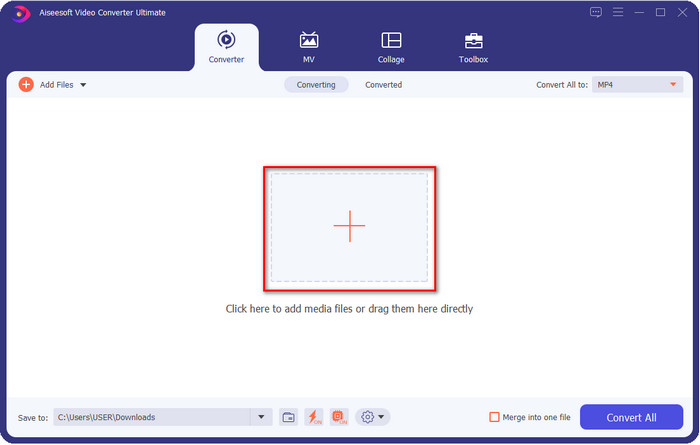
Step 1. By clicking the + button, a file folder will show on your screen where you can locate the video or audio file you want to check the metadata. Once you've chosen the file, click Open and proceed to the next step.
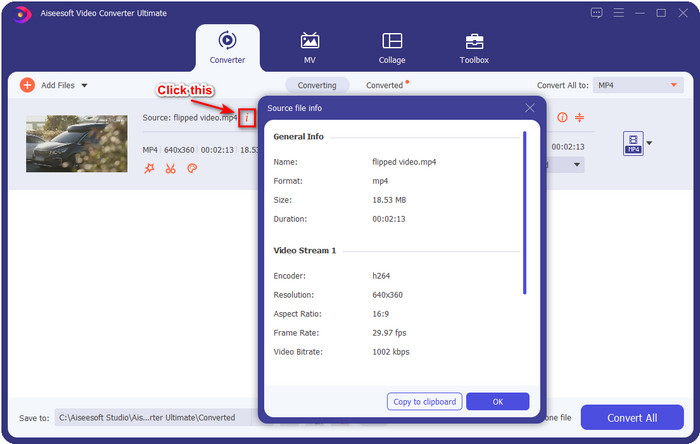
Step 2. While the file is on queue, click the i icon; voila, you have now viewed the metadata of your video file saved on your computer.
Comment ajouter ou modifier les métadonnées du fichier vidéo ou audio avec le meilleur éditeur de métadonnées
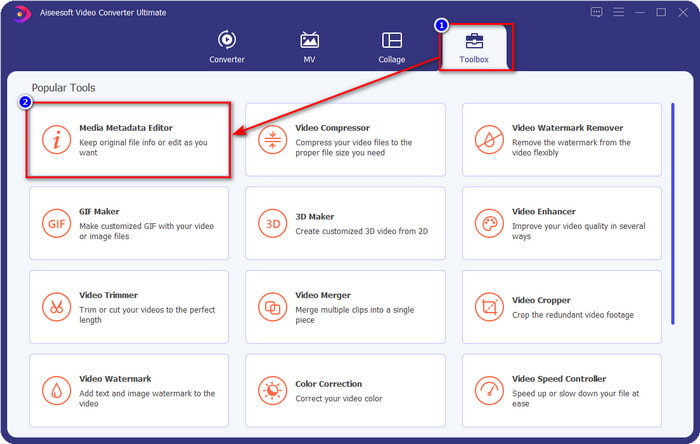
Step 1. After you've opened the software, you must go to the Toolbox section, and in that section, you will see a feature Media Metadata Editor, then click it.
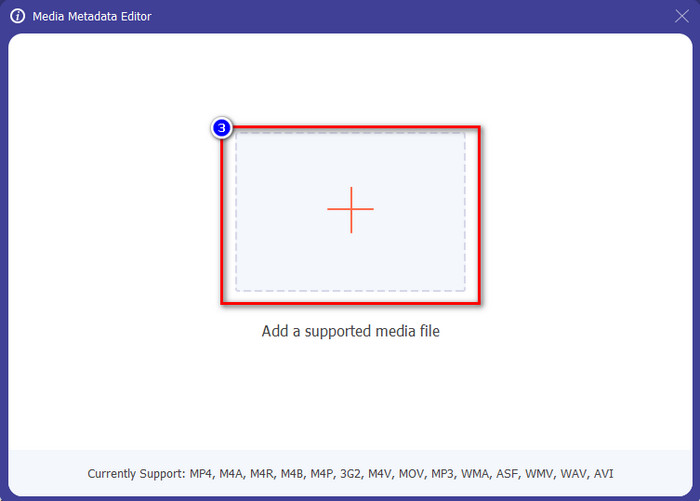
Step 2. New windows will show, click the + button, find the video or audio file on the computers folder, and click Open.
Step 3. Add or edit the data about the file according to your needs; after that, click Save to apply the changes you add.

Photoshop [Meilleur visualiseur de métadonnées pour les professionnels]
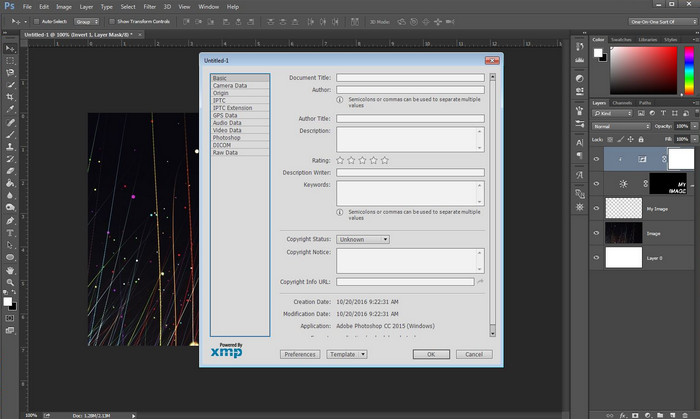
Photoshop became known as the top photo editor you can use as a professional. This tool offers users the high-end editing you will need to make your photo look better than before. Although the tool offers advanced editing, viewing the file's metadata, this tool is too expensive for some users. Maybe you are asking why we add this editor to the list, well it is popular, and many users already use this, so why not? Although it can add metadata on every PSD file, the metadata it supports is minimal, which means it is mostly about basics. So, if you want to view metadata in Photoshop, you must purchase the tool.
Avantages
- C'est le meilleur éditeur que vous puissiez trouver sur le web.
- Il prend en charge un large éventail de formats de fichiers image que vous pouvez insérer et vérifier ultérieurement ses métadonnées.
- Le choix de l'éditeur pour être un logiciel d'édition de premier ordre sur le bureau.
Les inconvénients
- Si vous achetez l'outil, attendez-vous à ce qu'il coûte cher.
- Il a besoin d'un ordinateur de bureau haut de gamme pour avoir une meilleure expérience d'utilisation.
- Ce n'est pas le meilleur choix pour les débutants.
En rapport:
How to Add Watermark in Photoshop
Partie 2. 2 visualiseurs de métadonnées gratuits disponibles sur le Web
Éditeur de métadonnées d'image de Jeffrey
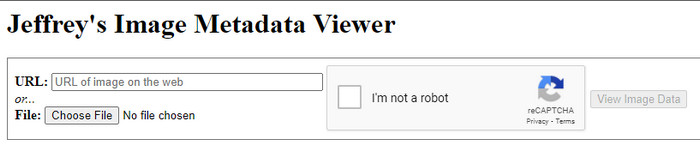
If you want a simple free metadata viewer on the web, try to use Jeffrey's Image Metadata Editor. This web tool is an effective tool to view the metadata of every media file you have for free. However, the users' interface of the web tool isn't as impressive as the others; it still serves its purpose as a metadata editor and viewer. Moreover, if you want to try and access this tool, you must beware because the website isn't protected on different web browsers, which means signing in to the website can lead to hacking or losing some files. Remember that you'll need to beware if you try to access the tool to view your metadata or edit it. So far, there aren't any reports of some who have been hacked while using the website.
Avantages
- Accès gratuit dans tous les navigateurs Web.
- Il prend en charge différents formats ; vous pouvez télécharger et afficher les métadonnées.
- Vous pouvez insérer l'URL au lieu du fichier pour économiser de l'espace.
Les inconvénients
- Le captcha est un peu gênant si vous voulez voir les métadonnées.
- Le site n'est pas sécurisé.
Metadata2go
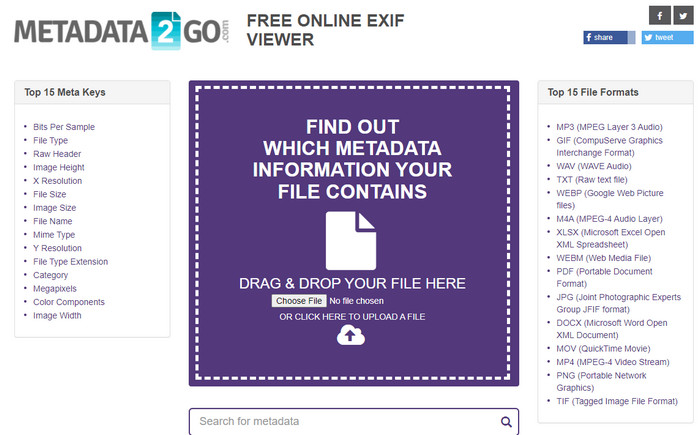
Metadat2go offers a wide range of image formats to insert and later view the metadata. Even though the GUI is much heavier than the first web tool we introduced, it is still easy to use for anyone who would like to access the tool. Although the tool is safer to use than the first one, there are some limitations on the functions, and most of the time the drag and drop function of it doesn't do well. But if you want to learn how to open and read metadata from video, this tool will suffice your needs.
Avantages
- Il est gratuit et sûr d'accéder sur différents moteurs de recherche.
- Il fait la tâche en douceur.
- Il prend en charge de nombreux formats d'image.
Les inconvénients
- Dans certains cas, les options ne fonctionnent pas bien, comme le glisser-déposer.
- Il prend en charge d'autres formats, mais il y en a peu de sélectionnés.
Partie 3. Tableau de comparaison sur les 4 visualiseurs de métadonnées [en ligne et hors ligne]
| traits | Convertisseur vidéo FVC Ultimate | Photoshop | Éditeur de métadonnées d'image de Jeffrey | Metadata2go |
| Afficher et modifier facilement les métadonnées |  | | | |
| Utilisation sûre | | |  | |
| Économique | | | | |
| Convivial | | | | |
| Fonctionnalités avancées disponibles | | | | |
| Basé sur le programme | Programme basé sur le bureau | Programme basé sur le bureau | Programme Web | Programme Web |
Partie 4. FAQ sur le visualiseur de métadonnées
Qu'y a-t-il dans les métadonnées ?
Dans les métadonnées, vous verrez un ensemble différent d'informations sur le fichier, par exemple, le nom de l'auteur, le genre (s'il s'agit de musique), le titre du fichier, la taille du fichier et bien d'autres.
Pourquoi ai-je besoin de voir les métadonnées ?
Eh bien, les métadonnées vous aideront à connaître de courtes informations sur le fichier que vous ne pouvez pas voir sur le fichier. En affichant les métadonnées, vous aurez une idée des données d'un certain fichier, qu'il s'agisse d'une image, d'une vidéo, d'un fichier audio, d'un PDF ou plus.
Puis-je utiliser des métadonnées pour protéger le fichier ?
Oui, vous pouvez ajouter des métadonnées pour protéger votre fichier des personnes qui veulent essayer de vous le voler. De cette façon, vous pouvez faire fonctionner les informations d'identification que vous avez créées si quelqu'un essaie de vous les voler. Cependant, il existe certaines techniques pour supprimer les métadonnées du fichier ; bien que quelqu'un puisse supprimer les données, il est préférable d'ajouter des métadonnées au fichier pour une protection supplémentaire et simple.
Conclusion
Now that we have the metadata viewer presented, it is time to choose one and use it to see your file's inside. Moreover, the first two tools we presented are undoubtedly the best on viewing metadata; but we can see that Photoshop is too expensive to use compared to the ultimate tool. So, therefore, if you want a cheap and safe way to view your metadata or edit it, you must use the FVC Video Converter Ultimate because it is the perfect tool for this task. Still, are you not convinced with the review we did on the tool? Well, you can download the tool on your software and try it for yourself!
-
 3 meilleures solutions pour supprimer facilement le filigrane des vidéos
 Vous voulez supprimer le filigrane gênant sur la vidéo ? Avec ce blog, vous pouvez découvrir les différentes idées pour supprimer le filigrane sur une vidéo.
-
 4 meilleures façons d'ajouter rapidement un filigrane sur n'importe quelle vidéo
 Apprenons à ajouter un filigrane à n'importe quelle vidéo sur Windows, Mac, Online, iOS et Android avec des étapes détaillées si vous lisez cet article.
-
 4 façons efficaces de supprimer les filigranes Tiktok des vidéos Tiktok
 Avez-vous besoin de supprimer le filigrane Tiktok de vos vidéos Tiktok exportées ? Vous pouvez le faire ici à l'aide des outils que nous présentons ; vous pouvez facilement le faire.
