


 Video Converter Ultimate
 Enregistreur d'écran
 Réparation vidéo
4 des meilleurs créateurs d'animation photo que vous pouvez utiliser pour créer des images animées
On this day most of the social media sites are already using a GIF instead of the old still image. Because GIFs are appealing in the eye of the users and it delivers a much better message compared to images. So, if you want to know what are the accessible photo animation makers you can use then proceed on the list below. As we search for the best maker you can use to add animation movement on the images.

Partie 1. Meilleur logiciel de création d'animation photo
In this list we already put this at first because it is the phenomenal editor you can use, the Video Converter Ultimate. So, if you want to make animation from photos you can easily make it here. Moreover, this desktop software can bring any image to life with its advanced features you can use even if you are pro or not. The overall experience when we try this software so far is the best compared to the other online or offline. So now, if you want to know how to bring your simple images to life then follow the steps indicated below and proceed.
5 Easy Steps to Bring Images to Life with the Video Converter Ultimate:
Step 1. Firstly, click the download button below and choose what OS you are currently using. Install the software next, do the set-up quickly, and click Start Now to proceed.
Téléchargement gratuit pour Windows 7 ou version ultérieure Téléchargement sécurisé
Téléchargement gratuit pour macOS 10.7 ou version ultérieure - Téléchargement sécurisé
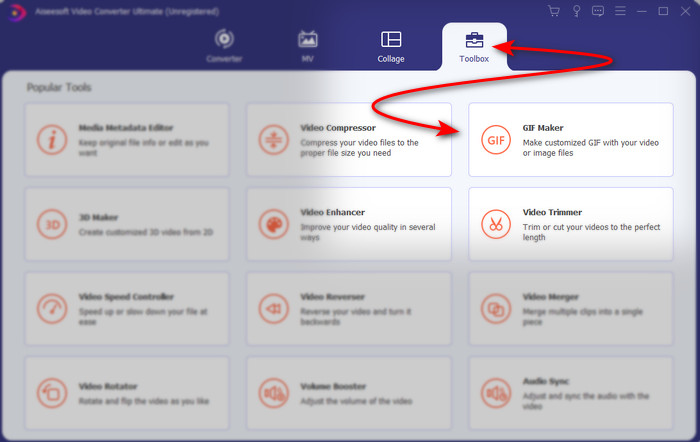
Step 2. Open the software and go to the Toolbox to locate the GIF Maker.
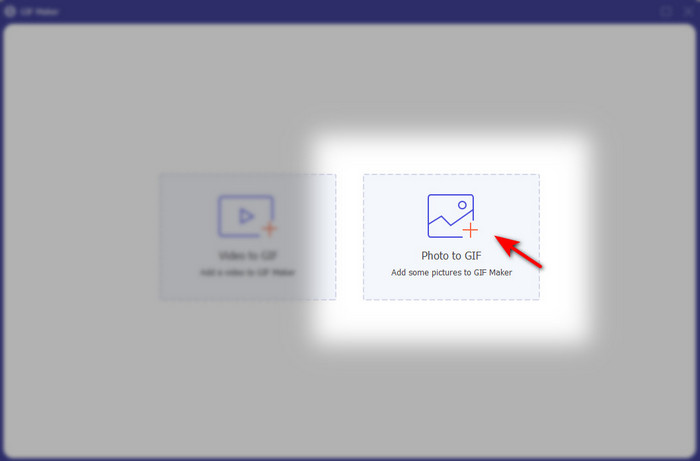
Step 3. Click the Photo to GIF option then a file folder will show next to your screen. Choose the file and click Open to insert it.
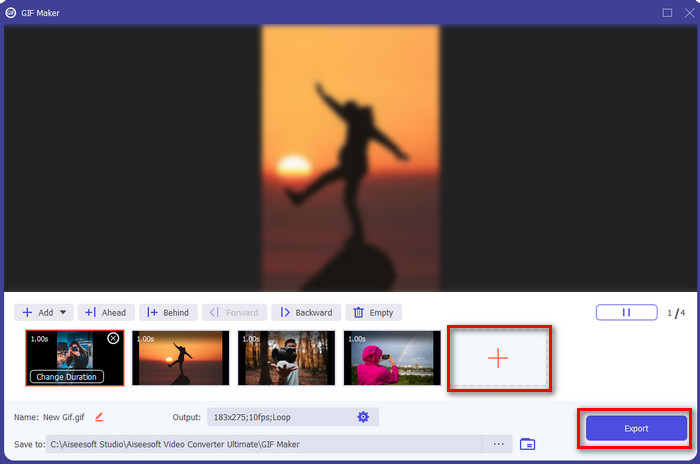
Step 4. Click the + button to insert more images to make animation from photos. Then set the duration by clicking the image first and then clicking the Change Duration button. After that, press Apply to save the changes. To download the animation, click Generate GIF.
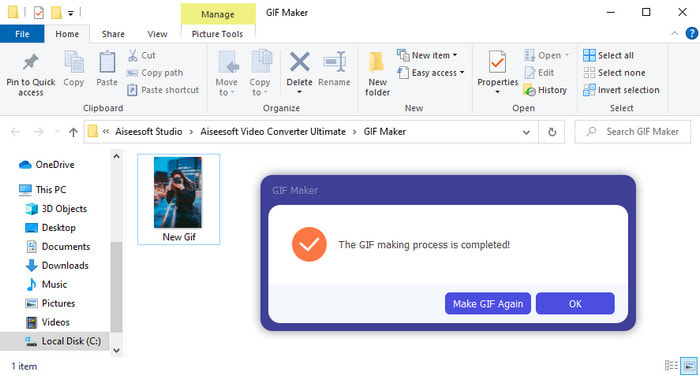
Step 5. After generating the GIF, a folder the animated GIF file will show on your screen. Click the file to watch the animation you've made earlier.
Partie 2. Top 3 des créateurs de photos animées en ligne gratuits
Haut 1. Ezgif
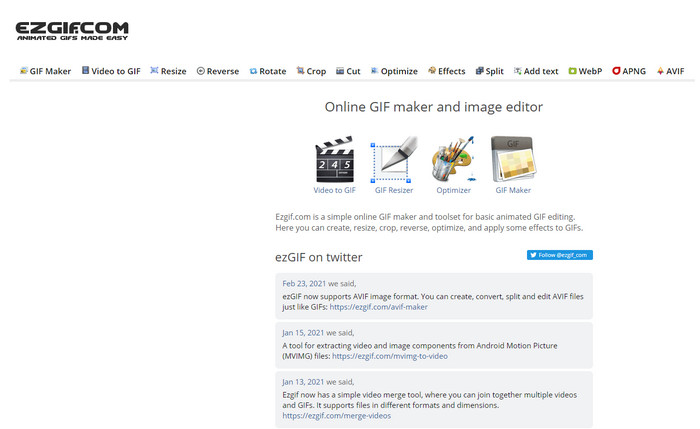
If you're looking for an animated photo maker online free then Ezgif must be it. This webtool is the best in the line of making a magnificent animated photo. And if you like creating one, then there is a chance that you've already used this online tool so if you haven't encountered this tool yet then it is a must to try it. However, some of the users find this tool lacks in some of the futuristic editing features they would love to use. So, if you are on a tight budget then this is a choice but remember that this tool is not the best choice for pro's and for starters it is great.
Avantages
- Facile d'accès et sécuritaire.
- Outil parfait pour les débutants qui veulent essayer de créer des GIF simples.
- Outil en ligne d'éditeur semi-pro.
Les inconvénients
- Il limite son utilisateur à l'expérience de la grandeur.
- Outil dépendant d'Internet. Donc, si vous n'avez pas Internet, attendez-vous à ce que vous ne puissiez pas utiliser cet outil en ligne.
Haut 2. Kapwing
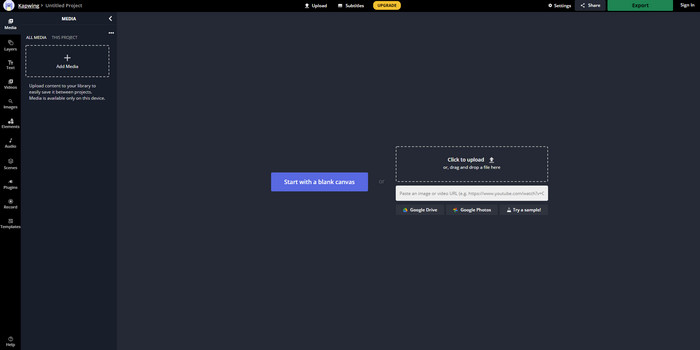
Unlike Ezgif, Kapwing is the best at improving the visual on the images. So, if you intend to use this online tool then learning how to make animated GIFs from photos will surely help you. The performance, accessibility and flexibility of the online tool is great to be used by anyone who has a small idea on editing. However, uploading and downloading image files here will take a lot more time than the other web tool. Also, watermark is included in the final output although you can remove it by signing in on the tool.
Avantages
- Il a beaucoup de fonctionnalités d'édition majeures par rapport à Ezgif.
- Outil en ligne gratuit accessible à tous ceux qui ont Internet.
- L'interface de l'outil en ligne est élégante et soignée.
Les inconvénients
- La sortie finale aura toujours un filigrane en bas à gauche.
- Pas le meilleur choix pour ceux qui viennent de commencer à éditer des GIF.
Haut 3. GIFMaker.me
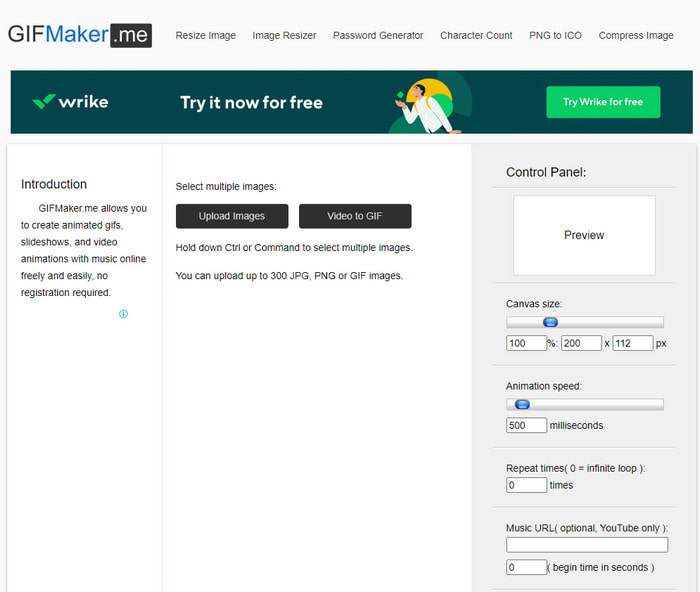
Another photo animation maker online that you can access for free, GIFMaker.me. This webtool is very convenient to those who don't have experience creating GIFs. Because in this tool you can just simply insert a bulk image and it will turn into a transitional GIF. However, this tool is the least favorite in this article because of its lack of editing features to make impressive GIFs. Although it lacks editing features if you just want to create a slideshow image then this must be your go to.
Avantages
- Générateur de GIF gratuit que vous pouvez utiliser sur le Web.
- L'interface du fabricant est simple et facile à comprendre.
- Un panneau de contrôle simple est disponible sur le côté droit de l'outil en ligne.
Les inconvénients
- Les publicités embêtantes sont sur l'interface Web.
- Il manque la plupart des fonctionnalités d'édition que vous aimeriez utiliser.
Partie 3. FAQ sur Photo Animation Maker
Puis-je utiliser des GIF animés comme fond d'écran ?
Vous ne pouvez pas utiliser un GIF animé brut et l'utiliser comme arrière-plan sur votre téléphone ou votre ordinateur. Cependant, vous pouvez utiliser un outil tiers pour le faire fonctionner. Donc, si vous voulez savoir comment le faire, cliquez sur ce lien pour continuer.
Pourquoi ne puis-je pas partager de GIF sur Instagram ?
Although GIFs are the most used format on the entire web still some platforms don't support GIF. Because Instagram only supports PNG and MP4 format. So, there two different ways on how to share GIFs on Instagram the first one is to convert GIF to MP4. On the other hand, you can learn different methods on how to post GIFs on Instagram by clicking these links provided.
A quoi sert le GIF ?
GIFs are made to be used to animate images but in a smaller file size compared to the other video format. Although it is animated, GIFs or Graphic Interchange Format are not considered as a video format. And in that case, you can learn a lot about GIFs. if you click and read this article thoroughly.
Conclusion
To sum up all the details above, it is now easier for the both of us to know what are the available animation makers we can use to make animation from photos compiled. Although the tools presented above are great help still the Video Converter Ultimate is the dominant GIF editor you would love to use. Because it is very easy to use, the interface is great, all of the advanced features are available here and more. So, if you have a doubt on this tool then see it for yourself by downloading it first and follow the indicated steps above.
Téléchargement gratuit pour Windows 7 ou version ultérieure Téléchargement sécurisé
Téléchargement gratuit pour macOS 10.7 ou version ultérieure - Téléchargement sécurisé
-
 Marvelous GIF to Video Apps pour les appareils Android et iOS
 Saviez-vous que vous pouvez convertir des GIF dans n'importe quel format vidéo que vous aimeriez utiliser sur votre téléphone ? Choisissez les meilleures applications sur votre Android ou iOS.
-
 Un guide simple sur la façon de transformer votre GIF en WMV sur Windows/Mac
 Voulez-vous savoir comment convertir GIF au format WMV ? Suivez ensuite cet article car il présente différentes solutions parmi lesquelles vous pouvez choisir.
-
 TS en GIF : comment transformer un fichier TS en GIF animés
 Apprenez à modifier les fichiers TS au format GIF à l'aide de cet article. La liste ci-dessous indique différentes idées sur TS et GIF et comment convertir TS en GIF.
