


 Video Converter Ultimate
 Enregistreur d'écran
 Réparation vidéo
 Téléchargement sécurisé
2 méthodes simples pour supprimer le filigrane Dxtory
Lorsqu’il s’agit d’enregistrer des gameplays et d’autres applications, Dxtory fait partie des logiciels de capture d’écran les plus populaires. Beaucoup de personnes utilisent cet enregistreur d’écran, car c’est l’une des rares applications de capture capable d’enregistrer jusqu’à 120 fps. De plus, il enregistre rapidement les flux vidéo DirectX et OpenGL sur votre système. Cependant, lorsque vous enregistrez avec Dxtory Screen Recorder, un filigrane apparaît sur votre vidéo. Par conséquent, les utilisateurs cherchent un moyen de supprimer ce filigrane gênant. Cet article va vous apprendre comment supprimer le filigrane Dxtory de votre vidéo enregistrée à l’écran.

Partie 1. Comment filtrer l'enregistrement à l'aide de Dxtory
Si vous recherchez une application logicielle capable d'enregistrer les temps forts de votre jeu, Dxtory est une application appropriée. Dxtory est une application qui peut vous aider à enregistrer votre écran tout en jouant à un jeu, en discutant d'une leçon en ligne ou en regardant des vidéos sur votre ordinateur. Il s'agit d'une application logicielle connue pour l'enregistrement d'écran. L'enregistreur d'écran Dxtory dispose des outils nécessaires pour accéder aux paramètres globaux, avancés, raccourcis clavier, capture d'écran, vidéo et audio, etc.
De plus, cet enregistreur d'écran vous permet de prendre une capture d'écran pendant l'enregistrement. Vous pouvez également modifier ces captures d'écran avec des options de bordure, de mise à l'échelle et de coupe. Il dispose également de plusieurs sources audio d'enregistrement, ce qui signifie que Dxtory peut enregistrer simultanément le jeu et le son du micro. C'est également la capture vidéo la plus rapide pour les applications DirectX et OpenGL. Donc, si vous souhaitez utiliser Dxtory pour filtrer l'enregistrement, continuez à lire cette partie.
Comment enregistrer le gameplay à l'aide de l'enregistreur d'écran Dxtory :
Étape 1. Commencez par télécharger Dxtory sur votre appareil. Suivez le processus d’installation. Vous pouvez acheter une licence afin de ne subir aucune limitation d’enregistrement et de ne plus avoir de filigrane sur la vidéo exportée.
Étape 2. Lancez l’application que vous souhaitez enregistrer, puis lancez Dxtory.
Étape 3. Allez dans l’onglet Target, puis cliquez sur le jeu auquel vous jouez. La liste des processus apparaîtra immédiatement dans la liste des cibles.
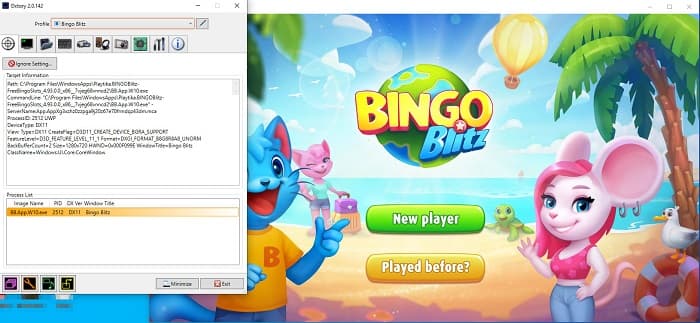
Étape 4. Ensuite, allez dans l’onglet Folder et choisissez le dossier de destination de votre fichier. Puis, allez dans Hotkeys pour sélectionner les touches qui serviront à contrôler votre enregistrement. Vous pouvez également régler le son audio.
Étape 5. Réduisez Dxtory et démarrez votre jeu. Vous verrez un indicateur numérique en haut à gauche de l’interface de votre jeu, qui indique vos FPS. Appuyez sur le raccourci de capture vidéo que vous avez défini dans le panneau Hotkeys pour commencer l’enregistrement.
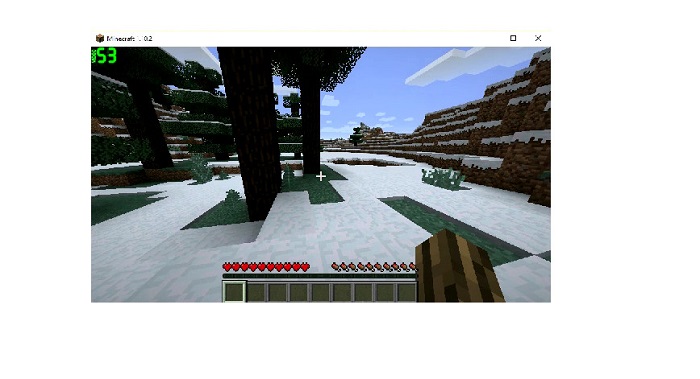
Étape 6. Puis, si vous voulez arrêter l’enregistrement, appuyez sur la même touche que celle utilisée pour démarrer. La vidéo est enregistrée dans le dossier de destination que vous avez choisi lorsque vous arrêtez l’enregistrement.
Vous pouvez maintenant profiter de votre vidéo enregistrée. Si vous n’avez pas acheté de licence, vous verrez un filigrane sur votre vidéo. Donc, si vous souhaitez supprimer le filigrane de la vidéo, lisez la partie suivante.
Partie 2. Comment supprimer le filigrane Dxtory à l'aide de l'outil ultime
Si vous souhaitez supprimer le filigrane Dxtory de la vidéo de votre enregistreur d'écran, vous souhaitez probablement utiliser cette application logicielle étonnante. Lisez cette partie pour connaître les descriptions complètes de cet outil et comment l'utiliser pour le processus de suppression du filigrane Dxtory.
FVC Video Converter Ultimate est l’un des logiciels les plus connus permettant de supprimer les filigranes de n’importe quelle vidéo. Son interface est simple à utiliser, ce qui en fait un outil très convivial. En outre, FVC Video Converter Ultimate prend en charge de nombreux formats de fichiers, dont MP4, MKV, MOV, M4V, AVI, FLV et plus de 1000 autres. Et si vous souhaitez disposer d’une application dotée de nombreuses fonctions de montage, cet outil est idéal pour vous. Il propose de nombreuses fonctionnalités avancées, comme le rognage vidéo, la suppression de filigrane vidéo, la fusion de vidéos, le découpage vidéo et bien d’autres encore dans la Boîte à outils (Toolbox).
Grâce à son interface de traitement rapide, vous pouvez facilement supprimer tout filigrane intégré dans votre vidéo. Par conséquent, suivez les étapes ci-dessous pour avoir une vidéo Dxtory sans filigrane.
Il existe deux façons de supprimer le filigrane Dxtory sur votre vidéo.
Méthode 1 : Comment supprimer le filigrane Dxtory à l'aide de la fonction de recadrage vidéo :
Étape 1. Commencez par installer FVC Video Converter Ultimate sur votre appareil en cliquant sur le bouton Télécharger ci‑dessous pour Windows ou Mac. Suivez le processus d’installation puis ouvrez l’application.
Téléchargement gratuit pour Windows 7 ou version ultérieure Téléchargement sécurisé
Téléchargement gratuit pour macOS 10.7 ou version ultérieure - Téléchargement sécurisé
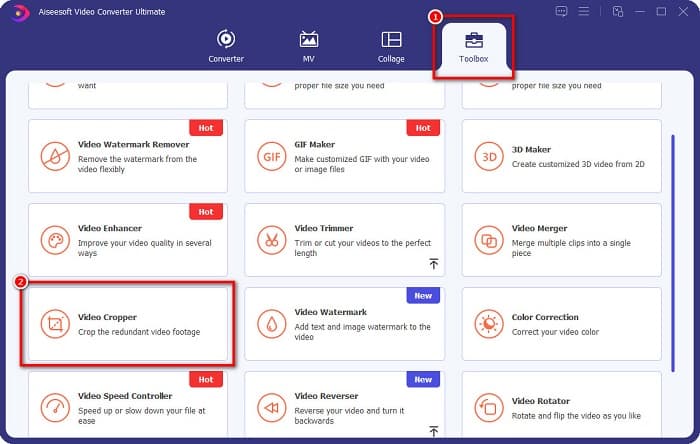
Étape 2. Sur l’interface principale, cliquez sur le panneau Toolbox, puis sélectionnez la fonction Video Cropper.
Étape 3. Ensuite, cliquez sur le bouton en forme de plus (+) pour importer la vidéo dont vous voulez supprimer le filigrane. Vous pouvez aussi glisser‑déposer votre vidéo depuis les fichiers de votre ordinateur.
Étape 4. Ensuite, vous pouvez prévisualiser votre résultat. Vous verrez un cadre de recadrage : ajustez les côtés de ce cadre de recadrage jusqu’à ce que le filigrane ne soit plus inclus dans la vidéo.
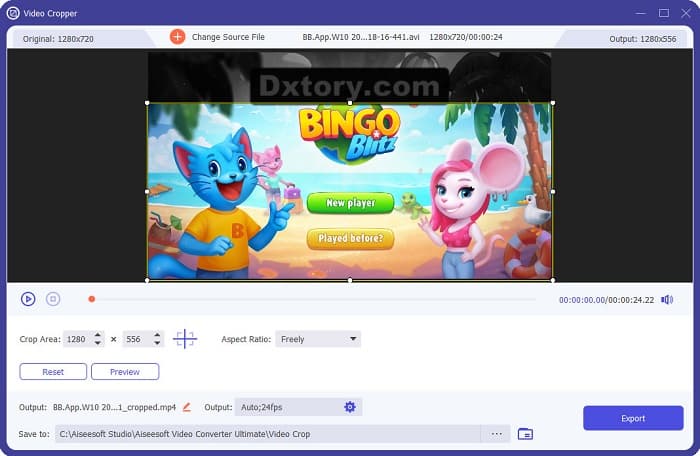
Vous pouvez ajuster la taille de la zone de recadrage en cliquant sur le bouton haut-bas sous l'aperçu de votre vidéo.
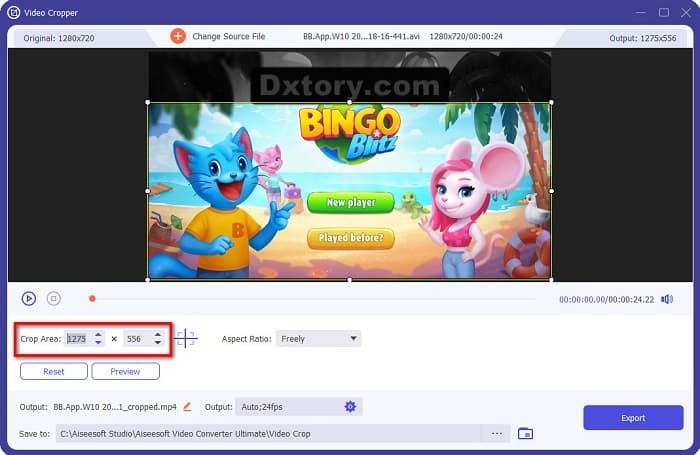
Étape 5. Enfin, cliquez sur le bouton Preview pour voir le rendu de votre vidéo, puis cliquez sur Export si vous êtes satisfait du résultat.
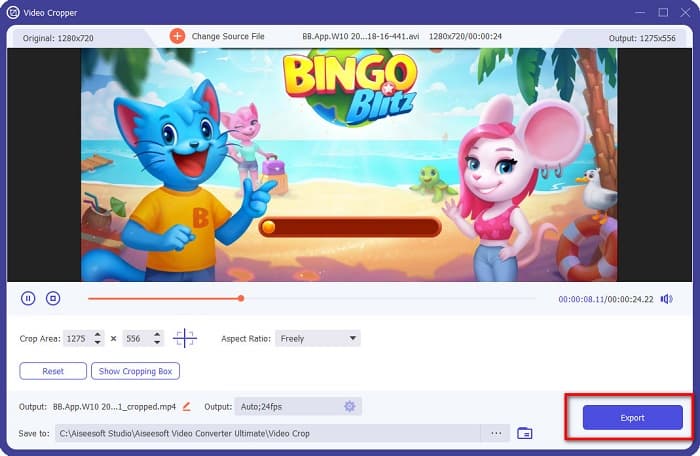
Avec ces étapes simples, vous pouvez supprimer le filigrane Dxtory sur votre vidéo à l'aide de la fonction Video Cropper de FVC Video Converter UItimate.
Méthode 2 : Comment supprimer le filigrane Dxtory à l'aide de Video Watermark Remover de FVC Video Converter Ultimate :
Étape 1. Si le logiciel est déjà téléchargé sur votre appareil, ouvrez‑le. Puis, allez dans Toolbox et sélectionnez Video Watermark Remover.

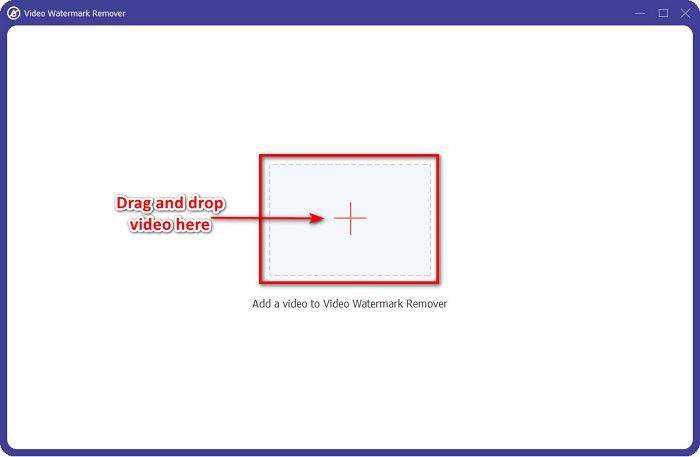
Étape 2. Ensuite, cliquez sur le bouton + ou faites glisser votre vidéo Dxtory dans la boîte avec le signe +.
Étape 3. Après avoir importé votre vidéo, un aperçu s’affiche. Cliquez sur la zone Add watermark removing.
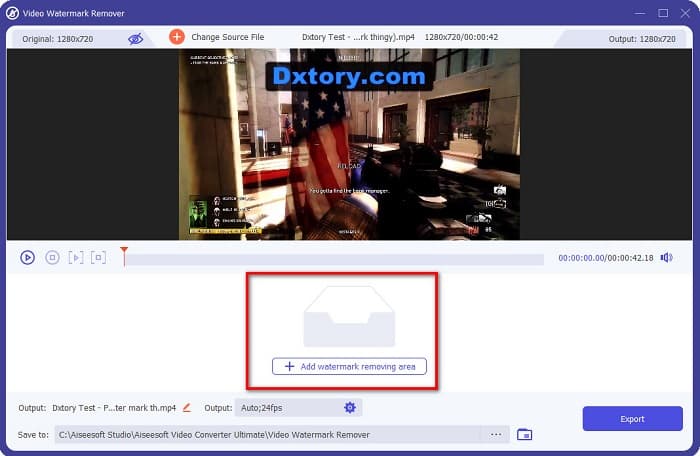
Étape 4. Une zone de suppression de filigrane apparaîtra alors sur votre vidéo. Placez‑la sur le filigrane Dxtory.
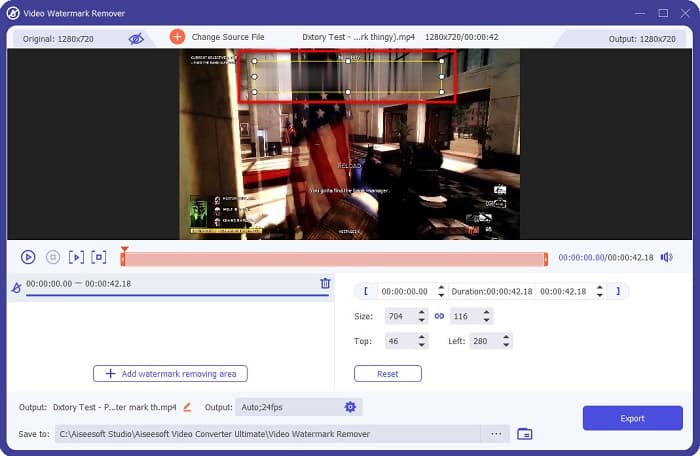
Optionnel. S’il y a deux filigranes ou plus sur votre vidéo, cliquez à nouveau sur add watermark removing area pour ajouter une nouvelle zone de suppression.
Étape 5. Pour finir, cliquez sur le bouton Export pour enregistrer la vidéo obtenue sur votre appareil. Et voilà !
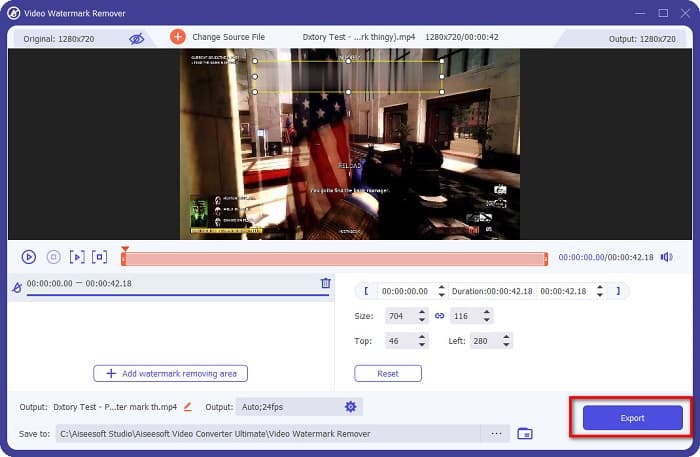
Simple, n’est‑ce pas ? Vous pouvez supprimer le filigrane Dxtory de votre vidéo aussi facilement que cela. Vous pouvez également supprimer les filigranes TikTok en utilisant des méthodes similaires à celles décrites ci‑dessus.
Partie 3. FAQ sur la suppression du filigrane Dxtory
Adobe After Effects peut-il supprimer le filigrane Dxtory ?
Oui. Adobe After Effects est l’outil de suppression de filigrane vidéo le plus populaire, capable d’enlever tout type de filigrane sur vos vidéos (logo, texte, images). Il peut également supprimer le filigrane Dxtory sur votre vidéo. Cependant, de nombreux utilisateurs trouvent son utilisation difficile. Repérez le filigrane sur votre image. Placez la boîte de suppression de filigrane sur le filigrane. Allez dans le panneau Layer. Créez des Null Objects. Cliquez sur Save Frame as. Importez vos vidéos modifiées. Réduisez l’Opacity de votre image. Utilisez l’option Pick‑up whip.
Pouvez-vous supprimer le filigrane de vos images ?
Vous pouvez supprimer des filigranes comme des logos, du texte ou tout autre élément sur vos images. Vous pouvez utiliser le FVC free watermark remover pour retirer tout type de filigrane de votre image.
Pourquoi Dxtory met-il des filigranes sur les vidéos ?
Dxtory a mis un filigrane sur ses vidéos afin que vous achetiez sa version payante. En outre, ils intègrent des filigranes sur leurs vidéos afin qu'elles ne soient pas protégées par le droit d'auteur.
Conclusion
Comme expliqué ci‑dessus, il existe des méthodes éprouvées pour savoir comment supprimer les filigranes Dxtory de vos vidéos. Et en utilisant FVC Video Converter Ultimate, vous pouvez facilement enlever tous les filigranes gênants de vos images. Téléchargez‑le dès maintenant et profitez de ses meilleures fonctionnalités.
-
 Comment supprimer facilement le filigrane de Wondershare DVD Creator
 Cet article contient des informations sur la façon de supprimer le filigrane de Wondershare DVD Creator. Pour obtenir toutes les informations dont vous avez besoin, il est indispensable de lire ceci.
-
 Comment supprimer le filigrane Coub en quelques étapes simples
 Apprenez à supprimer le filigrane Coub sur vos vidéos à l'aide de ces outils de suppression de filigrane populaires. Lisez cet article pour connaître ces outils incroyables et comment les utiliser.
-
 Comment supprimer facilement le filigrane Lumion sur Windows et Mac
 Besoin de supprimer le filigrane Lumion pour le présenter de manière professionnelle ? Eh bien, il existe des outils que vous pouvez utiliser pour vous aider à vous débarrasser du filigrane qu'il laisse.
