


 Video Converter Ultimate
 Enregistreur d'écran
 Réparation vidéo
 Téléchargement sécurisé
Comment supprimer le filigrane dans SmartDraw de 2 manières possibles
Si vous avez besoin d’un moyen simple et puissant pour créer des graphiques, des schémas et des cartes, puis les présenter avec une qualité de niveau professionnel, utilisez SmartDraw. Vous pouvez laisser libre cours à votre imagination et la concrétiser grâce à SmartDraw. L’outil est‑il gratuit ? Vous pouvez profiter d’un essai gratuit de sept jours qui vous permet d’utiliser l’outil gratuitement, mais avec un filigrane. Gérer un filigrane sur un fichier exporté peut être pénible. C’est pourquoi nous vous présentons cet article de blog, dans lequel nous ne retenons que les meilleurs outils du marché, capables de supprimer efficacement le filigrane. Restez avec nous et lisez les informations ci‑dessous pour apprendre comment supprimer le filigrane dans SmartDraw de deux manières efficaces.

Partie 1. Comment supprimer un filigrane dans Smart Draw en achetant une clé de licence [Version officielle]
Comment supprimer le filigrane de SmartDraw ? C'est la première façon que nous vous présenterons, et c'est en achetant la clé de licence pour cet outil. Cette plate-forme vous propose différents types de plans que vous pouvez obtenir et qui profiteront à votre fin. De plus, vous ne pouvez pas acheter un accès d'un mois à cet outil, donc si vous envisagez d'acheter sa clé de licence, vous serez facturé mensuellement, mais le total que vous paierez est dans sa version annuelle. Si vous appréciez les performances de cet outil et souhaitez l'acheter, vous pouvez suivre les étapes que nous ajoutons ci-dessous.
Étapes pour supprimer un filigrane dans SmartDraw avec une clé de licence :
Étape 1. Ouvrez le site officiel de SmartDraw et assurez‑vous d’accéder au bon site afin d’effectuer une transaction sécurisée.
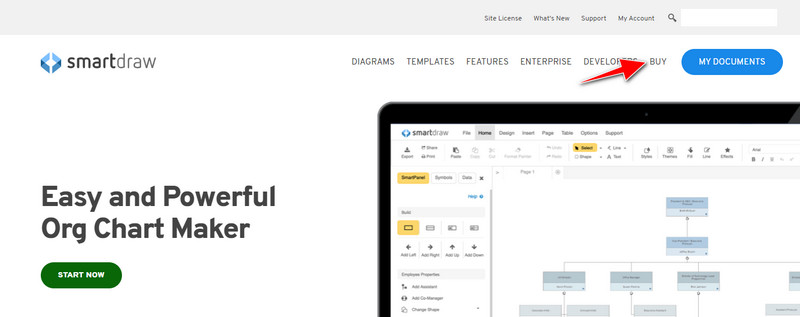
Étape 2. Sur le site, cliquez sur Buy pour voir les offres disponibles.
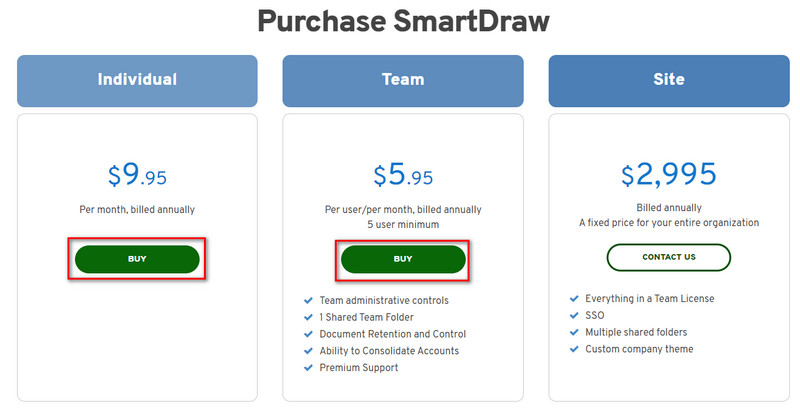
Étape 3. Vous pouvez acheter SmartDraw en tant qu’Individual, Team, or Site. Cliquez sur Buy Now si vous allez acheter la version Individuelle ou Équipe.
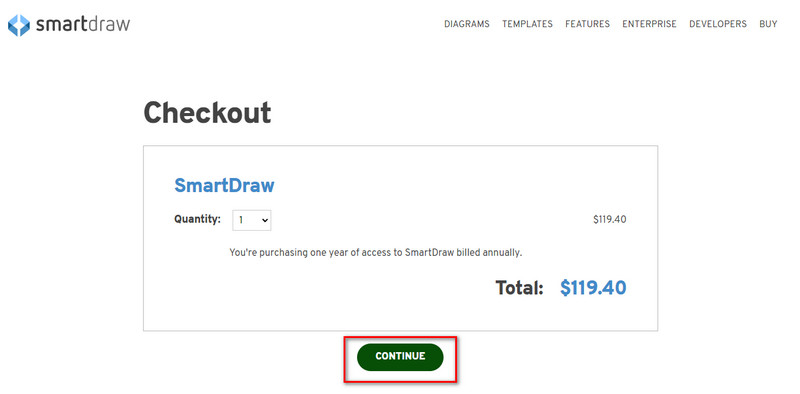
Étape 4. Sur la partie droite, vous verrez le montant total de l’outil après facturation annuelle ; cliquez sur Continue pour poursuivre.
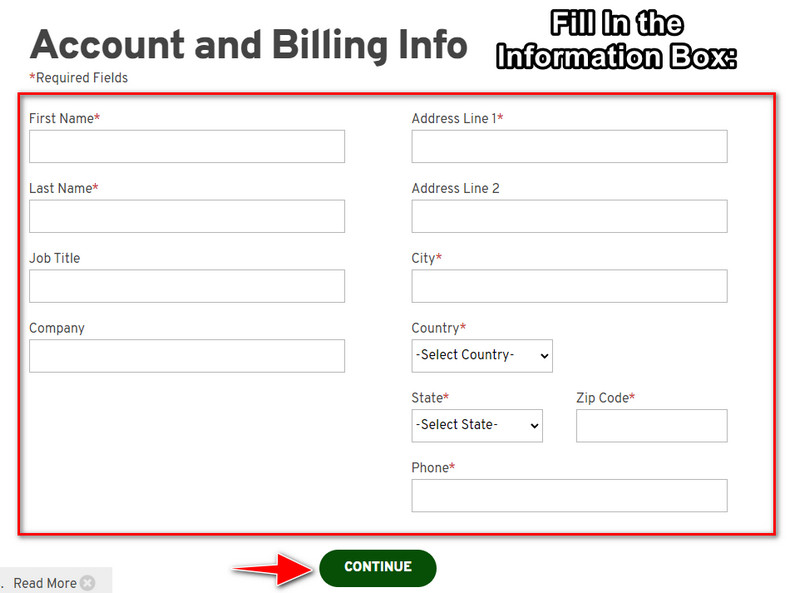
Étape 5. Ajoutez les informations de votre compte et de facturation requises, puis appuyez sur Continue pour obtenir la clé de licence.
Partie 2. Comment supprimer le filigrane dans Smart Draw gratuitement à l'aide du service Web [sans frais]
Comment supprimer le filigrane de la version d’essai de SmartDraw sans acheter ? Vous aurez alors besoin d’utiliser le FVC Free Watermark Remover Online. Ce supprimeur de filigrane est prêt à l’emploi. Vous n’avez pas besoin d’être un expert pour retirer le filigrane de votre image, car l’utilisation de cet outil est très simple. Même si vous êtes un professionnel, vous pouvez toujours utiliser ce logiciel pour supprimer les filigranes ou objets indésirables sur votre image. Grâce à ce supprimeur de filigrane, aucune marque sur votre image ne résistera. Vous préférez essayer ce logiciel plutôt que d’acheter la clé de licence ? Dans ce cas, suivez le tutoriel ci‑dessous pour retirer efficacement le filigrane sur les images.
Étapes pour supprimer gratuitement le filigrane de SmartDraw sur un graphique ou un diagramme :
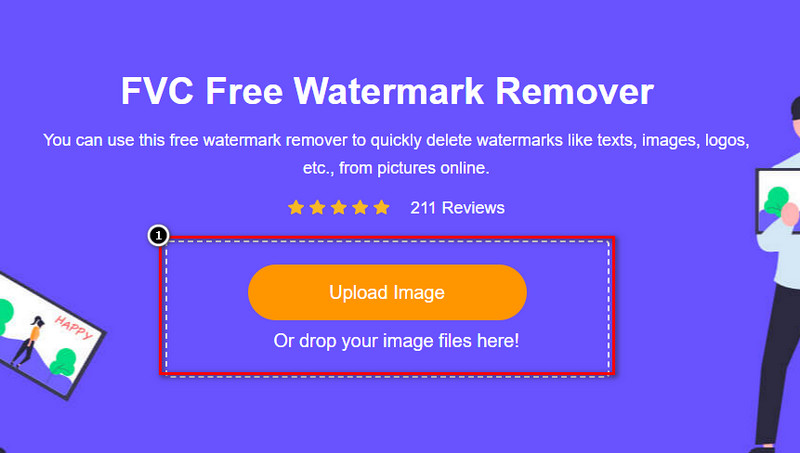
Étape 1. Au lieu de chercher l’outil en ligne dans votre navigateur, vous pouvez cliquer sur ce lien pour l’ouvrir ; un nouvel onglet s’affichera dans votre moteur de recherche.
Étape 2. À l’aide de votre souris, glissez‑déposez le graphique ou le schéma que vous avez créé avec SmartDraw afin de le téléverser.
Étape 3. Maintenant que le supprimeur de filigrane en ligne est lancé, choisissez l’outil que vous souhaitez utiliser pour surligner le filigrane sur l’image.
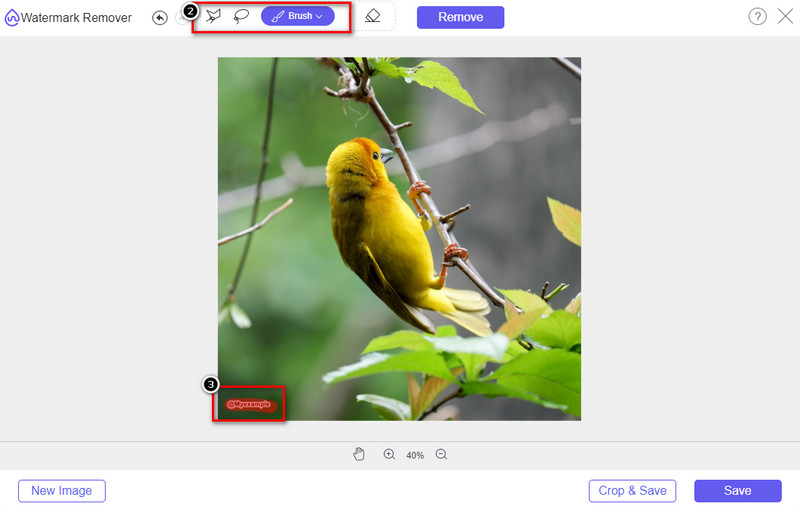
Étape 4. Après avoir surligné le filigrane ou le logo sur l’image téléversée, appuyez sur Remove.
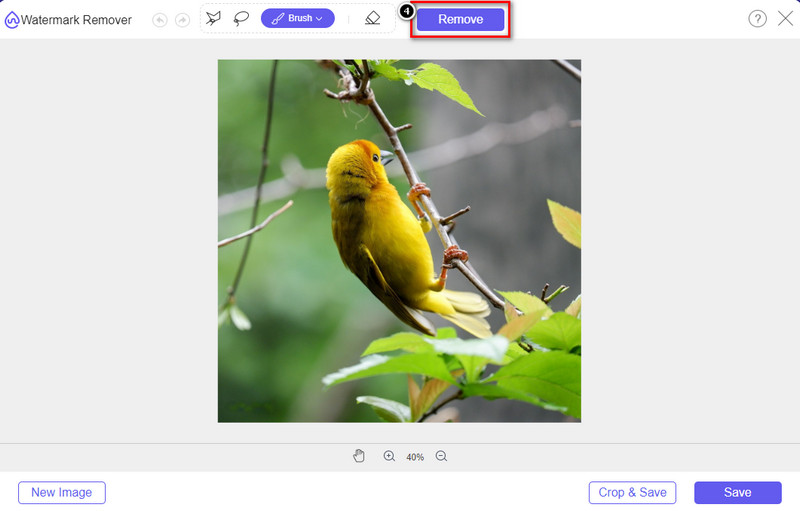
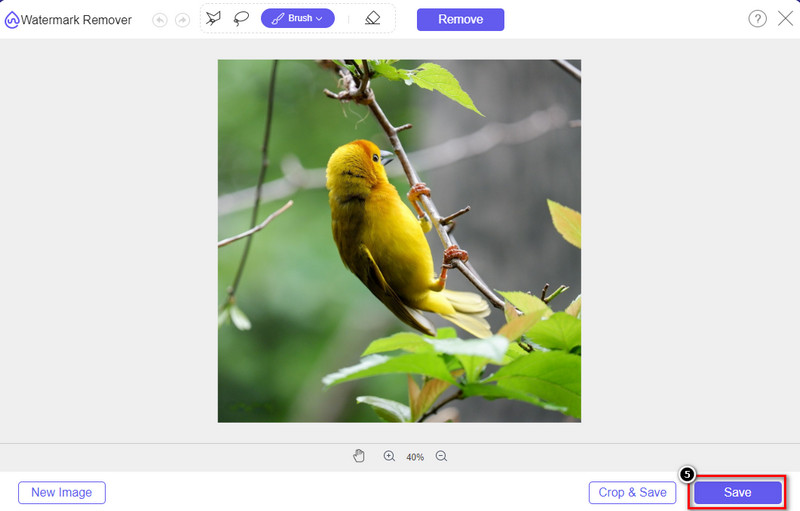
Étape 5. Patientez le temps que le filigrane soit supprimé, puis cliquez sur Save pour télécharger le graphique ou le schéma que vous avez téléversé. Un dossier s’affichera sur votre écran ; vérifiez maintenant la version du graphique ou du schéma que vous avez créé, cette fois sans filigrane.
Avantages de l’utilisation de FVC Free Watermark Remover Online :
◆ Il n'est pas nécessaire de télécharger l'application car elle est disponible sur le Web.
◆ Prend en charge une large gamme d'images et peut supprimer efficacement les filigranes.
◆ Il s'agit d'un éliminateur de filigrane dédié qui produit une sortie de haute qualité.
◆ Aucun filigrane n'est ajouté à la sortie finale une fois exportée.
◆ Aucune limitation sur le nombre de fois à utiliser et la taille du fichier.
Partie 3. Partie supplémentaire - Comment créer un graphique, un graphique ou un diagramme sur SmartDraw avec des étapes détaillées
La partie précédente vous apprend à vous débarrasser du filigrane SmartDraw. Dans cette partie, nous vous apprendrons à créer un tableau, un graphique et un diagramme à l'aide de SmartDraw ; vous pouvez suivre les étapes que nous ajoutons ci-dessous pour savoir comment procéder.
Étape 1. Rendez‑vous sur son site officiel pour créer un graphique, un diagramme ou un schéma.
Étape 2. Maintenant que vous avez ouvert le site officiel, cliquez sur Start Now et ouvrez votre compte.
Étape 3. Sur la partie gauche, choisissez le type de modèle que vous souhaitez utiliser ou créer.
Étape 4. Ajoutez les informations à chaque étape de votre organigramme. Des options supplémentaires seront disponibles sur la partie gauche du site.
Étape 5. Cliquez sur le bouton Export, choisissez le format que vous souhaitez obtenir, puis cliquez pour lancer le processus. Si vous utilisez la version gratuite, un filigrane apparaîtra ; vous pouvez reprendre les étapes de la partie 2 pour supprimer ce filigrane.
Pour aller plus loin :
Comment supprimer le filigrane B612 de vos images
Comment supprimer gratuitement le filigrane WOW Slider
Partie 4. FAQ sur la suppression du filigrane SmartDraw
SmartDraw peut-il exporter des images PNG ?
Oui, vous pouvez avoir un graphique transparent au format PNG. Cependant, il ajoutera un filigrane si vous utilisez la version gratuite. Vous pouvez acheter la version officielle, il y aura donc un filigrane sur l'image exportée.
Combien coûte SmartDraw ?
Si vous êtes sur le point d'acheter un plan sur SmartDraw, vous pouvez acheter son plan à partir de $ 5.95. Vous pouvez consulter les autres tarifs proposés sur le site officiel.
Quel est l'avantage d'acheter la version premium de SmartDraw ?
Vous pouvez obtenir le contrôle de l'administrateur d'équipe, le dossier d'équipe, l'assistance premium et exporter des images sans filigrane pour des plans individuels. Pour d'autres avantages premium, vous pouvez obtenir, visitez le site Web officiel et voyez quelles fonctionnalités et fonctions vous pouvez obtenir.
Conclusion
Maintenant que vous savez comment enregistrer SmartDraw sans filigrane avec les deux méthodes que nous ajoutons. Soit vous l'achetez, soit vous utilisez un outil pour supprimer le filigrane sur le fichier exporté. Si vous n'aimez pas acheter l'outil, vous devez l'utiliser car c'est l'outil Web le plus efficace pour éliminer le filigrane. Si vous pensez que cet article vous a aidé à résoudre le problème, alors vous nous attribuez une note de 5 étoiles.
-
 4 meilleures façons de supprimer le filigrane du GIF [en ligne et hors ligne]
 Besoin de supprimer le filigrane du GIF ? Avec l'outil de cet article, vous apprendrez les différents styles avec les différents nettoyeurs de filigrane disponibles sur votre plateforme.
-
 5 façons les plus simples de supprimer les métadonnées de tous les fichiers multimédias
 Comment supprimer les métadonnées ? Est-ce difficile de le faire ? Dois-je acheter ou utiliser un outil gratuit pour supprimer les balises ? Toutes ces questions ont des réponses dans cet article.
-
 Exceptionnel Photobucket Watermark Remover en ligne et hors ligne
 Apprenez à supprimer le filigrane Photobucket de vos photos à l'aide de cet incroyable dissolvant de filigrane Photobucket. Lisez cet article pour apprendre les moyens.
