


 Video Converter Ultimate
 Enregistreur d'écran
 Réparation vidéo
 Téléchargement sécurisé
Tutoriel complet sur la façon de supprimer le filigrane Weibo que vous devez savoir
Weibo est une plate-forme de médias sociaux connue utilisée pour partager, diffuser et obtenir des informations comme Twitter que vous pouvez souvent utiliser en Chine. Vous pouvez également publier et télécharger des vignettes, des photos et des vidéos ici. Cependant, il y aura un filigrane une fois que vous l'exporterez. De nombreux utilisateurs souhaitent le supprimer car il perturbe les visuels du contenu.
Despite the thousands of watermark removers available, few tools can handle removing watermarks effectively. So, if you want doesn't like the watermark on the visual media you download. This article accumulates the best tools to use. We tested them out to prove that they are functional and practical in removing the watermark. To teach you how to remove the Weibo watermark, you must keep up the pace of reading this article.

Partie 1. Comment supprimer un filigrane d'une vidéo Weibo à l'aide de l'outil Ultimate Watermark Remover
Weibo watermark can be a problem on other tools because most tools leave a smear of the watermark. Yet, if you use the FVC Video Converter Ultimate, there will be no smear left on the watermark. No matter how big or small the watermark is, this tool can erase it effectively without any trace of the watermark. So you can enjoy watching the video you export on Weibo. In other words, removing the watermark with the help of this tool is a piece of cake.
De plus, vous pouvez également utiliser cet outil pour d'autres choses, comme couper, fusionner, compresser, rogner, créer des GIF, etc. Et si vous souhaitez ajouter un filigrane sur votre vidéo afin que personne ne puisse vous la voler, vous pouvez utiliser ce logiciel pour le faire. C'est le logiciel tout-en-un nécessaire sur votre bureau. Voulez-vous savoir comment supprimer le filigrane de la vidéo Weibo ? Vous pouvez suivre les étapes suivantes car nous expliquons comment le faire étape par étape.
Téléchargement gratuit pour Windows 7 ou version ultérieure Téléchargement sécurisé
Téléchargement gratuit pour macOS 10.7 ou version ultérieure - Téléchargement sécurisé
' : Avant de suivre les étapes suivantes, assurez-vous d'avoir exporté la vidéo Weibo sur laquelle vous souhaitez supprimer le filigrane afin de pouvoir la retrouver facilement dans le dossier.
Step 1. First of all, you must download the software on your desktop and choose the version based on the operating system. After installing the software, follow the WinRAR set-up process that will show on your display, click Start Now to launch it, and proceed.
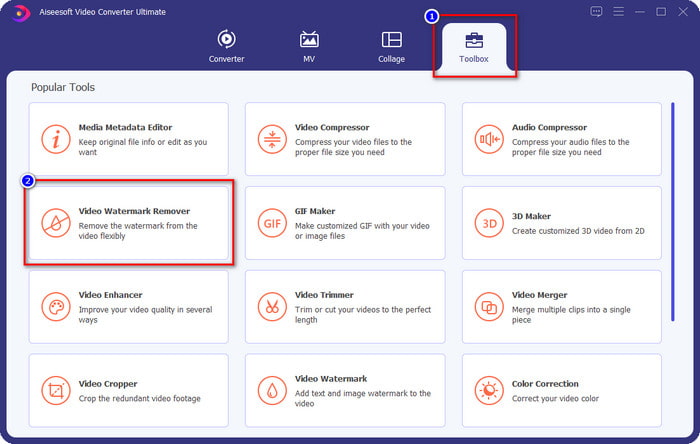
Step 2. Go to the Toolbox section and look for the Video Watermark Remover; click it.
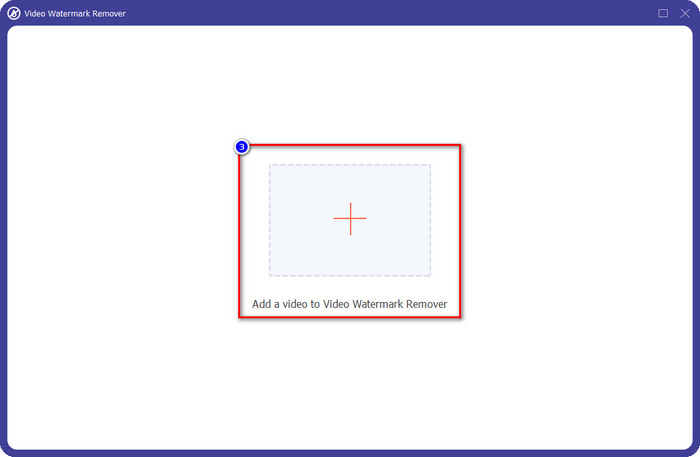
Step 3. Click the + button, and locate the Weibo video watermark you downloaded earlier in the folder, click the file, and press Open to upload it now.
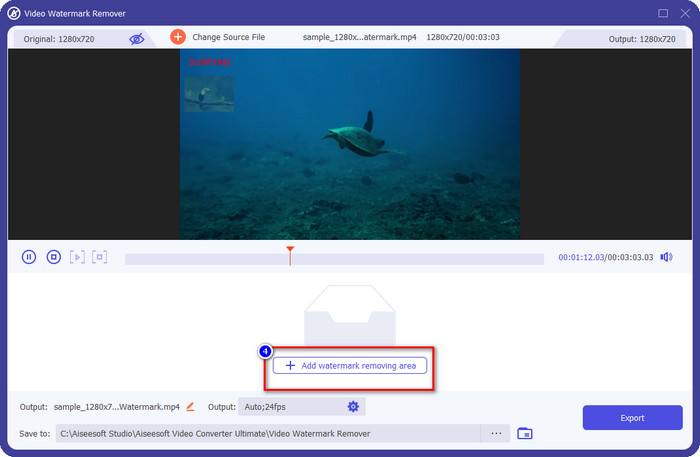
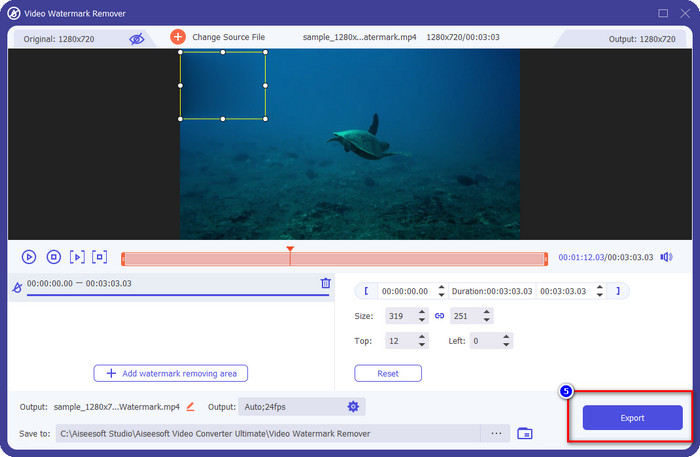
Step 4. On the new window that will show, click the Add Watermark Removing Area to proceed with removing the watermark.
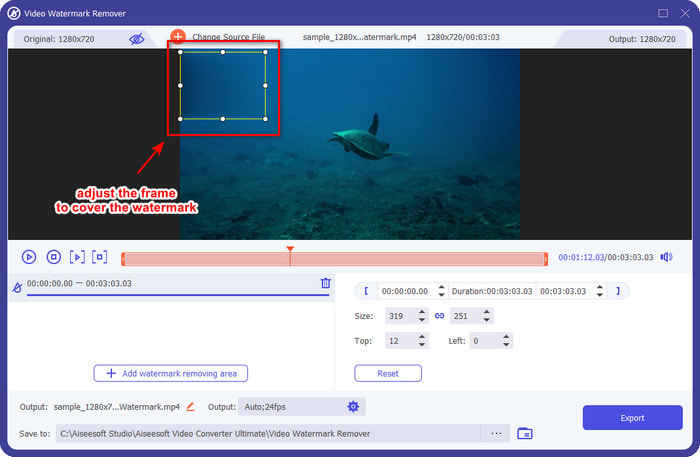
Step 5. Drag and hold the selection box to cover the watermark; you can also expand or shrink it according to your specifications and cover it before you export.
Step 6. After placing the selection box on the watermark, click Export to remove the watermark on the video you upload. There is no need to wait because it supports an ultra-fast process; you will have the Weibo video without the watermark after a few seconds.
Partie 2. Comment supprimer le filigrane de Weibo Photo à l'aide de la version gratuite sur le Web
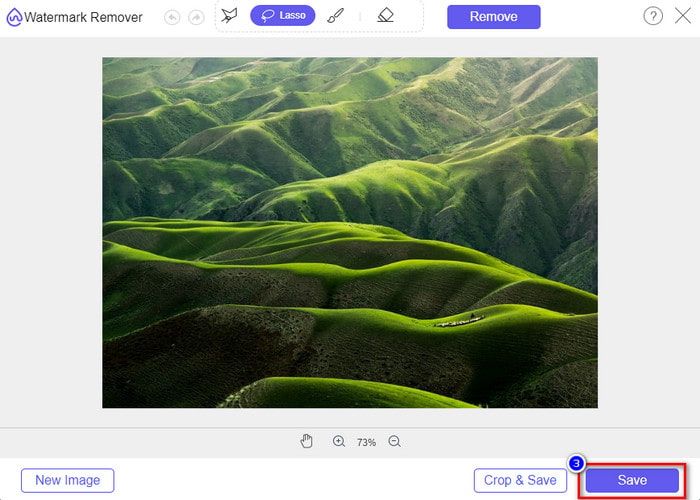
How to save Weibo photos without a watermark? You can't save an image without a watermark if exported on Weibo. But, you can use FVC Free Watermark Remover to erase the watermark on images. It is your complete watermark remover on images with a watermark. Functionality-wise, we can say that this tool is far better than the other watermark remover you can use on the web. So, if you want to remove the watermark on the image, this is the first choice that you might want to try. Though it can remove the watermark on an image, it isn't capable of removing it on videos like the ultimate tool can do for you.
Néanmoins, son utilisation est gratuite et son interface Web est propre, vous ne verrez donc même pas de publicités qui pourraient vous déranger. Vous voulez savoir comment utiliser cet outil Web ? Suivez ensuite les étapes indiquées ci-dessous pour l'essayer par vous-même.
Remarque : Identique à la vidéo, assurez-vous de télécharger l'image Weibo que vous souhaitez avoir et assurez-vous de la placer sur un dossier visible et facile d'accès.
Step 1. To access the watermark remover on the web, click this link to open it.
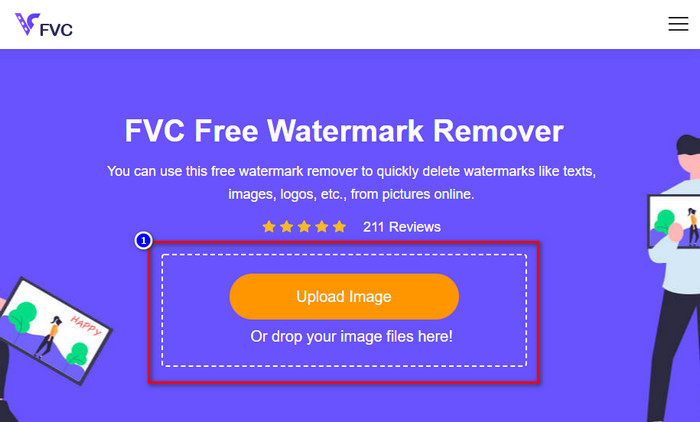
Step 2. On the web interface, click Upload Image, then a folder will show on your screen, find the image, and press Open to upload it.
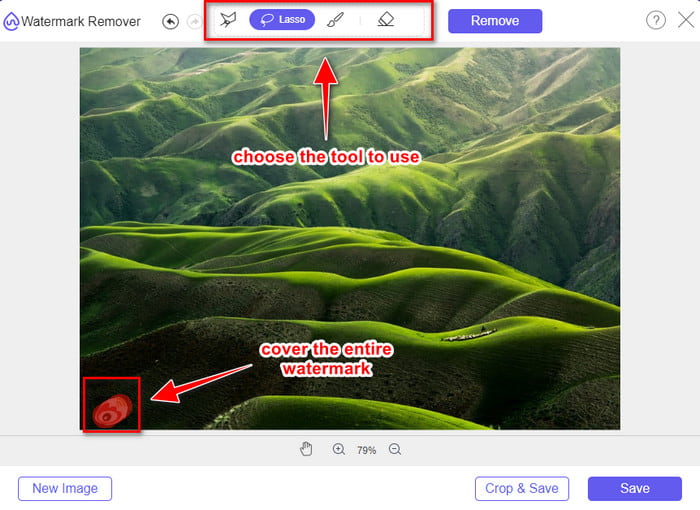
Step 3. You can trace the watermark here to remove it and ensure that every inch of the watermark is inside the tracing you did.
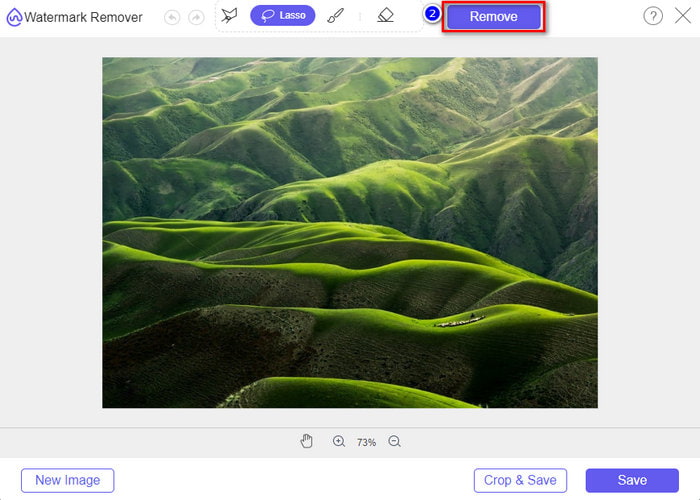
Step 4. Press Remove to erase the watermark that is in your image.
Step 5. After removing the watermark on the Weibo image, click Save to download the Weibo image without a watermark.
En rapport:
How to Remove TikTok Watermark
Partie 3. FAQ sur la suppression du filigrane Weibo
Pourquoi le filigrane Weibo est-il devenu flou après l'avoir exporté ?
Certains outils brouillent le filigrane afin qu'il ne soit pas visible sur les supports visuels qu'ils ont exportés sur Weibo. Mais tous les outils ne brouillent pas les filigranes ; certains enlèvent le filigrane sur les supports visuels sans aucune trace. Donc, si vous souhaitez supprimer le filigrane sur Weibo sans le brouiller, vous devez connaître l'outil que nous mentionnons ci-dessus pour vous aider à le supprimer.
Puis-je masquer le logo Weibo sur le fichier exporté ?
Oui, vous pouvez. De cette façon, vous ne verrez pas le filigrane de Weibo sur le fichier. Cependant, la falsification couvrirait certaines parties du fichier, donc au lieu de vous aider, cela pourrait aggraver le fichier. Ainsi, un dissolvant de filigrane est nécessaire pour effacer le filigrane du fichier.
Tous les fichiers exportés sur Weibo ont-ils un filigrane ?
Exporter tout type de fichier sur cette plateforme de microblogging laissera une trace. Quoi qu'il en soit, des filigranes sont ajoutés au fichier. Néanmoins, vous pouvez le supprimer avec l'outil que nous avons mentionné plus haut dans cet article.
Conclusion
Amazing right? The FVC has the tool; you will need to remove the Weibo watermark on video and images instantly. Even though you haven't experience or are professional in this type of editing, editing is possible with the aforementioned tool. So, if you want to remove a watermark on an image, whether it is exported on Weibo or not, FVC Free Watermark Remover is the tool you will ever need. But on videos and GIFs, you must use professional software that is easy to use and affordable, like the FVC Video Converter Ultimate. What are you waiting for? Remove the watermark on your visual media to enjoy seeing it without any crest of the mark.
-
 Meilleure façon d'ajouter un filigrane à une vidéo dans Photoshop sur Windows et Mac
 Vous voulez savoir comment ajouter un filigrane à une vidéo sur Photoshop ? Dans ce cas, cet article vous fournira la ou les deux choses que vous devez savoir.
-
 3 meilleures solutions pour supprimer facilement le filigrane des vidéos
 Vous voulez supprimer le filigrane gênant sur la vidéo ? Avec ce blog, vous pouvez découvrir les différentes idées pour supprimer le filigrane sur une vidéo.
-
 4 meilleures façons de supprimer le filigrane du GIF [en ligne et hors ligne]
 Besoin de supprimer le filigrane du GIF ? Avec l'outil de cet article, vous apprendrez les différents styles avec les différents nettoyeurs de filigrane disponibles sur votre plateforme.
