


 Video Converter Ultimate
 Enregistreur d'écran
 Réparation vidéo
Comment accélérer les vidéos TikTok sur Tiktok ou utiliser l'autre logiciel alternatif
L’une des applications de divertissement vidéo qui connaît la croissance la plus rapide et que vous pouvez utiliser sur votre téléphone mobile est TikTok. Bien que TikTok soit sorti en 2016, il est immédiatement devenu très populaire en quelques mois à peine. Parmi les effets de montage les plus courants qu’on y réalise, on trouve l’accélération de la vidéo pour créer un effet visuel. Donc, si vous faites partie de ces utilisateurs et que vous voulez savoir comment faire, vous êtes au bon endroit. Nous allons passer en revue différents outils qui vous aideront à apprendre comment accélérer une vidéo sur TikTok.

Partie 1. Comment accélérer une vidéo sur TikTok
Comme indiqué plus haut, TikTok est devenu l’une des plateformes de courts clips vidéo les plus célèbres, et y monter une vidéo peut se faire très facilement. Notez que vous pouvez accélérer la vidéo pendant le tournage et non après qu’elle soit terminée. De plus, si vous essayez d’accélérer une vidéo sur TikTok, vous devrez estimer la vitesse globale sans savoir à l’avance si c’est bien celle que vous souhaitez obtenir. Cependant, si vous ne voulez pas télécharger un outil tiers pour accélérer une vidéo, alors TikTok fera l’affaire. Suivez donc les étapes ci‑dessous pour accélérer une vidéo sur TikTok.
Étapes pour filmer une vidéo accélérée sur TikTok :
Étape 1. Commencez par télécharger TikTok sur votre téléphone mobile et lancez l’application une fois le téléchargement terminé.
Étape 2. Appuyez sur le signe + pour commencer à filmer. Puis cliquez sur « ajouter un son » pour insérer une musique de fond et, si vous le souhaitez, un filtre. Ensuite, pour accélérer la vidéo, cliquez sur Vitesse et choisissez l’option qui vous convient parmi celles proposées. Pour démarrer l’enregistrement, appuyez sur le bouton rond et appuyez de nouveau dessus pour l’arrêter.
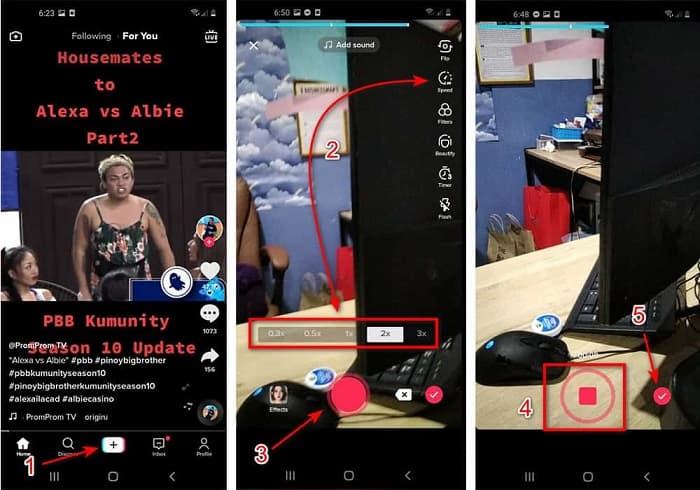
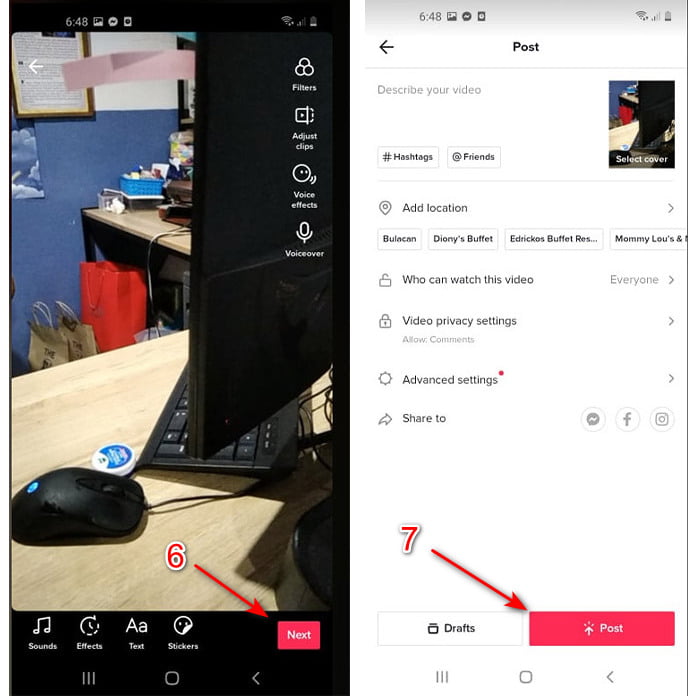
Étape 3. Pour vérifier la vidéo, appuyez sur le bouton validation puis cliquez sur Suivant. Enfin, cliquez sur Publier pour la mettre en ligne sur TikTok.
Partie 2. Comment accélérer toutes les vidéos TikTok sur Video Converter Ultimate
Contrairement à la fonction de montage intégrée que TikTok met à votre disposition, Video Converter Ultimate vous permet de gérer manuellement l’accélération, mais de manière plus simple. De plus, pendant que vous accélérerez la vidéo, un aperçu sera disponible pour déterminer si la vitesse vous convient. Par ailleurs, ce logiciel remarquable permet déjà à ses utilisateurs de profiter de fonctionnalités de montage de niveau professionnel avancé, mais avec des étapes simplifiées. En raison de ses fonctions avancées, cet outil est payant. Toutefois, pas de quoi s’inquiéter : il ne vous coûtera ni des centaines ni des milliers de dollars. Si vous voulez savoir quels sont les avantages ou les principales fonctionnalités dont vous bénéficierez avec cet outil, jetez un œil à la liste ci‑dessous.
Meilleures fonctionnalités que vous trouverez dans Video Converter Ultimate :
Il s'agit d'un logiciel indépendant de la plate-forme, ce qui signifie que vous pouvez le télécharger sur votre PC, Mac ou Linux.
◆ Tous les outils d'édition avancés, de convertisseur, de créateur de GIF et bien plus sont disponibles dans cet outil.
◆ La convivialité de l'outil est très pratique pour tout le monde, même pour les pros ou les débutants en édition.
◆ Il permet aux utilisateurs d'exprimer leur côté créatif grâce à diverses fonctionnalités d'édition disponibles ici.
◆ Bien que l'outil soit payant, il reste moins cher et très abordable pour quiconque voudrait l'essayer.
Donc maintenant, si vous voulez savoir comment accélérer des vidéos TikTok avec cet éditeur alternatif remarquable, lisez et suivez les instructions ci‑dessous pour réussir à 100%.
Étapes pour accélérer des vidéos TikTok avec Video Converter Ultimate :
Étape 1. Pour utiliser le logiciel, vous devez d’abord le télécharger sur votre PC ou votre Mac. Puis installez‑le, effectuez le simple paramétrage initial et cliquez sur « terminer » pour continuer.
Téléchargement gratuit pour Windows 7 ou version ultérieure Téléchargement sécurisé
Téléchargement gratuit pour macOS 10.7 ou version ultérieure - Téléchargement sécurisé
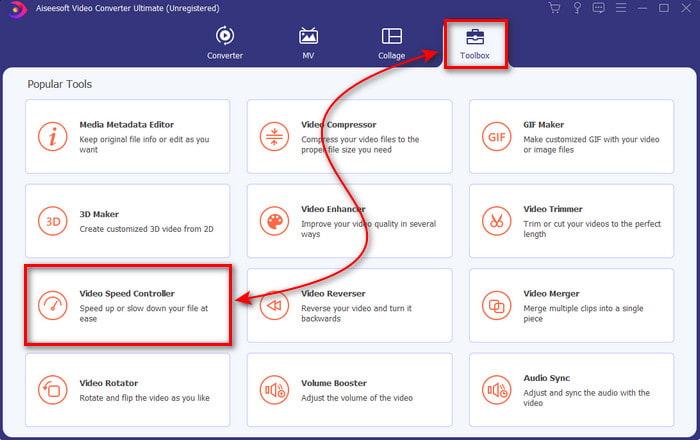
Étape 2. Appuyez sur Boîte à outils puis sélectionnez Contrôleur de vitesse vidéo dans la liste.
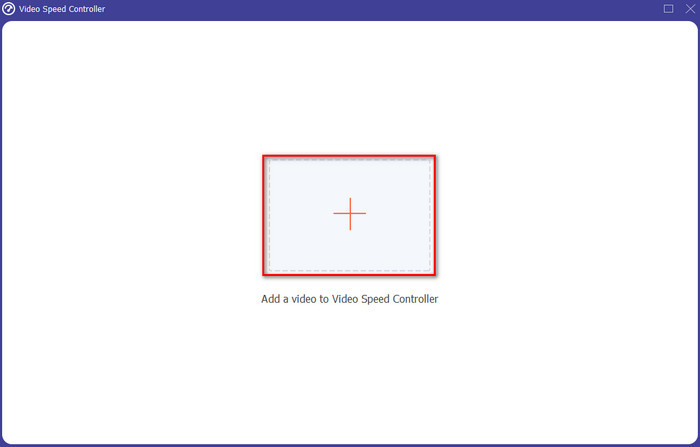
Étape 3. Pour ajouter le fichier que vous voulez accélérer, cliquez sur le bouton +. Choisissez ensuite le fichier dans le dossier qui s’ouvre et cliquez sur Ouvrir pour continuer.
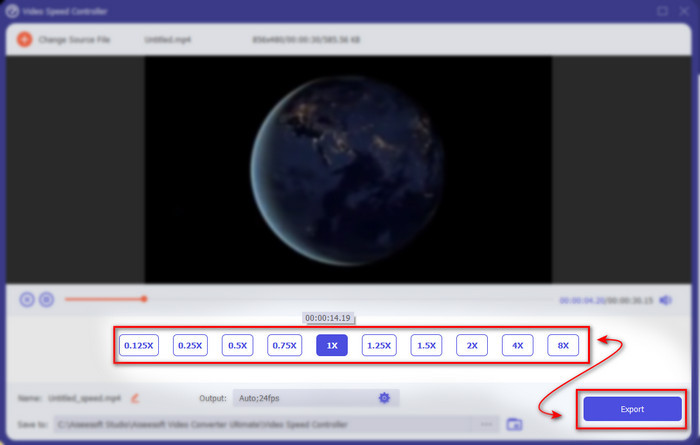
Étape 4. Pour régler la vitesse de la vidéo, choisissez l’option de vitesse en bas. Puis, pour télécharger le fichier, cliquez sur Exporter afin de lancer le processus d’exportation.
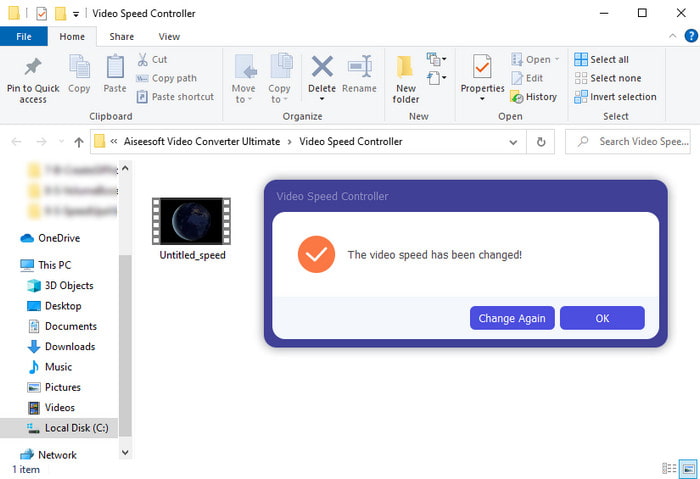
Étape 5. Inutile d’attendre une minute entière, car le fichier sera prêt en quelques secondes. Si un dossier s’affiche ensuite sur votre écran, cela signifie que le fichier a déjà été exporté. Cliquez sur le fichier pour regarder la vidéo que vous avez accélérée.
En rapport:
Partie 3. FAQ sur l'accélération d'une vidéo sur Tiktok
Comment accélérer une vidéo TikTok qui n'est pas la vôtre ?
Si vous voulez accélérer une vidéo qui ne vous appartient pas, vous devez d’abord télécharger la vidéo TikTok. Appuyez sur le bouton + puis sur Importer et choisissez la vidéo dans votre galerie. Sélectionnez l’option de vitesse et cliquez sur Suivant pour la mettre en ligne. Vous pouvez aussi utiliser Video Converter Ultimate pour l’accélérer en suivant les étapes indiquées ci‑dessus.
Puis-je enregistrer une vidéo de 3 minutes sur Tiktok ?
Absolument oui, vous le pouvez s'ils sont enregistrés séparément, mais vous ne pouvez pas enregistrer une vidéo de 3 minutes d'affilée. Parce que la durée d'enregistrement avec cette prise en charge de l'application est de 15 à 60 secondes complètes. Ainsi, si la durée de la vidéo que vous souhaitez enregistrer est supérieure à une minute, il est préférable de l'enregistrer séparément. Cependant, si vous faites partie des utilisateurs sélectionnés par Tiktok pour essayer l'enregistrement de 3 minutes, vous avez de la chance car cela n'a été testé que pour un petit groupe de personnes.
Puis-je ajouter du MP3 à mes vidéos sur Tiktok ?
Lorsque TikTok est sorti pour la première fois, les utilisateurs étaient autorisés à ajouter de la musique à leur vidéo, mais ils ont maintenant supprimé cette fonctionnalité. En raison du problème de droit d'auteur qui a été déposé sur TikTok. Donc, pour éviter le problème, ils le suppriment et ajoutent un échantillon de musique disponible ou vous pouvez utiliser une autre application pour le faire pour vous.
Tiktok a-t-il une limite d'âge ?
Selon les termes et conditions de TikTok, 13 ans ou plus doivent être l'âge de l'utilisateur qui utilisera cette application. De plus, Tiktok n'a pas de vérification de l'âge lorsque vous vous inscrivez, alors attendez-vous à ce que plus de 16 contenus s'affichent sur votre flux.
Conclusion
Et maintenant que vous savez comment accélérer une vidéo sur TikTok, il est temps d’en profiter. Choisissez la solution qui vous semble la plus adaptée. Si vous pensez que les fonctions d’accélération intégrées de TikTok sont suffisantes, utilisez‑les. Mais si vous voulez bénéficier d’une accélération plus poussée avec aperçu, alors utilisez Video Converter Ultimate. Quel que soit l’outil que vous choisirez, vous pouvez vous attendre à un excellent résultat grâce à leurs fonctions et à leurs performances globales.
-
 7 étapes faciles pour résoudre les problèmes de retard audio OBS [Résolu]
 Avez-vous du mal à regarder votre clip vidéo après l'enregistrement à cause du retard audio lors de l'utilisation d'OBS Studio ? Lisez l'article ci-dessous pour savoir comment corriger efficacement l'audio désynchronisé.
-
 Excellentes voies possibles | Comment réparer le retard audio VLC [2021]
 Avez-vous du mal à regarder votre film préféré sur votre lecteur multimédia VLC à cause de l'incertitude audio ? Continuez à lire cet article pour connaître toutes les manières possibles de corriger le retard audio VLC.
-
 Meilleures façons d'augmenter le volume MP4 en ligne et hors ligne
 Avez-vous du mal à entendre les sons de votre clip vidéo ? Lisez l'article ci-dessous pour savoir comment augmenter le volume mp4 de différentes manières.
