


 Video Converter Ultimate
 Enregistreur d'écran
 Réparation vidéo
Apprenez-en plus sur les 5 meilleurs éditeurs vidéo pour PC et comparez
De nos jours, beaucoup de gens aiment filmer pour conserver des moments mémorables et la plupart utilisent aussi ces vidéos pour gagner de l’argent. Les vloggers et les influenceurs, par exemple, se filment en permanence dans leurs activités pour leurs fans, et aussi pour gagner davantage de popularité que les autres influenceurs ou vloggers. Donc, si vous êtes un vlogger ou un influenceur en herbe qui adore se filmer, vous devez absolument envisager d’utiliser le meilleur éditeur vidéo pour Windows 10 afin d’améliorer et de créer des vidéos impressionnantes, d’obtenir plus de mentions J’aime, de vues, d’abonnés, et aussi de faire des bénéfices sur le long terme. Avant de commencer, nous tenons à vous féliciter, car vous avez déjà franchi la première étape pour devenir un vlogger ou un influenceur à succès. Mais choisir le bon outil à utiliser est l’une des étapes cruciales que vous allez rencontrer. C’est pourquoi nous avons réuni ci‑dessous différents éditeurs vidéo, toujours aussi efficaces, parmi lesquels vous pourrez choisir.

Partie 1. Les 5 meilleurs éditeurs vidéo Windows en ligne et hors ligne
Top 1. Convertisseur vidéo ultime
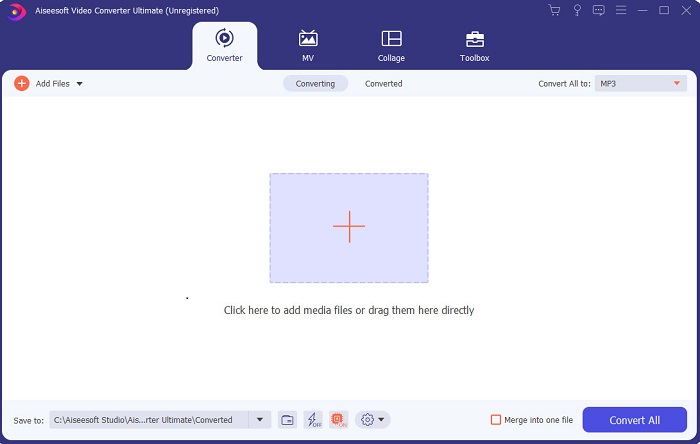
Si vous voulez prendre l’avantage et obtenir les meilleures vidéos comme vos idoles, utilisez alors FVC Video Converter Ultimate. Ce convertisseur et éditeur vidéo pour Windows a déjà aidé de nombreux utilisateurs à devenir populaires dans le monde entier, et peut‑être serez‑vous le prochain. La plupart des influenceurs, vloggers et monteurs vidéo connus l’utilisent comme éditeur, outil d’amélioration, booster, et bien plus encore. Donc, si vous voulez obtenir un résultat professionnel comme vos idoles et en tirer de vrais revenus, vous devez télécharger ce logiciel immédiatement pour devenir la nouvelle sensation d’Internet et aussi la meilleure version de vous‑même. Nous avons également indiqué ses avantages et inconvénients pour vous aider à mieux comprendre cet outil.
Téléchargement gratuit pour Windows 7 ou version ultérieure Téléchargement sécurisé
Téléchargement gratuit pour macOS 10.7 ou version ultérieure - Téléchargement sécurisé
Avantages
- Pour les débutants, cet outil est le bon choix pour eux. Comme il fournit des instructions simples à suivre et plus faciles à comprendre. En gros, c'est au point.
- Pour les professionnels, pas comme les autres éditeur vidéo pour PC cet outil a beaucoup de fonctionnalités futuristes. Par exemple, si vous souhaitez améliorer votre qualité audio et améliorer la vidéo, vous pouvez utiliser cet outil. De plus, si votre audio n'est pas synchronisé avec la vidéo, il dispose d'une fonction de synchronisation audio pour le corriger.
- Dans l'ensemble, c'est le convertisseur et l'éditeur phénoménaux sur lesquels vous pouvez compter. Surtout si vous voulez faire une entrée surprenante dans le monde des vloggers et des influenceurs.
- Le logiciel d'édition est téléchargeable et aucun outil d'édition n'a les mêmes fonctionnalités que celui-ci.
Les inconvénients
- Cet outil n'est pas gratuit mais son prix est bas. En d'autres termes, il est bon marché et produit une sortie de haute qualité.
Haut 2. Windows Movie Maker
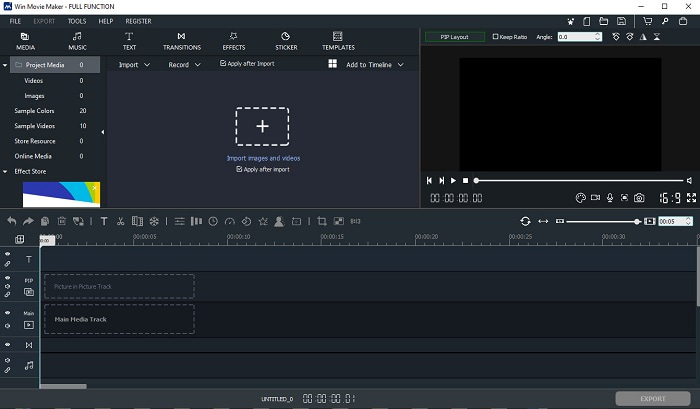
Cet éditeur vidéo pour Windows 7, 8, 10 et XP fait partie des meilleurs pour créer et monter des vidéos. Windows Movie Maker a déjà été téléchargé par de nombreux utilisateurs pour monter leurs propres vidéos, puisqu’il propose des fonctions de montage avancées. Mais l’outil peut être trop déroutant pour ceux qui débutent dans la création et le montage. En revanche, si vous êtes un pro ou, disons, si vous avez déjà de l’expérience en montage, vous devez essayer cet outil. Il existe une version premium, très similaire à la version gratuite, mais sans filigrane sur la vidéo exportée.
Avantages
- Pour les débutants, cet outil n'est pas idéal mais c'est super pour faire des montages compliqués.
- Pour les professionnels, les fonctionnalités qui sont présentées ici sont faisables si vous avez de l'expérience.
- Il fournit des transitions, des effets et des autocollants, etc.
Les inconvénients
- L'outil est un peu dérangeant à cause des fonctions de l'outil que vous pouvez faire ici. De plus, il est accablant et il n'a aucune instruction sur la façon de le faire fonctionner.
- Si vous utilisez la version gratuite de cet outil, attendez-vous à avoir un filigrane sur la vidéo elle-même après l'avoir exportée.
Haut 3. OpenShot
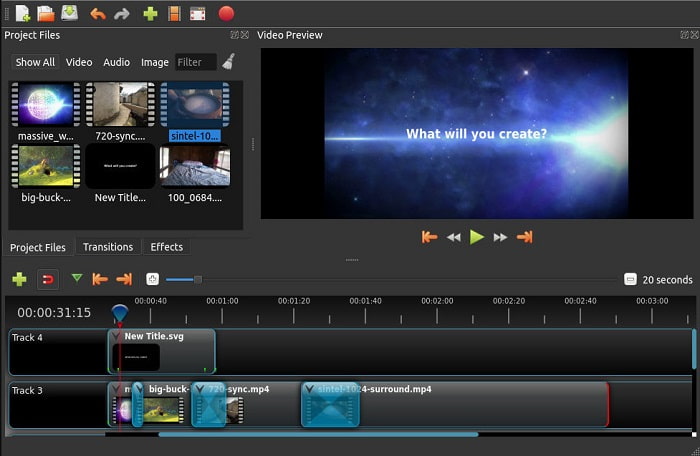
Un autre logiciel de montage vidéo gratuit sans filigrane est Openshot. Il offre des fonctions plus faciles à comprendre que Windows Movie Maker. De plus, après l’installation, un petit guide présente les fonctions de l’outil. Cela dit, seules les fonctions de base sont expliquées. Cet outil ne fournit d’ailleurs que des fonctions de montage basiques, ce qui limite votre créativité. De plus, une fois installé, il peut paraître un peu ennuyeux à utiliser à cause de l’interface en monochrome.
Avantages
- Pour les débutants, il s'agit d'une version plus simple de Windows Movie Maker. Vous pouvez ajouter des effets, des transitions et plus encore.
- Pour les professionnels, c'est bien pour eux de l'utiliser mais ce n'est pas le meilleur.
- Le logiciel est correct s'il est livré avec une édition simple.
Les inconvénients
- Je ne peux pas en changer l'interface ennuyeuse et c'est moins interactif.
- Certains bugs majeurs et mineurs sont toujours présents ici même après la mise à jour.
Top 4. Travaux de lumière
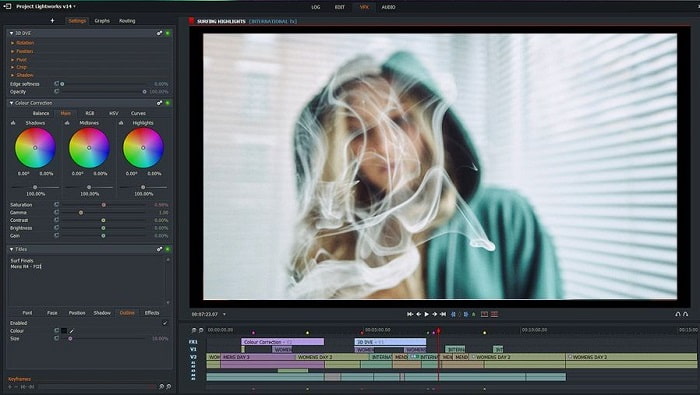
Lightworks est un éditeur vidéo gratuit pour Windows, mais il propose aussi une version premium. Toutefois, lorsque nous avons essayé de le télécharger, un message a indiqué que le fichier .exe pouvait endommager notre ordinateur. Nous n’avons donc pas procédé à l’installation et avons mené des recherches approfondies sur cet outil. Si vous l’installez sur votre disque, vous devrez d’abord vous inscrire avant de pouvoir l’utiliser. Les fonctions de montage offertes sont nombreuses et peuvent être difficiles à appréhender si vous êtes débutant, et même un peu complexes pour un utilisateur avancé. Mais pas d’inquiétude, vous pouvez apprendre à l’utiliser en le pratiquant.
Avantages
- Pour les débutants, l'outil est trop compliqué et il peut être trop difficile à manipuler. Surtout si vous voulez essayer de faire de l'édition simple.
- Pour les professionnels, vous pouvez utiliser les fonctionnalités d'édition en temps réel fournies par cet outil. Bien que certaines fonctionnalités soient nouvelles et que la plupart d'entre elles soient payantes.
- Les performances globales de l'outil sont classées dans la classe A pour l'édition et la réalisation de vidéos.
Les inconvénients
- Si vous voulez avoir une sortie 1080px, vous devez acheter l'outil. Et avant même de pouvoir l'utiliser, vous devrez vous inscrire.
- Le logiciel contient un fichier .exe dangereux, téléchargez-le à vos risques et périls.
Top 5. ClipChamp
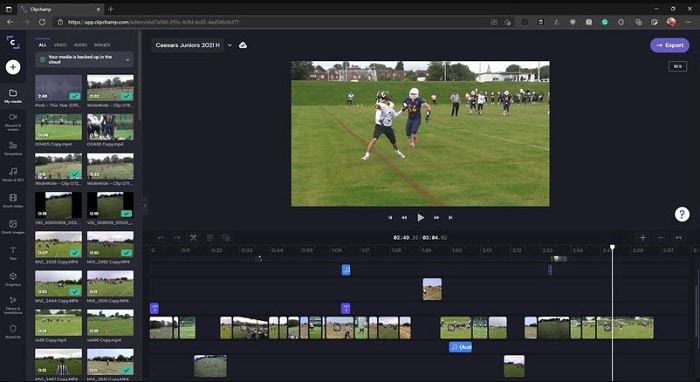
Cet outil en ligne propose davantage de fonctions si vous passez à une formule payante. C’est aussi l’un des outils les plus faciles d’accès pour monter des vidéos sans télécharger de logiciel spécifique. Clipchamp est un excellent outil, mais vous devrez vous inscrire avant d’y accéder. Cet éditeur vidéo en ligne pour Windows 10 offre des fonctionnalités similaires à celles de Lightworks, à la différence qu’il s’utilise directement en ligne. Néanmoins, si vous importez vos fichiers vidéo pour les monter, attendez‑vous à un processus d’importation assez lent. L’avantage, c’est que vous n’avez pas besoin de télécharger le logiciel pour qu’il fonctionne.
Avantages
- Pour les débutants, cet outil est indispensable, mais le processus d'édition et d'insertion de vidéo ici est un peu plus lent.
- Pour les professionnels, il est acceptable d'utiliser et d'éditer des vidéos simples avec des ressources limitées.
- Dans l'ensemble, l'outil est plus facile à comprendre que Windows Movie Maker.
Les inconvénients
- Dépendant d'Internet, ce qui signifie que si vous avez un Internet lent, attendez-vous à un processus instable.
- Besoin d'un formulaire d'inscription avant même de pouvoir utiliser l'outil Web.
Partie 2. Tableau de comparaison des 5 éditeurs vidéo pour Windows
| Caractéristiques | Video Converter Ultimate | Windows Movie Maker | OpenShot | Lightworks | ClipChamp |
| L'édition vidéo comme le rognage, la coupe, la fusion, etc. |  | | | | |
| Optimiseur vidéo | |  | | | |
| Filigrane | | | | | |
| Programme pris en charge | Outil de bureau | Outil de bureau | Outil de bureau | Outil basé sur le Web | Outil basé sur le Web |
| Échelle des prix | Pour 1 mois : $25.00 Pour un an : $31.20 | $39.95 Paiement unique | Gratuit mais vous pouvez faire un don | QScan Pro QScan Pro - Activations d'abonnement mensuel $59.99 | Créateur - $9/mensuel Entreprise - $19/ mensuel |
| Pour la licence à vie : $55.20 | QScan Max QScan Max – Activations d'abonnement mensuel $119.99 | Platine Affaires – $39/ mensuel |
Partie 3. FAQ sur Windows Video Editor
Quel est le meilleur éditeur vidéo Mac que je peux utiliser ?
Même si les outils présentés ici sont tous des éditeurs pour Windows à l’exception de Video Converter Ultimate, pour découvrir d’autres éditeurs vidéo pour Mac, vous devez cliquer sur ce lien et faire votre choix dans la liste.
Pourquoi mes vidéos ne peuvent-elles pas être lues sur Android ?
Il existe de nombreuses raisons pour lesquelles les vidéos peuvent ne pas se lire sur votre appareil Android. Pour savoir lesquelles, il est essentiel de les identifier rapidement et de résoudre le problème en lisant l’article Comment réparer les vidéos qui ne se lisent pas sur les téléphones Android.
Comment compresser mes longues vidéos et les partager sur YouTube ?
Pour l’instant, vous pouvez téléverser des fichiers d’une taille maximale de 256, donc la meilleure solution est de les compresser. Si vous voulez partager vos vidéos sur YouTube, apprenons alors comment réduire la taille du fichier et le publier sur YouTube.
Conclusion
Avant de devenir l’un de ces vloggers ou influenceurs que vous admirez, vous devez être capable de faire votre propre montage. Aujourd’hui, vous avez l’occasion d’utiliser un éditeur phénoménal offrant des fonctions de montage dignes d’Hollywood et une qualité professionnelle. Ainsi, vous impressionnerez vos spectateurs, vos abonnés et même vous‑même. Brillez donc de mille feux et laissez la lumière tracer votre chemin vers la réussite avec l’aide de FVC Video Converter Ultimate.
-
 Le meilleur éditeur MP4 pour Windows et Mac en 2025
 Que vous utilisiez votre ordinateur pour le montage vidéo MP4 ou que vous travailliez simplement sur votre téléphone, vous pourrez trouver d'excellentes options ici, y compris le meilleur éditeur MP4 pour Windows et Mac.
-
 Comment ajouter de l'audio et de la musique à une vidéo gratuitement sur votre ordinateur / téléphone
 Cet article présente 4 moyens simples d'ajouter gratuitement de l'audio à une vidéo. Quelle que soit la piste audio que vous souhaitez ajouter à votre vidéo, vous pouvez obtenir des résultats satisfaisants ici.
-
 Comment couper et fusionner des chansons en ligne - 4 meilleures façons de savoir
 Lorsque vous souhaitez couper et fusionner des chansons en ligne pour créer un morceau de musique, vous pouvez en savoir plus sur les 4 meilleurs outils en ligne pour couper les chansons et combiner les fichiers de l'article.
