


 Video Converter Ultimate
 Enregistreur d'écran
 Réparation vidéo
[Éprouvé] 2 des meilleurs éditeurs de balises disponibles sur Windows et Mac
La plupart des fichiers audio que nous avons enregistrés sous Windows sont en WMA, et vous pouvez modifier leurs métadonnées à l’aide d’un éditeur de métadonnées WMA. Cependant, choisir le bon éditeur de métadonnées à utiliser sur votre ordinateur de bureau peut être une tâche un peu difficile à gérer pour un particulier. Mais aujourd’hui, cette tâche n’est plus aussi compliquée que vous le pensez, grâce aux deux éditeurs que vous pouvez utiliser sous Windows et Mac. Vous voulez savoir lesquels ? Si vous continuez à lire cet article, nous vous proposerons un comparatif objectif entre ces deux logiciels que vous pouvez télécharger afin de voir lequel est le meilleur. Restez avec nous et profitez de ce billet de blog pour découvrir deux excellents outils à ne pas manquer en 2022.

Partie 1. Utilisez l'éditeur de balises WMA ultime disponible sur Windows et Mac pour modifier les balises WMA
Le premier sur notre liste est le meilleur éditeur de métadonnées WMA FVC Video Converter Ultimate, l'outil qui présente un éditeur puissant pour leurs balises que tout le monde aime. Avec cet outil, vous pouvez facilement gérer ce problème comme un pro, même si vous n'avez aucune expérience dans la modification de vos balises WMA. Contrairement aux autres éditeurs de balises, vous n'aurez pas besoin de connaissances approfondies sur cet éditeur de métadonnées pour savoir comment l'utiliser ; en quelques clics et une fraction de seconde, vous obtiendrez votre WMA étiqueté sans transpirer.
Vous en voulez plus ? L’une des meilleures fonctionnalités que cet outil propose est la Boîte à outils, où vous pouvez faire de multiples choses que les autres outils ne peuvent pas vous offrir, comme compresser, couper, ajouter ou supprimer un filigrane, inverser, et bien plus encore. Ainsi, toutes les tâches que vous pouvez imaginer sur vos fichiers multimédias peuvent être facilement gérées par vous avec l’aide que vous apporte cet outil. En outre, vous pouvez convertir rapidement votre format WMA en plus de 1 000 nouveaux formats grâce à un processus de conversion ultra‑rapide. Remarquable, n’est‑ce pas ? C’est bien ce dont cet outil ultime est capable. Et pour apprendre à ajouter une étiquette WMA, les étapes ci‑dessous vous aideront à le faire comme un expert.
Étape 1. Commencez par cliquer sur le bouton de téléchargement ci‑dessous, puis choisissez si vous utilisez actuellement Windows ou Mac. Installez‑le immédiatement et, une fois l’installation terminée, lancez le programme.
Téléchargement gratuit pour Windows 7 ou version ultérieure Téléchargement sécurisé
Téléchargement gratuit pour macOS 10.7 ou version ultérieure - Téléchargement sécurisé
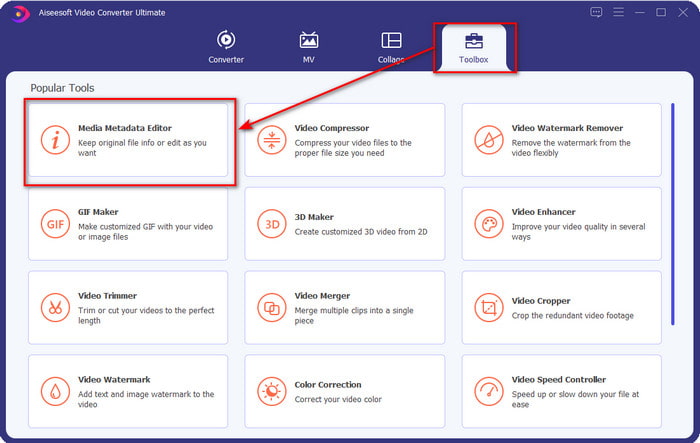
Étape 2. Dans la partie supérieure, cliquez sur la Boîte à outils, puis faites de même sur Éditeur de métadonnées multimédia.
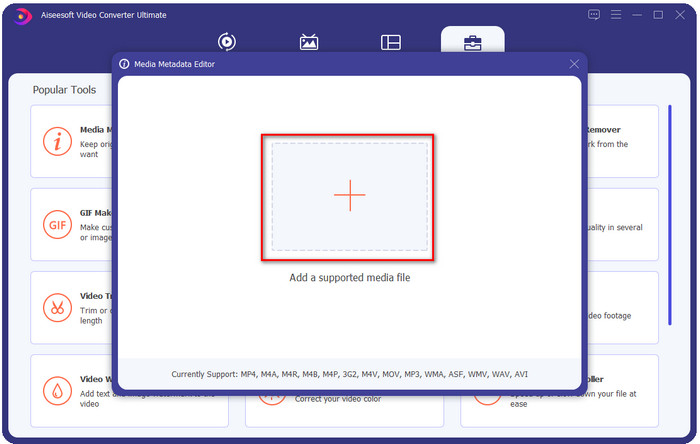
Étape 3. Importez le fichier en cliquant sur l’icône + dans la mini‑fenêtre qui s’affiche, repérez le fichier WMA dans le dossier, puis appuyez sur Ouvrir pour passer à la procédure suivante.
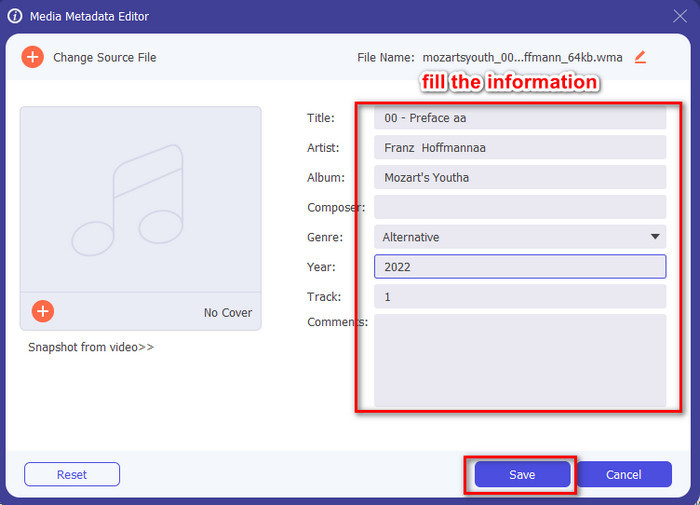
Étape 4. Dans cette zone, vous pouvez modifier les métadonnées ou les tags de votre WMA et remplir la zone de texte en conséquence. Une fois terminé, cliquez sur Enregistrer pour appliquer les changements apportés à votre fichier audio. Ainsi, vous avez renseigné les métadonnées de votre fichier audio en un rien de temps.
Partie 2. Utilisez l'éditeur de balises WMA gratuit disponible sur Windows et Mac pour modifier les métadonnées WMA
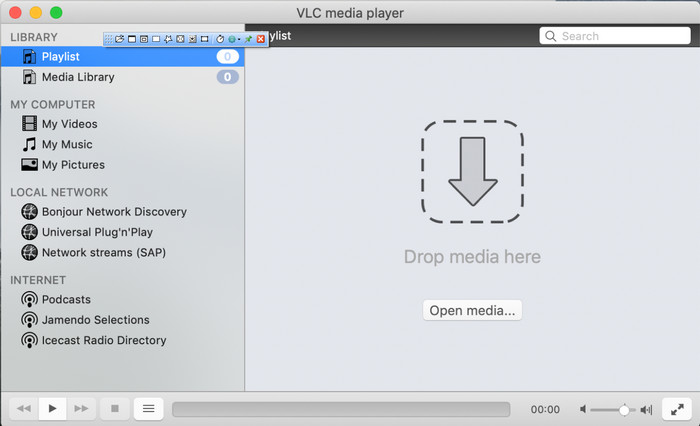
VLC Player est un autre éditeur de tags WMA que vous pouvez télécharger gratuitement sur Windows et Mac. Ce lecteur multimédia peut vous aider à modifier les tags de vos fichiers vidéo et audio. Contrairement au premier logiciel mentionné, cet outil n’est pas conçu à l’origine pour ajouter des métadonnées à n’importe quel fichier multimédia. Il sert principalement à lire différents fichiers multimédias que le lecteur natif d’origine ne peut pas lire sans télécharger un codec supplémentaire. Bien que l’outil puisse ajouter des tags, il n’est toujours pas aussi efficace que les autres éditeurs de tags spécialisés.
De plus, cet outil nous a prouvé beaucoup de choses car il est fiable et sûr à télécharger. En plus de ces fonctionnalités, cet outil est également capable de convertir, d'éditer simplement et d'enregistrer l'écran si vous en avez besoin. On peut dire que c'est un outil polyvalent qui n'offre pas une telle excellence sur d'autres fonctions mais sur la lecture de vidéos est sans aucun doute le meilleur du marché.
Partie 3. Tableau de comparaison entre l'éditeur de balises WMA gratuit et ultime
Pour rendre l'examen encore plus simple à comprendre pour nous, nous incluons un tableau de comparaison pour savoir quel outil est le mieux à télécharger sur votre lecteur. Veuillez le lire attentivement pour comparer et contraster le convertisseur vidéo FVC et le lecteur VlC et le juger, qui est le meilleur éditeur de métadonnées WMA.
| Convertisseur vidéo FVC Ultimate | VS | Lecteur VLC |
 | Disponible sur Windows et macOS | |
| Prend en charge une large gamme de formats pour modifier les balises |  |
| Fonctions polyvalentes telles que le rognage, la découpe, l'édition, etc. | |
| Convivial | |
| Meilleure interface utilisateur graphique | |
Partie 4. FAQ sur l'éditeur de métadonnées WMA
Puis-je lire WMA sur VLC ?
Oui, vous pouvez facilement lire un fichier WMA avec VLC, car ce format est pris en charge. Si vous voulez en savoir plus sur VLC, vous pouvez lire cet article ; en appuyant sur ce lien, vous découvrirez VLC et ses autres alternatives disponibles.
Qu'est-ce que WMA ?
Le WMA est un format audio utilisé pour stocker une série de codecs audio créés par Microsoft avec l’aide de son compositeur Stan LePard. Ce format audio est l’un des concurrents connus du format audio standard, le MP3. Cependant, ce format n’est pas aussi populaire qu’on pourrait l’imaginer ; ainsi, si vous souhaitez transférer un fichier avec l’extension .wma, attendez‑vous à avoir besoin d’une application tierce si les destinataires n’utilisent pas Windows. Alors, que faire ? Pouvez‑vous convertir le WMA en MP3 pour le rendre compatible avec le destinataire ? Avec l’aide de cet article, vous apprendrez comment convertir WMA en MP3 sur Windows, Mac et en ligne.
Ai-je besoin d'un codec supplémentaire pour lire WMA ?
Cela dépend du programme que vous utilisez actuellement ; si vous êtes un utilisateur Windows, vous n'aurez pas besoin de télécharger un codec supplémentaire pour lire le fichier audio sur votre bureau. Cependant, tous n'étaient pas des utilisateurs de Windows, donc la conversion du fichier audio est le meilleur moyen de rendre le WMA compatible avec vos appareils. Si vous recherchez un convertisseur, nous vous suggérons de choisir le meilleur convertisseur audio que vous pouvez télécharger sur Windows et Mac, le FVC Video Converter Ultimate. Suivez ces étapes si vous voulez savoir-faire. Téléchargez l'outil sur votre bureau, puis installez-le ensuite. Ouvrez l'outil et cliquez sur l'icône + pour télécharger le fichier WMA ; en haut à droite, cliquez sur Convertir tout en et choisissez le format audio disponible dans la liste. Appuyez sur Convertir tout pour démarrer le processus de conversion. Facile comme ça.
Conclusion
Maintenant que nous avons une idée du FVC Video Converter Ultimate et du lecteur VLC, il est temps de choisir le meilleur éditeur de balises WMA à utiliser. Ces outils sont parfaits pour éditer les balises de vos fichiers WMA, donc si vous préférez, vous pouvez gérer l'édition des balises rapidement. Mais si vous voulez qu'un outil professionnel gère cette tâche, optez pour l'outil ultime. En appuyant sur le bouton de téléchargement, vous pouvez l'avoir sur les deux systèmes d'exploitation pour ajuster vos balises WMA.
-
 Qu'est-ce que les métadonnées : découvrez les informations de base sur les métadonnées
 Qu'est-ce que les métadonnées ? Est-ce important ? Quelles sont les parties des métadonnées ? As-tu la même question? Dans cet article, vous apprendrez les informations de base sur les métadonnées.
-
 4 des meilleurs visualiseurs de métadonnées en ligne et hors ligne [Mise à jour 2025]
 Puis-je vérifier les métadonnées de mon fichier ? Oui, vous pouvez, à l'aide de cet article, nous vous présenterons les différents visualiseurs de métadonnées que vous pouvez utiliser.
-
 6 filtres Snapchat animés Snapchat préférés sur Snapchat
 Vous voulez connaître les meilleures façons d'ajouter des filtres sur les vidéos Snapchat ? Eh bien, vous pouvez cliquer dessus et découvrir les différents filtres que vous pouvez utiliser pour appliquer sur les vidéos Snapchat.
