


 ממיר וידאו אולטימטיבי
 מקליט מסך
 תיקון וידאו
שיטות יתרונות להמרת DV ל-FLV בקלות
קובץ DV הוא קובץ שמכיל וידאו דיגיטלי. הניתוח שלנו לקובצי DV גילה ש-Digital Video הוא אחד השימושים בפורמט. עדיין לא הסברנו במלואו מה מכילים הקבצים האלה או כיצד המשתמשים עושים בהם שימוש, אך הצוות שלנו עובד על אלפי סוגי קבצים. אם יש לך מידע על הפורמט, נשמח לשמוע ממך. עם זאת, סיומת הקובץ .flv מציינת קובצי FLV (Flash Video). משתמשים יכולים לנגן ולשדר תוכן אודיו ווידאו דרך האינטרנט בעזרת Adobe Flash Player או Adobe Air באמצעות פורמט FLV. קובצי FLV מקודדים את הנתונים שלהם באותו אופן כמו קובצי SWF. כאשר פותרים את בעיית פורמט הווידאו DV, משתמשים נוטים יותר להמיר אותו לפורמט FLV, שהוא תואם למגוון רחב של נגני מדיה. לכן, אם אתה מחפש כלים שיכולים להמיר DV ל‑FLV, המשך לקרוא מאמר זה.

חלק 1. הדרך הטובה ביותר להמיר DV ל-FLV במצב לא מקוון
Video Converter Ultimate הוא אחד מתוכנות ההמרה המעולות שיכולות לעזור לך להמיר פורמט וידאו DV לפורמט FLV. עם מערכת האצת המהירות האולטרה שלו, ניתן להמיר DV ל‑FLV בשניות, בקצב שכלים אחרים אינם יכולים להתחרות בו. הודות לתוכנה הזו, לא תצטרך לדאוג לגבי המרת DV לפורמטים אחרים, משום שהיא תומכת במגוון פורמטים שלא תאמין, כגון MP4, MOV, 3GP, FLV, WMV, WEBM, MPEG ועוד. מעבר להמרת קבצים, לתוכנה יש כלי עריכה נוספים, והיא יכולה לחתוך (trim), לשפר (enhance), למזג (merge), להאיץ ועוד כלים שימושיים שיכולים לשדרג את הווידאו שלך לרמה הבאה.

ממיר וידאו אולטימטיבי
6,357,200+ הורדות- הוא תומך ביותר מ-1000 פורמטי וידאו ואודיו שונים.
- המר פי 30 מהר יותר מממירים אחרים.
- יכול להמיר וידאו באיכות 4K HD.
- הוא מציע מספר רב של כלים מוצגים אחרים שעוזרים בשיפור הסרטון שלך.
- זה לא דורש חומרת תחזוקה כבדה כדי לפעול.
הורדה חינמיתל-Windows 7 ומעלההורדה מאובטחת
הורדה חינמיתל-MacOS 10.7 ומעלההורדה מאובטחת
שלב 1: הורד את התוכנה על‑ידי לחיצה על הכפתור Free Download הממוקם למעלה. לאחר מכן עליך להתקין את התוכנה במחשב שלך ולהפעיל אותה על‑ידי לחיצה על Start Now לאחר שתסיים את ההתקנה.
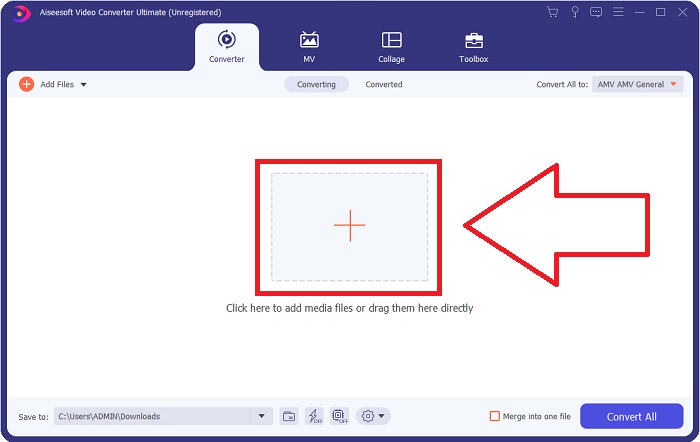
שלב 2: לאחר מכן תופיע חלונית קופצת על המסך. התוכנה תציג את פונקציית הConverter. כדי לייבא קובץ מהמחשב שלך, לחץ על כפתור + שבמרכז, או שפשוט גרור כל קובץ וידאו בפורמט DV אל האזור המרכזי.
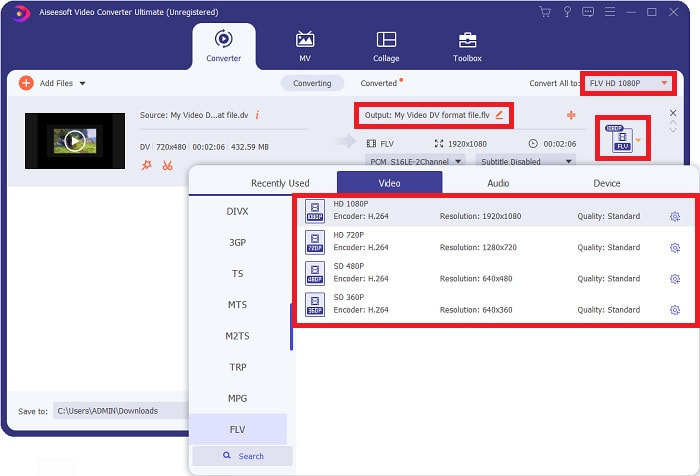
שלב 3: אתה כבר באמצע התהליך. לחץ על סמל בחירת הפורמט שנמצא ליד פלט הווידאו שלך ובחר בפורמט הווידאו FLV. לאחר מכן תוכל גם לבחור בין איכויות הווידאו השונות שהתוכנה מציעה.
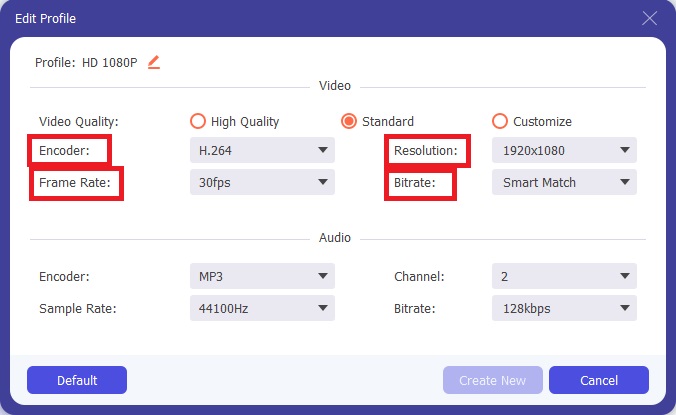
שלב 4: עוד מאמץ קטן לסיום. אם כל איכויות הווידאו הקיימות אינן מספקות את הצרכים שלך, תוכל להתאים אישית את איכות הווידאו של פלט הקובץ על‑ידי לחיצה על סמל גלגל השיניים שליד בחירת איכויות הווידאו.
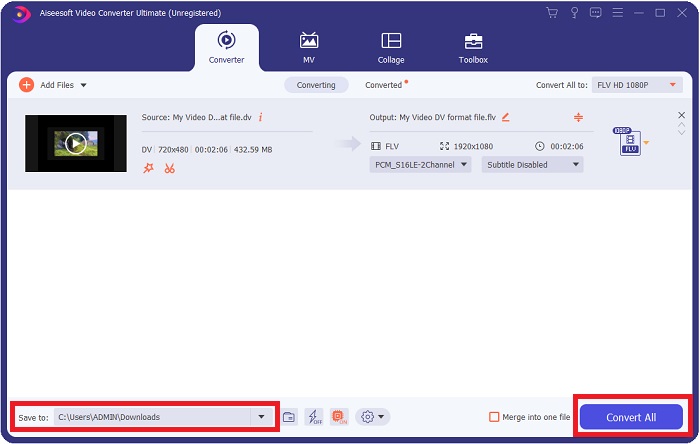
שלב 5: עכשיו אתה כבר כמעט בסיום. עבור אל שדה Save to בפינה השנייה כדי לבחור את המיקום שבו יישמר הקובץ המומר. כעת תוכל להמיר את הקובץ שלך על‑ידי לחיצה על כפתור Convert All הממוקם בפינה הימנית התחתונה של המסך.
חלק 2. כיצד להמיר DV ל-FLV באינטרנט
האינטרנט מציע ומציג כלים מקוונים שונים שיכולים לעזור לך להמיר DV ל‑FLV. אבל הכלי המקוון הזה שנקרא Free Video Converter Online שונה מכלים אחרים במהירות ההמרה, משום שהוא יכול להמיר קובץ בתוך שניות. הוא גם תומך בפורמטים כמו MP4, FLV, MOV, M4A, TS, WMV, ASF, VOB, AAC, WMA ועוד. הוא גם ממיר וידאו לוידאו באיכות HD ללא איבוד איכות. כלי המרה חינמי זה מפורסם ביכולות ההמרה שלו, ומאפשר למשתמשים לכוונן את יצירות הווידאו שלהם ללא מאמץ. כעת נעבור על כל השלבים שיעזרו לך להשתמש בממיר המקוון הזה.
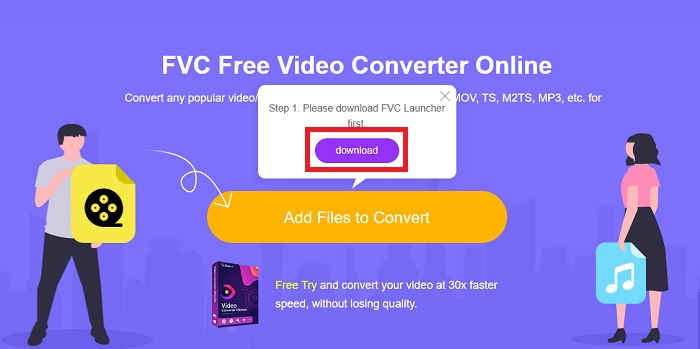
שלב 1: כדי להיכנס לדף הראשי של הכלי המקוון הזה, לחץ על קישור זה והמשך. לחץ על כפתור Add Files to Convert במסך הראשי של המחשב שלך כדי להוריד את המשגר שיאפשר לך להשתמש בכלי המקוון הזה. לאחר מכן לחץ עליו שוב כדי להמשיך להעלאת קובץ.
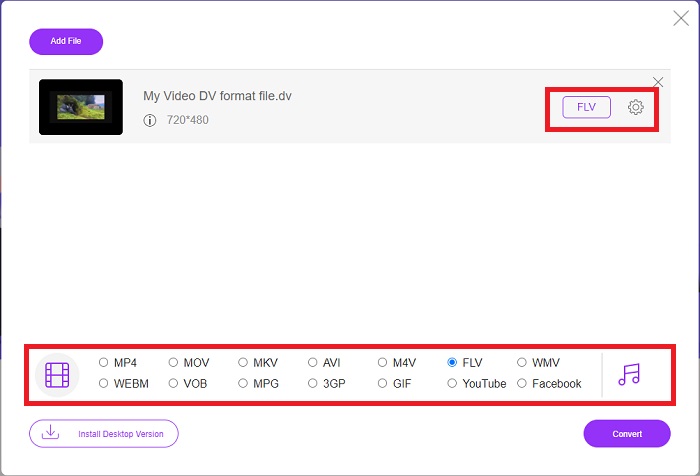
שלב 2: כעת, כשיש לך קובץ שברצונך להמיר, עליך לבחור את פורמט הווידאו FLV מתוך בחירת פורמטי הווידאו בתחתית המסך. אתה יכול גם להתאים חלק מהמפרטים של הווידאו שלך על‑ידי שינוי הגדרות וידאו כמו רזולוציה, קצב פריימים וכו’, באמצעות לחיצה על סמל גלגל השיניים.
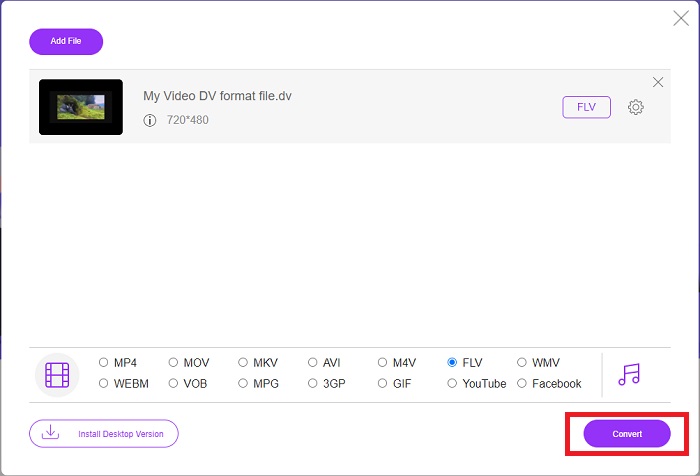
שלב 3: לאחר מכן תוכל כעת להמיר את הקובץ על‑ידי לחיצה על כפתור Convert הממוקם בחלק התחתון השמאלי של החלון.
חלק 3. תרשים השוואה: DV Vs. FLV
קובץ וידאו דיגיטלי (DV) נוצר על ידי מצלמה דיגיטלית ונשמר בפורמט הגולמי שבו המשתמשים תמיד משתמשים. קובץ וידאו דיגיטלי (DV) כולל בלוקים של ממשק דיגיטלי (DIF), כל אחד מכיל 80 בתים. ניתן לכלול אודיו, וידאו ומטא נתונים בתוך בלוקים של DIF. ניתן לאחסן בלוקים של DIF כקבצי מחשב בצורתם הגולמית או כפורמטים של קבצים עטופים סביבם - ריבוי הבלוקים לרצפים של 150 בלוקים. מסגרת וידאו יכולה להכיל עד עשרה או שנים עשר רצפים.
עם זאת, שירותי סטרימינג כמו YouTube, Hulu ו‑Vevo משתמשים בפורמט Flash Video של Adobe Systems עבור הווידאו המקוון שלהם. Adobe Flash Player (כולל תוספי דפדפן) ותוכנות צד שלישי יכולים לקרוא ולנגן קובצי FLV כמעט בכל מערכת הפעלה (למעט iOS). אייפונים ומכשירי אנדרואיד יכולים לנגן קובצי FLV באמצעות תוכנות קוד פתוח ודפדפנים מסוימים. Flash עדיין מהווה בעיה עבור iOS. ניתן לצפות בקובצי FLV רק בתוכנת נגן FLV, ומשתמשים יכולים להשתמש בתוכנות לכידת מסך והקלטה כדי להקליט סרטוני FLV.
| סיומת קובץ | DV (.dv) | FLV (.flv) |
| שם קובץ | וידאו דיגיטלי | קובץ וידאו פלאש |
| פותח על ידי | מפיקי מצלמות וידאו מרובים | Adobe System Incorporated |
| יתרונות | ◆ Mini DV סטנדרטי מחזיק 19.5 ג'יגה-בייט, מה שמגיע לכ-25 סנט לכל ג'יגה-בייט של אחסון. ◆ המרת HD לתקן אינטואיטיבית ◆ קלטות קלות לתיוג ואידיאליות לאחסון לטווח ארוך. | כשמדובר ביצירת דפי אינטרנט דינמיים ואינטראקטיביים, Adobe Flash יכול להיות נכס עצום. התהליך פשוט, אך התוצאות עשויות להיות משמעותיות. בימי הזוהר שלו, פלאש היה בשימוש נרחב גם למשחקי וידאו פשוטים. |
| חסרונות | ◆ יש צורך בחיבור Firewire (לרוב המחשבים הרגילים אין את זה). ◆ איכות ההקלטה יורדת עם כל מעבר עוקב. ◆ זה מקליט רק 60 עד 90 דקות בכל פעם. | זה חיסרון שהפופולריות של FLV דעכה עם השנים. יצירת תוכן FLV עשויה לקחת זמן רב ולעלות הרבה כסף. בנוסף, משתמשים לא יכולים לצפות בתוכן פלאש במכשירי iOS, מה שמגביל מאוד את יכולתו למשוך עוקבים חדשים. |
| תוכניות התומכות בקובץ | ◆ נגן מדיה VLC | ◆ RealPlayer ◆ Apple QuickTime Player ◆ נגן מדיה VLC ◆ MPlayer |
חלק 4. שאלות נפוצות לגבי המרת DV ל-FLV
מהי הרזולוציה של DV?
עם DV, הרזולוציה הסטנדרטית רושמת 720 פיקסלים אופקיים ו-480 קווים שלובים במדינות המשתמשות בזרם חשמלי של 60Hz ו-576 קווים עם זרם חשמלי של 50Hz. גרסת HDV של וידאו דיגיטלי (HDV) היא תקן HDV רשמי, וה-DVCPRO HD של פנסוניק הוא דוגמה לפורמט כזה (ראה HDV ו-DVCPRO).
האם וידאו DV משולב?
תמיד יש הרבה קטעי DV בתחתית תחילה. קטעים אחרים עשויים להופיע תחילה. פרש את הקליפ המיובא שוב עם הפרדת שדות מופעלת, תחתון קודם (קובץ > פרש מדה > מרכזי) כדי לראות אם הוא שזור. לאחר מכן, בחלון הפרויקט, השתמש בקיצור Alt-לחיצה כפולה כדי לגשת אליו. השתמש במקשי הדף למעלה/Dn כדי לנווט בסרטון. השזירה מתרחשת אם הסרטון משתנה בכל פעם שאתה לוחץ על לחצן ההפעלה. תנועת טלטלה מציינת שסדר השדה שגוי, ויש לפרש את הצילומים מחדש באמצעות סדר השדה האחר.
האם FLV הוא פורמט וידאו מתאים?
Adobe Flash Player שומר קבצי וידאו בפורמט FLV. כל פלטפורמות הווידאו והדפדפנים מקבלים את זה כאחד מפורמטי הווידאו הנתמכים שלהם. פלטפורמות הזרמת וידאו מקוונות כגון YouTube מרוויחות מהשימוש בפורמט FLV. כתוצאה מגודל הקובץ הקטן שלהם, הם מהירים ופשוטים להורדה.
סיכום
לסיכום כל הנושאים שניתנו, תבחין שהממיר הטוב ביותר שהמאמר הזה ממליץ להשתמש בו הוא התוכנה Video Converter Ultimate והכלי המקוון Free Video Converter Online. מאחר ששני הממירים האלה יכולים להתעלות על ממירים אחרים, יש להם כלים מקצועיים נוספים וממשק ידידותי למשתמש.
-
 האסטרטגיה הטובה ביותר כיצד להמיר קובץ DV לפורמט AVI עם שלבים מפורטים
 האם אתה רוצה להמיר את קובץ ה-DV שלך ל-AVI? לאחר מכן קרא את המאמר הזה כדי להכיר את הכלי הייחודי שבו אתה יכול להשתמש כדי להמיר ונגן מדיה כדי להפעיל את ה-DV שלך במחשב האישי או ב-Mac.
-
 2 הדרכים המובילות כיצד להמיר קבצי DV ל-MOV בחינם בשולחן העבודה ובאינטרנט
 יש לך בעיה בהמרת קבצי ה-DV שלך ל-MOV ב-Mac שלך? אם זו הבעיה שלך, נוכל לפתור אותה יחד אם נקרא את המאמר הזה.
-
 MP4 ל- FLV | 3 הממירים המובילים בחינם (מקוונים / מק / חלונות)
 פוסט זה הוא המדריך המפורט להמרת MP4 ל FLV. אתה יכול לקחת את שלושת הממירים החינמיים המובילים כדי לשנות MP4 ל- FLV באופן מקוון, במחשב Windows או Mac בקלות.
