


 ממיר וידאו אולטימטיבי
 מקליט מסך
 תיקון וידאו
 הורדה מאובטחת
ממיר האופוס ל-MP3 הטוב ביותר: סקירה והשוואה מקיפה
אם ברצונך שהמוזיקה שלך תהיה תואמת ליותר מכשירים, שקול לעבור מOpus ל‑MP3. פורמט האודיו MP3 נתמך באופן אוניברסלי, כך שתוכל להאזין לקובצי MP3 כמעט בכל מכשיר. כדי לוודא שהמוזיקה שלך נגישה על כמה שיותר מכשירים, המֵר את קובצי ה‑Opus שלך ל‑MP3.
לעומת זאת, ניתן לנצל את היתרונות של פורמט Opus אם תמיר MP3 ל-Opus. Opus מוכרת לעתים קרובות כאידיאלית עבור סטרימינג, משחקים מקוונים ותקשורת קולית בשל השמע האיכותי, הדחיסה היעילה והשהייה המינימלית שלו. אם תמיר את קובצי ה-MP3 שלך ל-Opus, תוכל להקטין את גודלם מבלי לאבד מאיכות הצליל המעולה. עם זאת, תגלה כאן את הכלים שבהם תוכל להשתמש כדי לבצע את ההמרה שלך. בדוק אותם למטה.

חלק 1. המר את OPUS ל-MP3 או MP3 ל-OPUS Online
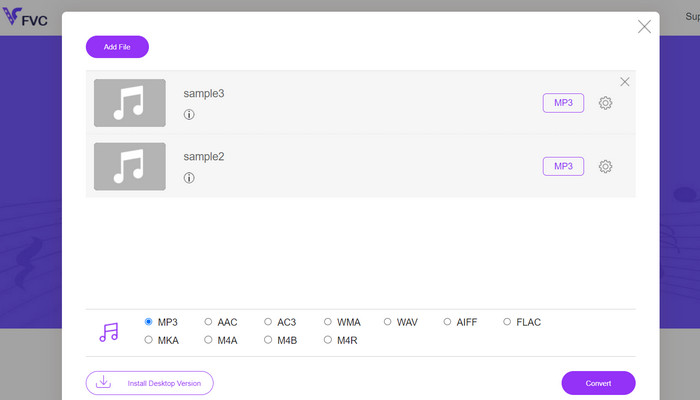
כמעט כל פורמטי הווידאו והאודיו הנפוצים ביותר ניתנים להמרה לפורמט לפי בחירתך בעזרת Free Audio Converter Online, יישום ממיר מולטימדיה מבוסס אינטרנט. למרות שהוא פועל ברשת, עדיין ניתן להמיר בו כמה סרטונים בבת אחת. התוכנית המקוונת הזו גמישה יותר מכפי שנדמה במבט ראשון, משום שהיא לא רק ממירה קבצים אלא גם מאפשרת למשתמשים לכוונן פרמטרים רבים של האודיו. ליישום המקוון הזה יש לא רק ממשק משתמש אינטואיטיבי, אלא שתהליך ההמרה עצמו כמעט שאינו דורש ידע טכני. באפשרותך לעיין בשלבים שלהלן כדי ללמוד כיצד פועל ממיר ה‑Opus ל‑MP3 המקוון הטוב ביותר הזה.
תכונות עיקריות
◆ המרת פורמט קובץ: הוא תומך בפורמטים פופולריים שונים כגון MP3, WAV, AAC, FLAC, OGG ועוד.
◆ המרת אצווה: תכונה זו מאפשרת לך להמיר תיקיות שלמות או קבוצה של קבצי אודיו במכה אחת.
◆ אפשרויות התאמה אישית: הוא מספק אפשרויות התאמה אישית נוספות, כגון התאמת קצב סיביות אודיו, קצב דגימה, תצורת ערוצים, או אפילו חיתוך או פיצול קבצי אודיו.
שלב 1. ראשית, עבור לעמוד Free Audio Converter Online מאת FVC בכתובת https://www.freevideoconverter.online/audio-converter.
שלב 2. בחר את קובץ ה‑Opus שברצונך לשנות על‑ידי לחיצה על הכפתור Add Files to Convert. לחלופין, ניתן לגרור ולשחרר את הקובץ לכל מקום בעמוד.
שלב 3. לאחר העלאת הקובץ, פשוט בחר MP3 מהתפריט תחת פורמט Audio כדי לבחור את פורמט הקובץ הרצוי. תוכל גם לבצע המרת אצווה מ‑Opus ל‑MP3 על‑ידי העלאת מספר קבצים.
שלב 4. תוכל פשוט ללחוץ על סמל Settings כדי להתאים את אפשרויות קצב הסיביות (bitrate), תדר הדגימה (sample rate) והערוצים של הפלט. לאחר מכן לחץ על הכפתור Convert כדי להתחיל בתהליך.
חלק 2. המר את OPUS ל-MP3 או MP3 ל-OPUS Offline
1. Video Converter Ultimate
אם ברצונך להמיר את קובצי הווידאו שלך ל‑MP3 או לכל פורמט אודיו אחר, אין צורך לחפש מעבר ל‑Video Converter Ultimate. הוא אינו מוגבל רק להמרה ל‑MP3; הוא עובד עם מגוון רחב של סוגי קבצים, כולל WAV, WMA, AAC, FLAC, OGG ו‑RA. הוא ללא עלות ופשוט לתפעול. נוסף על כך, תהליך המרת קובץ האודיו מהיר כל‑כך שתוכל לקבל את הקובץ שהומר תוך זמן קצר מאוד.
ניתן להמיר וידאו לפורמטים שונים של וידאו ופורמטי שמע. אתה לא צריך להיות חכם טכנולוגי כדי להגדיר את זה; בנוסף, זה לוקח רק כמה דקות. המר במהירות קבצים ותיהנה מהממשק האינטואיטיבי.
תכונות עיקריות
◆ המרה באיכות גבוהה: התוכנה מבטיחה פלט באיכות גבוהה על ידי שימור איכות הווידאו והשמע המקוריים במהלך ההמרה. הוא תומך בהמרה ללא אובדן עבור פורמטים מסוימים, ומבטיח אובדן איכות מינימלי.
◆ המרת אצווה: Video Converter Studio מאפשר המרת אצווה, ומאפשר לך להמיר מספר קבצים בו-זמנית.
◆ הגדרות מוגדרות מראש ספציפיות למכשיר: התוכנה מציעה מגוון הגדרות מוגדרות מראש ספציפיות למכשיר, מה שמקל על המרת סרטונים עבור מכשירים ספציפיים כמו סמארטפונים, טאבלטים, קונסולות משחקים ועוד. זה מבטיח תאימות ואיכות השמעה אופטימלית.
שלב 1. כדי לוודא שהכלי עונה על הצרכים שלך, נסה תחילה את גרסת הניסיון בחינם. לאחר מכן התקן את התוכנית במחשב שלך וסייר בממשק שלה.
הורדה חינמיתעבור Windows 7 או גרסה מאוחרת יותרהורדה מאובטחת
הורדה חינמיתעבור MacOS 10.7 או גרסה מאוחרת יותרהורדה מאובטחת
שלב 2. לחץ על Add Files או על סמל ה‑Plus, ולאחר מכן נווט לקובץ האודיו במחשב שלך כדי להעלותו. לחיצה כפולה על הקובץ תתחיל את תהליך הייבוא לתוכנית. אפשרות נוספת היא לגרור ולשחרר את הווידאו מדפדפן הקבצים של המחשב אל התוכנה.
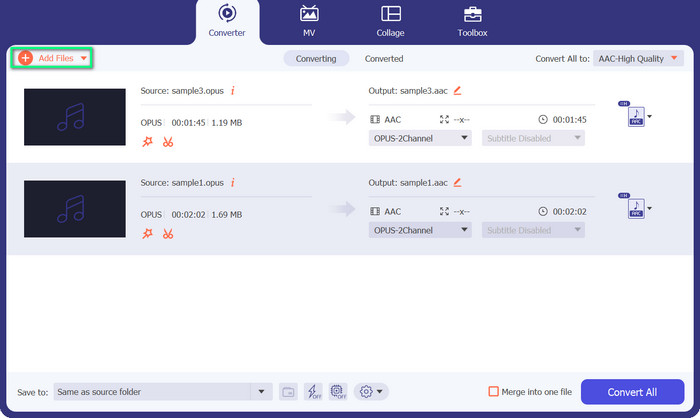
שלב 3. פורמט ה‑MP3 או ה‑Opus של הקובץ גלוי מיד. כעת נשנה את קובץ ה‑Opus ל‑MP3. כפתור Convert All to נמצא בפינת הימנית העליונה של הכלי. לאחר מכן, חפש את פורמט Opus או MP3 בתפריט Audio. לאחר מכן בחר Convert All כדי להתחיל בתהליך ההמרה.
2. VLC
VLC הוא נגן מדיה רב-גוני המשלב פונקציונליות המרת אודיו ווידאו משולבות. הכלי אמין להמרת Opus ל-MP3 ופורמטים אחרים בשל תמיכתו בפורמטים שונים, ממשק ידידותי למשתמש ואפשרויות התאמה אישית. VLC מציע תהליך המרה יעיל ויעיל עם אי נוחות מינימלית, המאפשר תאימות משופרת, שיתוף קבצים והנאה ממוזיקה מרובה מכשירים.
תכונות עיקריות
◆ תאימות בין פלטפורמות: VLC זמין עבור מערכות הפעלה שונות, כולל Windows, macOS, Linux, Android, iOS ועוד. אתה יכול ליהנות מהתכונות שלו במכשירים ופלטפורמות שונות.
◆ המרת אודיו ווידאו: VLC מספק יכולות המרה מובנות, המאפשרות לך להמיר קבצי אודיו ווידאו מפורמט אחד לאחר.
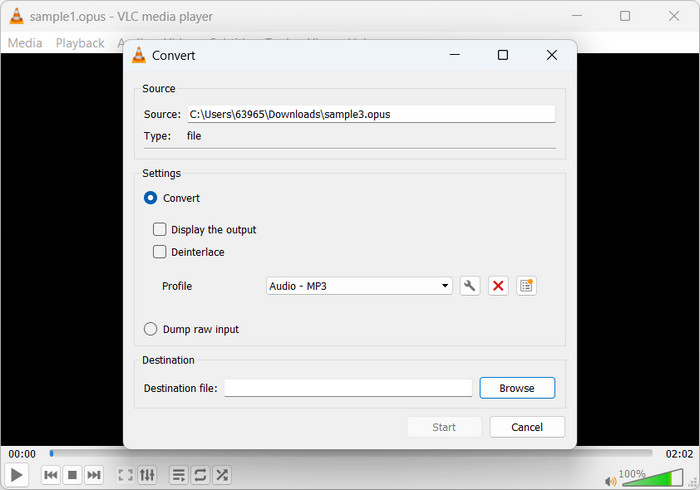
שלב 1. הפעל את נגן המדיה המועדף עליך. כדי להמיר או לשמור מדיה, עבור אל Media בתפריט הראשי ולחץ על Convert/Save.
שלב 2. בחר את קובץ ה‑Opus שברצונך להמיר על‑ידי לחיצה על כפתור Add בלשונית File וניווט אליו. לאחר מכן פשוט לחץ על כפתור Convert/Save.
שלב 3. בחר Audio - MP3 כפורמט הפלט של הפרופיל בלשונית Profile. כדי לשנות את קצב הסיביות, תדר הדגימה ופרמטרים נוספים של האודיו, באפשרותך לבחור פרופיל ולאחר מכן ללחוץ על האפשרות Edit selected profile.
שלב 4. בחר היכן ברצונך לשמור את קובץ ה‑MP3 לאחר ההמרה. כדי להתחיל את ההמרה, השתמש בכפתור Start. כך ממירים Opus ל‑MP3 ב‑VLC.
3. FFmpeg
FFmpeg הוא חבילת תוכנה בקוד פתוח וכלי שורת פקודה המשמש לניהול נתוני מולטימדיה. התוכנה מציעה מגוון רחב של ספריות ותוכניות לניהול פורמטים מגוונים של אודיו, וידאו וסטרימינג. FFmpeg מאפשר המרת Opus ל-MP3 במערכות לינוקס.
תכונות עיקריות
◆ תמיכה בפורמט מולטימדיה: FFmpeg תומך במגוון עצום של פורמטי מולטימדיה, כולל פרוטוקולי אודיו, וידאו והזרמה.
◆ התאמה אישית ואוטומציה: FFmpeg מציע אפשרויות התאמה אישית נרחבות באמצעות פרמטרים של שורת הפקודה, המאפשרים לך לכוונן את תהליך ההמרה בהתאם לדרישות הספציפיות שלך.
שלב 1. התקן אותו בלינוקס. ניתן להתקין את FFmpeg באמצעות מנהל החבילות של הפצת הלינוקס שלך. ב‑Ubuntu, הפקודה sudo apt-get install ffmpeg תבצע את ההתקנה.
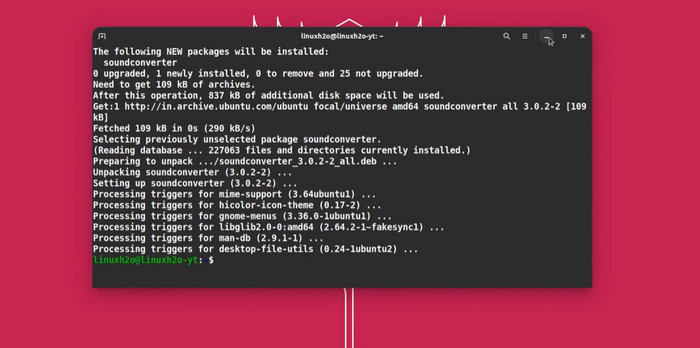
שלב 2. פתח את הטרמינל – Linux Terminal. השתמש בפקודת cd כדי לנווט לתיקייה שבה נמצא קובץ ה‑Opus שלך. אם קובץ ה‑Opus נמצא בתיקיית Music שבספריית הבית שלך, השתמש בפקודה cd ~/Music. המרת Opus ל‑MP3 FFmpeg ממיר Opus ל‑MP3 באמצעות הפקודה הזו: input.opus ffmpeg -c: a libmp3lame output.mp3
החלף את input.opus בקובץ Opus ואת output.mp3 בשם קובץ ה-MP3 שלך.
שלב 3. הזן את פקודת FFmpeg. FFmpeg קורא את קובץ ה‑Opus, מיישם את libmp3lame ושומר את קובץ ה‑MP3. זמן ההמרה תלוי בגודל ובמורכבות של קובץ ה‑Opus. הטרמינל מציג את התקדמות ההמרה. כך FFmpeg ממיר Opus ל‑MP3.
לקריאה נוספת:
מדריך מעשי כיצד להמיר סרטונים לפורמט MP3
הכלים הטובים ביותר שבהם ניתן להשתמש להמרת MP3 לקבצי M4R במנות
חלק 3. OPUS מול MP3
כעת, הנה השוואה מפורטת של שני פורמטי האודיו מבחינת יחס דחיסה, איכות שמע, מורכבות ורישיון.
| אוֹפּוּס | MP3 | |
| יחס דחיסה | יחס דחיסה גבוה, מציע גדלי קבצים קטנים יותר | יחס דחיסה מתון, וכתוצאה מכך גדלי קבצים גדולים יותר |
| איכות שמע | איכות שמע מעולה, אפילו בקצבי סיביות נמוכים | איכות שמע טובה, אך עשויה להציג חפצים בולטים בקצבי סיביות נמוכים |
| מוּרכָּבוּת | Codec מורכב יחסית בהשוואה ל-MP3 | Codec פשוט יותר, מובן ומיושם באופן נרחב |
| רישיון | Opus הוא קוד אודיו פתוח וללא תמלוגים | ל-MP3 דרישות רישוי פטנטים לשימוש בו |
חלק 4. שאלות נפוצות על OPUS וממירי MP3
באילו תרחישים אופוס מועדפת על פני MP3?
Opus מועדפת בתרחישים הדורשים אודיו עם אחזור נמוך ואיכות גבוהה בקצבי סיביות נמוכים, כגון תקשורת קולית, ועידת וידאו, סטרימינג ויישומים בזמן אמת שבהם שמירה על הבהירות ומזעור העיכובים הם חיוניים.
האם אופוס ו-MP3 יכולים להשיג שקיפות?
ל-Opus יש פוטנציאל להשיג שקיפות, כלומר, לא ניתן להבחין בין האודיו הדחוס למקור. עם זאת, MP3 בדרך כלל אינו מגיע לשקיפות, וייתכנו חפצים בולטים, במיוחד בקצבי סיביות נמוכים יותר.
מתי נפוץ MP3?
MP3 משמש בדרך כלל עבור השמעת מוזיקה כללית, פודקאסטים, הפצת אודיו ויישומים שונים אחרים שבהם רצוי איזון של איכות שמע טובה וגדלים סבירים של קבצים. יש לו היסטוריה ארוכה של תאימות ותמיכה רחבה.
סיכום
המרת Opus ל‑MP3 היא יתרון כאשר נדרשת תאימות MP3 ותמיכה נרחבת. Opus מספק אודיו באיכות גבוהה ודחיסה יעילה בקצבי סיביות נמוכים, אך MP3 הוא פורמט אודיו מוכר ונפוץ הנתמך במגוון רחב של מכשירים ותוכנות. המרת Opus ל‑MP3 משפרת את התאימות ומקלה על השמעה במכשירים ובפלטפורמות שונות.
-
 5 חותכי MP3 לחתוך כל אודיו בקלות [2023 עודכן]
 האם אתה צריך חותך MP3 כדי לחתוך את האודיו? במקרה זה, קרא את המאמר הזה מכיוון שאנו מספקים את הכלים שאתה יכול לסמוך עליהם המספקים חיתוך קל לשמע.
-
 המר MP3 ל-OG ותיהנה מאיכות צליל מעולה
 מחפשים לשפר את איכות הסאונד של קבצי המוזיקה שלכם ובמקביל להקטין את גודלם? ממיר MP3 ל- OGG הוא הפתרון המושלם. בדוק אותם בפוסט הזה.
-
 FLAC לעומת MP3: איזה פורמט קובץ אודיו שולט
 פוסט זה ישווה את ההבדלים העיקריים בין FLAC לעומת MP3. זה כולל את איכות הצליל שלהם, גודל הקובץ, התאימות ועוד.
