


 ממיר וידאו אולטימטיבי
 מקליט מסך
 תיקון וידאו
למד את אמנות המרת קבצים להמרת AMR לפורמט MP3
AMR הוא מיכל אודיו המשמש לאחסון נתונים של קול או דיבור אנושי. לכן, אם אתה מדבר בשיחת טלפון ורוצה להקליט אותה, זהו הפורמט הטוב ביותר להקלטה. למרות שגודל הקובץ של מיכל זה קטן, רוב נגני המדיה עדיין אינם תומכים בפורמט זה. אז במקום להתקין נגן מדיה, למה שלא תנסה להמיר אותו לפורמט חדש? הדרכים הטובות ביותר להמרת AMR ל‑MP3 מופיעות ברשימה למטה. בנוסף, בחר את הממיר שתומך בהמרה בצורה יעילה ואפקטיבית.

חלק 1. AMR לעומת MP3: איזה מהם עדיף?
AMR ו-MP3 הם אחד מפורמטי האודיו הטובים ביותר שבהם אתה יכול להשתמש כדי לאחסן את האודיו שלך תוך שמירה על איכותו. אבל יש ביניהם גם הבדלים, אז אנחנו כאן כדי לקבוע מה הם ולאפשר לנו לדעת איזה מהם הוא הטוב ביותר.
א.מ.ר
כפי שהוזכר קודם לכן פורמט זה משמש לאחסון קבצי אודיו שהוקלטו באמצעות שיחות טלפון. מלבד זאת, הפורמט הזה נדחס ופותח על ידי אריקסון כדי להיות קטן בגודלו. אמנם, פורמט זה אינו מתאים לאחסון מוזיקה בגלל הדחיסה שהוא מספק.
MP3
זה ידוע כפורמט האודיו האוניברסלי לאחסון הקלטות אודיו ומוזיקה בשני הדרכים. כמו כן, פורמט זה ידוע ברחבי העולם כך שתוכל להאזין לפורמט הקובץ עם שם הסיומת .mp4 בכל נגן מדיה. אבל אם אתה משתמש בזה כדי לאחסן שיחות הקלטת, גודל הקובץ גדול בהרבה והאיכות פחותה מ-AMR.
אז אם אתה רוצה להקליט ולשמור בפורמט AMR או MP3, נסה להשתמש ב־FVC Screen Recorder. הוא מתהדר ב־Audio Recorder להקלטת אודיו בגודל קובץ קטן ובהקלטה צלולה במיוחד. לכן, הקלט כאן את סשני הג׳אם שלך, הפודקאסטים ועוד.
הורדה חינמיתעבור Windows 7 או גרסה מאוחרת יותרהורדה מאובטחת
הורדה חינמיתעבור MacOS 10.7 או גרסה מאוחרת יותרהורדה מאובטחת
יתר על כן, בואו נמשיך כעת ונבחר את הממיר הטוב ביותר להמרת AMR ל-MP3 עם השלבים המפורטים להלן. כל הכלים המוזכרים להלן כבר נבדקו בקפידה על ידי הצוות שלנו כדי לספק רק עובדות לגביו.
חלק 2. למד כיצד להמיר AMR ל-MP3 באופן מקוון ולא מקוון
1. ממיר וידאו FVC Ultimate
הממיר הפנומנלי הגיע אלינו לעיר, FVC Video Converter Ultimate. לכל בעיה יש פתרון אחר, אבל אם יש ברשותך את הממיר הרב־תכליתי הזה – ממיר, עורך, משפר, מאיץ ועוד – אז למה לחפש כלי אחר לפתור את בעיית ההמרה שלך, אם לכלי הזה יש הכול? בנוסף, רוב הממירים אינם יעילים ואינם אפקטיביים בביצוע ההמרה. למרות שהכלי הזה בתשלום, אין סיבה להילחץ, מפני שהוא זול, כלומר גם אם יש לך כמה דולרים בלבד אתה עדיין יכול ללמוד איך להמיר AMR ל‑MP3. כדי להרשים מישהו, תוכל להשתמש בממיר הזה על ידי ביצוע הצעדים הפשוטים המובאים במיוחד עבורך.
שלב 1. הורד את התוכנה לכונן שלך על ידי לחיצה על כפתור ההורדה. לאחר מכן התקן, הגדר ולסיום לחץ על Finish כדי לשמור את ההגדרות.
הורדה חינמיתל-Windows 7 ומעלההורדה מאובטחת
הורדה חינמיתל-MacOS 10.7 ומעלההורדה מאובטחת
שלב 2. כדי להוסיף את קובץ האודיו בפורמט AMR, לחץ על סימן הפלוס כדי לאתר את הקובץ בתיקייה שלך.
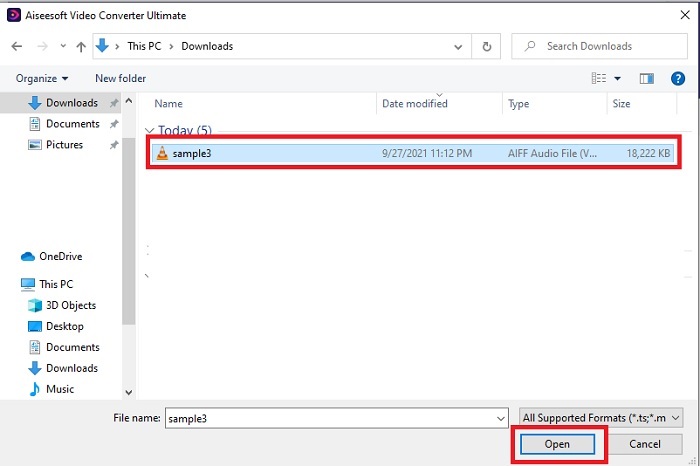
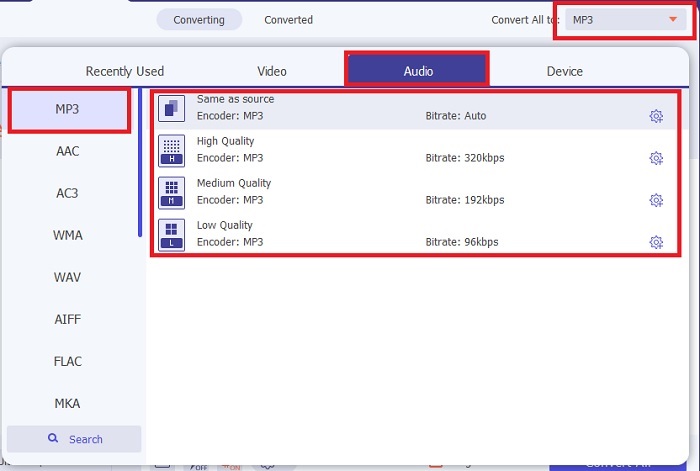
שלב 3. לחץ על האפשרות Convert All כדי לשנות את AMR ל‑MP3 או לכל פורמט אודיו אחר שתרצה.
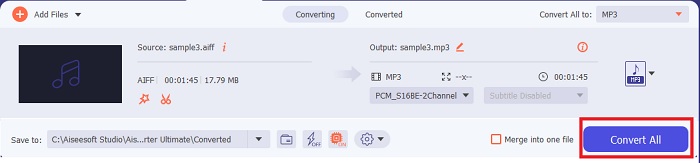
שלב 4. כדי להתחיל את תהליך ההמרה, לחץ על Convert All.
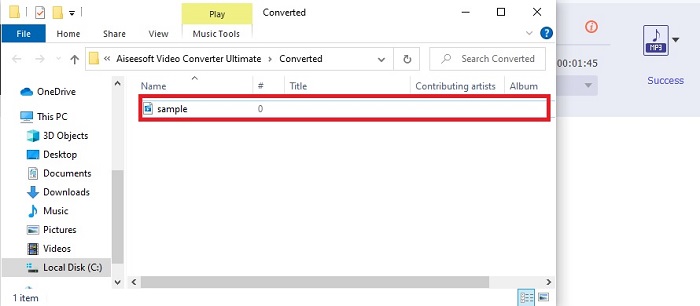
שלב 5. כאשר התהליך מסתיים, תיקיית קבצים תופיע על המסך. לחץ על הקובץ הראשון כדי להאזין לקובץ ה‑AMR החדש שהומר.
2. FVC Free Audio Converter
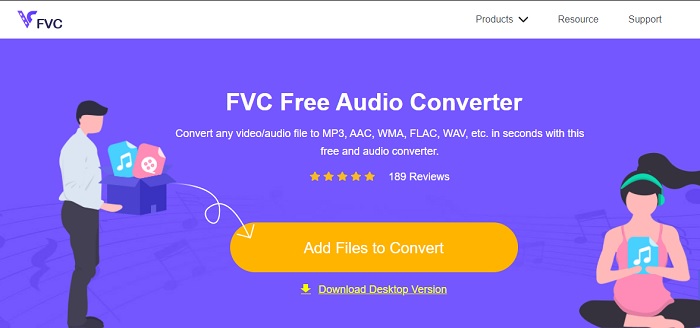
אם אינך אוהב להוריד תוכנה לכונן שלך, תוכל להשתמש ב־ממיר AMR ל‑MP3 אונליין, FVC Free Audio Converter. כלי רשת זה פותח על ידי FVC עבור מי שלא רוצים להוציא כסף על המרה. עם זאת, אפשר להשתמש בכלי הזה רק אונליין, כלומר אינך יכול להשתמש בו אם אין חיבור אינטרנט באזור שלך. בנוסף, אפשרויות העריכה העיקריות אינן קיימות בכלי אינטרנט זה, אך ניתן לשנות את קצב הסיביות (bitrate), ה‑fps והרזולוציה של הפלט הסופי. מעבר לכך, מספר הפורמטים הזמינים כאן מוגבל מאוד, אבל מספר ההמרות שניתן לבצע אינו מוגבל. כלומר, אתה יכול להמיר את כל הקבצים שלך ללא הגבלה, אך אחד־אחד. כדי להבין איך כלי אינטרנט זה פועל, עליך לעקוב אחרי השלבים המוצגים למטה.
שלב 1. כדי לפתוח את FVC Free Audio Converter, לחץ על הקישור שמפנה אל דף הבית הראשי.
שלב 2. לאחר מכן לחץ על Add Files to Convert כדי להפעיל את הכלי.
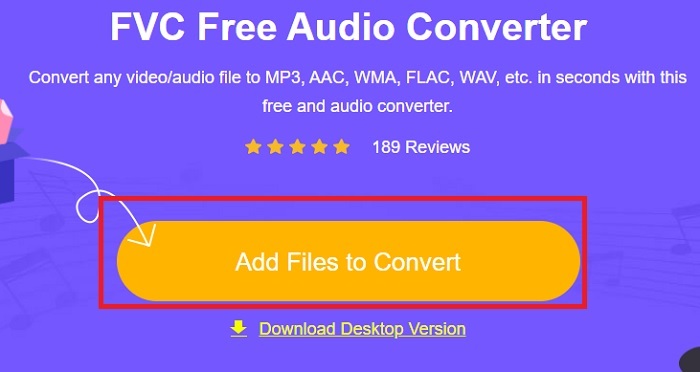
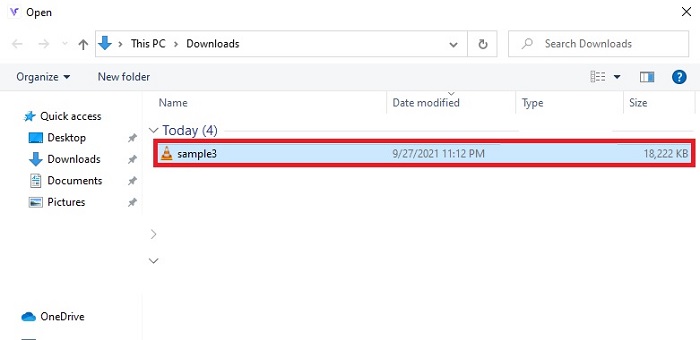
שלב 3. לאחר הפעלת הכלי, זה הזמן המתאים להכניס את קובץ ה‑AMR שלך. לאחר שאיתרת את הקובץ, לחץ על open כדי להעלות אותו לכלי.
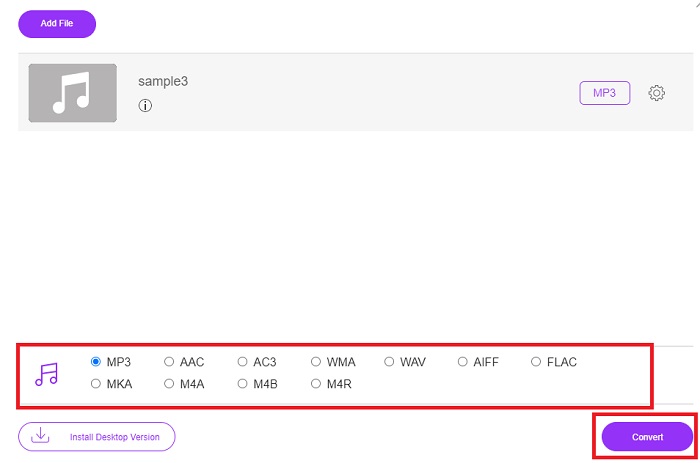
שלב 4. בחר כאן את פורמט האודיו שאליו ברצונך להמיר. אם כבר בחרת את הפורמט החדש, לחץ על כפתור Convert כדי להתחיל את התהליך.
שלב 5. כאשר ההמרה מסתיימת, לחץ על התיקייה כדי לאתר את קובץ ההמרה שסיימת קודם.
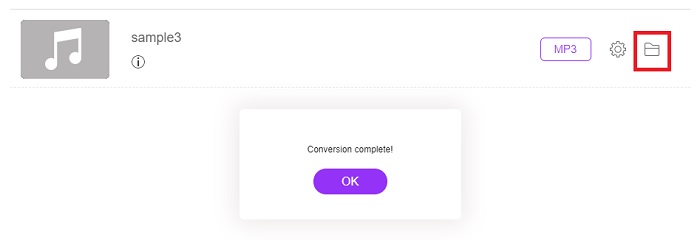
3. נגן מדיה VLC
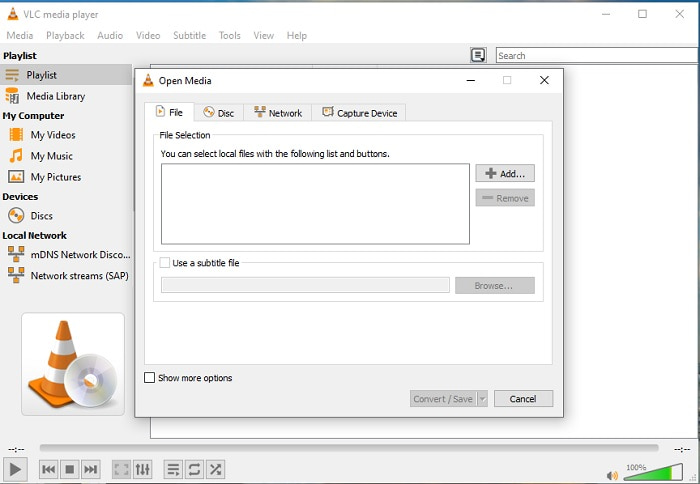
תוכל להשתמש ב־תוכנת המרת AMR ל‑MP3 שניתנת להורדה בחינם למחשב ה־PC או ה‑Mac שלך. אבל VLC תומך בפחות פורמטים ופחות אפשרויות שיפור שניתן להוסיף לקובצי המדיה שלך. בנוסף, המרת קבצים כאן מעט מסובכת יותר מאשר ניגון קובצי המדיה. לכן, אם אתה מנסה להמיר כאן, אל תצפה ליותר מדי, מפני שזה לא הכלי הטוב ביותר להמרה. בכל זאת, אתה יכול לנסות בעצמך על ידי ביצוע השלבים הבאים.
שלב 1. הורד, התקן ופתח את VLC על שולחן העבודה שלך.
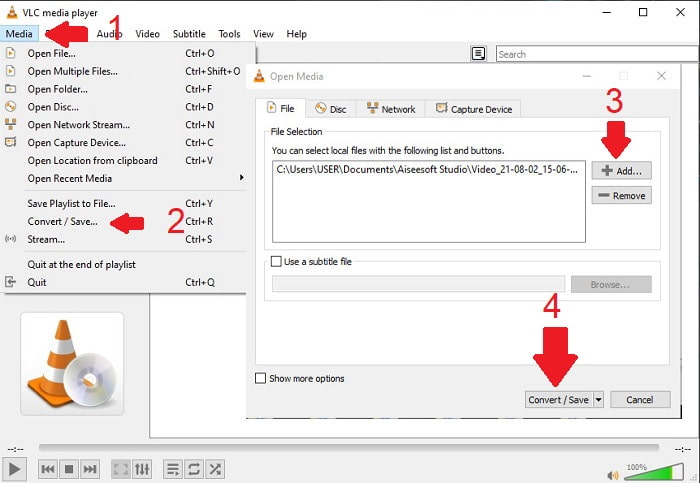
שלב 2. לחץ על Media בחלק העליון של הממשק, ואז על Convert/Save. בממשק החדש לחץ על Add כדי להכניס את הקובץ ואז על Convert/Save כדי להמשיך.
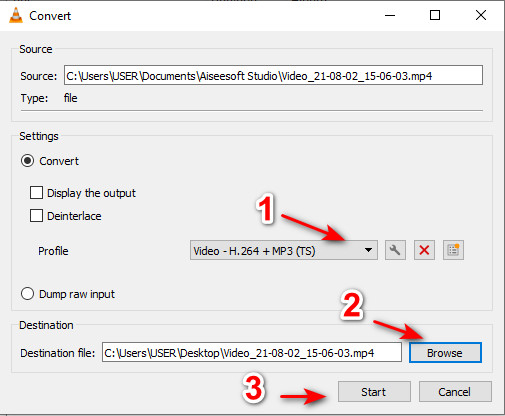
שלב 3. בחר את הפורמט הרצוי תחת Profile, הגדר את Destination file, ולחץ על Start.
4. Windows Media Player
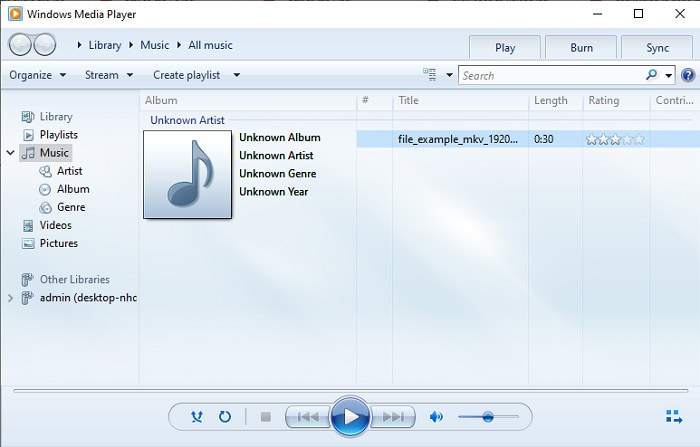
בניגוד ל‑VLC, Windows Media Player הוא נגן המדיה המובנה שבו ניתן להשתמש על כל מחשב שולחני עם Windows. עם זאת, לא ניתן לנגן כאן קובצי AMR בגלל אופן הדחיסה שלהם. לכן, אם ברצונך לנגן כאן קובצי .amr עליך לעקוב אחרי ההנחיות להמרת AMR ל‑MP3 ב‑Windows Media Player. טכנית, זה לא ממיר טיפוסי אלא יותר כלי ״ripper״ שמשנה את הפורמט שבו נשמר הקובץ לאחר מכן.
שלב 1. פתח את Windows Media Player על שולחן העבודה שלך.
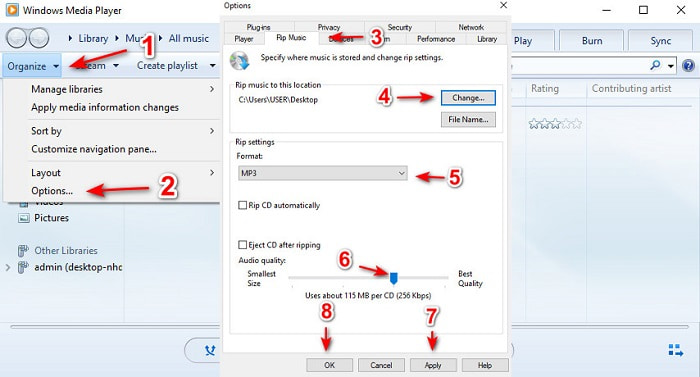
שלב 2. לחץ על Organize ובחר Options. לאחר מכן לחץ על Change כדי לשנות את יעד השמירה, בחר את ה־Format והתאם את איכות האודיו לפי רצונך. לחץ Apply ואחר כך OK כדי להמשיך.
שלב 3. הכנס את ה‑DVD, ה‑CD או את דיסק ה‑Blu-ray שברצונך ל״ריפ״ ולהמיר. לאחר ההכנסה התהליך יתחיל באופן אוטומטי.
לקריאה נוספת
חלק 3. שאלות נפוצות לגבי AMR ל-MP3
למה אני לא יכול להפעיל את קבצי ה-.amr שלי?
אם עדכנת את מערכת ההפעלה, יש סיכוי שקובצי .amr לא יופעלו כראוי. ברוב המקרים קובץ .amr כבר פגום או מקולקל ולכן אינך יכול לנגן אותו. אך תוכל לפחות לנסות להוריד את נגן ה‑AMR הזה כדי להאזין ולנסות לשחזר חלק מהנתונים שבקובץ .amr שלך. הורד Blu-ray Player ל‑PC הורד Blu-ray Player ל‑Mac
מהו ה-codec המשמש לאחסון נתונים עבור קבצי AMR?
קובצי AMR משתמשים ב-codec של 8 מקורות כדי להגדיר את תדרי הדגימה 8kHz או 13-bit המשמשים באופטימיזציה של נתונים של נאומים מילוליים אנושיים. כמו כן, הוא מקודד עם פס צר מתחת ל-200 עד 3400 הרץ.
האם אוכל לנגן קבצי AMR באייפון שלי?
למרות שקובצי .amr עדיין בשימוש במכשירי Android, מערכת iOS אינה תומכת בסוג פורמט זה בגלל מורכבות הנתונים. לכן, הדרך הטובה ביותר לשמור AMR ב‑iOS שעליך לשקול היא להמיר AMR ל‑MP3 באייפון. תוכל להשתמש בכלי שהוצג למעלה ולאחר מכן להעביר את הקבצים לאייפון שלך.
סיכום
לסיכום, כעת קל יותר להבין מהו פורמט AMR ואיזה סוג קבצים הוא כולל. אף שהממירים שהוצגו כאן מסוגלים לבצע המרת AMR ל‑MP3, עדיין הממיר הפנומנלי הצליח לבלוט. FVC Video Converter Ultimate מציג פוטנציאל רב לא רק בהמרה אלא גם במשימות אחרות. לכן, אם ברצונך לחוות רמה חדשה של המרת קובצי מדיה, חובה לנסות את הממיר האולטימטיבי.
הורדה חינמיתעבור Windows 7 או גרסה מאוחרת יותרהורדה מאובטחת
הורדה חינמיתעבור MacOS 10.7 או גרסה מאוחרת יותרהורדה מאובטחת
-
 כיצד להמיר M4A ל MP3 עם 4 ממירי שמע בחינם
 לא יכול לנגן M4A וצריך להמיר אותו ל-MP3? האם יש דרך חינמית להמיר M4A ל-MP3 באינטרנט? פוסט זה חולק 4 דרכים חינמיות לעזור לך להמיר M4A ל-MP3 עם iTunes, ממירי אודיו מקוונים ומקצועיים.
-
 כיצד להמיר WMA ל- MP3 ב- Mac / Windows / Online
 האם ניתן להמיר WMA ל- MP3 באמצעות Windows Media Player? כיצד להמיר WMA ל- MP3 בחינם? פוסט זה משתף 4 שיטות פשוטות שיעזרו לך לבצע את המרת השמע מ- WMA ל- MP3 ב- Mac, Windows PC ובאינטרנט.
-
 5 כלי ההקלטה הטובים ביותר AMR הזמינים ביותר עבור כל מערכת ההפעלה
 רוצים לדעת מהו פורמט AMR ומהו מקליט ה- AMR הטוב ביותר שעליכם לבחור שיספק הקלטה מדהימה.
