


 ממיר וידאו אולטימטיבי
 מקליט מסך
 תיקון וידאו
 הורדה מאובטחת
המרה חלקה של Caf ל-MP3 לשמירה על איכות השמע והנגישות
המרת Caf ל-MP3 חיונית לשיפור התאימות והנגישות. המרת קבצי ה-Caf שלך ל-MP3 מבטיחה השמעה חלקה על פני פלטפורמות שונות, ומבטלת בעיות תאימות. בנוסף, קבצי MP3 קטנים יותר בגודלם, מה שהופך אותם לקלים יותר לאחסון, העברה ושיתוף. בין אם אתה רוצה ליהנות מאוסף האודיו שלך בסמארטפונים, מחשבים או מערכות ברכב, המרת Caf ל-MP3 מעניקה לך גמישות ונוחות רבה יותר בגישה למוזיקה, לפודקאסטים או להקלטות האהובים עליך.
באמצעות ממיר Caf ל‑MP3, באפשרותך להמיר בקלות את קובצי ה‑Caf שלך לפורמט MP3 הפופולרי, המבטיח נגישות רחבה יותר, נפח קובץ קטן יותר ושיתוף חלק של אוסף השמע שלך. כעת גלה אילו כלים תוכל להשתמש בהם כדי לעזור לך להמיר את הקבצים שלך מCaf ל‑MP3.

חלק 1. מהו CAF, ולמה המרת CAF ל-MP3
Caf או Core Audio Format הוא פורמט קובץ שמע שהוצג על ידי Apple Inc. הוא נפוץ בשימוש בפלטפורמות macOS ו-iOS. קבצי Caf נוצרים ומשמשים לעתים קרובות ביישומי אודיו מקצועיים, כגון עריכת סאונד, מיקס והקלטה. המרת Caf ל-MP3 מציעה מספר סיבות ויתרונות משכנעים. הנה כמה מהסיבות העיקריות שבגללן כדאי לשקול להמיר את קבצי ה-Caf שלך לפורמט MP3:
תאימות משופרת: MP3 הוא אחד מפורמטי האודיו הנתמכים ביותר במגוון רחב של מכשירים, נגני מדיה ומערכות הפעלה. על‑ידי המרת קובצי Caf שלך ל‑MP3, אתה מבטיח תאימות ומעלים בעיות או מגבלות השמעה שעשויות להופיע עם קובצי Caf.
נגישות: המרת Caf ל‑MP3 מאפשרת נגישות רחבה יותר לתוכן האודיו שלך. ניתן להזרים קובצי MP3 במגוון מכשירים, כולל סמארטפונים, טאבלטים, מחשבים ניידים, מחשבים שולחניים, נגני מוזיקה ניידים ואפילו במערכות שמע לרכב. גמישות זו מאפשרת לך ליהנות מהמוזיקה, הפודקאסטים או ההקלטות האהובים עליך בכל זמן ובכל מקום.
נפח קובץ קטן יותר: קובצי MP3 דחוסים בדרך‑כלל, ולכן נפחם קטן משמעותית בהשוואה לקובצי Caf. דחיסה זו מסייעת לחסוך מקום אחסון במכשירים שלך, מבלי לפגוע באופן מורגש באיכות האודיו. בנוסף, היא מקלה על העברת קובצי האודיו או שיתופם עם אחרים באמצעות דוא"ל, אפליקציות מסרים או פלטפורמות אונליין.
חלק 2. המר CAF ל-MP3 לא מקוון
Video Converter Ultimate הוא תוכנה יעילה במיוחד המאפשרת להמיר מגוון פורמטים של קבצים לסוגי אודיו שונים, כגון Caf ו‑MP3. התוכנה מציעה פונקציית המרה באצווה, המאפשרת למשתמש להמיר מספר קובצי אודיו בו‑זמנית.
בנוסף, למשתמשים יש את היכולת לייעל את האיכות של כל שיר רצוי באמצעות תכונת התוכנית המאפשרת התאמה אישית של טכניקות הפלט, כולל קצב דגימה וקצב סיביות. עבור אנשים המבקשים לבצע המרה אצווה של קבצי אודיו מ-Caf ל-MP3 או להיפך, סיפקנו להלן מדריך תמציתי לעיונכם. אתה יכול לעיין בהוראות שלהלן כדי ללמוד כיצד לשנות את Caf ל-MP3.
שלב 1. בחר את סמל ההורדה החינמית המתאים שלהלן כדי להתקין את התוכנית במכשיר שלך. הקפד לעקוב אחר ההוראות שעל המסך כדי להפעיל את התוכנית בשלב הבא. לאחר ההתקנה, ניתן לשלוט בקלות בממשק שלה. כלי זה פועל כממיר Caf ל‑MP3 עבור Mac ו‑Windows.
הורדה חינמיתעבור Windows 7 או גרסה מאוחרת יותרהורדה מאובטחת
הורדה חינמיתעבור MacOS 10.7 או גרסה מאוחרת יותרהורדה מאובטחת
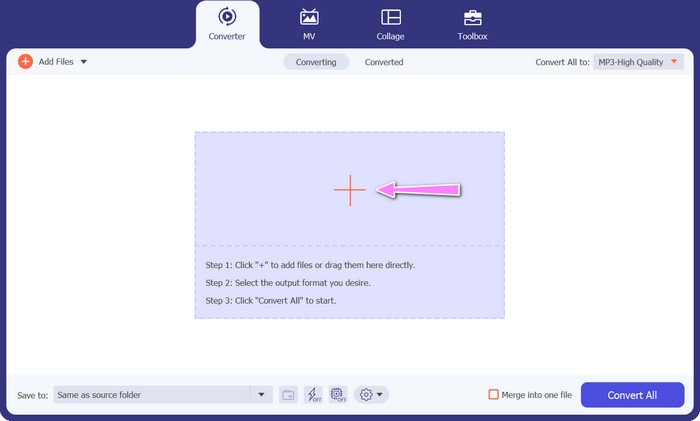
שלב 2. לחץ על כפתור ההוספה בממשק הראשי כדי לייבא את קובץ האודיו שברצונך לערוך. לאחר מכן תועבר לחלון תצוגה ממוזערת של הקובץ שיובא. באפשרותך גם להעלות תיקייה שלמה כדי להמיר מספר קבצים בבת אחת. בחר את המיקום במערכת הקבצים שלך שבו נמצאים כל קובצי האודיו הדרושים.
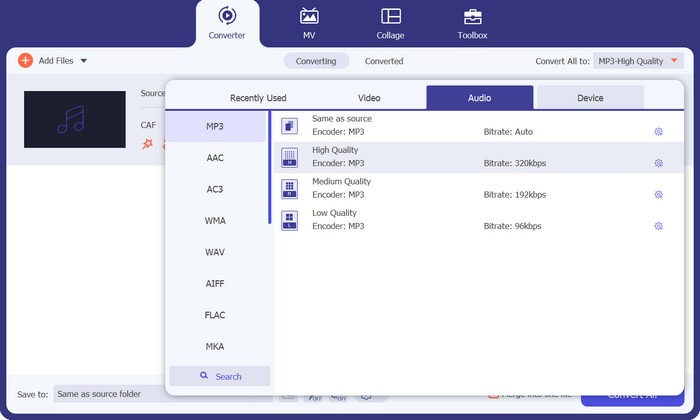
שלב 3. כעת באפשרותך לשנות את פורמט הפלט על‑ידי לחיצה על כפתור המר הכל ל הממוקם בחלק העליון של חלון התוכנית. בחר MP3 מהחלון המסומן אודיו. במקביל, באפשרותך לשנות את קצב הדגימה וקצב הסיביות (bitrate) של קובץ הפלט כדי להשיג את האיכות הרצויה.
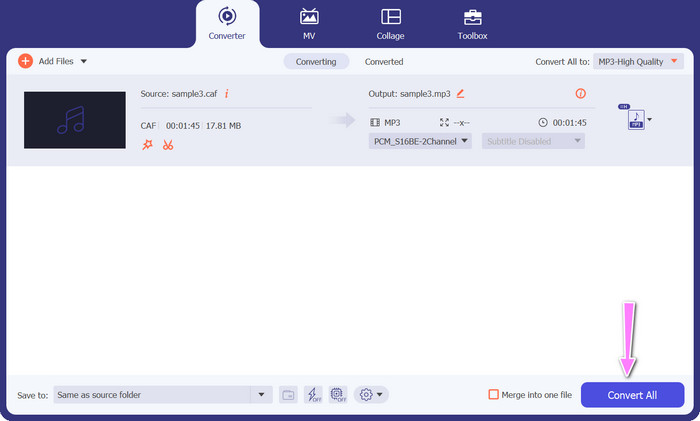
שלב 4. לחץ על כפתור המר הכל שבתחתית כדי להתחיל בתהליך ההמרה כשלב האחרון. לאחר מכן התוכנית תפתח באופן אוטומטי את תיקיית הפלט, כך שתוכל לוודא את פורמט הקובץ החדש.
יתרונות
- זה יכול להמיר Caf לפורמט קובץ אודיו MP3 באצוות.
- התוכנית עובדת היטב עם Windows ו-Mac OS.
חסרונות
- זה דורש דמי מנוי בתשלום לאחר הניסיון בחינם.
חלק 3. המרת CAF ל-MP3 באינטרנט
באפשרותך גם להשתמש בFree MP3 Audio Converter Online, שהיא אפשרות נוספת. זוהי אפליקציה מבוססת‑אינטרנט שפועלת יחד עם החיבור לרשת, כפי שמרמז שמה. לכן אינך צריך להתקין אפליקציה ייעודית להמרת Caf ל‑MP3. הכל נגיש, וכל מה שאתה צריך הוא הדפדפן שלך כדי לבצע את הפעולות. מבחינת תכונות, ממיר Caf ל‑MP3 חינמי זה אינו נופל מאף פתרון אחר. בנוסף, באפשרותך להעלות מספר גדול של קבצים, להמיר אותם בכמות (באצווה) או להתאים את הפרופיל של קובץ וידאו או אודיו. על‑ידי ביצוע השלבים המתוארים כאן, תרכוש ידע על ממיר ה‑Caf ל‑MP3 המקוון הטוב ביותר.
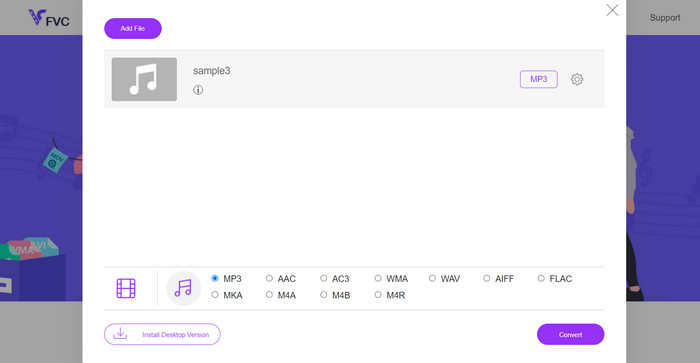
שלב 1. עבור ישירות לאתר הראשי של Free MP3 Audio Converter Online באמצעות לחיצה על הקישור המופיע למעלה. באפשרותך להעלות את קובץ האודיו שלך דרך המסך הראשי על‑ידי בחירה באפשרות הוסף קבצים להמרה.
שלב 2. על המסך תופיע תצוגה מקדימה של הקובץ המקורי שבחרת. באפשרותך לבחור את פורמט הפלט הרצוי על‑ידי גלילה מתחת לחלונית שבה היית בתחילה.
שלב 3. כדי לשנות את פורמט הקובץ מ‑Caf ל‑MP3, לחץ על כפתור המר. אם ברצונך להמיר קובץ נוסף, יהיה עליך לבצע שוב את אותה פעולה מההתחלה.
יתרונות
- משתמשים עשויים ליהנות מהמרות בלתי מוגבלות ליום.
- ממיר Caf ל-MP3 המקוון הזה עובד כמעט בכל דפדפני האינטרנט.
חסרונות
- מהירות ההמרה פרופורציונלית לרוחב הפס הזמין באינטרנט.
לקריאה נוספת:
המרת MP3 ל‑AAC: כיצד לשפר את איכות האודיו שלך
הורדת נגן MP3 – 10 נגני המוזיקה החינמיים הטובים ביותר ל‑MP3 לשנת 2023
חלק 4. שאלות נפוצות לגבי המרת CAF ל-MP3
האם אוכל לשמור את המטא נתונים של קבצי ה-Caf שלי לאחר המרתם ל-MP3?
שימור המטא נתונים במהלך המרת Caf ל-MP3 תלוי בממיר או בתוכנה הספציפית שבה אתה משתמש. לכלי המרה מסוימים יש את היכולת לשמור מטא נתונים כגון שם האמן, שם האלבום, מספר הרצועה ועוד. עם זאת, חשוב לציין שלא כל הממירים תומכים בשמירת מטא נתונים.
האם יש פורמטים אחרים של שמע שאני יכול להמיר אליהם קבצי Caf?
כן, מלבד MP3, ישנם עוד כמה פורמטי שמע שאתה יכול להמיר אליהם קבצי Caf, בהתאם לצרכים הספציפיים שלך. פורמטים אלטרנטיביים נפוצים כוללים WAV, FLAC (Free Lossless Audio Codec), AAC ו- OGG (Ogg Vorbis).
האם אני צריך לשלם עבור ממיר Caf ל-MP3?
קיימות אפשרויות המרת Caf ל-MP3 בחינם וגם בתשלום. ממירים מקוונים רבים מציעים שירותים בחינם, המאפשרים לך להמיר קבצי Caf ל-MP3 ללא כל עלות. עם זאת, תוכנות מתקדמות מסוימות או שירותי פרימיום מקוונים עשויים לדרוש רכישה או מנוי עבור תכונות נוספות או מהירויות המרה גבוהות יותר.
סיכום
באמצעות המרה מCaf ל‑MP3 תוכל למצות את מלוא הפוטנציאל של אוסף האודיו שלך וליהנות מהשמעה חלקה בכל זמן ובכל מקום. הדבר מאפשר לך ליהנות מהמוזיקה, הפודקאסטים או ההקלטות האהובים עליך במגוון רחב של מכשירים ופלטפורמות.
-
 4 הדרכים הטובות ביותר להמרת AIFF ל- MP3 במחשב Mac ו- PC
 נתקל בקשיים בגלל שקובצי AIFF גדולים מכדי להישמר? לכן, עליך להמשיך לקרוא בזמן שאנו מסבירים כיצד לתקן זאת על ידי המרת AIFF לפורמט MP3.
-
 גלה כיצד להמיר AMR ל-MP3 [מקוון ולא מקוון]
 מתקשה בגלל שלא ניתן להפעיל קובצי amr על שולחן העבודה שלך? לאחר מכן קרא מאמר זה כדי ללמוד כיצד להמיר AMR לפורמט MP3.
-
 מדריך כיצד להוסיף תמונות אלבומים ל-MP3 ללא מאמץ ב-Breze
 האם אתה רוצה לדעת איך להוסיף תמונות אלבום ל-MP3? אם כן, קרא את הפרטים המלאים ומדריך לעריכת תמונות האלבום בקובץ שלך.
