


 ממיר וידאו אולטימטיבי
 מקליט מסך
 תיקון וידאו
הדרכים הנוחות ביותר כיצד להמיר MP3 ל-M4R עבור מכשירי אפל
האם אי‑פעם חשבת להפוך את המוזיקה האהובה עליך לרינגטון באייפון שלך? האם זה בכלל אפשרי? בהחלט כן. כל מה שצריך הוא להמיר את הקובץ. למה צריך קודם להמיר אותו? כדי שנוכל להגדיר אותו כרינגטון? בעיקר משום שכדי להגדיר קובץ מסוים כרינגטון שיר, הוא חייב להיות בפורמט M4R. לכן עליך למצוא את ממיר ה‑MP3 ל‑M4R הטוב ביותר דרך iTunes שמתאים לך. מאמר זה מציג שיטות שונות כיצד תוכל להמיר את קובץ ה‑MP3 שלך, ואף לבצע המרת אצווה של MP3 ל‑M4R על‑ידי קריאת התוכן להלן.

חלק 1. הדרך הכי ריאלית להמיר MP3 ל-M4R
Video Converter Ultimate הוא ללא ספק הכלי המשכנע ביותר שבו אתה יכול להשתמש כדי להמיר MP3 ל-M4R. לא רק קובץ בודד, אלא הוא גם יכול לבצע המרת אצווה מ-MP3 ל-MP4. זהו ממיר שיכול להפיק סרטוני HD ואודיו ללא אובדן. למעשה, אידיאלי ומומלץ לו להמיר את הקובץ מבלי לאבד את איכותו המקורית. המהירות מהירה פי 30 מהממיר הרגיל בחוץ. בנוסף, אם אתה ממיר רשימת השמעה לשמירה בטלפון שלך בהחלט הכלי הזה יכול לעשות את העבודה בשבילך. ללא מאמץ וללא זיעה. בינתיים הנה כמה מהתכונות האחרות שתוכלו ליהנות גם מהן מלבד המרת אודיו. כמו כן, מדריך שלב אחר שלב נכתב להלן לעיונך אם תחליט להשתמש בו.
◆ ערוך מטא נתונים.
◆ האצת GPU במהירות גבוהה.
◆ תמיכה טכנית בזמן אמת.
◆ דחיסת וידאו נתמכת.
שלב 1. כדי להשתמש בו, הורד את האפליקציה בלחיצה על כפתור ההורדה למטה. לאחר שהאפליקציה תותקן ב‑Windows או ב‑Mac שלך, הפעל אותה.
הורדה חינמיתל-Windows 7 ומעלההורדה מאובטחת
הורדה חינמיתל-MacOS 10.7 ומעלההורדה מאובטחת
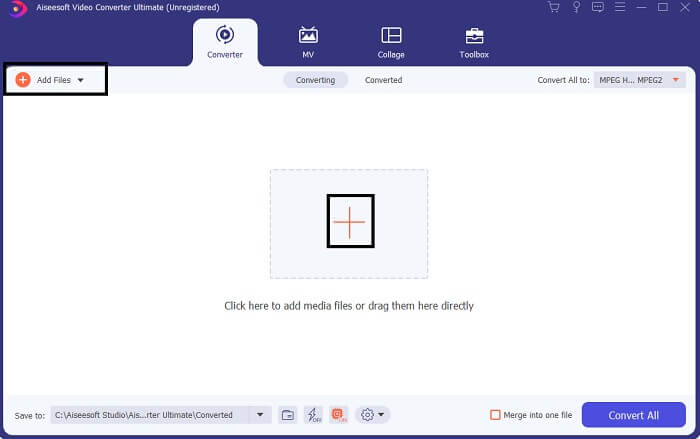
שלב 2. בממשק הראשי של הכלי תראה שתי אפשרויות להעלאת קובץ. תוכל ללחוץ על סמל הפלוס במרכז או ללחוץ על כפתור הAdd Files בצד השמאלי העליון. בחר את הקובץ הרצוי והעלה אותו.
שלב 3. כדי לקבל את התוצאה הרצויה, שנה את הפורמט על‑ידי לחיצה על תפריט הבחירה הנפתח הממוקם בצד הימני העליון של הממשק.
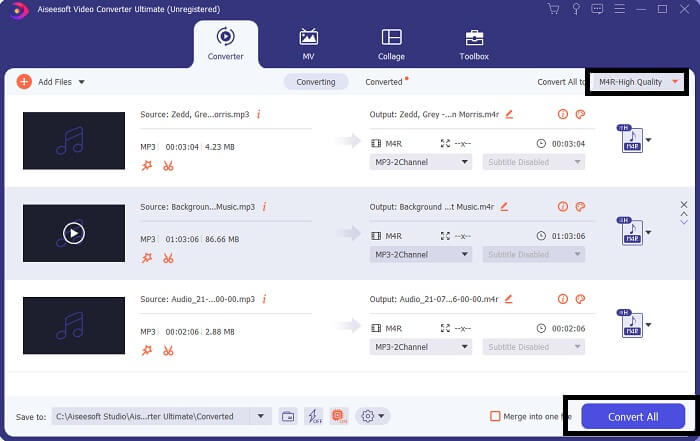
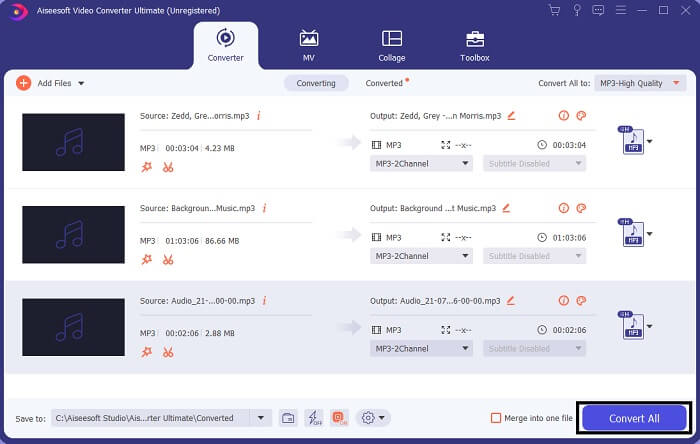
שלב 4. לבסוף, לחץ על כפתור Convert All בפינה הימנית התחתונה של הממשק הראשי. לאחר מכן המתן עד לסיום ההמרה.
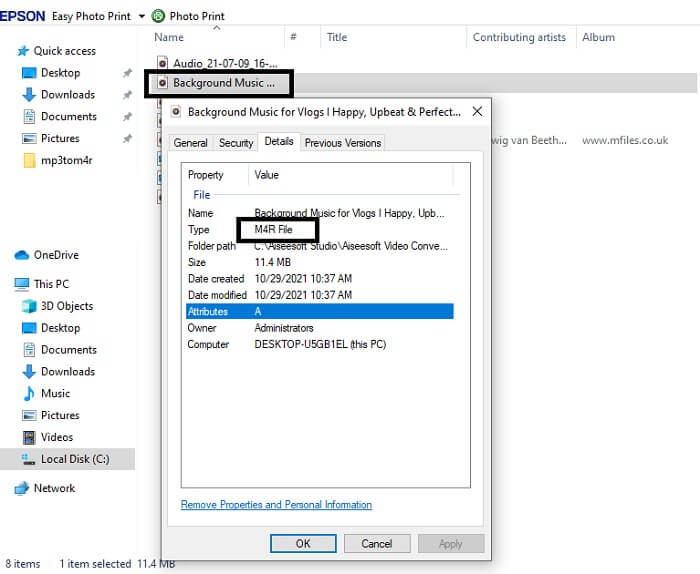
שלב 5. לבסוף, פתח את התיקייה שבה נשמר פלט האודיו והעבר אותו לאייפון שלך. תוכל להשתמש בכלי או אפליקציית העברה לשם כך. תוכל למצוא המלצות באינטרנט – כל שעליך לעשות הוא לחפש, ואז לבצע את התהליך של הגדרתו כרינגטון באייפון שלך.
חלק 2. כמה מהכלים הטובים ביותר להמרת MP3 ל-M4R באינטרנט
FVC Free Audio Online Converter
כלי פרימיום להמרה הוא טוב, אבל אין כמו כלי פרקטי. מתוך התחשבות בצרכים שלך, FVC יצרה גרסה חינמית של הכלי. FVC Free Audio Converter הוא כלי חינמי לשימוש בכל זמן ומכל מקום. כל מה שאתה צריך הוא חיבור אינטרנט פעיל ודפדפן נתמך. ממיר MP3 ל‑M4R לרינגטון אייפון זה מסוגל להפיק אודיו איכותי ללא איבוד נתונים. הפלט מספק, מבלי שתצטרך להוציא עליו כסף. חכה, יש עוד – האם ידעת שהוא יכול גם לבצע המרת אצווה? כן, אפשר! הנה גם כמה תכונות בולטות נוספות שתקבל אם תשתמש בו. בנוסף, מדריך שימוש נכתב לנוחותך.
◆ לקובץ שהומר יש איכות דומה למקור.
◆ 100% חינם ובטוח לשימוש.
◆ אין הגבלה בגודל בהמרה.
◆ המרת אצווה נתמכת.
שלב 1. כדי לגשת לכלי, בקר באתר הרשמי של FVC Free Audio Converter.
שלב 2. משם, לחץ על Add Files to Convert. אם זו הפעם הראשונה שלך, עליך לאשר גישה על‑ידי לחיצה על Open FVC Launcher. לאחר מכן תופיע על המסך חלונית שתאפשר לך לאתר את הקובץ שברצונך להמיר.
הורד את גרסת הדסקטופ כדי להמיר קבצים במצב אצווה.
שלב 3. לאחר העלאת הקובץ תופיע חלונית נוספת. בחלק התחתון שנה את פורמט הפלט על‑ידי סימון M4R.
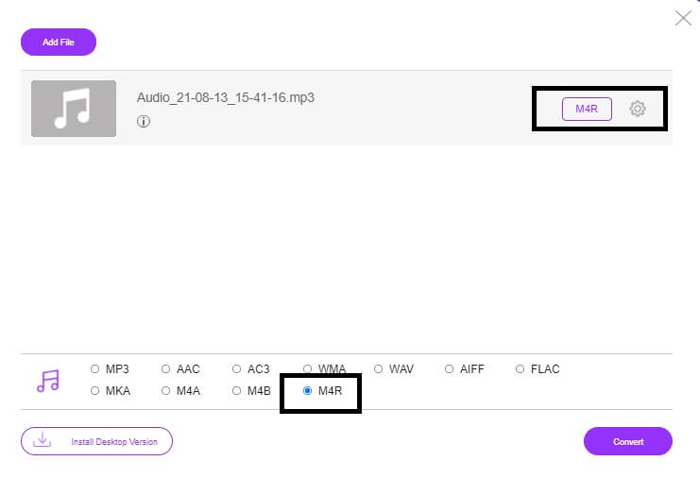
שלב 4. לאחר מכן לחץ על כפתור Convert כדי להתחיל בתהליך ההמרה.
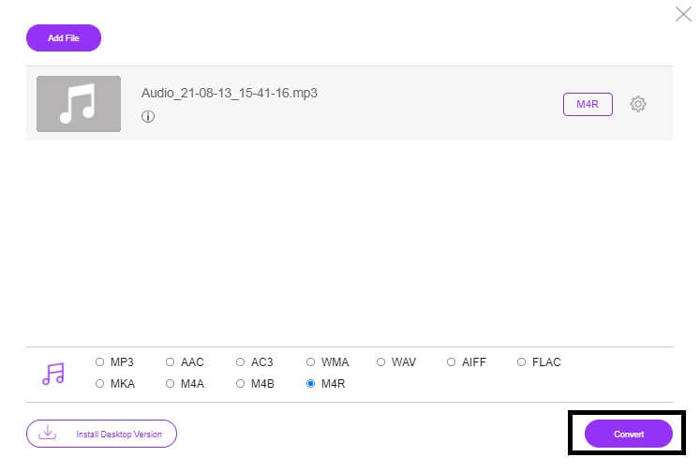
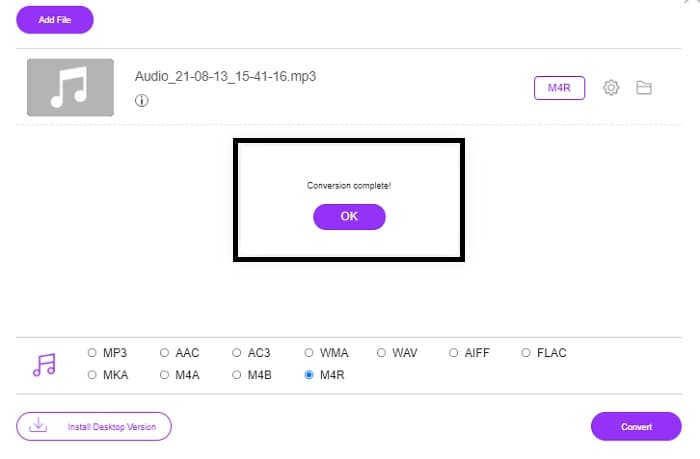
שלב 5. לבסוף, בחר תיקייה לשמירת הקובץ, והקובץ יישמר אוטומטית. לאחר מכן העבר אותו לאייפון שלך. זכור שניתן לבצע המרת אצווה, אז אל תגביל את עצמך.
קשור:
M4ROnline על ידי ממיר קבצים
פשוט אך אמין – כך משתמשיו מתארים את הכלי המקוון הזה. כברירת מחדל הוא מיועד במיוחד להמרת Mp3 ל‑M4R. כפי שמעיד שמו, זה בדיוק מה שהכלי נועד לעשות. הוא פועל מדפדפנים שונים כך שאין צורך להוריד או לרכוש אותו. אם תבקר באתר, תבחין בפשטות ממשק הכלי. הוא מאוד ישיר: עליך רק ללחוץ על כפתור Browse כדי להתחיל את תהליך ההעלאה וההמרה. אם ברצונך לנסות אותו, מומלץ לבקר באתר הרשמי ולהתנסות בו. לכן, זהו כלי חלופי טוב. באפשרותך גם לעיין בשלבים שלהלן כדי להכיר את אופן השימוש בכלי.
שלב 1. הדבר הראשון שעליך לעשות הוא להיכנס לעמוד הרשמי של M4R Online ואז ללחוץ על Browse.
שלב 2. בחר את הקובץ מתוך התיקייה שלך ולחץ על כפתור Upload File.
שלב 3. לאחר שתופיע הודעת סיום, לחץ על הקובץ כדי להוריד אותו.
Online-convert.com
זהו כלי המספק שירות כבר זמן לא מבוטל. ניתן לומר שרבים מצאו את הכלי המקוון הזה מועיל מאוד לצורכי ההמרה שלהם – אחרת הוא לא היה ממשיך להתקיים עד היום אם לא היה מוכח כיעיל. כאשר תיכנס לעמוד הבית של האתר, תראה את כל הכלים הזמינים לשימוש: ממיר אודיו, ממיר וידאו, ממיר תמונות, ממיר מסמכים, ממיר ספרים אלקטרוניים – כולם מרוכזים בעמוד הבית. ריכוזם במקום אחד מקל על המשתמש למצוא את הכלי הדרוש לו. לכן הוא בהחלט ראוי להיכלל ברשימה זו של ממירי MP3 ל‑M4R דרך iTunes. להלן אופן השימוש בכלי, לעיונך.
שלב 1. בקר באתר הרשמי של הכלי ובחר Audio Converter.
שלב 2. לחץ על הDrop down, בחר את פורמט הפלט ולאחר מכן לחץ על GO.
שלב 3. חלון חדש יופיע. שם לחץ על כפתור Choose Files והעלה את הקובץ. כדי להתחיל את תהליך ההמרה לחץ על Start Conversion. כשהקובץ מוכן, הוא יורד אוטומטית למחשב שלך.
MP3 לעומת M4R
פורמט MP3 שוחרר בשנת 1993 על ידי Moving Picture Experts Group (MPEG). זה היה הסטנדרט לאחסון מוזיקה מכיוון שהוא יכול לדחוס אודיו לגודל קטן בהרבה מאשר פורמטים לא דחוסים אחרים. זה עדיין נמצא בשימוש נרחב בימינו, במיוחד להפצת אודיו באינטרנט.
קובץ M4R משמש לשמירת רינגטון אייפון מותאם אישית שנוצר באמצעות Apple iTunes. בדרך כלל, אתה יכול לראות את הפורמט הזה בעת העברת קטע רינגטון מהמחשב למכשיר iOS. קבצי M4R שנוצרו עם iTunes כוללים בדרך כלל הגנה על זכויות יוצרים.
חלק 3. שאלות נפוצות לגבי המרת MP3 ל-M4R
מה זה M4R?
זוהי סיומת קובץ שנוצרה במיוחד על ידי אפל ומשמשת אך ורק כרינגטון לאייפון ומכשירי אפל אחרים. זה טוב כמו M4A ו-MP4 כשזה מגיע לאיכות.
האם יש ממיר MP3 ל-M4R מלבד iTunes?
בהחלט, יש. אתה יכול לבחור מהכלים שלמעלה או לשקול להשתמש ב-Windows Media Player על ידי העתקה. אם אתה לא רוצה לעבור את כל התהליכים, אתה יכול פשוט להשתמש בכלים החינמיים הזמינים באינטרנט. הם ממירים ישירות את האודיו לפורמט הרצוי במקום לעבור את התהליך הארוך של ההעתקה.
למה אני צריך להמיר את הקובץ שלי מ-MP3 ל-M4R כדי להשתמש בו כרינגטון?
זה חובה. כדי להיחשב כקובץ כצלצול, הקובץ חייב להיות כברירת מחדל בפורמט M4R כדי להיות מושמע כרינגטון שלך.
סיכום
עם כל זה, בוודאי שאתה יכול לסמוך על הכלים המפורטים לעיל. אתה רק צריך לגשת לאיזה כלי יכול להיות מועיל עבורך בהתאם לצרכים שלך. אם אתה סטודנט ואזרח רגיל שרוצה להמיר ורוצה להמיר MP3 ל-M4R ב-Mac בחינם או בכל מכשיר שאתה משתמש בו, אתה יכול להתייחס לכלים החינמיים. לשימוש מקצועי, מומלץ להשתמש ב-Video Converter Ultimate. אתה תמיד יכול לחזור לדף זה אם אתה רוצה לדעת יותר על עוד כלים להמרה.
-
 [חינם ומקוון] 3 שיטות להמרת MP3 ל-MP4 עם תמונה
 כיצד להמיר MP3 ל MP4 באיכות גבוהה? פוסט זה מציג 3 שיטות יעילות וחינמיות לשינוי MP3 ל- MP4 עם תמונות ב- Windows ו- Mac.
-
 למד כיצד להמיר MP3 לפורמט WAV
 האם אתה רוצה לדעת איך להמיר MP3 ל WAV? קבע איזה מהכלים מייצר את ההמרה האיכותית ביותר שאתה יכול לקבל.
-
 הנחיות כיצד להמיר M4A ל-WAV [PC ו-Mac]
 למד עוד על איך להמיר M4A ל-WAV עם שלבים מפורטים וכלים שונים לבחירתך.

