


 ממיר וידאו אולטימטיבי
 מקליט מסך
 תיקון וידאו
 הורדה מאובטחת
המרת MP3 ל- OGG כדי להשיג גדלים קטנים יותר ואיכות צליל מעולה
בשנים האחרונות, המרת MP3 ל- OGG הפכה פופולרית יותר בגלל היתרונות שהיא מעניקה. למרות שקובצי MP3 פופולריים מאוד, איכות הצליל מוקרבת לעתים קרובות כדי להקטין את הקבצים. המשמעות היא שהפרטים והחדות הולכים לאיבוד. לקבצי OGG, לעומת זאת, יש איכות צליל טובה יותר וגדלים קטנים יותר של קבצים. זה הופך אותם לאפשרות מצוינת עבור אנשים שרוצים להפיק את המרב מספריית המוזיקה שלהם.
נדרש ממיר MP3 ל‑OGG כדי להמיר קובצי MP3 ל‑OGG. משתמשים יכולים לשנות בקלות את קובצי ה‑MP3 שלהם לפורמט OGG באמצעות ממיר. כך הם מקבלים איכות צליל טובה יותר מבלי להקטין את גודל הקובץ. בעידן של הזרמת אודיו באיכות גבוהה, כל חובב מוזיקה שרוצה לשפר את חוויית ההאזנה שלו צריך ממיר MP3 ל‑OGG.

חלק 1. הדרך הטובה ביותר להמיר MP3 ל- OGG
FVC Video Converter Ultimate הוא כלי תוכנה רב־תכליתי המאפשר למשתמשים להמיר קובצי וידאו ואודיו בפורמטים שונים. בין היכולות הרבות שלו, FVC הוא ממיר MP3 ל‑OGG מצוין, המאפשר למשתמשים להמיר בקלות את המוזיקה שלהם מ‑MP3 לפורמט OGG בכמה לחיצות בלבד.
יתר על כן, זה מאפשר למשתמשים להתאים את איכות הפלט כדי להשיג את האיזון המושלם בין איכות הצליל וגודל הקובץ, מה שמבטיח שהמוזיקה שלהם נשמעת נהדר לא משנה היכן היא מושמעת. בין אם אתה חובב מוזיקה או פשוט מחפש לייעל את אוסף האודיו שלך, FVC Video Converter Ultimate הוא בחירה מצוינת לכל צרכי ההמרה שלך. נסה זאת היום ותחווה בעצמך את ההבדל באיכות הסאונד.
שלב 1. השגת האפליקציה והוספת קובצי MP3
הורד והתקן את FVC Free Video Converter מהאתר הרשמי. הפעל את התוכנית ולחץ על כפתור הסימן פלוס כדי לייבא את קובץ ה‑MP3 שברצונך להמיר.
הורדה חינמיתעבור Windows 7 או גרסה מאוחרת יותרהורדה מאובטחת
הורדה חינמיתעבור MacOS 10.7 או גרסה מאוחרת יותרהורדה מאובטחת
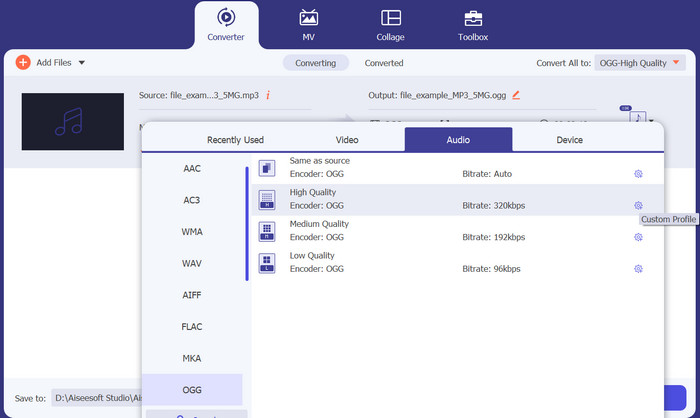
שלב 2. בחירת OGG כפורמט הפלט
בחר ב‑OGG כפורמט הפלט על‑ידי לחיצה על תפריט הנפתח Profile ובחירה ב‑OGG מרשימת הפורמטים הזמינים. במידת הצורך ניתן גם להתאים את הגדרות הפלט על‑ידי לחיצה על כפתור Settings. כך ניתן להתאים פרמטרים כגון קצב סיביות, קצב דגימה וערוצים.
שלב 3. ציון תיקיית הפלט
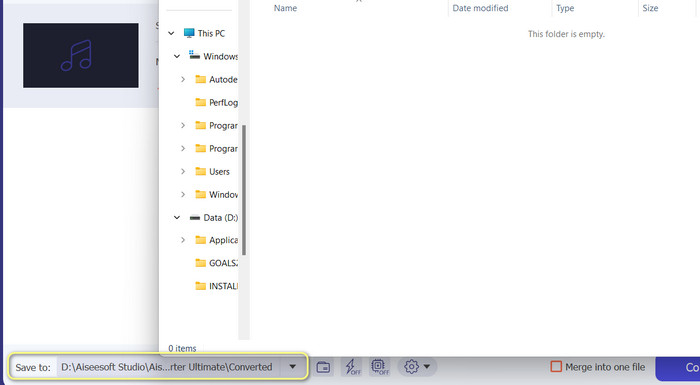
בחר את תיקיית היעד שבה ברצונך לשמור את הקובץ המומר על‑ידי לחיצה על כפתור Browse שליד שדה Output Folder.
שלב 4. המרת קובצי MP3 ל‑OGG
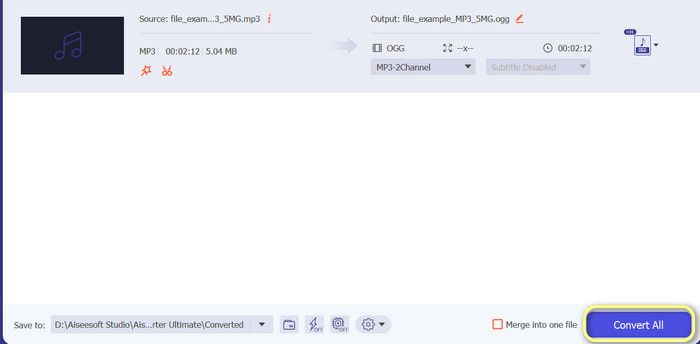
לאחר שאתה מרוצה מההגדרות, לחץ על הכפתור Convert All כדי להתחיל בתהליך ההמרה. FVC Free Video Converter יתחיל להמיר את קובץ ה‑MP3 שלך לפורמט OGG. סרגל ההתקדמות יציג באיזה שלב נמצאת ההמרה, ותוכל גם לראות את זמן הסיום המשוער.
יתרונות
- התאם אישית את הגדרות פלט השמע.
- מהירות המרה מהירה.
- הוא מציע כלי עזר רבים לצרכים שונים.
חסרונות
- תכונות מוגבלות מוצעות למשתמשים בחינם.
- זה עשוי לדרוש משאבי מחשב גבוהים יותר עבור האצת חומרה.
חלק 2. כיצד להמיר MP3 ל- OGG באמצעות ממיר אודיו בחינם
ממיר האודיו המקוון של 123apps הוא כלי רב עוצמה המקל על שינוי MP3 ל-OGG באינטרנט. עם הממשק הקל לשימוש שלו, משתמשים יכולים להוסיף במהירות קבצי MP3 ולבחור להמיר אותם לפורמט OGG. הממיר גם מאפשר למשתמשים לשנות את ההגדרות עבור הפלט, כגון קצב הסיביות וקצב הדגימה, כדי לקבל את האיכות של קבצי OGG שהם רוצים. תהליך ההמרה מהיר וקל, ומשתמשים יכולים לקבל את הקבצים שהשתנו ישירות מהאתר. נוסף על כך, ממיר האודיו המקוון עובד עם הרבה קבצי אודיו שונים, מה שהופך אותו לכלי שימושי עבור אנשים שצריכים להמיר אודיו בדרכים שונות. בינתיים, עקוב אחר ההוראות שלהלן כדי ללמוד כיצד לשנות MP3 ל- OGG ישירות מהאתר.
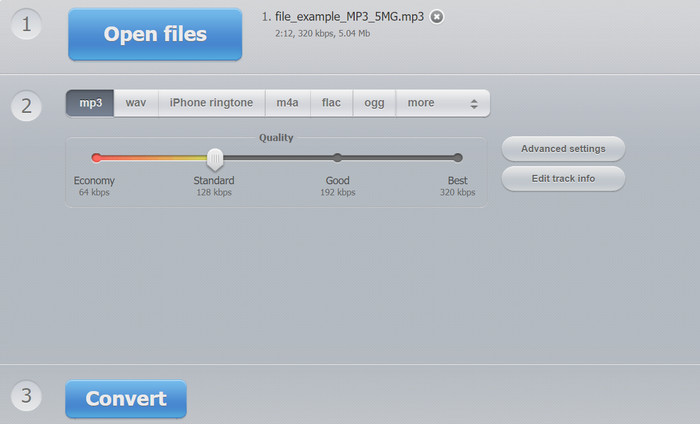
שלב 1. פתח את דפדפן האינטרנט שלך ונווט לאתר Online Audio Converter מאת 123apps. לחץ על הכפתור Open files כדי לבחור את קובץ ה‑MP3 שברצונך להמיר.
שלב 2. בחר OGG כפורמט הפלט מתפריט הבחירה. באופן אופציונלי, ניתן להתאים את הגדרות הפלט כמו קצב סיביות, קצב דגימה וערוץ. שלב זה אינו חובה, אך יכול להיות שימושי אם ברצונך לשלוט באיכות קובץ הפלט.
שלב 3. לחץ על הכפתור Convert כדי להתחיל בתהליך ההמרה. הדבר עשוי לקחת מספר רגעים, בהתאם לגודל הקובץ ולמהירות חיבור האינטרנט שלך. לבסוף, לחץ על הכפתור Download כדי לשמור את קובץ ה‑OGG במחשב שלך.
יתרונות
- זה תומך בהמרת אצווה.
- אין הגבלה לגודל קובץ ההעלאה.
חסרונות
- האתר מציג מודעות.
- תמיד יש צורך בחיבור לאינטרנט.
חלק 3. כיצד להמיר MP3 ל- OGG עם Audacity
יש גם את ממיר Audacity MP3 ל- OGG. כן, שמעתם נכון. תוכנית זו היא תוכנת עריכת אודיו בקוד פתוח המציעה את היכולת להמיר קבצים מ-MP3 ל-OGG. בנוסף להמרה, Audacity מספקת גם מגוון כלי עריכה ואפקטים המאפשרים למשתמשים לשנות ולשפר את קבצי האודיו שלהם, מה שהופך אותו לכלי רב-תכליתי עבור משימות עריכה והמרה של אודיו.
יתר על כן, Audacity זמין עבור מערכות ההפעלה Windows, macOS ו-Linux, מה שהופך אותה לנגישה. עם התכונות המתקדמות וקלות השימוש שלה, Audacity היא בחירה מצוינת עבור כל מי שמחפש להמיר את קבצי ה-MP3 שלו לפורמט OGG. למד כיצד תוכנית זו פועלת על ידי עיון במדריך שלהלן.
שלב 1. הורד את Audacity והתקן אותו במחשב שלך. פתח את Audacity ולאחר מכן פתח את קובץ ה‑MP3 שברצונך להמיר. ניתן לעשות זאת על‑ידי לחיצה על File ואז Open, איתור קובץ ה‑MP3 במחשב ולחיצה עליו.
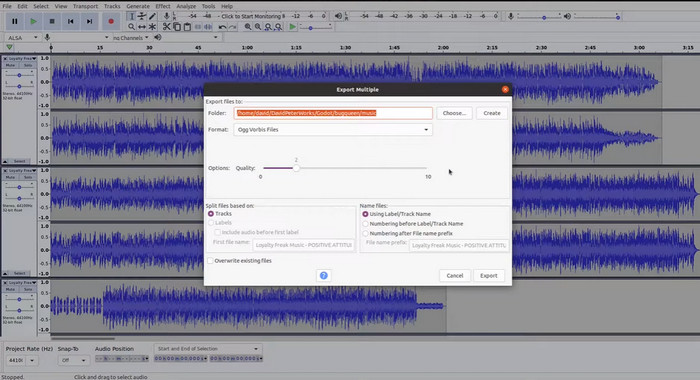
שלב 2. לחץ על File ולאחר מכן על Export לאחר שקובץ ה‑MP3 פתוח ב‑Audacity. בחר OGG Vorbis Files כסוג הקובץ בתיבת הדו‑שיח Export Audio.
שלב 3. על‑ידי הזזת מחוון ה‑Quality, תוכל להגדיר את איכות קובץ ה‑OGG לרמה הרצויה. הגדרות איכות גבוהות יותר יגדילו את גודל הקובץ, בעוד שהגדרות איכות נמוכות יותר יקטינו את גודל הקובץ אך עלולות לפגוע באיכות המוזיקה.
שלב 4. לחץ על Save כדי לשמור את קובץ ה‑OGG במיקום שתבחר במחשב. לחץ על OK כדי לסיים את שינוי הפורמט.
יתרונות
- זה יכול להמיר MP3 ל- OGG באצווה.
- זה יכול להיות מותקן ב-Windows, macOS ו-Linux OS.
חסרונות
- קהילת תמיכה ייעודית אינה תומכת בתוכנית.
- אין ייצוא MP3 ישיר.
לקריאה נוספת:
הכלים הטובים ביותר שבהם ניתן להשתמש להמרת MP3 לקבצי M4R במנות
2 הדרכים הטובות ביותר לעריכת נתוני מטא של OGG שכדאי לנסות בחינם
חלק 4. כיצד להמיר MP3 ל- OGG באמצעות FFmpeg
FFMPEG היא בחירה מצוינת עבור משתמשים שצריכים להמיר קבצי MP3 לפורמט OGG ודורשים מידה גבוהה של שליטה וגמישות בתהליך ההמרה. הוא יכול להתמודד עם מגוון רחב של פורמטי אודיו ווידאו, והוא תומך במגוון קודקים והגדרות שניתן להשתמש בהם כדי לכוונן את פורמט הפלט כדי לעמוד בדרישות ספציפיות. בנוסף, מכיוון ש-FFMPEG הוא כלי שורת פקודה, ניתן לגשת אליו במגוון רחב של מערכות הפעלה, כולל Windows, macOS ו-Linux להמיר MP3 ל- OGG. בצע את השלבים להמרת FFmpeg MP3 ל- OGG ההוראות שלהלן.
שלב 1. פתח את הטרמינל או את שורת הפקודה במחשב שלך. אתר את המיקום שבו מאוחסן קובץ ה‑MP3 שברצונך להמיר.
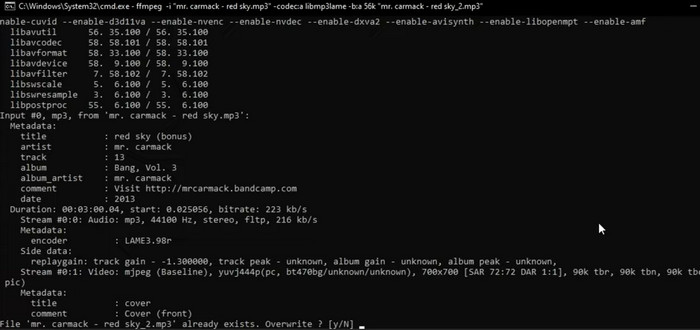
שלב 2. הקלד ffmpeg -i input.mp3 output.ogg, כאשר input.mp3 הוא שם קובץ ה‑MP3 שלך, ו‑output.ogg הוא השם שברצונך לתת לקובץ ה‑OGG שלך. כדי להריץ את הפקודה, לחץ על Enter.
שלב 3. המתן עד ש‑FFMPEG יסיים את תהליך ההמרה. כאשר ההמרה תסתיים, אמורה להופיע הודעה המציינת שההמרה הצליחה. כעת, שמור את קובץ ה‑OGG החדש באותה תיקייה שבה נמצא קובץ ה‑MP3 המקורי שלך.
יתרונות
- זה נותן למשתמשים רמה גבוהה של גמישות ושליטה.
- זה ממיר קבצים במהירות וביעילות.
- תאימות בין פלטפורמות.
חסרונות
- רוב המשתמשים אינם חשים בנוח להשתמש בכלי שורת הפקודה.
- זה יכול לקחת קצת זמן ללמוד איך להשתמש בו ביעילות.
חלק 5. כיצד להמיר MP3 ל- OGG עם נגן מדיה VLC
נגן מדיה VLC הוא כלי מולטימדיה רב עוצמה שנמצא בשימוש נרחב להפעלת סוגים שונים של קבצי מדיה. עם זאת, ייתכן שמשתמשים רבים לא יודעים שתוכנה זו יכולה לשמש גם כממיר MP3 ל- OGG יעיל. עם כלי הממיר המובנה שלו, נגן המדיה VLC יכול להמיר במהירות ובקלות קבצי MP3 לפורמט OGG, מה שמאפשר למשתמשים ליהנות מהמוזיקה האהובה עליהם במגוון פורמטים. בין אם אתה מחפש להמיר קובץ בודד או אצווה של קבצים, נגן המדיה VLC מספק פתרון פשוט וידידותי לכל צרכי המרת האודיו שלך. למד כיצד להפוך MP3 ל- OGG באמצעות השלבים הבאים:
שלב 1. כדי לנגן וידאו, הפעל את VLC ובחר Media משורת התפריט של הנגן. בתפריט הנפתח תופיע האפשרות Convert /Save; בחר בה.
שלב 2. באזור File Selection, בחר את קובץ ה‑MP3 שברצונך להמיר על‑ידי לחיצה על כפתור Add. כשתהיה מוכן להמיר או לשמור את הקובץ, לחץ על הכפתור Convert / Save.
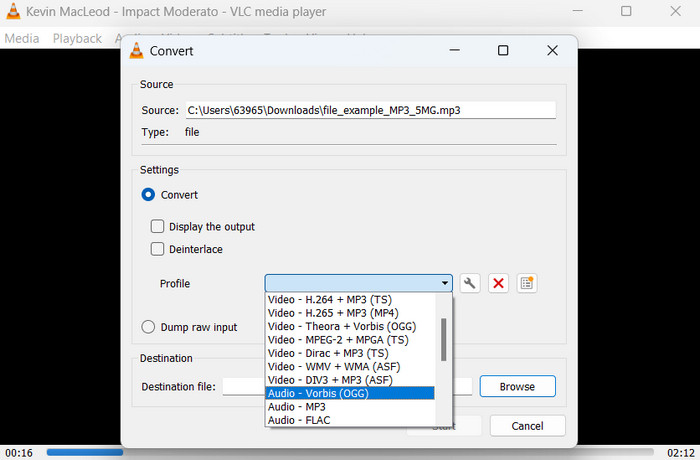
שלב 3. לחץ על התפריט הנפתח Profile ובחר Audio - Vorbis (OGG) כפרופיל הרצוי.
שלב 4. כדי לספק מיקום חדש ושם קובץ לקובץ המומר, לחץ על כפתור 'Browse' מימין לסעיף Destination file. ניתן להתחיל את ההמרה על‑ידי לחיצה על כפתור Start בתחתית החלון.
יתרונות
- הוא תומך במספר פורמטים.
- פשוט וידידותי למשתמש.
חסרונות
- אפשרויות עריכה מוגבלות.
- אובדן איכות שמע אפשרי.
חלק 6. שאלות נפוצות לגבי MP3 ל- OGG
האם יש הבדל באיכות הסאונד בין קבצי MP3 ו- OGG?
כן, יש הבדל באיכות הסאונד בין קבצי MP3 ו- OGG. קבצי OGG נוטים להיות בעלי איכות צליל טובה יותר בשל אלגוריתם הדחיסה הטוב יותר שלהם, אך ייתכן שההבדל באיכות הצליל לא ניתן לזיהוי למאזין הממוצע.
כמה זמן לוקח להמיר קובץ MP3 ל- OGG?
הזמן שלוקח להמיר קובץ MP3 ל- OGG תלוי בגודל הקובץ ובמהירות המחשב שלך. בדרך כלל, זה לוקח כמה דקות להמיר קובץ בודד, אבל זה יכול להשתנות בהתאם לגורמים שונים.
האם ניתן להשתמש בממירי MP3 ל- OGG במכשיר נייד?
כן, ישנם ממירי MP3 ל- OGG זמינים גם למכשירים ניידים. ניתן להוריד ממירים אלו כאפליקציות מחנויות האפליקציות המתאימות למכשירי אנדרואיד ו-iOS.
סיכום
המרה מ‑MP3 ל‑OGG אפשרית בדרכים שונות. לכל אחד מהממירים שנדונו יש סט יתרונות וחסרונות משלו. חלקם אינטואיטיביים ופשוטים יותר לשימוש, בעוד אחרים מספקים יותר גמישות ופונקציות חזקות יותר. באיזה ממיר משתמש יבחר להשתמש תלוי בסופו של דבר בצרכים האישיים שלו.
-
 נגני OGG מצוינים עבור Windows ו- Mac שאסור לכם לפספס
 כשאתה רוצה להשמיע את האודיו המועדף עליך בפורמט OGG, במיוחד כשיש פחות אחסון. תוכלו ללמוד עוד על 5 שחקני ה- OGG הטובים ביותר ממאמר זה.
-
 למד כיצד להמיר MP3 לפורמט WAV
 האם אתה רוצה לדעת איך להמיר MP3 ל WAV? קבע איזה מהכלים מייצר את ההמרה האיכותית ביותר שאתה יכול לקבל.
-
 4 השיטות הטובות ביותר לתיקון ועריכה של מטא נתונים של MP3 ב-Windows וב-Mac
 רוצה לדעת את הסודות של עריכת מטא נתונים של MP3 בנחת? הבלוג הזה ילמד אותך טכניקות שונות עם הכלים השונים שאתה ניגש אליו בקלות.
